

Docking Station Dual Monitor: QUUGE 7 in 1 USB C Dock Stand with Dual HDMI(4K120Hz + 60Hz), Gigabit Ethernet, 2xUSB3.0, 100W PD & Laptop Stand, Macbook Docking Station USB C for MacBook Air/Pro, Dell
Original price was: £91.98.£82.78Current price is: £82.78.


Price: £91.98 - £82.78
(as of Jun 07, 2025 05:01:42 UTC – Details)
From the brand

QUUGE USB C HUB Series
QUUGE Docking Sation Series
QUUGE Basic Style Series
Why chooes QUUGE?
√ 18 month repair service for all Quuge products.
√ Industry leading based technical support team.
√ Comprehensive USB product line with over 120 products to get you connected.
√ Professional USB peripheral company for over 10 years.
What do I do when I have a problem?
If you have any questions or initial faults with your product, please feel free to connect us.
We will take responsibility for any product issues.
Language : Multiple Languages
Product Dimensions : 18 x 9.7 x 5.7 cm; 853 g
Date First Available : 21 May 2024
Manufacturer : QUUGE
ASIN : B0CQYHFSPJ
Item model number : QS601
Country of origin : China
Guaranteed software updates until : unknown
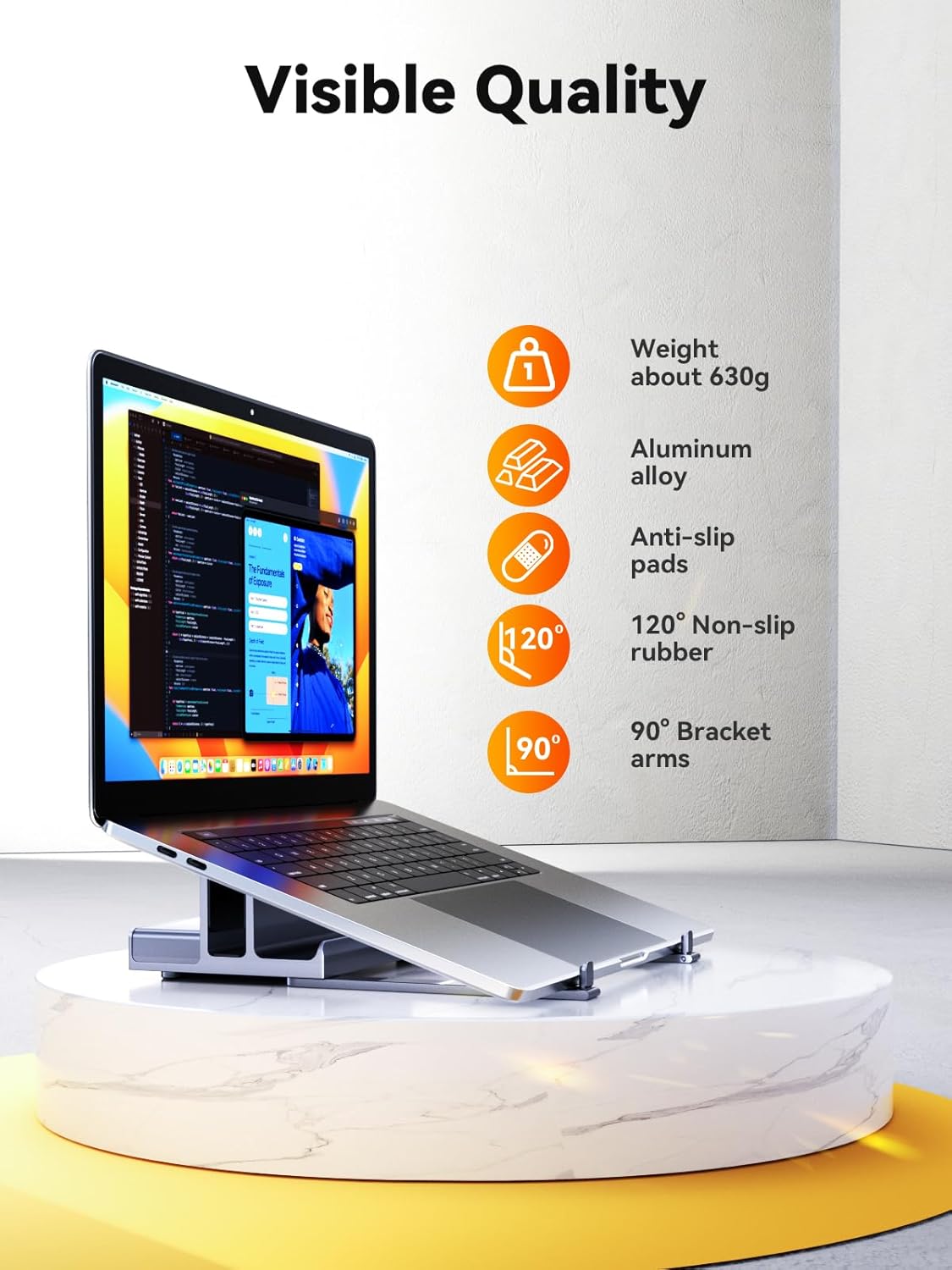
【3‑in‑1 Laptop Stand, Storage & USB‑C Hub】 The QUUGE USB‑C dock combines a tilt-adjustable laptop stand, vertical storage for closed laptops (≤2 cm), and a USB‑C hub that expands one port into multiple connections. Free up to 40% of desk space and enjoy a more ergonomic setup. ⚠️ Before use, see the product video for setup and ensure your device supports Thunderbolt 4 or full-function USB‑C.
【7‑in‑1 Macbook Docking Station】 Effortlessly expand your ultrabook’s capabilities by connecting its Thunderbolt 3/4 port to this sleek USB‑C dock: gain two HDMI outputs (one supporting up to 4K@120 Hz), two USB‑A 3.0 ports, a Gigabit Ethernet jack and an 85 W PD charging port. This all‑in‑one solution streamlines your workspace, supports multiple peripherals simultaneously and minimises wear on your laptop’s native ports.
【Dual-Monitor 4K output】 This USB C docking station dual monitor delivers instant dual-screen 4K@60Hz via two HDMI ports (zero driver required) – expand to triple displays by adding your laptop screen. The HDMI 2.1 port pushes 4K@120Hz on Windows systems, which can eliminating lag during live sports broadcasts or gaming. ⚠️ Tips: For true 4K clarity: Pair with Ultra HD Certified HDMI 2.1 cables and monitors.
【85W Fast Charging and 5Gbps Data Transmission】 The Mac Docking Station delivers 85W full-speed laptop charging via PD3.0 (requires 100W adapter) while reserving 15W for stable hub operations. Dual USB 3.0 ports achieve 5Gbps transfer speeds – move a 1GB file in 3 seconds, ideal for 4K video editors and data-intensive tasks. ⚠️ Power adapter not included.
【1 Gbps Wired Ethernet & Professional After Sales】 The Macbook air dock built-in Gigabit Ethernet port delivers up to 1 Gbps of fast, stable, and interference-free wired connectivity—perfect for video calls, streaming, and lag-free online gaming. Some devices may have partial compatibility issues—please scroll down to the Product Description section or contact our support team to confirm before purchase. If you have any questions, we’re here to help—our team is online 24/7 and guarantees a response within 8 hours.
13 reviews for Docking Station Dual Monitor: QUUGE 7 in 1 USB C Dock Stand with Dual HDMI(4K120Hz + 60Hz), Gigabit Ethernet, 2xUSB3.0, 100W PD & Laptop Stand, Macbook Docking Station USB C for MacBook Air/Pro, Dell
Add a review
Related Products


Original price was: £91.98.£82.78Current price is: £82.78.
Liam –
Love it
This thing is ingenious. I love it, I use it to travel for work and also mobile gaming
eire –
the laptop-dock support arms are a stand out feature to me – giving me choice
I’ve tried quite a lot of docks before settling on this one so I think it’s only right that I start with what I found to be the main difference that sets it apart – and that’s the fact it has extended support legs/arms. The arms tuck away neatly when not needed and it’s actually easy to miss them – but basically once I extend them I can use it elevate my laptop to a position where I find the screen more comfortable to look at – this works for me in the times I want to use it as a second monitor in addition to my main uwhd one. Basically, I think its really good that I’ve got the choice to either have it open and docked, or folded and slipped away between the vertical stands when I need more desk space. The areas that touch my laptop all have these soft-touch silicone covers too, so I’m not concerned about the sturdy metal frame scratching or anything.
adl99 –
A nice stand. One star off for adjustability.
So this will hole most mainstream laptops nowadays. Unfortunately it won’t take my kid’s school chromebook with case in the stand-up slot, but it holds a MacBook nicely. So no adjustability of that, one star off.The rest it is great. It has fold out legs that make it a slightly raised platform for your laptop to rest on, raising the screen. That’s nice. The cable to connect it to the laptop IS REAPLACEABLE! in case it wears out (yay!) and the selection of ports are good. So… not for the kid, but used elsewhere.
Redders –
Well made, heavy construction with useful functions.
This dual HDMI docking station has all the necessary sockets to plug in a modern laptop. I say âmodernâ because anyone with an old one with things like a VGA video output will be disappointed. The input for the unit relies on an up to date modern USB C connection which ferries all the necessary data including video to the other sockets on the unit.Thereâs a very useful high capacity charging port, but you have to supply the power to pass this along to your connected device. It claims to have a high wattage capacity. The units which were lower powered seem to work fine.The construction is very robust. Thereâs the main unit which has two stabilising arms which you unfold to give the unit more support. The attractive metal finish has a bit of a sheen to it which looks nice in my view. I was most impressed by how solid the unit feels.The description says the unit can be used with a Steam Deck which sadly I donât have to try with the stand. However I do have access to a PC laptop and a MacBook. There are two high speed USB A style sockets. I plugged in some USB storage to each of these and also swapped one out to try with some SSD external storage which I have to try moving some files around. There were no issues here.There are two HDMI ports. To test these I had to purchase a new high speed USB cable to connect our Mac to the tv in this instance. The good news is that there was a great on screen picture on my OLED tv. I did have to adjust the scanning function on the tv to make sure the output was displayed properly.The picture quality was great. I wasnât able to test the full high speed gigabit connection as my network nowhere approaches the kind of internet speeds this unit supports, however it did pass along my top speeds with no issues.A good solid robust unit with all the connections of a modern PC/Mac.
Super Shopper 3000 –
Sleek 2in1 design
This works really well, very happy with it. For me it’s more suited as a vertical docking stand as I have 2 screens setup and don’t need use my laptops screen, plus I don’t have much desk space and this helps open up my limited space. It’s easy to use and simple set up. Basically plug and play style and Importantly, has all the ports I need.
Amazon Customer –
m3 max and this only supports single extended display, mirrored using the 2 HDMIs, NOT 2 extended
I have m3 max and this only supports single extended display, mirrored using the 2 HDMIs, NOT 2 extended
Tim –
No Power Adapter , and 85W not 100W pass through
Does not come with a power adapter, also manual states 85W max on the PD 3.0 port not 100W power pass through stated in the description.
Daniel Hibbert –
Game-Changer for My Setup!
I recently got my hands on the QUUGE Dual HDMI Docking Station, and it has completely transformed how I use my Steam Deck and other USB-C devices. This 7-in-1 USB-C dock is a powerhouse, combining sleek design with incredible functionality.Design and Functionality:The vertical stand is a brilliant design choice, helping me save desk space while keeping my Steam Deck securely in place. The dock feels solid and well-made, with a compact form factor that fits nicely on my desk without adding clutter.Port Variety and Performance:This dock comes loaded with ports: two HDMI outputs, a 1Gbps Ethernet port, two USB-A ports, and 100W power delivery. The dual HDMI capability is a standout feature, allowing me to connect two monitors effortlessly. The display quality is superb, supporting up to 8K@30Hz or 4K@120Hz, which is perfect for both gaming and productivity.Seamless Connectivity:The Ethernet port provides a reliable and fast internet connection, crucial for online gaming and streaming. The USB-A ports are super handy for quick data transfers, and they deliver impressive speeds at 5Gbps. The 100W power delivery ensures my devices stay charged, even when Iâm pushing them to the limit.Multi-Device Compatibility:While itâs an ideal match for my Steam Deck, the QUUGE dock works flawlessly with my laptop and tablet, making it a versatile addition to my tech arsenal. The plug-and-play setup means I can switch between devices without any extra steps, which is a huge time-saver.Easy to Use:Setting up the dock couldnât have been easier. Itâs truly plug-and-play, with no need for drivers or complicated setup. The vertical design keeps everything neat, and the accessible ports make connecting and disconnecting devices a breeze.Great Value:Considering the features, build quality, and performance, the QUUGE dock is a fantastic value. Itâs a versatile tool that enhances both work and play, making it an essential part of my setup.Final Thoughts:If youâre in the market for a reliable and high-performance docking station for your Steam Deck, laptop, or any USB-C device, the QUUGE Dual HDMI Docking Station is a top pick. Itâs a perfect blend of style, function, and convenience. Highly recommended!
HB –
– hochwertig verarbeitet- 50 cm USB-C auf USB-C kabel liegt bei- Ist wirklich platzsparend, wie beschrieben- Mein Notebook habe ich aufgeklappt hineingestellt und nutze den Bildschirm dadurch- ich bin bisher sehr zufrieden
Vincenzo Rifino –
E’ veramente comodo e utilissimo
Alberto –
Por el momento todo perfecto, solo llevo un dÃa con el pero pinta bien.
Ein Kunde –
Der gröÃte Pluspunkt für mich: das lange USB Kabel (ca. 35cm) ist sehr praktisch! (Das haben anscheinend nicht viele Docking Stations).Bisher verwendet: Ethernet, USB für Tastatur und Maus, Headset mit Mikro: läuft einwandfrei.Den HDMI-Anschluss kann ich nicht nutzen, da mein Laptop das DisplayPort-Alt-Modus nicht unterstüzt.(Der Hinweis steht unten in den Fragen/Antworten).
Mark Mcdowell –
Super basic, but great item.Before I got this, my laptop would constantly overheat even when doing basic tasks. Now I don’t have to worry about overheating, plus the added bonus of having a ton more ports! Also supports 144hz and 1080p on both of my monitors! Amazing value for money.