

aicoco Webcam, 2K Web cam with Intelligent Sensor, AI Auto Tracking, Gesture Control, 2X Zoom, Noise-Canceling Microphones, No App, Computer Camera for YouTube Gaming Conference Teaching Streaming
£56.28



Price: £56.28
(as of Jun 11, 2025 13:35:00 UTC – Details)
Product Description


Type C General Interface
USB Type C to Type A Cable*1pcs (1.5meters)Support C to A and C to C cable (need purchase separately/compatible with your own Type C to C cable!)Type-C provides the efficient video and transfer speed.

Noise Reduction Microphone
Webcam with microphone for desktop picking up 3 meters, with noise reduction algorithm can keep clear calls even if it’s noisy around you.

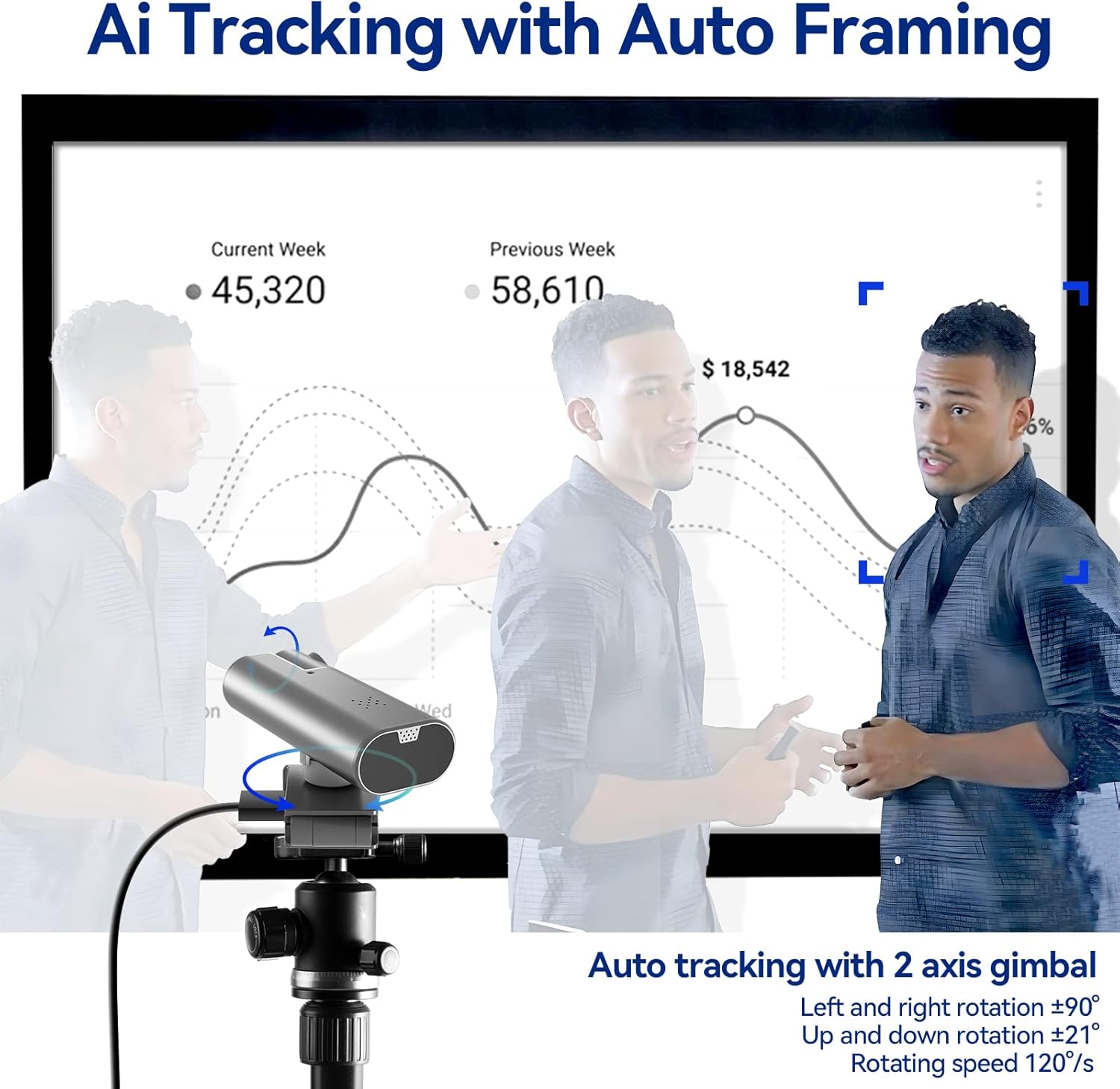
2-Axis Gimbal, Smooth AI Tracking
Built-in premium quality double brushless motors support you difference angle snappy tracking.


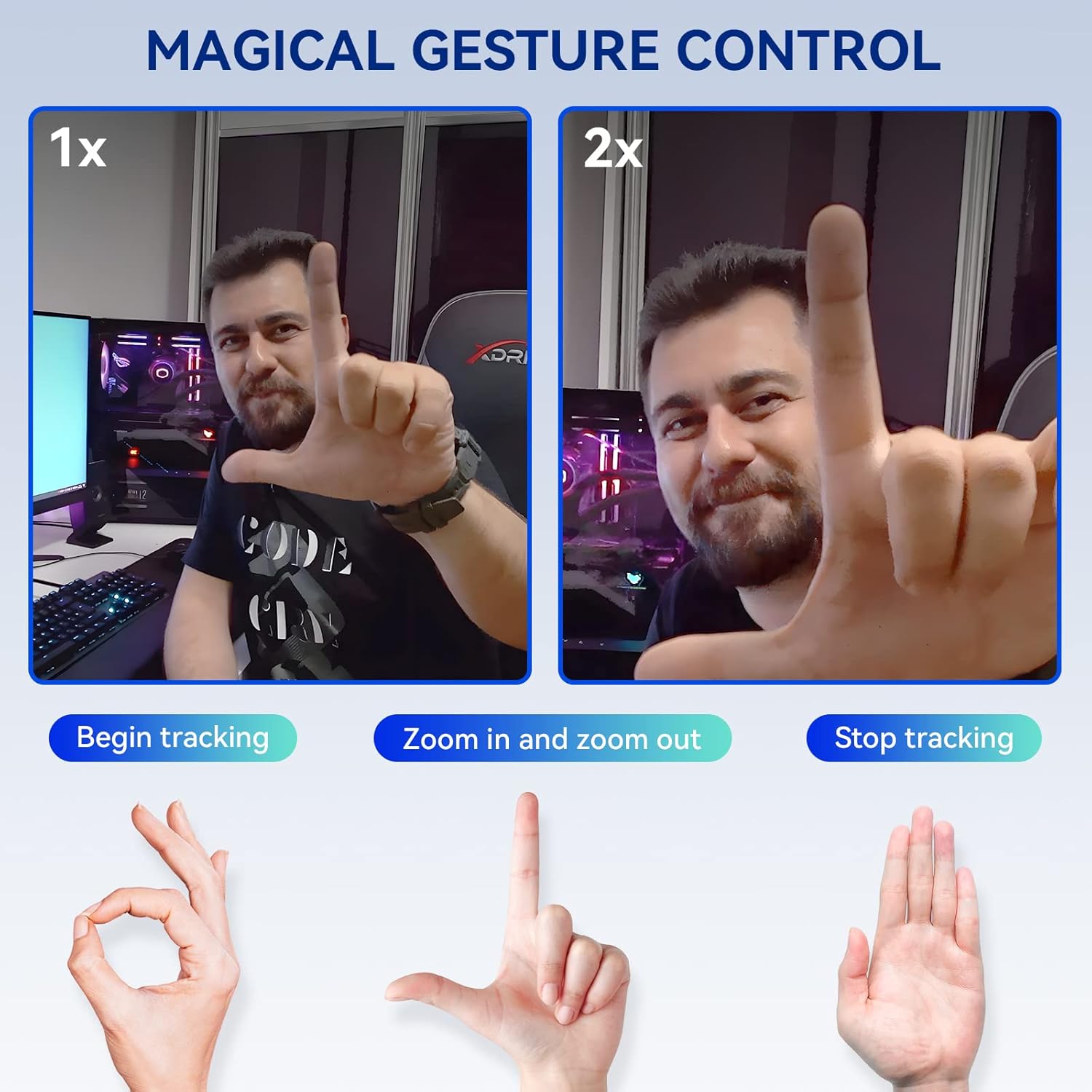
NOTICE: To remove “AICOCO” video watermark logo, just need simply keep “stop tracking” gesture for 3-5s!
Streaming Camera for Gaming/Teaching/Conference/Video Calling
Zoom: 2X Digital Zoom
Wide angle of lens: 95°
AI GIMBAL:Pan:-90°~+90° Tilt:-21°~+21°
FPS: 25fps at both 2k and 1080p
Produce Video Format: Supports video output in MP4, FLV, MOV, MKV, TS, and M3U8
Max Speed Control: 120°/S
Build-in Audio: Built-in mics pick up 3 meters distance
Port: Type C interface, USB Type A to Type C Cable*1pcs
Cable Length: 1.5 meters/5 feet
Size: 110*62*57mm/4.3*2.4*2.2IN Weight: 185g=0.4 pounds
Video resolution:2560*1440,1920*1080,1280*720,860*540,484*480,640*360,350×288,160×120
Support Systems: Windows 7/8/10/11, Mac OS, Android 9.0 or above, Ubuntu (NOT Support Lunix/Window Hello)
Video Calls with Freedom: Tiktok, Youtube, zoom, skype, cisco Webex, Meet, xsplit, Streamlabs, ecamm, vMix, DindTalk, Twitch, Liveme, WeChat etc
AICOCO Streaming Webcam Motion-tracking Webcam with Microphone, Computer Camera, 2K Web Cam, Web Camera, Streaming Camera, Usb Camera, for your Comfortable Pleasant Video Calling Experience!
AI Tracking + Movable Gimbal: AICOCO streaming camera comes with with 1/3″ sensor and our enhanced artificial intelligence tracking algorithm enabling it to lock on one out of multiple people. With 2-axis gimbal (Rotate 90 left and right, 21 up and down), Wide angle of lens 95 , you can walk around in Video Conferencing, Live Gaming, Home Video Calling, Online Sports Education, and Teaching Online.
True 2K: AICOCO 2K Ultra HD webcam, up to 2560*1440p, is significantly clearer than other typical 1080P USB camera & always shows your face at its best during every video conversation. Even after using the 2x magnified capability of the zoomable camera for computer, there is NO blur.
Magical Gesture Control: Control AICOCO webcam with just 3 simple gestures to Begin/2x Zoom/Stop. This stream webcam provides a completely new live streaming & meeting experience.
Noise Reduction Microphone: Webcam with microphone for desktop pickup 3 meters, noise-canceling algorithm, and stereo audio capabilities make communication for you simple, natural, and professional.
Wide Compatibility and Plug and Play: A 1.5m Type-C to USB A cable is included. You can use it easily just by connecting it to your computer without installing any software or drivers. Streaming webcam supports Windows 7/8/10/11, Mac OS, Ubuntu, Android 9.0 or higher. Mainstream media like Microsoft Teams, Zoom, Skype, Twitch, and Youtube are all compatible. For flexible installation (desktop/tripods), this zoom camera is built with a universal 1/4″ hole at the bottom..
6 reviews for aicoco Webcam, 2K Web cam with Intelligent Sensor, AI Auto Tracking, Gesture Control, 2X Zoom, Noise-Canceling Microphones, No App, Computer Camera for YouTube Gaming Conference Teaching Streaming
Add a review
Related Products


£56.28
Mike –
Auto zoom and track canât be switched off
Great camera and tracking and zoom is good when you want it. The camera will start with wide vision and zoom in, so your whole surroundings will be seen. You can turn automation off, but if you gesticulate it will often see the turn on instructions and zoom and track without you realising. If you want to give it instructions you have to make hand gestures to your audience.
Carlos –
Es una camara 2k a 30FPS con reconocimiento facial por IA y te sigue segun gires la cabeza o te muevas de un lugar a otro, esta muy bien para streaming con buena calidad y si quieres para reuniones funciona tambien tiene buen ángulo de visión.
Slug_Overdose –
This camera might not be as great as some of the alternatives, but it’s also substantially cheaper than those, and it serves our intended purpose. We use it to track our toddler during video calls with family so she can stay in frame while playing around the living room. It works well and has pretty decent video quality. The tracking is essentially 180 degrees. It is slightly disappointing that you can’t remove the brand watermark from the picture, and the camera does sometimes get confused and switches tracking subject, though that might be because we’re doing the hand gestures on behalf of our toddler to trick the camera.Overall, this camera is an excellent value for a tracking camera at nearly half the price of competitors. I probably wouldn’t recommend it in a professional context, but for personal video calls with family, it’s more than enough.
Yael Sarquis –
Llegó antes de tiempo y se ve muy bien.
Amazon ã«ã¹ã¿ãã¼ –
After intensive use for meetings. I have to say, that I really like this camera and the tracking function. Even that the angel of the vertical movement is low and microphone is almost useless.
Amazon Customer –
Updated: After reaching out to the manufacturer, they sent me a replacement that has since worked mostly as expected. It is particularly sensitive to the USB cable used and length of the cable which knocks off a star. Otherwise impressed with the vendors willingness to make things right.I play tabletop RPGs and occasionally there will be one or two people that have to be remote. I bought this so that they could more easily keep track of things without having to adjust the camera. The first time I used it it connected and worked great. There were a few things that didn’t quite do what I had hoped but I was also hoping that with more experimentation it would work better. Unfortunately, due to some other circumstances it was several weeks before I had the chance to use it again as I had several remote fully remote games and a few non-remote games. When I went to use it again, it no longer functions. I’ve tried multiple USB cables and the camera simply doesn’t work. On the computer side. There is no response as though I have not plugged in anything. This is pretty disappointing and unfortunately I’m outside the return window. I would recommend avoiding this.