

GuKKK Mini Wireless Photo Printer, Portable Thermal Printer With 11 Rolls of Paper and 5 Colouring Pencils, Smartphone Bluetooth Connectivity
Original price was: £17.87.£13.97Current price is: £13.97.



Price: £17.87 - £13.97
(as of Jun 12, 2025 15:30:49 UTC – Details)
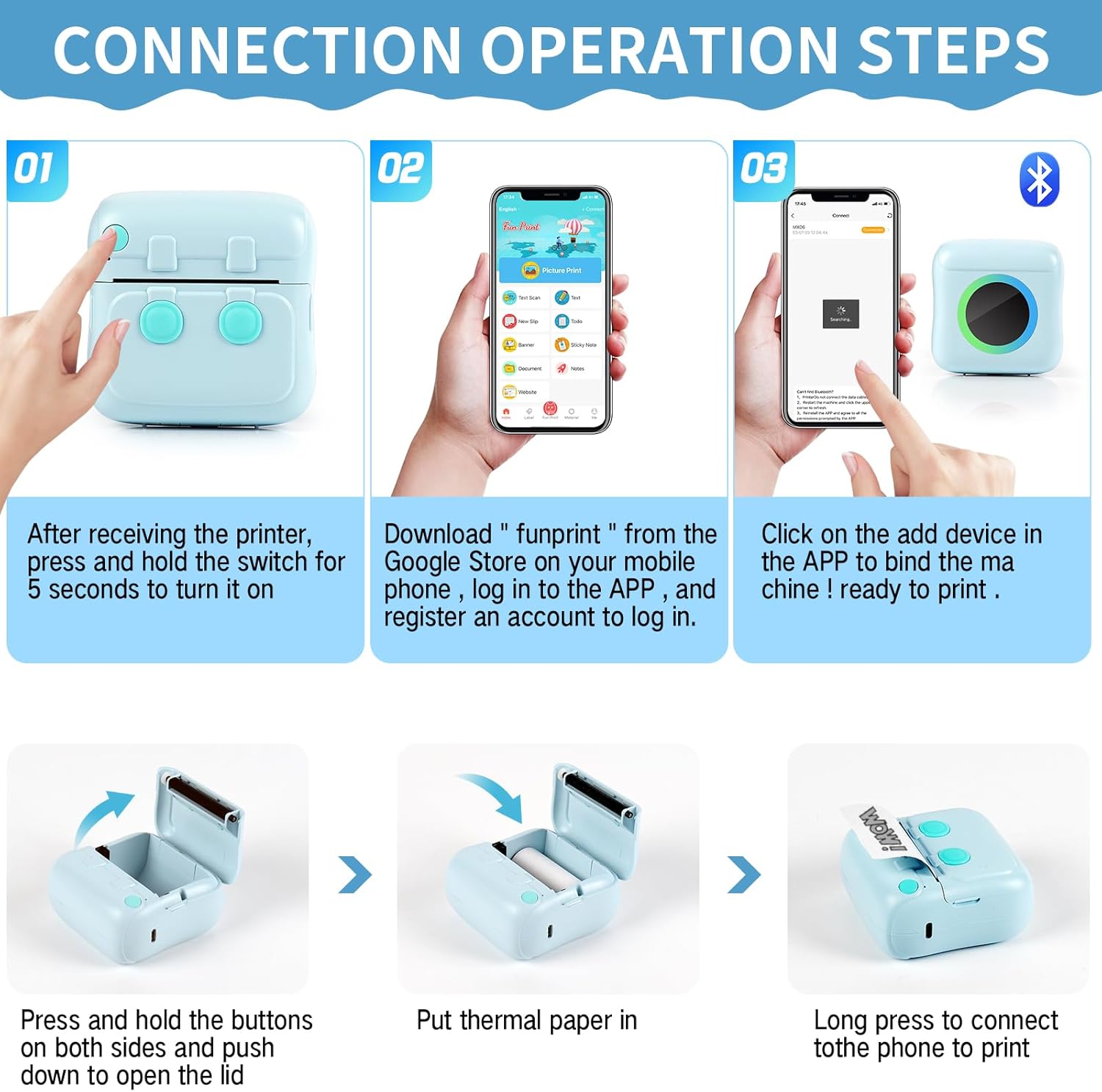
GuKKK Bluetooth thermal printer – make beautiful moments immortal. Do not hesitate, it is a great gift for students, office workers, lovers, friends, family, etc. to bring you this Bluetooth mini printer is a practical and meaningful gift! High performance design. Bluetooth instant connection, no wires required to connect to smartphones, easy operation, long battery life of 1200mAh, saving time and effort. Experience the freedom of printing anytime, anywhere and capture the beauty in no time. Energy saving and environmental protection. The Bluetooth thermal printer uses thermal printing technology, does not use ink, is more environmentally friendly and clean. Cool black and white images to make your photos look more stylish. Superior Quality The thermal printer has a resolution of 200 DPI and a high-quality print head for razor-sharp print quality. Record every warm moment anytime and anywhere, and clear images can take you back to these beautiful and meaningful moments. Strong functional design You will be amazed at the functionality of the Bluetooth printer, which supports multiple functional applications, you can print photos, labels, stickers, notes, work plans, shopping lists and more. Record your happy life, make your study and work more efficient and bring a new entertaining experience. Product specifications: Material: ABS Printer size: 8*8*3.5cm Printing paper size: 57 x 26 mm (it is recommended to use printing paper of size 57 x 25 mm, as exceeding this size can easily lead to paper jams). Print speed: MAX 40 mm/s Resolution: 200 DPI Connection method: Bluetooth connection. Charging method: USB Print type: thermal print. Built-in battery: 1200mAh Package includes: 1 x printer. 5 x thermal printing paper (2 white + 1 red + 1 green + 1 yellow). 3 x self-adhesive printing paper. 1 x USB cable. 1 x instruction sheet. 5 x watercolour pencils. Steps for use: 1. Download the app from the Google Store or Apple Store: “Tiny Print”. 2. Turn on the Bluetooth of the mobile phone and hold the on/off button of the printer to turn it on. 3. Click: My devices, search for Bluetooth devices: GBXX-XXXX, and pair; 4. Select the print function in the app, click “Print” to print, and you are done. Tips: 1. The printer can only print in black and white and does not support colour; 2. To avoid paper jams, wrap the printing paper tightly and place it in the mini pocket thermal printer.
Thermal inkless printing technology: the Bluetooth thermal printer uses thermal printing technology, does not use ink, is more convenient to use, environmentally friendly, fun and practical. Thermal black and white print images to make your black and white photos look elegant and cool. Note: If the printing is not clear after repeated use of the photo printer, you can wipe the laser bar of the printer with alcohol (the laser bar is in the paper loading compartment). Printing paper size: 57 x 26 mm (it is recommended to use printing paper of size 57 x 25 mm, as exceeding this size can easily lead to paper jams).
【Bluetooth instant connection printer】: the printer uses the “Fun Print” app Bluetooth connection, no other complicated processes are required. Simply follow the connection instructions to quickly connect to any smartphone, and you can start your journey to wireless black and white printing. To capture your child’s growth and the importance of travel, feel the joy of beautiful memories.
【Excellent Performance Bluetooth Printer】: Portable printer with super print quality, 200 DPI high resolution, built-in rechargeable 1200mAh Li-ion battery with high density, longer battery life, high-quality photo printer to better capture beautiful moments. After seeing this beautiful landscape, you can rediscover the lost beauty in clear images.
【Nice and practical instant printer】: mini smartphone photo thermal printer, elegant and simple but cute appearance, compact and lightweight body size, can be put in a bag or bag when travelling, you can take it with you, just record any you want to log something.
【The Best Mini Photo Printer for Gifts】It supports a variety of functional applications and can print photos, stickers, work schedules, etc. It is an excellent gift choice for students, couples, family members, friends etc. and a little assistant to record a good life!
9 reviews for GuKKK Mini Wireless Photo Printer, Portable Thermal Printer With 11 Rolls of Paper and 5 Colouring Pencils, Smartphone Bluetooth Connectivity
Add a review
Related Products


Original price was: £17.87.£13.97Current price is: £13.97.
Amanda –
Brilliant
For the price itâs not half bad, Iâve been printing returns labels and itâs perfect, itâs really not bad at pictures either
Michelle –
Lost a star due to the accompanying app
Great little printer for my 12 year old to print photo’s and make stickers but the accompanying app requires you to be 17! This is nonsense given that this product is clearly marketed to children. Therefore, she could not download the app to her phone.
kelly –
I’d spend your money on something better in all honesty
It’s awful can’t see the writing printed half the time it doesn’t connect waste of money tbh
Kindle Customer –
Ideal gift
Perfect little gift for a little crafter, only down side is it prints black and white but not a big problem. Easy to use battery life is very good
Nino Miladinovski –
This compact thermal printer is a great little device. I’ve tested it with the provided paper and the print quality is decent. However, I primarily use it for tattoo stencil printing, and it excels in this task.
Claudia –
Hallo :)Ich habe mir diesen Mega süÃen Printer gekauft!Mit dabei waren:Die Rollen mit denen man Printen kann (3 Klebefolien, 2 normal weiÃe, 1 gelbe, 1 blaue und eine rosane)Das AnleitungsbuchEin Kabel (ohne Stecker!)Natürlich der Printer selbst und ein kleines extra.Kommen wir doch gleich mal dazu: es sind fünf kleine Filzstifte in verschiedenen Farben. Blau, rot, grün, gelb und orange.Die Filzstifte sehen recht billig aus, aber sie sind doch recht gut. Es sind süÃe kleine Ministifte, die man auch gut mit irgendwohin nehmen kann und wie ich finde, sind sie auch sehr gut für kleine Kinder.Wir haben auch natürlich noch die Papiere, die ich alle in meinen Bildern gezeigt habe. Dabei haben wir orange rosa blau weià und dann das Highlight: weiÃe Klebe Folie.Ein kleiner Tipp am Rande: versucht mindestens eins der beiden Seiten bei der Klebe Folie erst noch zu lassen, denn sonst wird es euch ewig dauern, zu versuchen, die Klebe Folie ab zu bekommen.Ich finde die Qualität recht gut, sogar bei Bildern von mir selbst und meiner Familie het es recht gut funktioniert (wobei man halt sagen muss, dass es doch ein Retro Style ist. Aber der gefällt mir echt gut.)An dem Printer haben wir kein Schnickschnack (sieht wie ich finde sehr hübsch aus) mit einem Ausschalter an der Seite und dem Loch für das Kabel zum anstecken. Auf der Vorderseite haben wir dann einen schwarzen Kreis (ich dachte als erstes es wäre eine Kamera, doch es ist es tatsächlich nicht, es ist nur ein schwarzer Kreis, an dem man nicht viel herumfummeln sollte, denn es hat irgendwas mit dem System oder so zu tun ;D )Dann ist auch noch ein kleiner Schlitz da, an dem man sieht, was der Printer gerade so braucht (leuchtet Rot, wenn Papier nicht richtig/kein Papier drinnen ist, oder wenn er fast keinen Akku mehr hat.Leuchtet Grün, wenn alles ok)Die Papiere zu wechseln, geht eigentlich auch ganz leicht: man öffnet einfach mit den zwei kleinen Stoppeln an den beiden Seiten die Klappe und füllt das Papier nach.Zum Drucken gibt es eine App: TinyPrint.Zu der App: ich finde, sie funktioniert sehr gut, wobei einige Begriffe dort recht komisch formuliert waren, was glaube ich daran liegt, dass es ursprünglich für ein anderes Land gemacht war.Die Papiere habe ich in einen Test gestellt (ebenfalls in meinen Bildern) und habe ein bisschen mit den stiften, die mit dabei waren herum gemalt, damit ihr mal seht, welches der Papiere eine gute und welches eine eher nicht so gute Qualität hat.Ich finde die beste Qualität ist bei dem normal weiÃen Papier, die zweitbeste, dann bei den farbigen Papieren und die, die er am schlechtesten abgeschnitten hat, war die Klebe Folie, da es recht schmierig war, auf ihr zu schreiben. Trotzdem verschmiert es nicht und funktioniert doch sehr gut.Die beste Qualität bei den Fotos finde ich ist auch bei der normalen weiÃen Folie. Die zweit beste Qualität ist dann doch bei der Klebe Folie und die drittbeste bei den farbigen Papieren.Alles in allem ein sehr, sehr süÃer Drucker, einfach zu benutzen und es sind auch mehrere Bilder gleichzeitig auszudrucken, wenn man das mit der App erst mal kapiert hat, was nach einiger Zeit auf jeden Fall der Fall ist.Ich kann diesen Printer nur sehr warm empfehlen und finde ihn perfekt für Journalling oder so, vielleicht sogar Hausaufgaben.Ich hoffe ich habe euch weitergeholfen 🙂
Miguel Javier Guelbenzu Fernández –
Todo tal y como se describe.
mara –
Super kleines Gerät. Hatte es im Internet gesehen und bestellt. Funktioniert super gut und druckt auch direkt,vorher App runterladen und los gehts . Super Spass auch für Kids
Fabiana –
Ho reso estremamente felice un’amica appassionata di fotografia. Con questo aggeggio si può stampare in qualsiasi momento e non necessità di cartucce di ricarica, grazie alla tecnologia che non utilizza inchiostro. La stampa avviene esclusivamente in bianco e nero e la qualità è accettabile. Penso la comprerò anche per me!