

arVin Keyboard and Mouse Adapter for Nintendo Switch, Wired Keyboard and Mouse Converter for PS4/PS3/Xbox One/Xbox 360 Console, Adapter Support Custom Mapping
£18.99


Price: £18.99
(as of Jun 13, 2025 10:17:24 UTC – Details)
Product Description
arVin Keyboard and Mouse Converter for Switch, PS4, PS3, Xbox 
 Enhance the Gaming Experience – Low Latency
This keyboard mouse converter allows players to use a keyboard & mouse instead of a game controller to enjoy games on for PS4/PS3/Xbox/Switch.
 Best Gaming Accessories for Shooting Games
arVin mouse keyboard adapter perfect for playing FPS, TPS, RPG, RTS games, allowing you to quickly defeat opponents in PUBG, Fortnte and Call of Duty games and easily win the game!
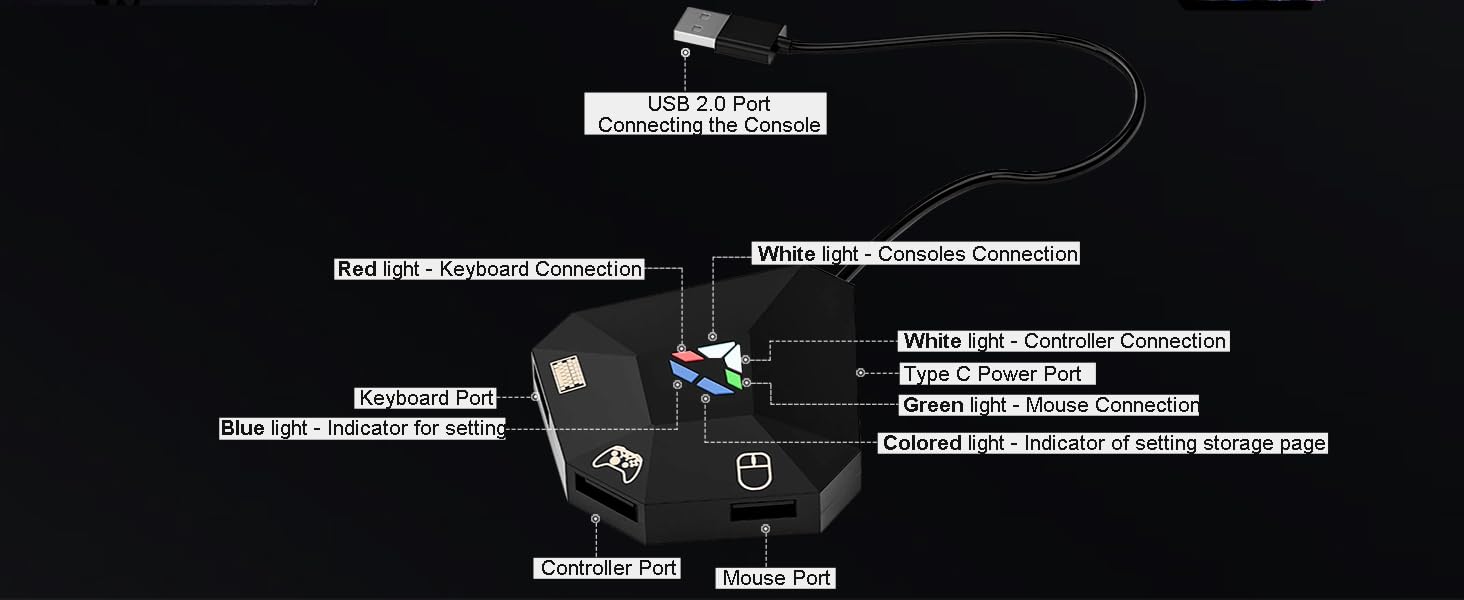 Mouse & Keyboard Converter Interface Introduction
 DIY Mapping Keyboard & Mouse Keys
 What Will You Get?
1x Keyboard Mouse Adapter for Switch/Xbox/PS4/PS3 (Console and keyboard and mouse not included)1x User manual


1 Switch Connction 2 Switch Default KeyF1 3 Switch Default KeyF2


1 Connection for PS4/3 2 PS-4 Default Key F1 3 PS-3 Default Key F1


1 Connection for Xbox 2 X-one Default Key F1 3 X-360 Default Key F1
Product Parameters/Compatible Devices/Functions/Cautions
Name Keyboard and Mouse Converter for Switch/PS4/PS3/Xbox Sizes 14*6.3*2.8inch Weights 0.11pounds Voltage DC5V/15V Current 2.6A Material ABS Interfaces USB port x4, Type C Port x1 For PlayStation Keyboard and mouse adapter for PS3, PS4, PS4 Slim, PS4 Pro [NOT for PS5] For Nintendo Switch Keyboard and mouse converter for Switch, Switch Oled [For Swich Lite extra Type-C adapter is required (not included)] For Xbox Keyboard mouse adapter for Xbox 360, Xbox One, Xbox One S, Xbox One X [Not for Xbox Series S/Xbox Series X] Support Keyboard & Mouse Types Support wired keyboard and mouse; Support 2.4G Wireless keyboard and mouse [Not support Bluetooth Wireless keyboard and mouse] Please Note (1)For Xbox & PS: Make sure use the Original controller to connect the converter. (2)For Switch: for remapping, you need to connect the Original switch pro controller. (3)When the keyboard and mouse connection is unstable, extra type c cable is required (Not included) to connect the ‘Type C Power Port’ to power the adapter. (4)Before connecting,make sure that the official controller is fully charged, if the controller battery is low, it will not be able to guide the keyboard and mouse to work Mouse Sensitivity Setting Press F12 and keys 1-9 (Numbers above keyboard letters) on keyboard simultaneously to switch; 1 is the lowest sensitivity and 9 is the highest sensitivity Mouse Cursor Y-axis Switching Press F12+Y key on keyboard simultaneously to switch the forward and reverse directions of the mouse cursor Y axis Storing Different Key Mappings Press F12 & F1-F8 keys on keyboard simultaneously to switch. (Please select the area where you want to store the keymap before mapping.) DIY Mapping Keys Press F11 and F12 simultaneously on keyboard to enter into DIY mappin [When setting, hold down the function key of the controller, then press the key on the keyboard and mouse to be set.]
arVin Switch Game Accessories
Add To Basket
Customer Reviews
3.9 out of 5 stars 314
3.7 out of 5 stars 57
2.3 out of 5 stars 7
1.4 out of 5 stars 3
3.0 out of 5 stars 2
Price
—
—
£12.13£12.13
—
—
For Nintendo Switch
✔
✔
✔
✘
✘
For PS4/PS3
✔
✔
✔
✘
✘
For Xbox One/Xbox 360
✔
✔
✔
✘
✘
For Xbox Series
✔
✔
✔
✘
✘
For IOS/Android/PC
✘
✘
✘
✔
✔
Product Dimensions : 21.59 x 6.35 x 2.54 cm; 49.9 g
Date First Available : 11 Mar. 2022
Manufacturer : arVin
ASIN : B08K8WQ7X1
Item model number : arVin
Guaranteed software updates until : unknown
Enhance the Gaming Experience: This mouse and keyboard converter for N-Switch can convert keyboard and mouse signals into controller signals to play the game, providing better game control methods for players and enhancing the fun of the game
Widely Compatible: The Keyboard and mouse adapter compatible with switch/ps4/ps3/xbox one/xbox 360 consoles. Our converter helps you to use external wired full size keyboard and mouse to play games by replacing your original wireless controller. Excellent for FPS (First Person Shooter), TPS (Third Person Shooter), RPG (Role Playing Games) and RTS (Real Time Strategy) games and so on. Please Note: only supports wired keyboard and mouse, not for wireless/bluetooth keyboard mouse
Custom Mapping: Our keyboard and mouse adapter for ps4/ps3 Support Custom Mapping & Reset Button Function. You can use the preset keyboard mapping or use Delta’s keyboard mapping program to set the keyboard mapping according to your preferences
Simple Operation: This keyboard and mouse adapter for Xbox Plug and play, no need to install drivers, guided by the original game controller, you can set any button on the keyboard and mouse as any function of the game buttons on the game board. No delay. Please read through user manual before using it
High Quality: Gaming Mouse and keyboard adapters are small in size, Convenient to carry, Beautiful in appearance and excellent in hand. Made of hard PVC material, it is very strong and sturdy and can withstand repeated insertion and removal, which is a must for gamers. The stable cable connection ensures a perfect gaming experience
8 reviews for arVin Keyboard and Mouse Adapter for Nintendo Switch, Wired Keyboard and Mouse Converter for PS4/PS3/Xbox One/Xbox 360 Console, Adapter Support Custom Mapping
Add a review
Related Products


£18.99
Craig –
Brilliant product great price
I highly recommend this. I’ve tried it on multiple consoles eg : Switch PlayStation, pc.And it’s worked flawlessly. Very easy to use. Very compatible. One thing to note it does feel weird on the switch. This is due to it using the motion controls but it does a really good job with how it works
Pegs R Hart –
DO NOT BUY
Plugged my keyboard/mouse and controller into it and after five minutes it smelt like burnt plastic DO NOT BUY
Ange M –
Didnât work
Bought so my son could use a keyboard with his Switch to play games but it didnât work so sent back.
Felicia Garrett –
bought for my son, he said it works good
Matthias –
Schnelle Lieferung und funktioniert einwandfrei
JL –
Ne fonctionne pas. La prise USB est lousse dans le port ce qui empêche la connexion. (à lâarrière de la base de la switch)La lumière blanche reste allumée 2 secondes max.Il faut utiliser le port sur les côtés de la base de la switch. Et tout fonctionne numéro 1.
Amazon Customer –
Damaged box..used
Monica Dls –
Mas pequeño de lo que esperaba!! Es un aparato del tamaño de mi mano! Y sirve para conectar varias cosas y convertÃr tu consola de juegos de juegos en este caso el wi de mis hijos como si fuera una computadora de juegos