

SSK M.2 NVMe SSD Cloner, Dual Bay Enclosure, Tool-Free 20Gbps USB3.2 Gen 2X2 Docking Station for M Key PCIe NVMe SSD Reader, Offline Clone
Original price was: £49.99.£42.49Current price is: £42.49.




Price: £49.99 - £42.49
(as of Jun 17, 2025 13:15:09 UTC – Details)
Product Description


Note: Target must ≥ Source, Both SSDs should be NVMe! Target will be cloned exactly the same as the source in partition, format and data.
Attention: NVMe SSD will generate a lot of heat during use. Therefore, do not touch the SSD when using this product. After use, wait for the SSD to cool down before touching and removing it.
Data Security Note:
Please check SSD type, this M.2 dock reads NVME SSD only. SATA and other SSDs will not work in both PC and Clone mode.The target drive has to be at least equal or larger than the source drive in capacity to use offline drive-to-drive cloning.Please confirm your source drive and target drive both can work properly, and target drive has no important data. The target drive will be cloned to be the same as the source drive in partition, format and dataThe cloning process will eliminate your target drive’s existing data.To keep the existing data on the target drive and the source drive, switch the dock to PC mode and connect the dock to your PC to transfer data through your computer manually.Please do not directly unplug the drives when cloning. Only when the cloning process is complete, can you eject your drives.When your hard drive is transferring data with the computer, PLEASE do not directly unplug the hard disk when the data transfer is in process. Eject the drive from the computer ONLY when transmission completed, or you may suffer from data loss.
Product Dimensions : 12.2 x 4.8 x 18 cm; 330 g
Date First Available : 12 Jun. 2024
Manufacturer : SSK Corporation
ASIN : B0D6W98FQ7
Item model number : DK201
Country of origin : China
Guaranteed software updates until : unknown
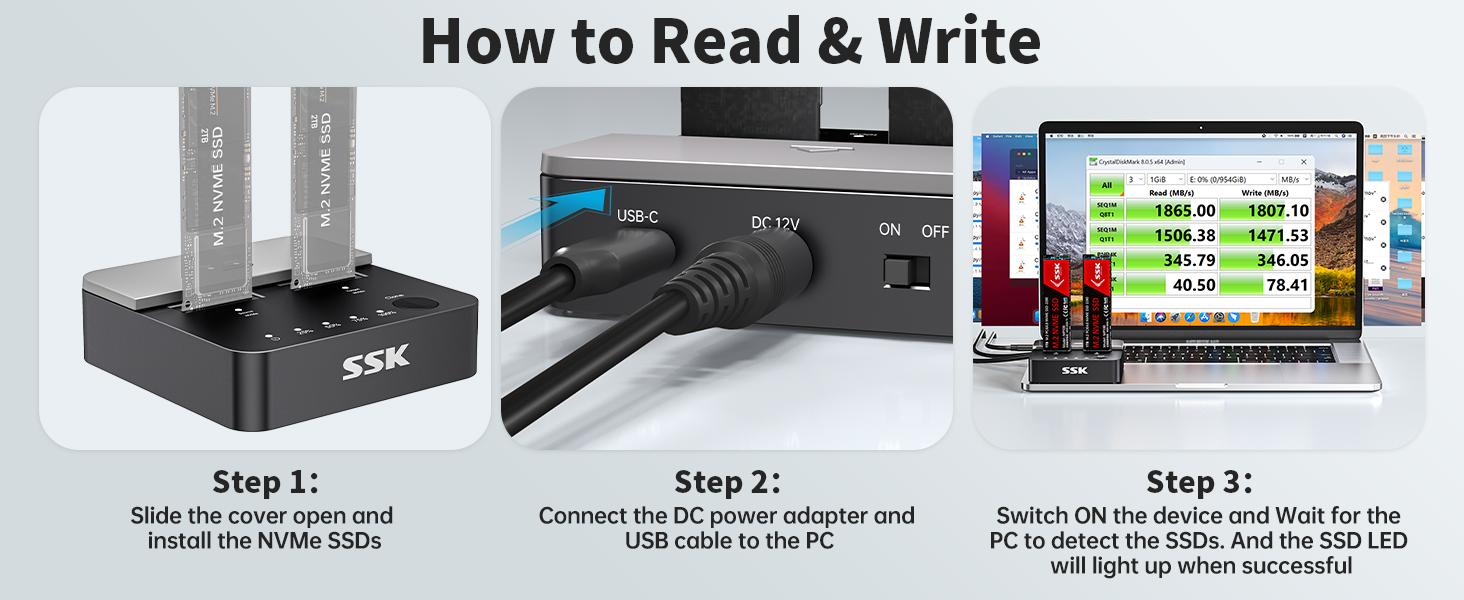
Versatile Dual NVMe Enclosure: This dual bay NVMe enclosure supports both M Key and B+M Key NVMe SSDs. Powerful JMS586U chip operates two SSDs simultaneously for multitasking without performance drop. Note: M.2 dock supports NVMe SSD ONLY, does not support SATA and other non-NVMe SSDs
Ultra-Fast M.2 Reader: Equipped with a USB 3.2 Gen 2×2 interface, this M.2 NVMe duplicator offers blazing speeds up to 20Gbps, making this SSD dock an ideal SSD to USB adapter for those needing speed
One-Click SSD Cloner: SSK NVMe dock doubles as a standalone nvme cloner, allowing you to clone drives with just a single button press. No need computer—this M.2 duplicator handlesall. Note: Please ensure both drives are NVMe protocol to use the cloning feature. SATA not supported. Target drive will be erased and cloned to match the source drive exactly
Optimized Speed and Stability: With USAP protocol support, this dual NVMe enclosure ensures faster data transfer, making it a reliable SSD docking station for professionals
Secure Data with Smart Technology: Safeguard your data with built-in S.M.A.R.T monitoring your SSD’s health, and TRIM optimizing performance and maintaining drive efficiency. This ensures your NVMe caddy remains reliable and effective over time
Enhanced Cooling and Easy Installation: The open design of this M.2 dock allows for easy SSD installation and effective heat dissipation. Note: High-performance SSDs may heat up during operation. It’s advised to allow the SSDs to cool down before handling them after heavy use
Seamless Connectivity: This dual ssd case comes with a 20Gbps USB-C and a 10Gbps USB-A cable, plus a 12V/2A power adapter, making it a fully equipped NVMe to usb adapter. Just format your new SSDs, and you’re ready to go with this NVMe dock
Clone Function Note:The target drive capacity has to be at least equal or larger than the source drive. Only NVMe drives are supported for cloning; SATA or other protocols are not supported. Please be carefully to press the Clone button since this will delete all data in the target drive and make sure the data cable is unplugged form the dock before cloning
Customers say
Customers find the hard drive enclosure easy to use and appreciate its quick cloning capabilities, with one mentioning it successfully copied a 250GB to 1TB drive. The device works well without requiring a PC, and one customer notes that systems boot immediately after cloning. They like its design and hardware quality. However, some customers report issues with the cloning process.
13 reviews for SSK M.2 NVMe SSD Cloner, Dual Bay Enclosure, Tool-Free 20Gbps USB3.2 Gen 2X2 Docking Station for M Key PCIe NVMe SSD Reader, Offline Clone
Add a review
Related Products


Original price was: £49.99.£42.49Current price is: £42.49.
Mr. Gerard Small –
Highly recommend!
Fantastic cloning tool, very easy to setup and use, i managed to transfer my 2TB m.2 nvme drive to my new 4TB m.2 nvme drive in minutes.Very fast transfer and no need to connect to the PC, just plug in the m.2 nvme drives into source and destination slots, switch it on at power source and push the button until the lights start to flash then sit back and wait, very easy and hassle free process.I highly recommend this product, very fast dispatch and delivery also. 10/10
N. Foo –
Great
Great product I’ve cloned. A few ssds for people using this upgrading to a larger one quick and easy to use .
Rich –
Clone without a PC, in minutes.
Very easy to clone, no pc needed, but.. you will need software, purchased seperately, if you want to alter the partition. This is true of all cloning docks. I used minitool partision wizard which requires a basic license (â¬59) to edit the partition, which, if you are cloning because you are moving to a larger capacity nvme drive, you will need to do, since a 1tb drive cloned to a 2tb will automatically create a 1tb partition on the larger drive.The process was very fast for cloning and equally fast to edit the partion once I figured out the software. The dock also allows you to use it as a external connection for nvme drives but bear in mind, the drives could get excessively hot if used a lot and with no heatsinks or cooling they are not designed for extended use outside of your PC or Laptop.For safety, any drive you remove for cloning from your conputer should be backed up first if it contains essential data. I didn’t bother and had no issues, but what can I say I like to live dangerously, even removing usb drives without a care in the world 😉
rocket man –
Worked perfectly
Had to upgrade my nvme SSD to a larger model, this device copied exactly and my system booted immediately. Remember to pause bitlocker before cloning!!
Sponge Bucket –
Only works for an hour.
Worked for about an hour then drives started to disappear. Lights either went out completely or were flashing red. The drives work fine in a single caddy so have to assume this is faulty. Drives were faster in the single caddies than this device.Returned for refund.
Amazon Customer –
Very quick cloning
Great little device for cloning and much quicker than my other clone device.Very small and neat design.
Wiz –
OK but not 100% ideal
Works great as a usb dock (be aware the ssd gets hot) however it couldnât copy my Windows 11 disk (maybe blocked by pc manufacturer!) so not a perfect fit for me.I will try it again with a different ssd source disk, so I will be keeping it.
Mr. D. E. Storr –
Easy to understand and use
Excellent pece of equipment had no problem easy to understand and use would recommend
Rüdiger –
Das Gerät hat meinen Hintern gerettet!Mein Notebook ist defekt, sodass ich nicht an die Daten vom SSD-Laufwerk gekommen bin.Mit diesem Gerät konnte ich ohne Probleme auf die Daten zugreifen und habe nun wieder Bewerbungsschreiben, Lebenslauf und Zeugnisse, sodass ich mich bewerben kann.Ich habe mich extra für dieses entschieden, da man hier zwei SSD-Datenträger gleichzeitig betreiben und diese auch klonen kann.Klonen bedeutet, dass man mit dem ersten eine exakte Kopie auf dem zweiten Datenträger anfertigen kann.Im Lieferumfang ist alles, was man benötigt, enthalten, die USB-Kabel sind sehr kurz, das Kabel vom Netzteil ist ordentlich lang.Die Datenträger müssen in ausgeschaltetem Zustand eingesteckt werden, ansonsten erkennt Windows sie nicht, zumindest war es bei mir der Fall.Auf der Geräterückseite ist ein Schalter.Das Klonen ging zügig vonstatten, 1 TB waren in 20 Minuten fertig, dafür darf die Dockingstation nicht mit dem Computer verbunden sein, wenn sie noch mit dem Computer verbunden ist, geschieht nichts.Der Ziel-Datenträger muss mindestens dieselbe Kapazität wie die Quelle haben.Beim Klonen werden sämtliche vorhandenen Daten auf dem Ziel gelöscht!So geht man vor:Quell-Laufwerk in “Source” steckenZiel-Laufwerk in “Target” steckenGerät einschalten”Clone”-Taste solange drücken, bis die LEDs der Prozentangabe blinkenWährend dem blinken, die “Clone”-Taste zur Bestätigung nochmals drückenDanach wird das Klonen gestartet, “Source” blinkt weià und “Target” rot.Den Fortschritt soll man man anhand der LEDs der Prozentangabe erkennen, bei mir leuchten die LEDs beim Klonen nicht.Datenträger während dem Vorgang nicht entfernen!Sobald der Vorgang beendet ist, sind alle LEDs, bis auf die, die signalisiert, dass das Gerät eingeschaltet ist, aus.Im Lieferumfang befinden sich1 Dockingstation1 Steckernetzteil1 USB-Kabel Type A <> Type C1 USB-Kabel Type C <> Type CAchtung!Das Gerät ist nur für NVMe PCIe und nicht für SATA bestimmt!Legt den Datenträger mit den Chips nach oben, sodass die Pins von euch weg zeigen.Eine Kerbe rechts, rechts 5 Pins = NVMe PCIe â Eine Kerbe links, links 6 Pins = NVME SATA âEine Kerbe links, links 6 Pins, rechts 5 Pins = NVME SATA âBitte entfernt keinerlei Datenträger, ohne diese in Windows abzumelden!Entfernt das Gerät nicht, oder schaltet es nicht ab, wenn sich Datenträger im Sockel befinden, ohne es in Windows abzumelden!Ansonsten kann es zu Datenverlust kommen!Klickt dafür unten rechts auf den Pfeil nach oben (“Ausgeblendete Symbole einblenden”) und dann auf das Symbol vom USB-Stecker (“Hardware sicher entfernen und Medium auswerfen”)Nun klickt ihr auf das entsprechende Gerät, hier also “SSK Storage auswerfen”.Die gilt nicht nur hier, sondern bei allen per USB-angeschlossenen Datenträgern!
Micseul –
Super produit, vous pouvez copié en 15 min juste en le mettant sous tension, 1 To sur un 2 To il suffit ensuite de d’augmenter l’espace sur le 2 to en tapant windows + R (iskmgmt.msc) pour avoir accès a vos disque dur et ensuite augmenter la capacité du 2 to.J’ai cloné mon windows 10 complet et je n’ai eu cas mettre le 2 To dans mon pc et voilà .Mon 1 To n’est pas éffacer je le garde en cas de panne.
Andrzej H. –
jest ok, daje radÄ
Alex –
Lo he usado para copiar la partición de la Steam Deck de un SSD de 512gb a uno más grande de 2TB. Te lo copia perfectamente con todas las particiones. Eso sÃ, después vas a tener que extender alguna partición manualmente usando el PC para que ocupe todo el disco, pero con el mismo dispositivo conectado al PC te deja hacerlo. Además, lo ha hecho rápido, lo que me sorprendió.La copia de particiones lo hice con el dispositivo solo, y la extensión de la partición principal ya con linux.
Micko –
This product is so worth its money on what it suppose to do i am now able to clone a ssd nvme to another ssd nvme as a back up just n case my computer ever crashes ..am so happy with this product..