

Logitech K780 Multi-Device Wireless Keyboard for Windows, Apple android or Chrome, Wireless 2.4GHz and Bluetooth, Quiet, PC/Mac/Laptop/Smartphone/Tablet, QWERTY UK Layout – Dark Grey/White
Original price was: £89.99.£79.99Current price is: £79.99.






Price: £89.99 - £79.99
(as of Jun 17, 2025 23:42:59 UTC – Details)
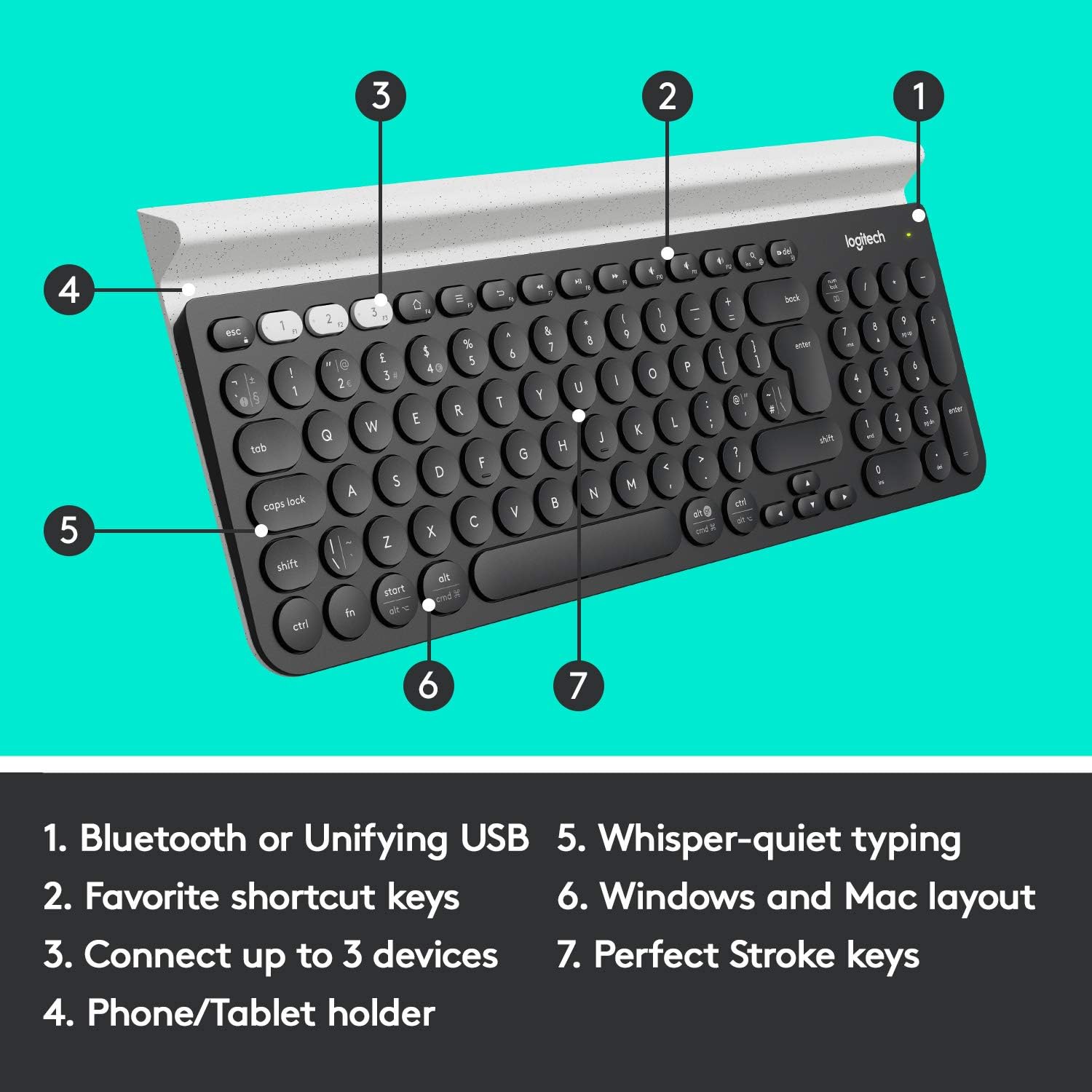
Multi-Device Productivity: Pair your wireless keyboard with up to 3 devices and switch between them with the touch of a button. Logitech Options let you customize keys, create hotkey shortcuts, and get notifications for device battery level, backlighting levels and more
Slim Quiet Keyboard: The Logitech PerfectStroke key system provides precision and quiet typing, solidly designed with thin, laptop-like, carefully crafted concave keys and shortcuts
Reliable Connectivity: Choose how you want to connect your device, whether via Bluetooth or Unifying receiver. This wireless keyboard has an integrated rubber cradle that carefully holds a variety of devices, from smartphones to a 12″ iPad Pro, at a comfortable reading angle
Adaptive Layout: Compatible with Windows, Mac, Android and Apple iOS, this Logitech wireless keyboard recognises the device it’s connected to so all the keys and keyboard shortcuts are exactly where you expect them to be. Can be used with wired, wireless, Bluetooth or gaming mice
The USB Dongle is located inside the battery compartment. In order to make the most of the K780 functionalities, it is recommended to install the Logitech Options software
Customers say
Customers find the keyboard’s keys very nice to type on and appreciate its ergonomic design, with one noting the round keys make it surprisingly ergonomical. The keyboard works well with multiple devices, supporting up to three via Bluetooth, and customers find it easy to set up and use, particularly with Mac and iPad. They praise its solid build quality, beautiful design, and seamless switching between devices, with one mentioning it works well with a Logitech 720 mouse.
8 reviews for Logitech K780 Multi-Device Wireless Keyboard for Windows, Apple android or Chrome, Wireless 2.4GHz and Bluetooth, Quiet, PC/Mac/Laptop/Smartphone/Tablet, QWERTY UK Layout – Dark Grey/White
Add a review
Related Products


Original price was: £89.99.£79.99Current price is: £79.99.
N. Walton –
Amazing keyboard! Solidly built, excellent battery and excellent switching!
I’ve had loads of keyboards, including quite a few wireless ones. I’m probably going to go out on a limb and say this is the best of the wireless keyboards I’ve ever used.The keyboard itself is very slim, far slimmer than mose, and the keys have a low profile, which makes it great for sliding on a shelf, or down the side of the sofa when you’re not using it. The top of the keyboard has a toblerone-shaped device-stand. I assume this is for people who want to prop up a tablet or phone. I don’t use it for this, but it looks like a far better solution than I’ve seen elsewhere, using legs and arms.The keyboard is SOLID. It’s quite heavy, heavier than it looks like it should be. My guess is that there’s a solid piece of metal forming the back of the keyboard, making it very stiff, and unlikely to bend/break if you accidentally sit on it. I’m really impressed by how solid it is.The key action is nice and clacky, so you get good tactile feedback. Of all the low-profile keyboards I’ve used, I’d say the key action on this one is as close to a ‘proper’ keyboard as I’ve got. The keys have a nice resistance, good spring and stop at the end of their travel with a nice firm ‘tack’ sound, not the muffled plastic of some chiclet-style keyboards.The pairing of the Unifying is relatively painless, but needs a PC to do it. Once the keyboard and dongles are paired, you can unplug them and stick them in anything that recognises a standard USB HID keyboard (which is pretty much anything, probably even including PS4s).Pairing of the bluetooth is very easy, and doesn’t need a PC.You can have the keyboard paired with up to two dongles AND a bluetooth connection all at the same time. You switch between the paired devices by pressing the function keys F1->F3. if you want the actual function key, you need to press Fn and the function key. This can be reversed, so you need to press Fn in order to switch. There is a way of doing this via the software (if I remember correctly), and you can do it with a special key combination on the keyboard, but some people say this is non-permanent, so if the batteries run out, you need to do it again.Battery life is excellent. I’ve not had to replace them in a year, and I’ve used the keyboard for about a day a week.I bought this with an M720 Triathlon mouse. The keyboard is able to pair up to the M720’s dongle, and the M720 mouse can pair up with the K780’s dongle. This allows you to have a proper Keyboard+Mouse pair for two different devices, and you just switch between them with the Function keys on the keyboard and a toggle switch on the mouse.I use this M780 with a MisterFPGA, a SteamLink and a Sony TV (via bluetooth). It works flawlessly with all three.Overall I’m extremely pleased with this keyboard, it’s absolutely the best wireless keyboard I’ve ever owned, and absolutely the best designed. The only slightly negative thing is that you need the Windows software to pair it and set up things on the keyboard, but I’m sure there’s a Mac version too now.
Amazon Customer –
Boring but good
Great keyboard, being able to pair it with several devices is handy although I don’t use the feature very often. The keys are more spaced out than on my partner’s Logitech K380 so I think it is the better choice for a desktop, although it is more expensive. I wouldn’t pay full price for one of these – I’ve seen them priced as high as £80 – but for the £50 I paid on a warehouse deal it’s great value. It’s got a decent bit of weight to it and is generally well made, I use mine daily for several hours and it feels like it’ll last for years. The low-profile keys have a good amount of travel (similar to old MacBook keyboards but a bit deeper) and I don’t really notice any difference in them being circular. Some of the hot keys can be remapped in the Logi Options app.Spending decent chunks of money on peripherals like keyboards etc is boring but it is worth it if you spend significant time interacting with a computer. The K780 is more comfortable, reliable and also better looking than most cheaper stuff.I don’t like the tablet holder as it’s too thin to use if you’ve got a thicker case on the tablet and it also holds the tablet too low and too close to the keys. If I use this with my iPad I stand it up in the case separately – I wouldn’t recommend buying this just because it has the slot. Connecting can also be awkward, especially if trying to (un)pair devices with the Unifying receiver. You’ll need to use the Logitech Unifying app to add/remove this keyboard if you’re using the receiver. Lack of a caps lock light is obnoxious on a keyboard that’s otherwise this capable but that aside it’s all pretty standard. It doesn’t always wake my Mac straight up on the first key press either so I usually mash a few keys which does the job.Keyboard is still showing 3/3 bars of battery left after 1 year of daily use and I don’t turn it off. It’s a boring but dependable keyboard so don’t pay too much for it but it’s nice to have, especially if you’re working from home and can get your employer to pay for it instead. Recommended.
Ali –
a versatile and efficient typing solution
The Logitech K780 Multi-Device Wireless Keyboard is a versatile and efficient typing solution.Its full-sized layout and comfortable keys make long typing sessions a breeze. The ability to switch between devices seamlessly is incredibly convenient, especially for those who work across multiple devices. The integrated stand can hold smartphones and tablets, adding to its functionality.However, the keyboard’s build quality could be improved as it feels slightly plasticky. Additionally, the lack of backlighting may be a downside for some users, especially in dimly lit environments.Despite these minor drawbacks, the K780 is a reliable and practical keyboard that meets the needs of multitaskers and professionals alike.
Cristian C. –
Cambio velocissimo tra i tre device supportati! un tocco di pulsante e via! Non perde la connessione! Ergonomica, malgrado la mia paura iniziale alla vista di quei pulsantini tondi… Ottima, precisa, non digito mai due lettere alla volta. Manca una lucetta sul pulsantino cambio tra maiucoli e minuscoli, ma per me, che ne faccio uso professionale, va benissimo anche senza! Uso due device BT ed il PC wireless! Vale tutti i soldini fino all’ultimo centesimo! Poi io ho preso quella con layout tedesco! Ottima!
Jean-Pierre –
Rien a dire, la qualité du clavier est au RDV.Coté pratique c’est aussi top : un jeu de trois touches permet de switcher de le l’ordinateur vers la tablette ou le smartphone et vice versa.Coté mise en route; c’est un jeu d’enfant.L’emballage ne comporte qu’un guide succinct de mise en route rapide mais il suffit d’aller sur le site Logitech pour avoir accès à un guide Online téléchargeable (merci pour la planète) et à une base de connaissances.Pour l’ordinateur, j’ai déjà un souris Logitech (protocole Logitech Unifying) donc je n’ai pas eu besoin d’utiliser le dongle USB présent dans le compartiment à piles du clavier. Ce protocole permet de connecter jusqu’à 6 périphériques sans fil via le même dongle (1 seul port USB occupé).Pour le smartphone ou la tablette c’est une connexion Bluetooth, la procédure est classique : activer le Bluetooth sur le device, appuyer longuement sur la touche de switch du clavier que vous voulez affecter au device, device qui propose un code à entrer sur le clavier pour jumeler les deux (ne pas oublier d’appuyer sur la touche Entrée après avoir saisi le code).C’est terminé; il suffit d’appuyer ensuite d’appuyer sur une des touches 1,2 ou 3 (en haut à gauche du clavier) pour l’affecter à l’appareil désiré.Les + : qualité du clavier, frappe agréable, clavier numériqueLes petits inconvénients : c’est un clavier multi périphérique, donc avec certaines touches avec 2,3 ou 4 entrées donc il demande un certain d’adaptation – clavier relativement mais ce n’est pas un nomade et il doit pouvoir supporter le poids d’une tablette et d’un smartphoneLes – : le voyant (vert) indiquant la mise sous tension s’éteint au bout de quelques secondes, et comme le bouton de mise en route ne comporte pas d’indication ON/OFF, il n’y aucun moyen (visuel) de savoir si le clavier est sous tension. Nota c’est ce voyant qui s’allume en rouge quand les piles sont à changer.Il manque aussi un voyant d’indication de verrouillage MAJ.L’absence de ces voyants est peut être voulu dans le but d’améliorer la consommation. De ce coté, je n’ai pas d’information, venant d’acquérir l’appareil.
khaled –
Ùسخ٠٠ÙÙد٠٠٠اÙØÙÙÙÙÙ ÙÙÙس اصÙÙ
olivier.mb –
Un peu lourd mais super, Le clavier de mon ordinateur portable était pratiquement HS, jâai mis celui-ci par dessus directement.Il est plutôt simple à installer il suffit juste de telecharger le logiciel âoptionsâ de logitech.
Mohammed Othman –
Thank you