

Arteck Universal Multi-Device Bluetooth Keyboard Ultra Slim and Compact Wireless Bluetooth Keyboard with Media Hotkeys for Windows iOS iPad OS Android Computer Desktop Laptop Surface Tablet Smartphone
Original price was: £25.99.£21.84Current price is: £21.84.


Price: £25.99 - £21.84
(as of Jun 18, 2025 11:14:44 UTC – Details)
Product Description

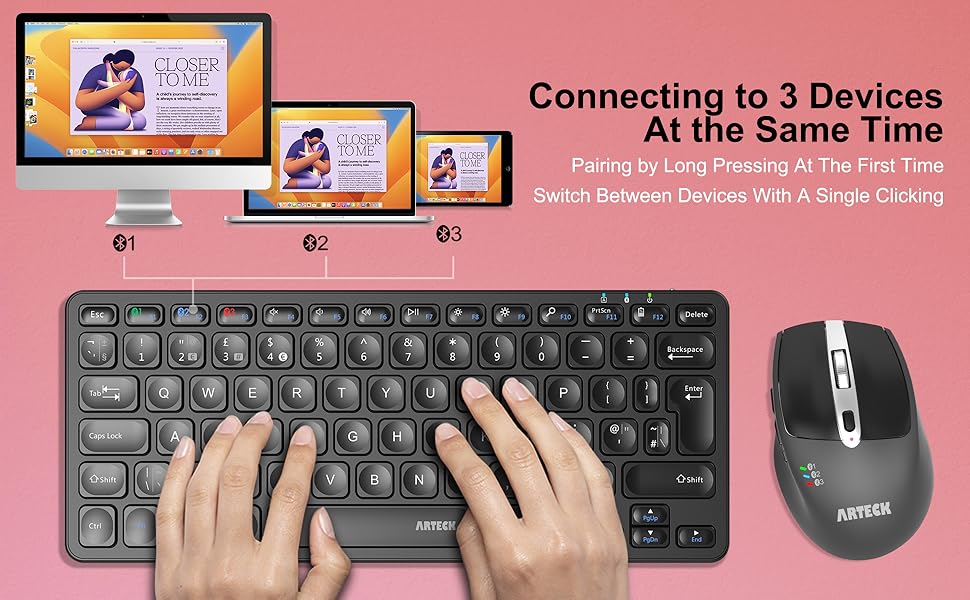


Switch Between 3 Devices with A Single Clicking
This keyboard is able to connect to 3 devices at the same time. After you pair the keyboard with 3 devices, you can simply switch the keyboard to type on any of the device with a single key clicking.
Cross Platform Compatible
Fully functional to all four major operating system: Windows / iOS / iPad OS / Android / MacOS, and features system-specific function keys for each operating systems. Any Bluetooth supported devices such as laptop, computer, tablet, surface, smartphone can easily be paired and gained quick access to common functions, such as volume level, playback control, brightness, and more.
Comfortable, quiet typing
The whisper-quiet, low-profile keys bring a whole new level of comfort to your fingertips. What’s more, keep all your most-used functions and media controls closer than ever Windows-dedicated hot keys. Keyboard with scissors kick construction can be used more than 3 million times continuously.
Rechargeable Battery
Built-in industry-high rechargeable Li-polymer battery provides 6-month use on a single charge. (based on 2 hours non-stop use per day)
3 Devices Switch with A Single Clicking: This keyboard is able to connect to 3 devices at the same time. You can switch between 3 devices with a single key clicking.
Broad Compatibility: Use with all four major operating systems supporting Bluetooth (Windows, iOS, iPad OS, Android, and Mac OS), including Computer, Desktop, PC, Laptop / iPad Pro, iPad Air, iPad, iPad Min, iPhone, Smartphone / Android Tablets like Samsung Galaxy, Surface etc.
Ultra Compact, Thin and Light: Compact size (11.12 X 4.5 X 0.24in) and light weight (12.1oz) but provides full size keys, shortcuts for comfortable typing.
6-Month Battery Life: Rechargeable lithium battery with an industry-high capacity lasts for 6 months between charges (based on 2 hours’ non-stop use per day).
Package contents: Arteck compact multi-device bluetooth keyboard HB305, USB-C charging cable, welcome guide, our 24-month warranty and friendly customer service.
Customers say
Customers find the keyboard’s keys comfortable to write on and appreciate its portability, noting it easily packs away into bags. The keyboard is easy to use, with straightforward setup, and customers praise its build quality, with one describing it as almost ‘clacky’ like a mechanical keyboard. They like its functionality, value for money, and connectivity, with one customer mentioning it pairs well with multiple devices.
11 reviews for Arteck Universal Multi-Device Bluetooth Keyboard Ultra Slim and Compact Wireless Bluetooth Keyboard with Media Hotkeys for Windows iOS iPad OS Android Computer Desktop Laptop Surface Tablet Smartphone
Add a review
Related Products


Original price was: £25.99.£21.84Current price is: £21.84.
La Kennedy –
Works perfectly, great portable keyboard
I have a Surface pro, and regularly take it out to meetings. Itâs a brilliant bit of kit, but sometimes the keyboard doesnât respond well. So I thought about using a portable keyboard. My keyboard of choice is the Logitech MX. Paid a lot of money for it, but it is incredible. But i wasnât sure if I would actually use the portable keyboard so wasnât sure I wanted to invest in the Logitech portable. So did my research and this popped up. Good size, and well made. Definitely not in the Logitech league, but actually pretty good. It was easy to set up, and I linked two devices easily. Love the fact that itâs chargeable, so no worries about batteries failing. It types well, and better than the pro keyboard. I will use it again, and take it with me when I travel. For the money itâs well worth it. It looks good, but, as said, do not think itâs of Logitech quality. BUT, itâs a good, quality product and does exactly what it says. All in all a good purchase.
Peter Ngo –
Exceptional Functionality and Value with the Arteck Bluetooth Keyboard (HB305)
I recently acquired the Arteck Universal Multi-Device Bluetooth Keyboard (HB305), and it has exceeded my expectations. Its practical features allow me to seamlessly switch between three devices, adding a significant level of convenience.The keyboard boasts great compatibility across major operating systems: Windows, iOS, iPad OS, Android, and Mac OS. Despite its lightweight, it provides full-size keys and convenient shortcutsâa perfect blend of portability and functionality.Impressively, the keyboard offers an extended battery life and convenient recharging via USB-C. With a helpful indicator for the remaining charge, concerns about unexpected battery failures are alleviated.Setting up the keyboard was straightforward, effortlessly linking two devices. The user-friendly design and quality construction make typing a joy, even surpassing the built-in keyboard on my Surface Pro. The keys are well-arranged, with a considerate layout, tilt, and indented keys enhancing the overall typing experience.In conclusion, the Arteck keyboard delivers exceptional value for money. While suggesting the addition of an Fn lock for improvement, its overall performance and features make it a reliable and cost-effective choice.
Kris –
Decent keyboard, good build quality, battery life could be better (updated)
Updated review:I bought this for my daughter to use with our laptop. The one I received initially had issues (see below) I returned it, wrote a 1 star review and bought another brand (EasyAcc, which we are very happy with).But Artec got in touch and offered to send another one for free if I would fix the review. Although I no longer need the keyboard, we said yes as this keyboard did seam like it should be good and it doesn’t do harm to have a backup. So we have now been using the new Arteck keyboard for a week (mostly my daughter playing Minecraft) and the keyboard works will now. The battery isn’t quite as good as the EasyAcc one, but actually they key layout is much better and it is slightly better size. So I think it will be her default one now.Basically I think we recommend this keyboard now.It also seams like their support is good, if you are unlucky like we were on the first one we got. Then they were pretty proactive at sorting getting a replacement.Initial review:I bought this for my daughter to use with our laptop. I had to charge it twice before it would actually keep power enough to connect. One connected it work ok for a bit but. Only lasted a few hours. Then it didnât seam to charge properly. And lots of disconnections randomly. Real shame. As it looks like it would be perfect.
Brahmin MC –
Great mulit device BT keyboard for the price.
Bluetooth : 3 devices, easy connect and switch using dedicated buttons.Keyboard : Great keys on keyboard. Almost ‘clacky’ like a mechanical for a fraction of the cost. Very responsive and free.Battery Life – pretty good, I have used it for at least 10 days+ without recharge.If you are looking for a light weight, well priced bluetooth keyboard I recommend this one.Cons : A bit difficult to use with Apple Macs. some of the keys are not mapped and the ‘command’ key is available but in a different place.
Will Bill –
Easy to use and great support
Keyboard has a great key feel and very easy to set up and use. Support is also very receptive and immediate. Very pleased.
Kester –
A well made device that works very well and is easy to set up.
The initial setting up was straightforward and the instruction leaflet, although small, well put together and relatively easy to read compared with some that come with other products. The keyboard feels like a quality product despite its very reasonable pricing.Initially, when undertaking my first typing tests, I found the keyboard very much over-sensitive with lots multi character output from a single key press. This frustrated me somewhat so I emailed Arteck customer support whose contact details are prominently shown in the leaflet. However, I probably have jumped the gun because, not be being overly familiar with Android other than in using my mobile phone, I didn’t realise that within the settings of my new Android tablet, for which I acquired the keyboard, was a section where I could adjust ‘Pointer’ speed and this resolved the issue without any problem being caused to normal touchscreen working.It’s early days but I am very happy with my purchase – its quality and ease of use, even for my aged and shaky fingers, mean I believe it deserves a five star rating.
Andre M –
I love this keyboard, exactly what I needed. Everything was as expected or better. Iâd buy again no question.
Tiburon –
I got this for a friend, his fingers too big for the Bluetooth keyboards that come with he ipad cases, this was inexpensive and seemed to have everything. I have been typing on the little keyboards for years, so I bought this to try on for him, as his âstopped workingâ it didnât. The keyboard will on occasion become unpaired for no reason, Itâs happened to me 3 times in a week, but all I do is simply push the F1 key for Bluetooth connection, and it reconnects. I do not need to go to settings, to to BT annd repair, etc. So itâs a super easy fix. I am about a week into this, and still is 100% fully charged, there is a cool F12 button that flashes when you push it, telling you how much charge you have left, in my case 4 times = 100%, 3 Xâs 75%,â¦etc. After the initial charge, that was it, itâs remained at 100%. The keys have a nice bounce to them, itâs much more like typing on my computer keyboard, but on my lap, NOW I am looking for a lap desk but ONLY for the keyboard, and maybe a slot for my ipad, although it sits on a stand that I put under/between my legs because I can adjust itâs height and distance from me. I am using the magnetic no slip cover to my ipad/keyboard case, which helps with slipich and stabilizes it on my lap, not magnetic, this keyboard is not magnetic. It does have the no slip rubber tabs, 1 in each corner to help too. Appling magnetics do not work either, I tried. They slip off this keyboard bottom at all points. Also it has F1, F2 and F3 for 3 different BT devices you can pair to this keyboard. I guess I could pair my phone too, but I mainly use voice to text on that, and type on my ipad. As I have done for this review.
Geocas1 –
****UPDATE 2/10/25****Retailers reached out to mewantibg to make things right and to their credit they did. I was offered a none Bluetooth replacement and this works great. I gace bought several Arteck keyboards in the past and haven’t had any issues although they were not Bluetooth. So maybe I just had bad luck with a couple of them. I’m still happy with my RF Wireless keyboards and even more happy that the company goes out of their way to make sure customers are taken care of. Changed from 1 star to 4****************************I got this keyboard and it constantly disconnected from Bluetooth. I opted to have a replacement and the same thing happens with the replacement. Seller can you assist with this issue as this iis the 2nd keyboard that has the same issue and i have MULTIPLE devices that connect to bluetooth to the same system with no issues.Very disappointed
Audi.RS4 –
I wanted a small keyboard for keeping in my backpack to use when traveling into the office. I don’t have an assigned desk anymore, and just grab what is open, and the keyboards are always different, are basic Dell or Amazon board and take getting used to.I decided to get this to use for taking into the office. I chose to go with Bluetooth, so I didn’t have a dongle hanging off the laptop, or accidentally left in the Docking Station. Having support for 3 devices, I could also easily use it with my personal laptop, if I wanted to.I love the feel of the keyboard. The key press has a good, clicky feel. It isn’t overly loud, but not quiet either, definitely not as loud as a mechanical keyboard. I prefer the feel of this over the Apple Keyboard my wife has.As for features, the keyboard has a good array of extra commands like brightness, volume and media controls. These commands have worked fine for me in both Windows and Linux.It is hard to speak to the battery life, only using it for around 8 hours for one day a week. But so far I don’t think I’ve had to charge it after the initial charge I did after receiving it. I do love that it has a USB Type-C port keeping me from increasing number of devices using the old micro-USB port or worse, something proprietary or barrel style.One reason I went with this, over many others I looked at, even others from Arteck was the placement of the Function key. The proper place for this is between the left control and super (Windows) key. The left control must be in the lower left for me as I use it a lot for copy and paste shortcuts. How people can stand macOS and using alt/option is beyond me.In conclusion, I am very pleased with this keyboard. So much so, I have now purchased the larger sized variant, with the USB dongle and numpad to use at my home setup. If you are looking for a small keyboard, this is a great option.
Raquel –
This is my favorite Bluetooth keyboard!!! I’m a graduate student, so my job requires endless writing. I can connect this keyboard to three laptops and the battery lasts a long time (a few days for me) – the charge time is quick. The smaller Bluetooth keyboards I’ve owned before were delicate, small, and overheated, so it hurt my hands. Fortunately, this keyboard size is just large enough where my hands don’t get fatigued, and small enough that it’s portable and lightweight. So, it’s perfectly sized with all the keys I need (smooth typing), it’s durable, and it does not get warm at all. I’ve had this one for a few months now and it works great. Sometimes I noticed that it will stop working before or after a computer update, but I found the very easy fix! Just remove/delete this keyboard from the Bluetooth settings on your device and then pair the Bluetooth keyboard back to the device – (tip: hold down f1, f2, or f3 on the Bluetooth keyboard to pair). This has happened maybe two times so far. I just removed it from my Bluetooth settings on my laptop and paired it back – done! 🙂 All is well.