

Joso Keyboard and Mouse Adapter for N-Switch, Switch Keyboard Adapter for Playing Apex, FPS, RTS, Plug and Play Mouse Converter for Xbox One/PS4
£18.99




Price: £18.99
(as of Jun 18, 2025 17:20:23 UTC – Details)
Product Description
The video showcases the product in use.The video guides you through product setup.The video compares multiple products.The video shows the product being unpacked. Joso Keyboard and Mouse Adapter Merchant video
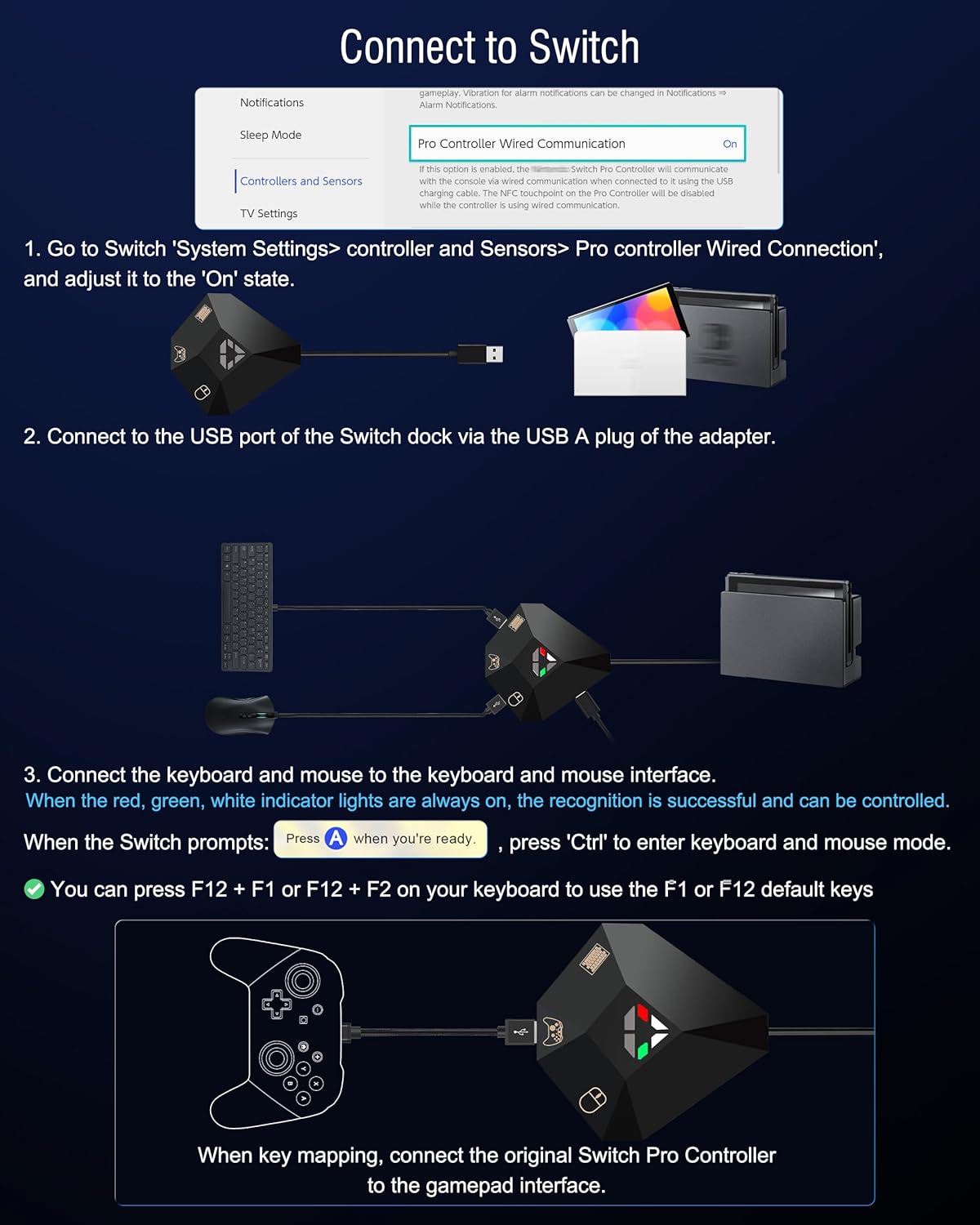
Keyboard and Mouse Converter Connection Guide & Default Key Mapping


 Perfect for FPS, TPS, and RTS Games
Perfect for playing games like Apex Legends, Fortnite, CoD, Halo Infinite, etc.
Theoretically all games on supported consoles are supported.
 Equipment Layout
To ensure the smoothness of the console, use a power cord with enough power to connect to the adapter’s Type-C power port
 What Will You Get?
1 x Keyboard and mouse adapter1 x User Manual
More Functions Settings and Precautions
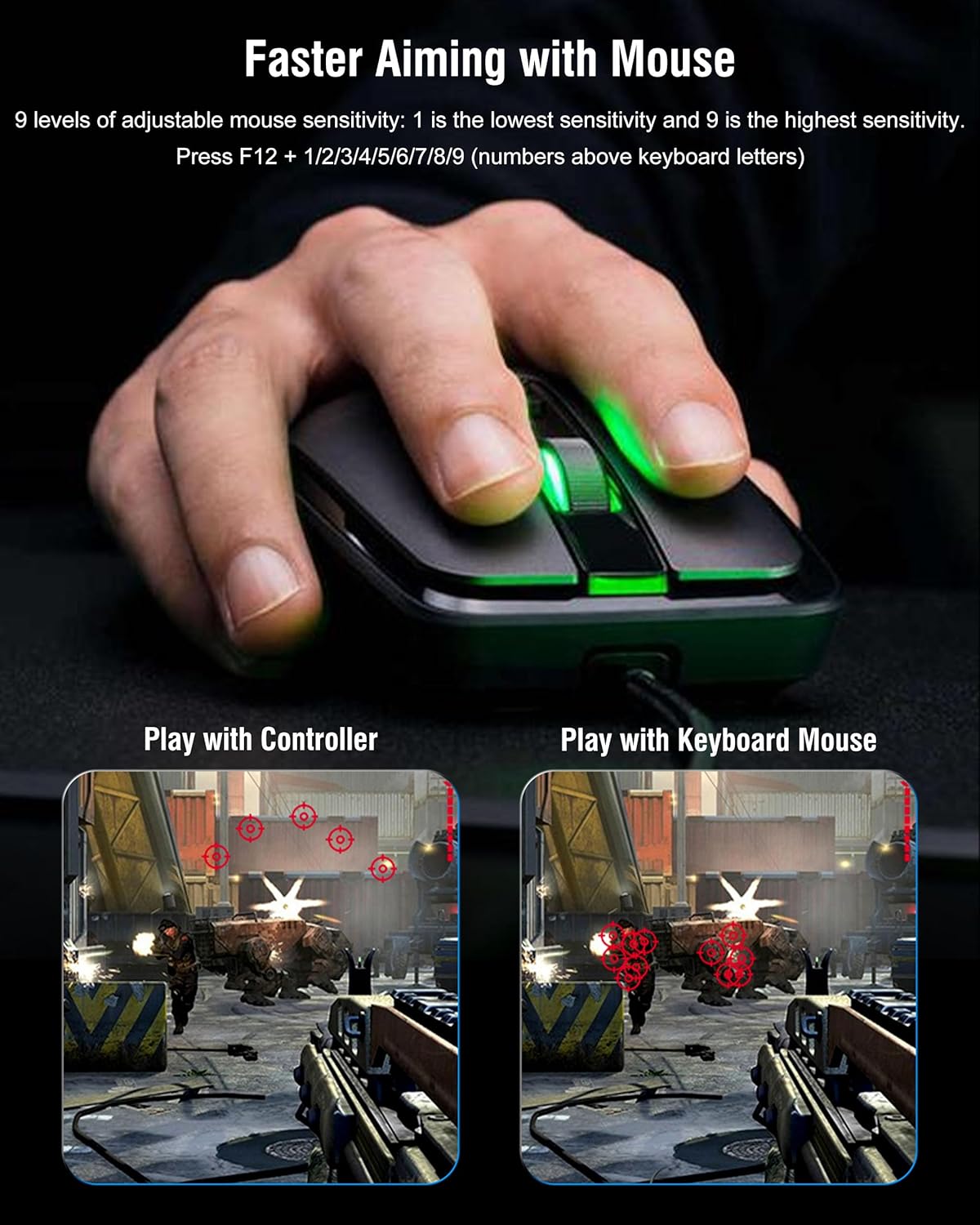
Switch Configs F12 + F1/F2/F3/F4/F5/F6/F7/F8 keys on the keyboard: Joso keyboard adapter supports 8 sets of keyboard/mouse key mapping storage. Please switch configs via F12+F1(no indicator)/F2(blue light)/F3(red light)/F4(purple light)/F5(green light)/F6(cyan light)/F7(yellow light)/F8(white light) before modifying the configuration. (The default config is F12+F1) Keys Mapping F11 + F12 keys on the keyboard: Press F11 + F12 on keyboard to set the key mapping, and when you are done recording, press F11 + F12 on keyboard again to end the macro recording. Before Key Mapping: 1. Make sure you gamepad is official Switch/PS4/x-box controller, and the Joso adapter is properly connected. 2. Press F12 + F1/F2/F3/F4/F5/F6/F7/F8 to enter the key mapping storage area, then press F11 + F12 to enter the key mapping mode. Adjust Mouse Sensitivity F12 + 1/2/3/4/5/6/7/8/9 (Numbers above keyboard letters): 1 is the lowest sensitivity and 9 is the highest sensitivity. Invert Y-axis Setting F12 + Y keys on the keyboard: In some games, the Y-axis control may have the opposite direction to the default setting. You can press F12+Y in the game to toggle the direction. For Mouse Cursor This adapter simulates controller input by emulating keyboard and mouse actions. The mouse acts as the right joystick, hence no mouse pointer is shown on screen. Once in-game, move the mouse to observe its effects. Support Keyboard & Mouse Types The keyboard mouse adapter is support wired keyboard and mouse; Support 2.4G Wireless keyboard and mouse. Does not work with Bluetooth keyboard and mouse. Kindly Reminder: 1. The keyboard adapter is work with Switch, Switch OLED, X-box One, X-box 360, PS4, and PS3. Does not work with Xbox Series S/X & PS5. Auxiliary Adjustment Settings The adapter uses the keyboard and mouse to help adjust settings such as key mapping, mouse sensitivity adjustment, and more. (Does not support the game app to adjust settings)
Package Dimensions : 15.8 x 7 x 2.5 cm; 50 g
Date First Available : 15 Mar. 2025
Manufacturer : ShenZhen YuYanXin Electronic Technology Co., LTD
ASIN : B0DT68SX5L
Item model number : TNS-19077
Country of origin : China
Guaranteed software updates until : unknown
Multi-Platform Compatibility: The converter for keyboard uses the original game controller as a guide, is a multi-platform compatible keyboard and mouse input adapter, compatible with Switch/Switch OLED, Xbox One/One S//One X/360, PS4 & PS3 (Not compatible with PS5 & Xbox Series)
Supported Functionality: This switch usb adapter supports key mapping and sensitivity adjustment & 8 key mapping storage areas to meet different game settings for different gamers & games (IMPORTANT: It can be used normally only when the console and official genuine controller are connected)
Enjoy Improved Precision, Speed, and Control: The keyboard and mice adapter for consoles helps you aim faster in games with a keyboard and mouse, giving you more control flexibility on your console, excellent for playing FPS, TPS, and RTS games like Apex Legends, COD, Fortnite, and more
Plug and Play: This adapter for mouse and keyboard no extra software download required; there are clear signs on the converter to tell you which device goes into which port (Please use the official genuine controller to reduce incompatibility issues)
Compatible with Various Keyboard/Mouse: Gaming keyboard converter for Switch, PS4 and Xbox1 is compatible with most wired keyboard/mice, 2.4G wireless keyboard & mouse (NOT supports Bluetooth keyboard/mouse)
Read before Use: Make sure the Original gamepad is working, if the power supply of the gamepad is insufficient please power the gamepad via the type c port of our adapter to ensure that the game is not interrupted
8 reviews for Joso Keyboard and Mouse Adapter for N-Switch, Switch Keyboard Adapter for Playing Apex, FPS, RTS, Plug and Play Mouse Converter for Xbox One/PS4
Add a review
Related Products


£18.99
Ace42 –
Works flawlessly with Switch OLED out of the box
Worked flawlessly straight out of the box.Plug it into the Switch docking station’s USB input; plug in USB mouse and keyboard into the marked slots, and it just works.The default keybinds are workable and somewhat make sense – Fortnite worked pretty much as you’d expect without needing any configuration. The conversion of analogue mouse input to gamepad works surprisingly well – my mouse’s DPI was set for my PC, but seemed to correspond exactly right for use with the Switch without me having to reconfigure it.Which is good, because the instruction manual makes the remapping system seem particularly convoluted; and implies that you need an official Nintendo Switch controller to do it.The instructions pamphlet has the information you need to figure out default keybinds, or to go through the reconfiguration process – but the translation feels very clunky. This harms your confidence in the accuracy of the information provided, and makes it daunting to even approach it.But it’s straightforward enough that you can figure it out just by playing around with it – and it allows for a dozen-or-so different keybind profiles for you to hot-swap between, so that adds a lot of flexibility to the device.
The Third Man –
Cheap alternative but probably not the best
An adaptor which allows you to use a standard gaming keyboard, gaming mouse and pro controller on a Nintendo switch / Xbox / PS4Sadly, I couldnât get the converter to work with a controller as implied â Iâm not sure if this was me, the controller or the settings? The instruction are not very clear and I has to resort to the listing in order to make sense of it all. In the end I just worked out the correct layout by playing an example game.It does have flaw in that you cannot add extra controllers without resetting the switch altogether. To be fair it did work as intended and even with a wireless mouse, but it was a âright chewâ. If youâre looking for a cheaper converter then this is it otheriwise move up to a GameSir VX Aimswitch which I really think is my preferred option
Amazon Customer –
SWITCH ADAPTER
Little unit but offers all the ports required to easily connect up your keyboard and mouse. This is great for certain games where itâs just easier to play the old fashioned way! Plug and play with no need to install any softwares etc for use, it just simply all slots together and works. No lag or issues when in use either which is good to see 🙂 Arrived well packaged with a little guide for use if needed.
Raphael Rostaizer –
Responsive, lag-free, and perfect for FPS games across multiple consoles
This keyboard and mouse adapter has been a solid addition to my setup, particularly for playing first-person shooters and real-time strategy games on consoles where precise aim and fast input matter. It works seamlessly with the Switch, PS4, and Xbox One, and the plug-and-play functionality means no tedious setup or extra software. I had it running within minutes, and it recognized both my wired keyboard and mouse right away.The responsiveness has been impressiveâno noticeable input lag, even in fast-paced matches on Apex or other FPS titles. It replicates the feel of PC gaming quite well, making console shooters feel much more controllable and immersive. Button mapping is straightforward, and the adapter handles remapping reliably, which was especially useful when switching between different games or consoles.The build quality is compact but sturdy, and the lightweight design makes it perfect for taking to a friendâs house or packing away easily when not in use. I’ve tested it with a few different brands of peripherals, and everything has worked without issue so far. It also supports various mouse sensitivities without glitches, which is a big plus for fine-tuning performance.For gamers who prefer the feel and accuracy of keyboard and mouse over traditional controllers, especially in competitive shooters, this adapter delivers. It’s a great solution that bridges the gap between console and PC gameplay, providing better control, more comfort, and a noticeable edge in performance.
Amazon Kunde –
Für die Switch ist es perfekt! Funktioniert einwandfrei ist klein und sieht schick aus! Würde es jederzeit für meinen Sohn wieder kaufen
Daniel H. Dyer –
This is the worst adapter you could possibly get. It is very hard to connect, and when I read the manual that came with it, it was very confusing and nothing that it said worked no matter what use you canât connect the controller and the keyboard to change keyboards whatsoever even ChatGPT was confused about this manual, but if you really want to look for a switch adapter, then get the Games or VX AIMswitch. I was looking at other ones for the actors and I saw this one it was cheap so I got it not caring about the other reviews but this one when I say it is terrible I mean it donât ever buy no matter what.
B. Lawrence –
I only give it two stars, because it did SOMEWHAT work with an XBOX One S. It was able to connect, but the connection was laggy.When we tried it on the Nintendo Switch, the ONLY way it will work is if you have an official Nintendo Pro controller to pair with it as well. We had a controller, but since ours wasn’t manufactured by Nintendo, but instead another company, it won’t work. Don’t get me wrong it does say “(Important: Keys mapping can only be customized when the console and official genuine controller are connected)” in the description. So, I can’t totally fault them for that, but it’s a letdown considering how many similar Nintendo aftermarket controllers are to the original.
â Schatzsucher â –
Bestellt habe ich mir den Mausadapter, da mein Sohn und ich oft Minecraft auf der Nintendo Switch spielen und die Steuerung mit dem Controller wenig spaà macht, da ich seit fast 30 Jahren mit Maus und Tastatur spiele. Ich habe nicht viel erwartet und wurde keinesfalls enttäuscht. Ich habe meine Tastatur und Maus angeschlossen, kurz einen Blick in die (englische) Anleitung geworfen und los ging es. Ich konnte direkt per Maus und Tastatur spielen. Die Empfindlichkeit und Steuerung funktioniert erstaunlich gut.Einen halben Punkt ziehe ich wegen der Standard-Einstellung ab, da die Tastenbelegung auf der Switch “willkürlich” scheint. Hier musste ich nach den ersten Tests die Tastenbelegung konfigurieren. Ohne Anleitung keinesfalls möglich. Für nicht-englisch-Sprachler umso schwieriger. Dennoch empfehlenswert, weil das Spielen um ein vielfaches erleichtert wird. Einen weiteren halben Punkt ziehe ich ab, weil das USB-Kabel deutlich länger sein könnte. Wenn man an der Konsole spielt, sitzt man mindestens 3 Meter vom Fernseher entfernt.