

TP-Link Deco X20(3-pack) AX1800Mbps Whole Home Mesh WiFi 6 System, AI-Driven WiFi Booster, up to 5,800 Sq ft Seamless Coverage, 1 GHz Quad-Core CPU, Connects over 150 Devices, TP-Link HomeShield’s KIT
Original price was: £219.99.£157.66Current price is: £157.66.


Price: £219.99 - £157.66
(as of Jun 20, 2025 01:51:20 UTC – Details)
From the brand

Mesh Wi-Fi 7 Systems
Mesh Wi-Fi 6/E Systems
Whole Home Mesh Wi-Fi Systems
Deco X50-Outdoor
Deco X50-5G
Deco X50-PoE (3-Pack)
Faster Connections: WiFi 6 Mesh System speeds up to 1,800 Mbps—1,201 Mbps on 5 GHz and 574 Mbps on 2.4 GHz, OFDMA and MU-MIMO technology quadruple capacity to enable simultaneous transmission and connect to more devices
Boosted Seamless Coverage: Achieve seamless whole home coverage with a clearer and stronger whole home WiFi signal generated by WiFi 6, make your home wholly covered with Deco X20 Wifi 6 Mesh Router
Ultra-Low Latency: Greater reduction in latency enables more responsive gaming and video chatting, enhance your mesh network speed further with Deco Mesh wifi 6 Technology.
One Unified Network: Multiple units form a whole-home network that auto-selects the best connection as you move around your home
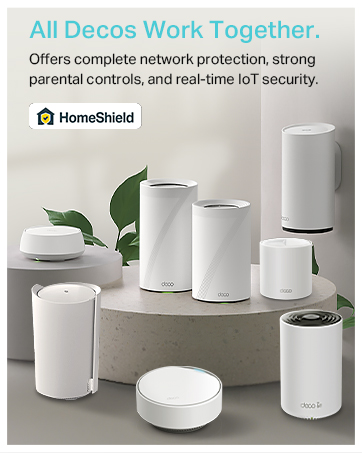
Total Security: WPA3 encryption and TP-Link HomeShield provide personalized features, including Parental Controls, Antivirus, and Quality of Service (QoS) to ensure a safer online experience
Customers say
Customers find the router easy to set up and appreciate its strong WiFi coverage throughout the house. The device runs without issues, and the app is user-friendly with good control features. While some customers report high speeds, others experience speeds dropping to around 100-120 Mbps. Customers disagree on the value for money, with some considering it good for the price while others find it poor. Customers report connectivity issues with devices losing connection and random disconnections over 24 hours.
8 reviews for TP-Link Deco X20(3-pack) AX1800Mbps Whole Home Mesh WiFi 6 System, AI-Driven WiFi Booster, up to 5,800 Sq ft Seamless Coverage, 1 GHz Quad-Core CPU, Connects over 150 Devices, TP-Link HomeShield’s KIT
Add a review
Related Products


Original price was: £219.99.£157.66Current price is: £157.66.
Omar –
Cannot Fault Performance
For the price, I think this mesh system is amazing. I tried a cheaper (tenda) mesh system but ended up returning it because the performance was poor, despite having five nodes. I then opted for a slightly more expensive, well-known brand TP-link.Set up is easy, the app is good. Three nodes, each with three ethernet ports, cover my 5-bedroom house. In my office I was struggling to get signal beyond 10mbs, now it is >100mbs. Close to the main node which is plugged into the router I am getting the advertised 250+mbs from my virgin super hub 3. I also have an ethernet switch which plugs directly into the main node and once you put system into bridge mode and turn off your router’s wifi signal you get one network covering your whole house.The app is good too, you can determine which devices connect to which node and set priorities for signals too. You can also name each device on your network which is handy if you like to see what device is connecting to what node and what the signal strength is. Not sure about the AI mesh functionality, but it seems to work in the background and you can run network optimisation to reduce interference and improve performance too. You can have a dedicated IoT network for clumping all your 2.4Ghz devices together such as cameras which is neat.The units themselves look good and feel more sturdy than what I had before. The only thing you can’t do is wall mount them, which would be nice an option. Overall, really pleased with the performance of these and at the price point I would highly recommend these
Brett –
Solved all my WIFI issues. Ring Devices work perfectly NOW
Hi there,I thought i would write this review because it took me a lot of time and research to resolve my connection issues with my RING devices, and I have now finally fixed the issues.I have been having connectivity issues with my Ring devices for months now and decided I needed to take action on fixing this issue. I first factory reset my main ISP router and intelligent pods and set all back up (checking WIFI channels for congestion and pods for signal, there was no signal coming off the pods or Ring pro chime WIFI extender) still the exactly same issues.I then bought a mesh tp-link router with 4 antennas and a tp-link mesh WIFI extender with 2 antennas, so putting my main ISP router in to modem mode and connecting my new tp-link mesh router to the existing ISP router, the Ring devices was still struggling with WIFI connection, I live in a 3 bedroom house and set the equipment up perfectly, the speeds however was excellent in every part of my house after installing the new tp-link mesh router and tp-link mesh extender from average 80 mbps to 250 mbps in the worst signal areas of my property, but the RING devices was still struggling.I decided to bite the bullet and go with the tp-link WIFI 6 deco Mesh system and I have now fixed the connection issues with my RING devices, full signal bars on both RING devices and all other devices in the house and 250mbps in every room in the house, the MESH system was very easy to set up via the tp-link deco app, i did have a issue when I first set the MESH system up because the connectivity to the RING devices was set to auto from 2.4GHz to 5GHz and was connecting to 5GHz automatically and the RING devices work better on 2.4GHz so I went in to the RING devices on the Deco app and changed from auto to 2.4GHz and this solved the issue and now works perfect, the deco app is brilliant and you can customise your deco system like renaming your devices and you can see the signal strength of each device including the deco units, please donât worry when you see your connected devices offline as the AI deco will connect automatically when needed to stop congestion.Please be aware when buying the deco systems and always go above what internet speed you have, so I have 250 mbps internet so I only required 300 mbps max capability deco system but went for the one up model to future proof if I ever needed more then 250mbps internet, itâs also worth getting WIFI 6 deco like mine for WIFI 6 devices.I am very happy with the tp-link WIFI 6 deco Mesh system, I know itâs not the cheapest option but in my case it was the only option and I am glad a bought it.I hope this review helps you solve your internet issues and saves you some precious time.
Daniel K –
Game changer for slow and unstable internet
Are you having problems with internet coverage? If the answer is YES, then get this and you’ll make the right choice.We live in a 2 storey house and internet upstairs was ridiculously slow and problematic. All I could get with any device upstairs was 45mbps max. Not only upstairs, but as long as I get away from the Virgin hub i get unstable internet connection and low speeds. Well TP-Link Deco x55 solved all these problems.I’ll admit that the price is slightly higher, but if you want stable internet connection, top speeds and reliability, you must get the mesh system.Setup was extremely easy and done in under 10minutes. After all 3 units were set up, immediate change could be seen. Speeds went up from 45mbps to stable 300-400mbps (our package provides 500mbps).What is extremely important is the app you need to use to set up the mesh system and it is one of the best apps out there. Nice, simple and very responsive. All controls are well organised and it makes you feel like an expert during setup stage.It’s only been the first week of use, however I’m confident that this system will do what it needs for a very long period.If stable and fast internet even through wireless connection is important, you must get this and all your current problems will be solved in no time!
asd12alarab12 –
٠٠تازة جدا
JJCK –
Très bon produit, toutefois trop cher.Bonne application, installation facile.Dans ma maison jâai de 800 mégas à 1 giga de wifi en moyenne.Petit conseil laissez le wifi de la box pour les invités et créez un nouveau réseau personnel et puissant à votre usage. Contrairement aux idées reçues adsl ou fibre nâont pas de meilleur wifi, dâoù lâintérêt de ce type dâappareil.
Ä°srafil ÅimÅek –
Beklentimizi karÅıladı.
luke –
After having tried powerline adapters in my new home and them not connecting I thought I’d give these a go and they have been flawless in operation. The setup was a little finicky but instructions were clear and worked well.
joy –
Nie jest źle ale spodziewaÅem siÄ lepszego pokrycia powierzchni . Nie warty swojej ceny. Nie wiem skÄ d tyle pochlebnych opinii . Nie polecam.