

SATECHI Dual USB C Docking Station and Stand with Dual 4K HDMI, Display Port, 75W PD Charging, 2 USB-C Data, 2 USB-A, Ethernet, SATA and NVMe SSD Enclosure, for MacBook and Windows
£126.72


Price: £126.72
(as of Jun 20, 2025 06:33:07 UTC – Details)
Product Description


1 Mac OS
2 Windows


What SSD drives will work with this Docking Station?
The Dual Dock Docking Station will support both M.2 SATA and NVMe Solid State Drives in sizes 2242/2260/2280, such as M.2 NVMe/SATA PCIe M key, PCIe B&M key SSD. (4TB max)
Is it required to run power through the USB-C PD port to use this dock?
Having that this dock is “bus-powered” when attempting large file transfers (or using more than 2 ports on the dock) we recommend utilizing passthrough charging to keep your host device powered.
How long are the connecting cables?
The Dual Connecting Cables are approximately 7.5″ (19.05cm).
Will this dock support Samsung 980 Pro NVMe?
Yes, it will support a Samsung 980 Pro NVMe drive. The SSD Enclosure is compatible with both M.2 SATA (up to 6Gbps transfer speeds) and M.2 NVMe (up to 10Gbps bandwidth for faster transfer speeds).
Can I use 2x HDMI + DisplayPort for running 3 external monitors?
No, it supports up to 2 displays: HDMI 1 + HDMI 2 or HDMI 1 + DisplayPort. Dual display works on Apple M1/M2 Pro & Max, Intel -based MacBooks, and compatible Windows devices. M1/M2 MacBook Pro/Air supports only 1 external display.
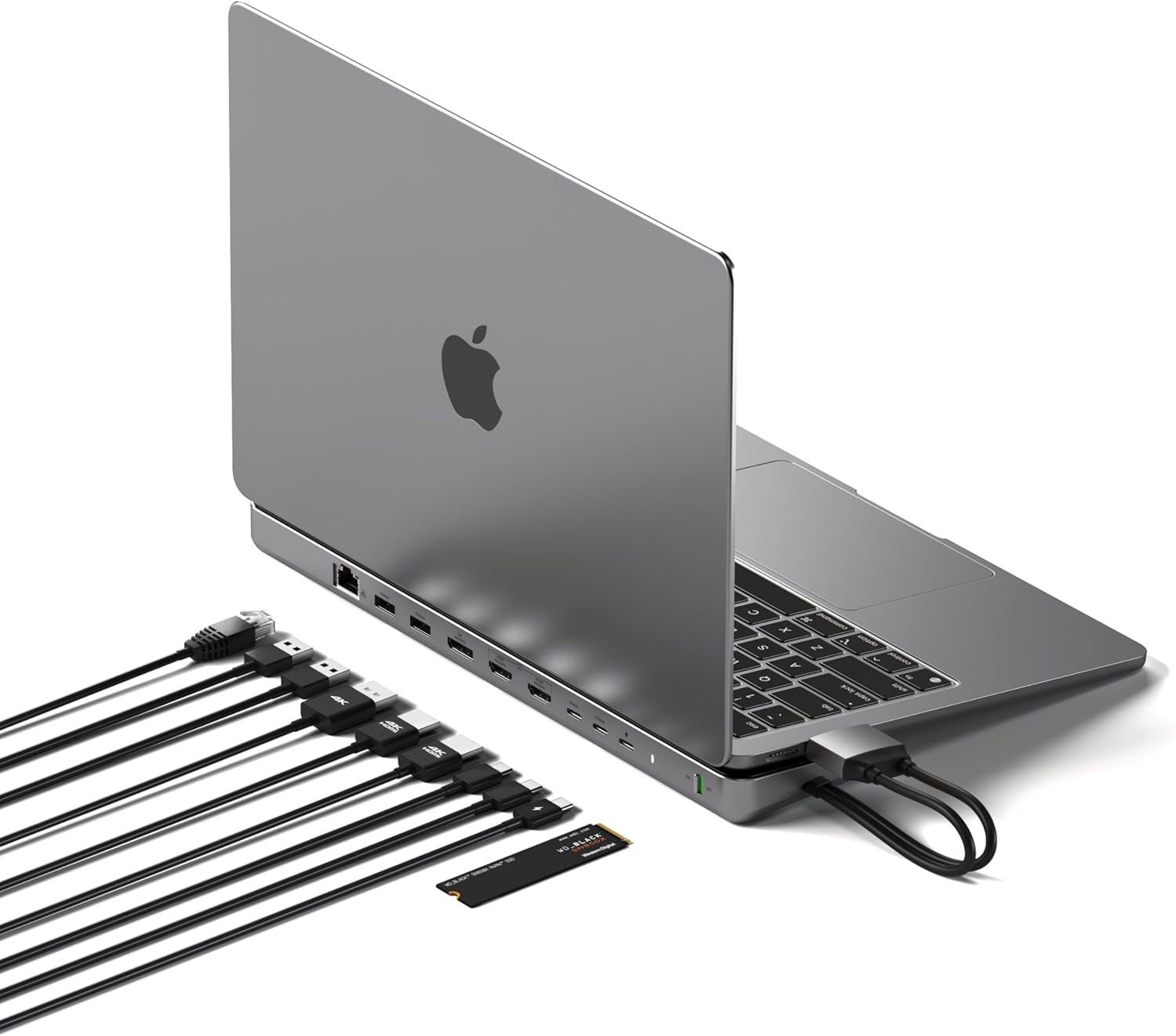
Enhanced Performance – Boost your workspace with a USB-C adapter that features a Gigabit Ethernet port, a DisplayPort, dual HDMI ports, an SSD enclosure, and multiple USB-A and USB-C ports with speeds up to 10Gbps. It also includes a 75W USB-C Power Port to keep your device charged efficiently. A comprehensive connectivity hub for increased productivity.
Dual Monitor Capability – This dual docking station extends your laptop screen with up to two external monitors in extended mode. Enhance productivity with expanded visual real estate. Choose dual HDMI ports or one DisplayPort and one HDMI (use the two farthest ports). Note: The MacBook M3 Pro supports only one external monitor in extended mode. Compatible with M4 MacBook Air and M4 MacBook Pro, and supports dual external displays with the laptop lid open—no additional software or drivers required.
Versatile SSD Enclosure – Enhance your storage capabilities with the USB-C Hub, featuring an SSD enclosure that supports NVMe SSDs at 10Gbps and SATA SSDs at 6Gbps. Ideal for data transfers, backups, data recovery, and external storage needs – adding functionality and speed to your data management tasks.
Efficient Power Delivery & Broad Compatibility – This dual dock features a USB-C power port delivering up to 75W to keep your device fully charged. Compatible with a wide range of MacBook Pro, MacBook Air, Microsoft Surface Pro, and Surface Laptop models. Also compatible with the XPS 15. Not compatible with the iPhone 15 and MacBook models with a single USB-C port. Note: Does not support data transfer or video output.
What’s Included – Dual Dock Stand, screw and screwdriver for the SSD enclosure, customer support, and a user manual for easy installation. Satechi products are covered by a 2-year limited warranty against defects in materials and workmanship under normal use.
Customers say
Customers praise the docking station’s build quality and excellent specifications. They like its functionality, with one customer noting it works well with both MacBook Pro and Air models.
13 reviews for SATECHI Dual USB C Docking Station and Stand with Dual 4K HDMI, Display Port, 75W PD Charging, 2 USB-C Data, 2 USB-A, Ethernet, SATA and NVMe SSD Enclosure, for MacBook and Windows
Add a review
Related Products


£126.72
Martin McCorry –
Excellent product.
Use on MacBook Air and works very well straight out of the box. Use display port for monitor to free up usb c and hdmi.
PhillG –
Good design, but too small for 16″ as support and NVMe not useful on Mac.
Works well on MacBook Pro, and I use it with a genuine 4K monitor (i.e. a 4K resolution is 4096 x 2160 pixels not UHD which is lower and also works), which exceeds the stated figures. The internal NVMe is a nice touch, but I keep forgetting to eject it when I unplug the dock, and so run the risk of corrupted data – so TBH I will remove the NVMe and use an external housing. My 16″ MBP is too large to use the wedge design, but I did not get the unit for its support feature – assume it would work with 13″ devices.If you’re a windows user, the NVMe would be useful as ejecting media is not so important with Windows file systems.
mikey –
Neat solution to the MacBook Airâs lack of connectivity
Easy, plug and play setup. I popped a 2TB SSD in the little bay and it worked perfectly. Ports all work as advertised, the only negative I can find is that there isnât quite enough friction on the top of the device, so when you rest your laptop of it, the computer tends to slip around a bit. I guess if we were planning on a semi permanent installation a bit of double sided tape âor Velcro? â might help.
Martin –
Does not give power out unless computer attached.
UNLESS you have a computer attached to this dock it does not giver power out from it.I have a superb Anker charging dock that I set up a direct USB-C lead from it to this dock and I thought it would provide power to externals without having a computer attached. It does not and this is disappointing
Liam –
Pretty bad. dont buy.
Ended up being a very bad purchase, feels low quality and the inbuilt nvme didnt work looks like it was broken on delivery. My laptop fully supports what it says yet the screens glitch once in a while and feels pretty hot.
mjmsurrey –
Excellent build quality
Tried all the functions all work well ⦠the only thing I miss a USB -C display port,
Amazon Customer –
Great device
Great device it has got most my cables connected up. There is always a need for a few more ports so I still needed to add more USB A and C hubs⦠I saw video that said I would not get two monitors working if I had an M1 chip alas I can run two screens YAYâ¦
JC –
Perfect dock
If you want a dual usb-c dock for your mac this is it. Works with both air and pro. All the ports you need and the facility to install an nvme m.2 inside the dock is great. Need a usb-c power supply but the mac air works with it. Very pleased with this.
AVP Belgium –
is niet zwaar genoeg voor Apple MacBook Pro 16″, deze heeft 100W nodig en deze is maar 80W
José González –
Con interruptor, conector interno para SSD.Multipuerto.Muy bien acabado y estable.
Amazonã«ã¹ã¿ãã¼ –
M1ã®MacBook Airã使ç¨ãã¦ãã¾ããUSB-Cã®ã³ãã¯ã¿ã¼ã2å並ãã§ãªãã¨ä½¿ãã¾ãããç§ã¯ä»ã¾ã§ããã2ç®æåºãã¦å¤é¨ã¢ãã¿ã¼ãHDçç¹ãã§ã¯ã©ã ã·ã§ã«ã¢ã¼ãã§ä½¿ã£ã¦ã¾ãããã両æ¹ã®USB-Cãå¡ããã¾ãã大ããã§ããä¸åã§æ¸ãã®ã§ãä»ã¾ã§ãããã¯ãã¹ã¯ä¸ã¯ã¹ãããªãªã£ãæãã¯ãã¾ããã¾ãSSDãè£ çåºæ¥ãã®ãæãé£ãã§ãã
Yrtoon –
Correspond à mes attentes! Parfait
Prakash Krishnan –
The unit is well built and works well , its been about 2 months now the issue is suddenly the screens go blank for about 5 seconds and then come back and its every annoying when you working on something critical. I tried changing cables , ports problem persists not able to know if its the unit , or is it a known problem as with a cheap alternative i had earlier it works smooth no issues.