

Minthouz DisplayLink Docking Station for 3x4K@60HZ Monitore mit 160W DC In,14 in 1 Laptop Docking Station for MacBook Dell HP Lenovo,6 x USB-A/C 10 Gbps,RJ45 Ethernet,4-Pole Jack USB to HDMI Adapter
£179.99


Price: £179.99
(as of Jun 21, 2025 19:33:32 UTC – Details)
Product Description


1 Full-Featured 2 DisplayLink Chip 3 Widely Compatible


1 HDMI & DP 2 Expansion Mode 3 Mirror Mode 4 Main Point


1 4K60Hz Link 2 160w Power Supply 3 10G Data Transport 4 Gigabit Ethernet 5 4-Pole Audio
Can he expand multiple different screens for Apple computers please?
Yes, but you need to download the displaylink driver for the docking station to work, and you need to enable screen recording permissions!
Is there lag when watching videos or gaming?
For office work, web browsing, and video streaming, lag is minimal. However, due to data compression technology:
Not recommended for high FPS games and cannot view HDCP content.
Why DisplayLink? It’s ideal for productivity, not GPU-intensive tasks.
Why does the dock get warm during use?
Mild warmth is normal and safe! The built-in DisplayLink chip actively processes data to deliver high-resolution displays. Our dock has passed UKCA safety certifications and includes overheat protection. Avoid covering the dock’s vents.
Why do I need to grant ‘Screen Recording’ permission when installing DisplayLink software on my Mac?
MacOS requires ‘Screen Recording’ for the DisplayLink driver to work properly. Once approved, the driver will be able to send data from your computer to a DisplayLink-enabled display via USB. No data, images or pixels will be stored or recorded.
What if there is a problem with the display or driver?
We’ve got you covered!
12-month safeguards
Step-by-step setup guides and video tutorials.
Always update to the latest drivers for macOS/Windows compatibility.
UG69PD25PRO Related Technologies
How displaylink works Highly efficient compression and transmission mechanisms enable video signals to be transferred to external displays via common interfaces such as USB. HDCP content An encryption technique for protecting digital audio and video content from being illegally copied or stolen during transmission 4-Pole Phone Jack A connection interface commonly used for audio devices, supporting the transmission of audio signals and additional functions (e.g. microphone or control buttons) HDMI Alt. Mode Developed by the HDMI Association to allow HDMI signals to be encapsulated and transmitted in a USB-C connector for ‘one wire connection’ to devices such as monitors and TVs. E-Mark Chip A microchip embedded in a USB Type-C cable or device that intelligently recognises the cable specification, power supply capacity and data transfer protocol to ensure safe and efficient operation of the device.
Package Dimensions : 28.4 x 14 x 7.2 cm; 1.25 kg
Date First Available : 25 Mar. 2025
Manufacturer : WINSTARS TECHNOLOGY LTD
ASIN : B0F2FKM1FT
Item model number : MT-UG69PD25PRO
Country of origin : China
Guaranteed software updates until : unknown
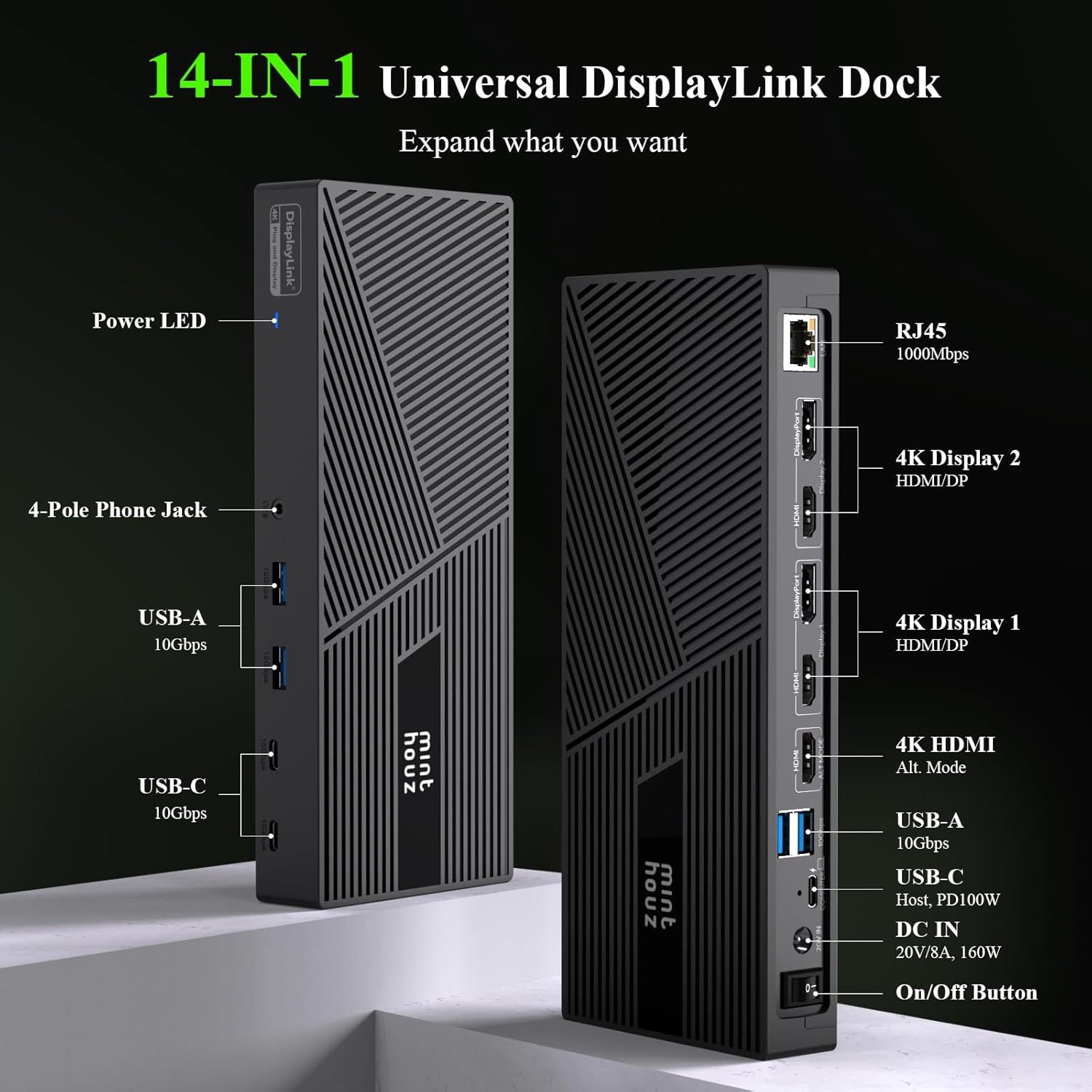
【⭐14-in-1-DisplayLink-Docking station von Minthouz】This USB C docking station has 3 HDMI ports and 2 DP ports, divided into a total of three video groups (2xDisplay&ALT HDMI), each video group can only display a screen, 4 USB-A and 2 USB-C10G data transfer ports, 1 Gigabit LAN port, 160W DC input (with adapter) and 100W output for laptops, 4- Pole Earphone Jack, LED display light and power switch.Optimising workspace for you。 Note: Displaylink driver download required
【⭐Wide range of compatibility】The USB C dock ensures broad compatibility with major operating systems, including Windows 10/11, macOS 12+, Linux, and Chrome OS., Optimised for productivity,and workflows, it works with leading monitor brands (Dell, LG, Samsung) and peripherals (keyboards, mice, external storage). Compatible with thunderbolt 4 /3 ,USB4/3,USB 3.0/2.0, ensuring versatility for legacy devices. Ideal for hybrid workstations requiring multi-monitor setups and stable connectivity.
【⭐Triple 4K@60Hz display】This powerful Triple Display Docking Station’s 3 HDMI and 2 DP ports expand three 4K@60Hz displays for you, so you can easily achieve HD multi-screen interaction, usb c hub improve office efficiency and productivity, and can expand three different screen displays for your Apple computer as well, which is something USB C and Thunderbolt docking stations can’t do. Note: Unable to view HDCP content.
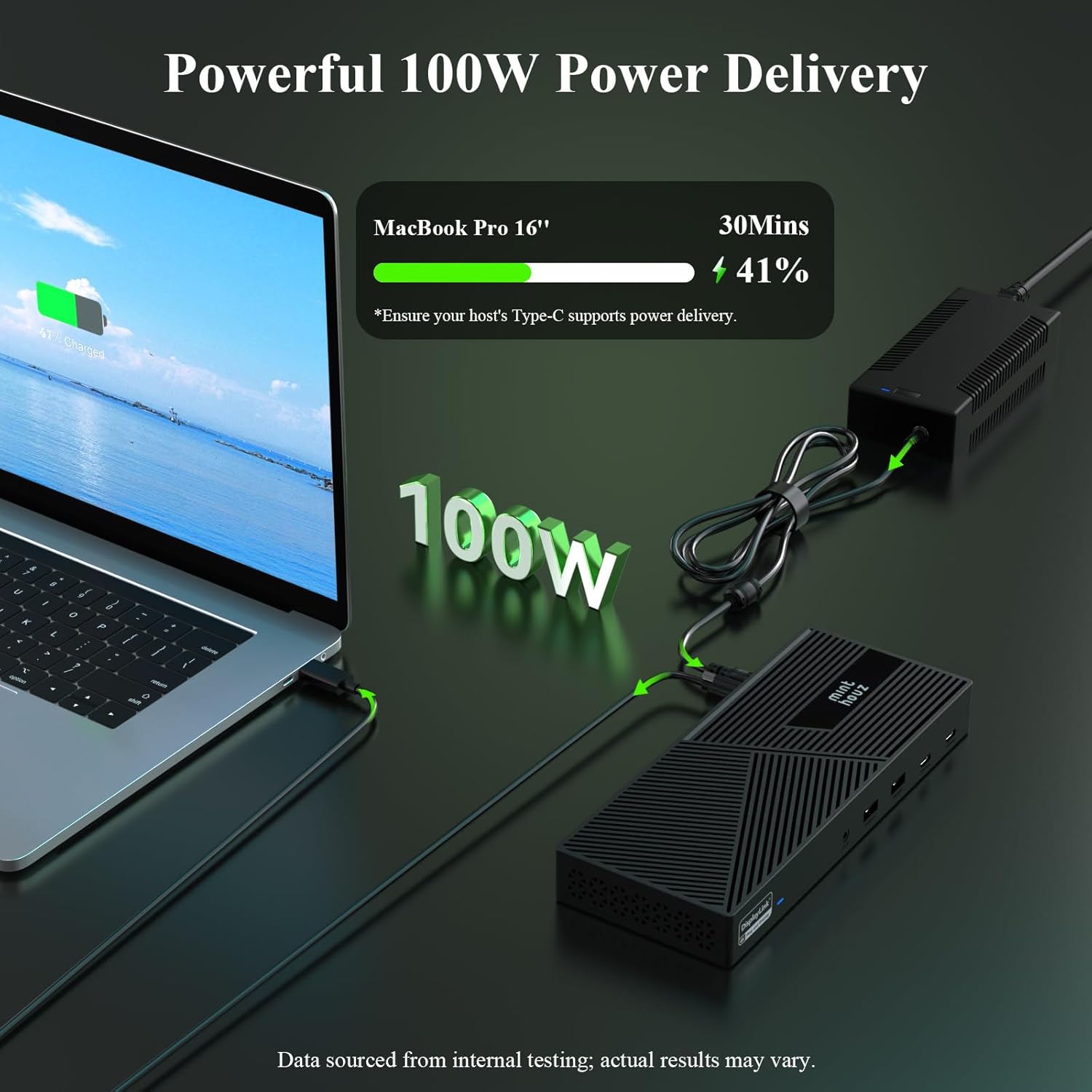
【⭐160W Power Input】This high-performance USB C multiport adapter features a robust 160W DC input, ensuring stable power delivery for multiple peripherals (displays, drives, accessories) even under heavy workloads. The USB-C PD port supplies up to 100W to fast-charge laptops, supporting demanding devices like MacBook Pro or high-end Windows laptops. Engineered for professionals, it balances power efficiency with versatile connectivity, eliminating bottlenecks during multitasking.
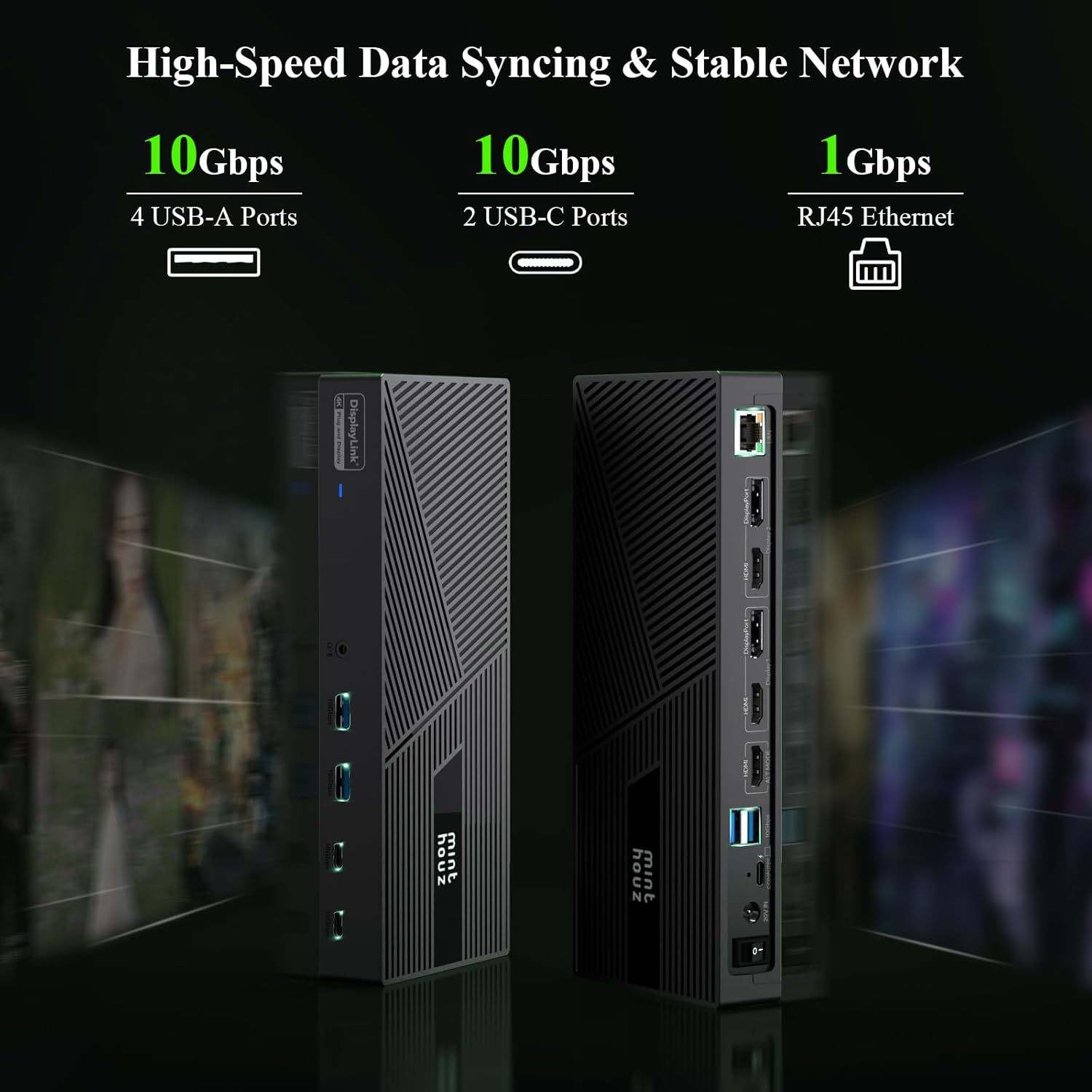
【⭐Fast 10G Data Transfer】This ultra-compact USB Hub delivers exceptional versatility with 4×10Gbps USB-A ports and 2×10Gbps USB-C ports, ensuring seamless connectivity for peripherals, storage. Its space-saving design optimizes desk setups without compromising performance. Built with robust aluminum alloy, it balances durability and portability. Backed by a 1-year warranty and customer support, we guarantee prompt troubleshooting and replacements.
8 reviews for Minthouz DisplayLink Docking Station for 3x4K@60HZ Monitore mit 160W DC In,14 in 1 Laptop Docking Station for MacBook Dell HP Lenovo,6 x USB-A/C 10 Gbps,RJ45 Ethernet,4-Pole Jack USB to HDMI Adapter
Add a review
Related Products


£179.99
Spence & Emma –
Good display adaptor & USB hub
Let me start this review by stating that I do not fully appreciate (and still do not fully appreciate, even having used the product) why this type of electronic gizmo commands such a price. This isnât a dig at Minthouz; all adaptors of this type seem to come at (what I think is) considerable cost. Perhaps I just donât appreciate the complexity of the electronics involved.That said, this is definitely one of the better multi-screen adaptors I have tried. Supplied in a plastic, slimline box, it has a USB C computer input, a plethora of HDMI/DisplayPort monitor outputs, USB A & USB C inputs/outputs, a headphone/microphone jack, and 1 Gbps ethernet.As it uses a (rather weighty) external power brick, the unit is totally silent in operation, but it does get a little warm. I connected a Dell laptop via the USB C lead that has a handy locking pin on it (which you can remove if you wish). This USB C supports Power Delivery (PD), so while in use, my laptop was kept fully charged. Neat.DisplayPort 1 was connected to a Samsung G6 monitor via HDMI, while DisplayPort 2 was connected to an ancient Dell LCD monitor, again via HDMI. All was good, all was easy to set up, and I didnât need to install any drivers on my laptop. All three screens were rock solid, with no glitches, and my desktop spanned correctly.I then connected a keyboard and mouse to the front USB A ports. Although this was a bit of a waste of their 10 Gbps speed potential, I still had two 10 Gbps USB C ports right next to them and another two 10 Gbps USB A ports on the rear. The keyboard and mouse operated exactly as I would expect with no lag.This DisplayLink plug-and-display docking station is great for a multi-monitor setup. It was easy to use and has more ports than I am likely to ever need, all at 10 Gbps. As it has an external power brick, power hungry USB drives are catered for as is keeping your laptop charged while in use. It will display at 4K; however, this is only at 60 Hz. Gamers, be awareâ¦
Ashish –
Versatile
I usually use two monitors, but this model supports up to three monitors, which is an appealing option for expanding a workspace. This unit has a wide range of ports, including HDMI, DP, USB-A and USB-C connections, as well as an RJ45 Ethernet port, which is ideal for a reliable network connection. It is very versatile and works with various laptop brands.Regarding data transfer rates, when connecting a single SSD, the speeds are impressive, allowing for quick file transfers. However, things get shaky when two SSDs are attached, as the performance tends to drop noticeably. For professionals who rely on speed and reliability for data-intensive tasks, this limitation may be a concern worth considering.On the display front, while the docking station can handle multiple monitors, the image quality during movie playback isn’t the best. For basic work tasks, it performs reasonably well, and you can certainly get by without any significant issues. However, you’re someone who enjoys watching films in high definition regularly. In that case, the quality may not meet your expectations, suggesting that this docking station is more suited for productivity work rather than entertainment.At (£143.99 on 16/06/2025), even after a 20% discount, it feels a bit steep for what it offers. It may not be the most economical choice available, especially if you’re seeking the best quality in both speed and visuals.
Amazon Customer –
Game changer
Iâve been using the Minthouz DisplayLink Docking Station for just over a month now, and I must say Iâm thoroughly impressed. Itâs an absolute game-changer for anyone juggling multiple monitors and peripherals â especially if youâre working from home or managing a hybrid setup.Setting it up was a doddle. I had it out the box, connected, and running three external 4K monitors at 60Hz in no time. Itâs plug and play, really â no faffing about with confusing instructions. Just install the DisplayLink driver (which is clearly signposted), and youâre off.What stands out most is the build quality. It feels solid and well-made â not flimsy or plasticky like some cheaper alternatives. Itâs compact enough to sit neatly on the desk without cluttering your space, yet offers a whopping 14 ports, including 6 x USB-A/C at 10Gbps, an RJ45 Ethernet port (which gives me a rock-solid wired connection), and a 4-pole audio jack which is a nice touch if youâre still using wired headphones or a mic.Performance-wise, everything runs buttery smooth. Thereâs no lag on the monitors, and I can transfer large files quickly thanks to the high-speed USB ports. Itâs also brilliant for my MacBook and my partnerâs Dell laptop â we just swap over the USB-C and it works seamlessly.The power input is generous too â 160W DC in means my laptop charges quickly, even when Iâve got everything connected. No overheating, no crashes â just dependable, efficient performance.In terms of value for money, Iâd say itâs well worth the price. Youâre getting a premium docking station with top-end specs, and if you’re serious about your desk setup, this one ticks all the boxes. Iâve tried cheaper docks before and they just donât come close.All in all, itâs a fantastic bit of kit â reliable, versatile, and built to last. Highly recommend for professionals, creatives, or anyone looking to streamline their workspace.
Alex –
Ich habe die Minthouz 14-in-1 Dockingstation jetzt seit einigen Tagen im Einsatz â und sie passt perfekt in mein Setup. Mein MacBook hat nur zwei USB-C-Ports, und davon ist einer fürs Laden belegt. Dank der Dock kann ich jetzt bis zu drei externe Monitore anschlieÃen (QHD bei mir, läuft stabil mit 60 Hz), mehrere Geräte gleichzeitig laden und alles über nur einen Anschluss steuern.Die Einrichtung war unkompliziert: DisplayLink-Treiber runterladen, kurz installieren, fertig. Danach sofort drei Bildschirme aktiv â das war vorher mit reinen USB-C- oder Thunderbolt-Docks nicht möglich. Vor allem mit dem Mac, der normalerweise nur einen externen Monitor unterstützt, ist das echt beeindruckend.Besonders gut gefällt mir die Kombination aus den vielen 10â¯Gbps schnellen USB-A und USB-C Ports â ich betreibe daran meine SSDs, eine alte Funktastatur (nicht Bluetooth) und Zubehör ohne jegliche Verzögerung. Der Gigabit-LAN-Anschluss ersetzt das schwache WLAN, und der klassische 3,5-mm-Klinkenanschluss (4-polig) ist auch praktisch, wenn man mit Headset arbeitet.Das mitgelieferte 160â¯W Netzteil ist kräftig genug, um alles sauber zu versorgen, inklusive Laptop mit bis zu 100â¯W PD. Das Gehäuse ist aus Aluminium, macht einen hochwertigen Eindruck und bleibt trotz der Leistung angenehm kühl.Klar â fürs Gaming ist das nichts, dafür reicht die Bandbreite von DisplayLink einfach nicht aus. Aber fürs Arbeiten mit vielen Monitoren und Geräten ist das Teil richtig stark. Ich bin ehrlich gesagt froh, dass ich mich dafür entschieden habe â gerade bei hybriden Setups mit Mac oder älteren Windows-Geräten ist das eine Top-Lösung.
SLAED –
Ich nutze die Minthouz 14-in-1 DisplayLink Dockingstation seit mehreren Wochen in meinem Home-Office und bin begeistert von der Vielseitigkeit und Leistung dieses Hubs. Die Einrichtung war dank Plug-&-Play und kurzer Treiberinstallation schnell erledigt. Besonders überzeugt hat mich die Möglichkeit, drei 4K-Monitore parallel mit jeweils 60 Hz anzusteuern â etwas, das ich mit reinen USB-C- oder Thunderbolt-Docks so nicht realisieren konnte.Die 160 W Stromversorgung liefert zuverlässig Power Delivery mit bis zu 100 W für mein MacBook Pro, während zusätzliche USB-A- und USB-C-Ports (jeweils 10 Gbps) blitzschnell externe Festplatten und Peripheriegeräte bedienen. Der Gigabit-LAN-Port sorgt für stabile Netzwerkverbindung und die 4-polige Audiobuchse erlaubt unkompliziertes Headset-AnschlieÃen. Das robuste Aluminiumgehäuse wirkt hochwertig und leitet Wärme gut ab, ohne dabei laut zu werden.Einzig die erklärungsbedürftige Aufteilung der Videogruppen (HDMI & ALT-HDMI/DP) erfordert einen Blick ins Handbuch, bevor alle Monitore korrekt erkannt werden. Sobald die Einstellungen allerdings sitzen, läuft alles reibungslos, und ich konnte meine Produktivität deutlich steigern.
Henning Peters –
Viele Laptops werden immer kleiner, USB-Anschlüsse, klassisches Ethernet oder mehr als ein Monitoranschluà sind rar – grad zB. an einem Macbook.Grad meines hat lediglich 2x USB-C, einer davon kann einen Monitor ansteuern, der andere für die Stromzufuhr und Ende…Diese “Zauberbox” bietet am Ende Anschlüsse für drei Monitore (1x nur HDMI, 2x HDMI oder DP), GBit Ethernet, eine klassische Audiobuchse (für ein Headset, also 4-polig) und diverse USB-Anschlüsse – und belegt nur einen USB-C-Port am MacBook.Zuvor ist es wichtig, den DisplayLink-Treiber zu installieren – dieser ist frei verfügbar auf deren Seite.Danach hat man “den vollen Ãberblick” über bis zu drei Monitore. Ich konnte 3 Monitore mit QHD problemlos betreiben, höhere Auflösungen habe ich hier nicht.Dank der USB-Ports kann ich nun problemlos wieder meine Funktastatur (die kann kein BT) betreiben und die Backup-SSD einfach anschlieÃen; der Ethernet überbrückt das eher mäÃige WLAN hier – perfekt.Der Strom kommt auch von der Dockingstation, so daà mein Mac-Netzteil aus bleiben kann.Perfekt zum Arbeiten – für Gaming & Co ist die Dockingstation dann doch nicht so geeignet, das schafft die kleine Grafikkarte dadrin nicht, und der USB-Port kommt auch an seine Grenzen.
A.W. –
Ist ganz schön teuer das Dingen, warum eigentlich?Die Displaylink-Technologie ist eine Grafikkarte an einem USB-Port (das ist komplex und kostspielig). Da ist also richtig Technik in dem Teil. Ein kleines MacBook kann nur 1-2 Monitore. Dieses Dock versorgt auch an einem MacBook, das das eigentlich gar nicht kann, 3 Monitor mit hoher Auflösung.Dabei ist zu beachten dass die Displaylink-Technik eben hinter einem USB-Port hängt und damit die Bandbreite reduziert ist. Das ist auf den betroffenen Monitor(en) eine Enschränkung: Gaming oder Videos laufen besser auf den vom Dock nativ angesteuerten Displays.Ansonsten bietet das Gerät viel Gutes wie z.B. einen 10Gbit USB Hub, finde ich super.Leider wurde eine grosse Chance verpasst. In dieser Preisklasse hätte ich zumindest 2,5Gbit Ethernet für statthaft empfunden.Power-Supply für das Notebook mit bis zu 100W PD deckt meinen Bedarf. Das 160W Netzteil wird auch nicht zu warm.Alles in allem: sehr gute Sache!Den Faux-Pas mit dem Ethernet kann man mit einem vergleichsweise billigen USB-Adapter wieder gerade ziehen, passt schon.
S. Os –
Für mein Homeoffice Setup mit drei Monitoren war ich auf der Suche nach einer Dockingstation, die diese Herausforderung auch für mein ThinkPad meistert und bin bei dieser Minthouz DisplayLink Dock gelandet. Die Einrichtung erforderte zwar die Installation des DisplayLink Treibers aber das war schnell erledigt und hat sich absolut gelohnt.Jetzt laufen alle drei 2K Monitore stabil und mit flüssigen 75Hz, was meinen Arbeitsbereich enorm erweitert und das Arbeiten viel effizienter macht.Die Konnektivität ist ebenfalls gut, die sechs schnellen 10 Gbit/s USB Ports (A und C) bieten genug Anschlussmöglichkeiten für all meine Peripherie, von externen SSDs bis zur Webcam ohne Geschwindigkeitsverluste. Auch der Gigabit Ethernet Anschluss und der Audio Jack funktionieren einwandfrei.Das starke 160W Netzteil liefert dabei genug Saft für die Dock selbst und lädt mein Laptop nebenbei zuverlässig auf. Eine absolute Power Dockingstation für anspruchsvolle Multi Monitor Arbeitsplätze (Unterstützung für DisplayLink vorausgesetzt)