

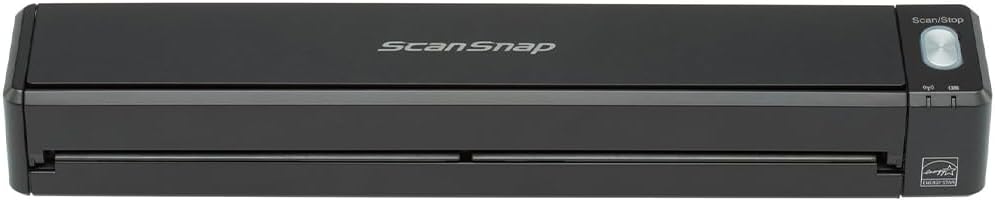
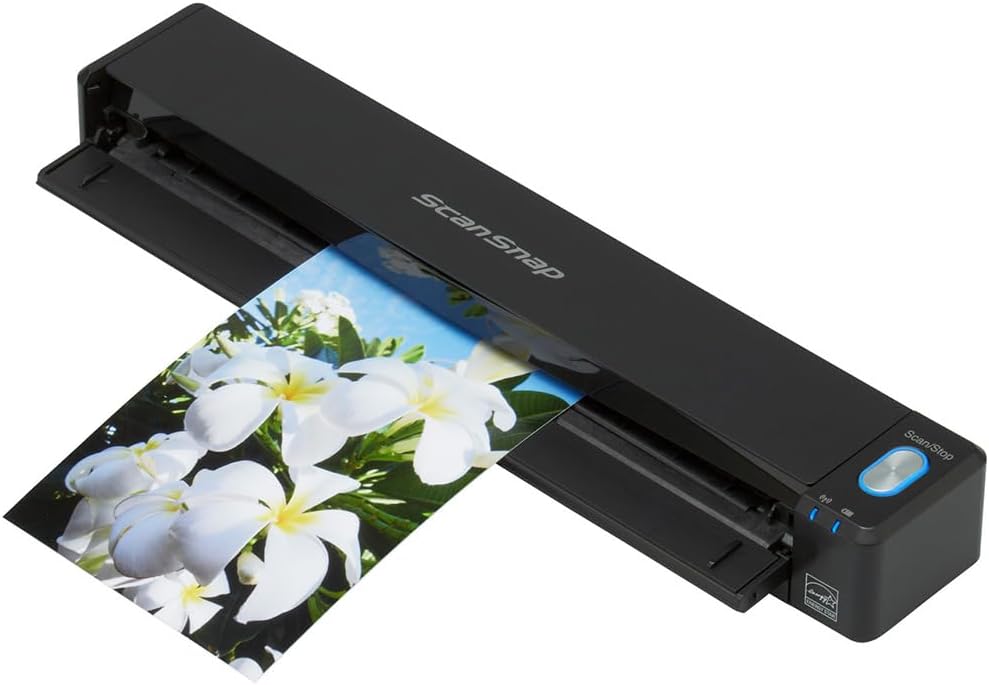
ScanSnap – iX100 (BLACK) Document/Photo/Business Card – Scanner -,12ppm/12ipm, USB/Mains Powered USB2.0, LED. Mobile/Portable Scanner, Scan A4, A5, A6, B5, B6, Wi-Fi or USB, 600 dpi, HIGH SPEED
£219.95






Price: £219.95
(as of Oct 15, 2025 15:12:34 UTC – Details)
From the manufacturer

ScanSnap iX100, designed for portability and convenience
 Bundled with a host of productivity boosting software
ScanSnap Organizer helps keep all your scans neatly organized and easily accessible with ScanSnap Organizer. View and edit scans, create filing cabinets, perform searches and more. ABBYY FineReader for ScanSnap is a popular OCR (optical character recognition) software that lets you scan documents directly to editable Microsoft Word, Excel and PowerPoint files. CardMinder ensures that adding and managing contact information is a breeze. Simply place a business card in the scanner and push the button. CardMinder captures the business card and places the information into editable fields. Foriegn language card? No problem. CardMinder recognizes 8 different languages and can export to Outlook, Excel and other contact management systems.
Battery powered scanner with Wi-Fi connectivity for the ultimate in portability!
The cross platform compatible ScanSnap iX100 brings the power and intuitiveness of the ScanSnap range of models to a compact and totally wireless format. Weighing just 400g the ScanSnap iX100 comes with a USB rechargeable Lithium-ion battery that is capable of up to 260 A4 scans on a full charge. Combined with an ability to scan either via a wireless network to PC workstations or mobile devices running the ScanSnap Connect Application this ScanSnap delivers a true ‘scan anytime scan anywhere potential’.
One button searchable PDF creation Scan a colour document in 5.2 seconds Battery powered Scan your business cards Scan wirelessly to a PC or Mac Scan wirelessly to iOS or Android mobile devices Direct Connect Mode or Wi-Fi scanning anywhere Dual scan – scan two small documents simultaneously More Quick Menu productivity ScanSnap receipt; Scan and extract information from your receipts ScanSnap Sync; Automatically synchronise captured documents across your devices ScanSnap Cloud – Automatically detects scanned material and routes to your preferred cloud accounts Built-in GI micro-processor – A dual-core CPU mounted “GI” processor performs the intelligent image enhancement responsible for great looking images with dramatically faster results and more sophisticated connectivity.

Scan anywhere
The ScanSnap iX100 can automatically detect Wi-Fi networks at home, in the office or on the go, it is only needed to be set up once after which any regularly visited network environment will be automatically detected. Alternatively with Direct Connect mode it is possible to scan wirelessly beyond an infrastructure network, simply download the ScanSnap Connect Application free of charge from the official application distribution services and then scan, save and distribute documents directly to an iPad, iPhone or Android device.

Scans a variety of documents
A multitude of everyday documents can be seamlessly processed by the iX100 at a speedy 5 seconds per A4 page, whether it be business cards or receipts (check out the impressive dual scan functionality that allows you to scan small documents simultaneously), photos, thicker items like postcards, bills, everyday A4 documents or even A3 documents. Scan both sides of a folded A3 document one after the other and if an adjoining pattern is detected the bundled software will automatically join the 2 page images together.

Flexible operation
The ScanSnap iX100 comes with a choice of paper paths, a straight paper path aids for the scanning of everyday documents and thick materials like post cards, business cards, and plastic ID or credit cards and a u-turn path helps facilitate the scanning process when space is at a premium or indeed when the Continuous Document Feeding function is activated. The Continuous Document Feeding function allows the insertion of pages one after another by detecting when a sheet enters and exits. Set the document face-up into the iX100 and push the Scan button, the iX100 will then proceed to scan the front side after which the page will exit from the top of the scanner if the paper path is set to U-turn, simply then re-insert the page without pressing the Scan button to scan the back side. After scanning has finished, press the Scan button to save the file.

Quick Menu productivity
The Quick Menu allows you to quickly transition between different scanning intentions. Just press the scan button and choose what you want ScanSnap to do. Quick Menu has been additionally enhanced so that now it can be set up to display your ‘Favourite’ scanning destinations or ‘Recommend’ an application for example if you are scanning a business card it could recommend CardMinder. * Scan to Folder: Store PDF scans to a folder * Scan to Email: Eliminate faxing and share electronic documents over email * Scan Business Card: Scan business cards and automatically extract contact information * Scan to Print: Use ScanSnap with your printer to create copies * Scan to Word (. doc): Scan directly to an editable Word file * Scan to Excel (. xls): Scan directly to an editable Excel file * Scan to PowerPoint (. ppt): Scan directly to an editable PowerPoint file * Scan to Picture Folder or iPhoto: Store JPEG scans to a folder * Scan to Microsoft SharePoint, Scan to SalesForce chatter * Scan to iPhone/iPad, Android or Kindle devices Scan to Cloud: Scan to Dropbox, Evernote, Google Docs * and/or SugarSync.

Receipt software with multi-currency support
A few simple steps to digitize and manage the information on your receipts. ScanSnap Receipt allows you to easily scan and extract information from your receipts, and export the data for other accounting software. The sophisticated features within ScanSnap Receipt automatically support various languages and currencies.

ScanSnap Sync
With ScanSnap Sync built into ScanSnap Organizer software and the ScanSnap Connect app, captured documents are automatically synchronised with all your devices through Dropbox, Google Drive or Microsoft OneDrive.

Scan direct to smart devices
The iX100 supports wireless scanning to iPad, iPhone, Android and Kindle devices for convenient viewing via the mobile app ScanSnap Connect Application*. The wifi of the ScanSnap installed computer must be switched on to use this feature.

Scan and create editable Excel, Word and PowerPoint files
This popular bundled OCR (optical character recognition) software for ScanSnap lets you scan documents with machine print directly to editable Microsoft Word, Excel and PowerPoint format.

Scan to the cloud
The iX100 can link to cloud services such as Dropbox, Evernote, Google Docs, Salesforce CRM and SharePoint Online (for Windows) for greater viewing possibility when on the move. It also offers some additional cloud syncing functions: Scan to SugarSync and Scan to Salesforce Chatter as well as ScanSnap folder for Windows OS only

Intuitive operation
The iX100 is designed to take the hassle out of post scan involvement thereby freeing up time for other tasks. The iX100 will automatically detect the size of the document scanned and display a cropped image accordingly, scanned images will be automatically rotated, any scan skew eliminated and colour is detected to help minimise file size.

Scan up to A3 in size
Available as an option, use carrier sheets to digitise larger documents (A3/B4), magazine and newspaper clippings, photographs, and more. Scan A3 by folding the document in half, placing in the carrier sheet and then manually scanning both sides, the software will automatically stitch the document together to display A3 on screen.

ScanSnap Cloud
Are you a fond user of cloud services like Dropbox, Google Drive, Evernote or alike? Then ScanSnap is your instant on-ramp for documents, business cards, receipts and photos. Simply scan and ScanSnap Cloud will identify the type of content and route it to your preferred cloud service. No PC required. Visit http://www.fujitsu.com/uk/microsites/scansnapcloud/europe/ for further information.
- Scan everyday documents at just over 5 seconds per A4 page
- Scan wirelessly to mobile and desktop devices, cloud services and office applications
- Cordless lithium-ion battery operation for ‘scanning anywhere’
- Scan two small documents such as business cards simultaneously, Scan your receipts and extract data
- Create totally editable and searchable Excel, Word and PowerPoint files
Customers say
Customers find the scanner excellent in quality and appreciate its portability for home use. The device scans fast and is easy to use, with good battery life and compact design. The WiFi connectivity receives mixed feedback – while some say it works well, others struggle with consistent connections. The build quality also gets mixed reviews, with some finding it well-made while one customer notes the paper guide and cover seem flimsy.
13 reviews for ScanSnap – iX100 (BLACK) Document/Photo/Business Card – Scanner -,12ppm/12ipm, USB/Mains Powered USB2.0, LED. Mobile/Portable Scanner, Scan A4, A5, A6, B5, B6, Wi-Fi or USB, 600 dpi, HIGH SPEED
Add a review
Related Products


£219.95
M_M –
Awesome portable scanner, good quality and easy to use
I bought this mainly for use by my husband who has been on the lookout for portable, good quality scanner for some time, though with both of us working out and about, it’s proved to be a valuable tool for us both already!No more hoarding scraps of paper for notes and diagrams, no more trying to straighten out crumpled papers hastily shoved into laptop bags at the end of meetings and a quick way to permanently record business card details before they turn into an unmanageable pile.The Fujitsu ScanSnap iX100 scanner is very compact and solid, it looks sleek and easily fits into laptop bags and handbags alike. Don’t be fooled by the small size, being barely wider than the A4 sheets it scans, it scans quickly and results in high quality scan images appearing on your connected device in seconds. Not only can you scan any paperwork up to A4, the scanner will recognise if you scan in two halves of an A3 document and merge them back together using the accompanying software. You have to feed the pages in one at a time, but the accompanying software will group together pages automatically if fed through in quick succession.The accompanying software is easy to follow and set up, connecting the scanner quickly and easily if you follow the instructions (seriously, the steps are simple, just make sure you follow ALL of them).You have to feed one sheet at a time although it has the function to combine a series of single sheets into one document. The software has some nice inbuilt auto-correct functionality, which will nicely straighten and correct images if you accidentally miss-feed documents into the scanner.Once set up and charged, the scanner can be used completely wirelessly. No power cables, no data cables, just turn on and scan. The battery lasts very well and sending of the images to computers and mobile devices is quick.Can’t recommend this enough, has been our best buy off Amazon so far this year.
N. Pollard –
Great little scanner for making electronic copies of receipts, statements and other household paperwork.
I bought this to cut down on the masses of paperwork cluttering up our house and wanted a hassle-free way to scan letters and receipts before throwing them in the recycling / shredder.Once set up, you can wirelessly scan items to your favourite cloud service (Evernote, Google Drive, Dropbox etc.) without the need for a computer or phone. Being battery operated, the scanner doesn’t even need to be plugged in – just insert the paper and press the button once to start scanning and again when you’ve scanned the last sheet of your document. The scans are processed using ScanSnap Cloud to turn them into multi-page PDFs with searchable text. I have found that the search facility on Google Drive will find text in any of my scanned documents in seconds.I can’t comment on the PC software, as I haven’t had any need to connect the scanner yet. The cloud service does everything I need.Downsides? Not many. The paper guide and cover seem a little flimsy and without a PC or phone you’re relying on Fujitsu to continue to provide the ScanSnap Cloud service during the lifetime of the device. Also, unlike larger, more expensive scanners, this won’t scan both sides of the paper at the same time. I haven’t found this to be a problem though.
ben –
… have tried other scanners but found this one really good The scan quality is excellent Works very well with …
I have tried other scanners but found this one really goodThe scan quality is excellentWorks very well with wifiIt’s light and portableBattery life is not bad as wellThe downside is duplex but you can scan a document bothside by feeding the otherwise as one documentThe speed of scan is very good when you consider the size of the scanGenerally Fujitsu scanners are good
Jerry –
Great Scanner Once Configured
I read numerous reviews before buying this as a gift and I have to say that I can see why some reviewers had problems with it. If you’re just using it with a mobile phone then it can be frustrating to set-up – it can either be set-up to connect directly to the phone or to use a wireless access point. If you’re just using it around the home then configure it to use a Wifi AP. I managed to do this using a computer, however, once configured we can now just using the phone and the scanner (all of the problems disappear). It’s brilliant when you get it working.
Andrew Ward –
small and compact and perfect for home use
Very neat and quick scanner, small and compact and perfect for home use. Well made and easy to us. Recommended.
N00dles –
Inconsistent wifi connectivity
Struggled to get a consistent wifi connection with this device, I normally don’t have any problems with my other wifi connected devices including Eyefi camera and scanner cards.
AlanJ –
absolutely love this, so much so I’ve bought one for work and home. Software is very dated but it’s okay. Great little device
absolutely love this, so much so I’ve bought one for work and home. Software is very dated but it’s okay. Great little device, shame it’s not £40.
James S Qi –
All new Scansnap printer/software does not support new MAC OS system above Majove
This was a very good business scanner before the new MAC Majove released, then after the Majove released, the Fujitsu replace the old software with a “Stupid” all in one software, which causes only trouble. The Scanner becomes very useless with the MAC computer, and we even need to purchase a new windows computer to use the old software. Do not buy if you are using the MAC.
Amazon ã«ã¹ã¿ãã¼ –
ç´æ£ãªã®ã§ã¸ã£ã¹ããã£ãããå®ãã¯ãªããã©ãæã¡éã¶ã®ãªãå¿ é ã ããå®å¿æãããã¾ãã
SPI CRISOSTOMO GESTORIA ADMINISTRATIVA –
Muy ágil y alta calidad
Bertolt –
Der Scanner ist seit einigen Monaten bei mir im Einsatz und ich möchte ihn nicht mehr missen.Ich nutze den Scanner mit macOS. Die Installation der Treiber war reibungslos. Die Oberflächen (GUI) der Treiber wirken zwar altbacken, doch man kommt zurecht. Da wünsche ich mir in Zukunft eine intuitivere Bedienung und modernen Look. Man kann das Gerät auch mit einem Rechner per WLAN koppeln. Einmal eingerichtet wird ist der Scanner nach dem Einschalten (Klappe auf) sofort einsatzbereit. Hat man mehrere Rechner (Macs) und möchte den Scanner nicht etwas umständlich per Treiber jedes mal neu koppeln, kommt man um den USB-Anschluss nicht herum. Der Akku hält im schnurlosen Betrieb bei mir ca. 40-50 Seiten durch â vielleicht auch mehr, wenn man den Scanner nach dem Scannen sofort wieder ausschaltet und längere Standby-Pausen vermeidet.Das Scannen an sich geht sehr flott bei 300 dpi, nur in der höchsten Qualität (600dpi/1200dpi BW) wird der Scanner langsamer.Bei mehreren Seiten reicht es einfach die nächste Seiten nachzuschieben. So sind viele Seiten ruckzuck eingescannt.Die umfangreiche Software ist wirklich sehr nützlich. Die Texterkennung ist hervorragend. Man kann durchsuchbare PDFs automatisch generieren. Es gibt Apps um Visitenkarten oder Kassenzettel zu katalogisieren, die Kontakte bzw. Ausgaben werden automatisch in einer Excel-ähnlichen Datenbank sortiert. Es gibt sehr viele Einstellungen wie man die Dokumente verwaltet oder mit Cloud-Diensten synchronisiert. Nur da wieder der Hinweis, dass insgesamt die Apps etwas altbacken vom Look wirken.Im Aktenkoffer/Rucksack lässt er sich gut verstauen und stört kaum wegen seines geringen Gewichts.Alles in allem ein toller portabler Scanner den man auch Zuhause gern einem stationären Scanner â ohne ScanSnap Software â vorzieht.
Anonymous –
Beware: This listing is NOT for the ScanSnap scanner; it is a listing for a storage/carrying case.The product title, images and listed details (model number, ASIN, “battery required,” etc.) all describe the ScanSnap iX100 scanner, and are all unrepresentative of the actual product being sold on this page.If you are wanting a case for your ScanSnap iX100, the case is made of a sturdy plastic with a nylon exterior. The case is held closed by Velcro. It is built fairly well, however I don’t think it’s worth nearly as much as today’s asking price ($60 CAD).The case gets 3 stars, but the listing itself gets 1 star for being misleading and factually inaccurate.
Umberto –
Veloce e praticissimo. Buon software, ottimo con connessione diretta wireless con dispositivi mobili. Un po’ più difficile la connessione wireless con un iMac, dove alla fine ho preferito connetterlo con cavetto USB, unendo il vantaggio di mantenerlo sempre carico.Avrei preferito a corredo una bella custodia rigida.