

Brother ADS-4700W Professional Desktop Document Scanner | SuperSpeed USB 3.0 |10.9cm Touchscreen |Advanced Image Capture, UK Plug
Original price was: £490.80.£408.11Current price is: £408.11.


Price: £490.80 - £408.11
(as of Oct 31, 2025 12:20:58 UTC – Details)
From the manufacturer


Fits into your workplace
Designed to allow businesses to simplify complex workflows or operational processes. With the simplicity of one-touch scanning, securely capture your documents to easily share and collaborate with colleagues, whether they’re at home or in the office.

Fast and reliable
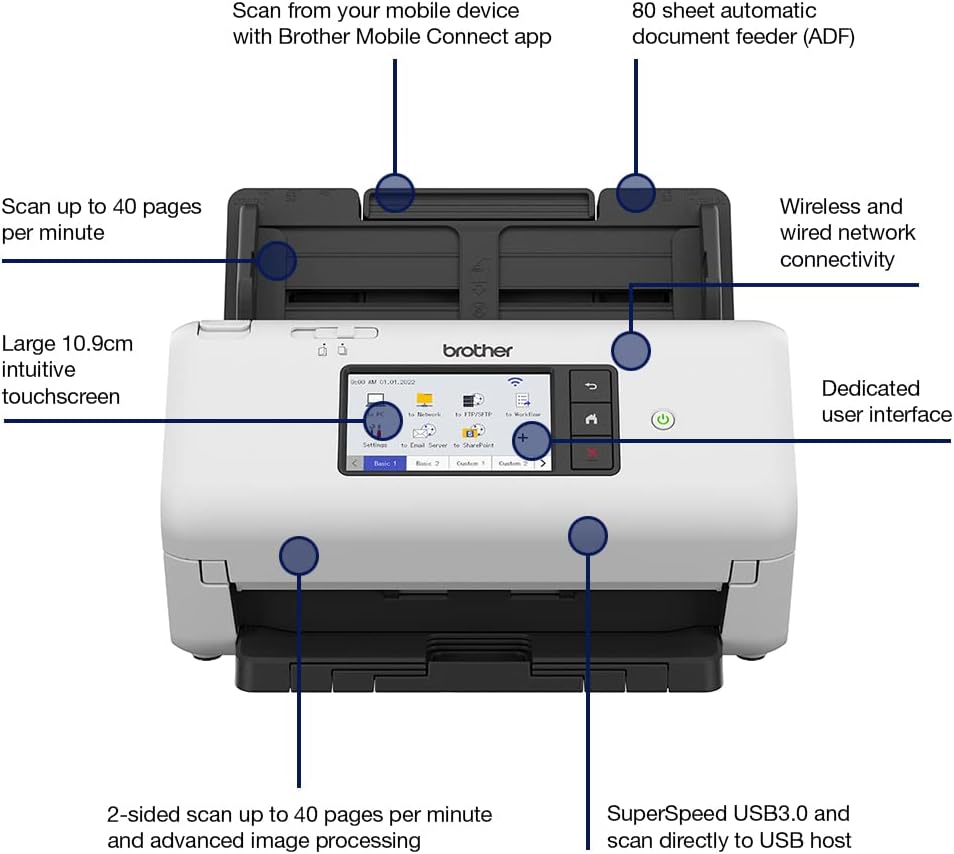
With an in-built ultrasonic multi-feed sensor to eliminate misfeeds, the ADS-4700W also has a large 80 sheet ADF capacity and rapidly scans up to 40 pages per minute.

Advanced connectivity
With USB3.0, USB host, network and wireless connectivity, you can securely scan documents and share with colleagues, without the need for a PC.

Advanced image capture and processing
Enjoy effortless and impressive image capture and processing – from easily referencing and locating scanned pages with the digital imprinter, to optimising image quality through the automatic vertical streaks and moiré reduction tools.
Fits into your workplace
Fast and reliable
Advanced connectivity
Advanced image capture and processing


100 years of technology innovation
Brother UK supplies and supports a complete range of technology products and services across the business and consumer markets. We are dedicated to helping people work smarter and more efficiently. We create solutions that inspire people to achieve more.

Brother ScanEssentials
Our ScanEssentials Lite software enables you to scan documents easily, create simple workflows and save them securely to folders on your network, with minimum effort.

Solutions ready
Our ADS4 series are designed for any corporate office looking for efficiency. They offer an attractive workflow proposition which includes a range of optional Brother Upgrades.

ADS-4500W
Add To Basket
Add To Basket
Add To Basket
Add To Basket
Customer Reviews
4.1 out of 5 stars 548
4.1 out of 5 stars 548
—
4.1 out of 5 stars 548
4.1 out of 5 stars 548
Price
£311.95£311.95 £319.45£319.45
— no data
£408.11£408.11 £665.52£665.52
Scan speed
Up to 35 pages per minute Up to 40 pages per minute Up to 35 pages per minute Up to 40 pages per minute Up to 60 pages per minute
Connectivity
SuperSpeed USB 3.0 SuperSpeed USB 3.0 and wired USB 3.0, wired and wireless USB 3.0, wired and wireless USB 3.0, wired and wireless
Paper handling
60 sheet ADF 80 sheet ADF 60 sheet ADF 80 sheet ADF 100 sheet ADF
2-sided scan
✓
✓
✓
✓
✓
Display
LED keys LED keys and 3 configurable hot keys 7.1cm touchscreen and 20 shortcuts 10.9cm touchscreen and 56 shortcuts 10.9cm touchscreen and 56 shortcuts
Power requirements
AC adaptor AC adaptor AC adaptor AC adaptor AC adaptor
Scan to
Email, file, OCR, image Email, file, OCR, image Email, file, OCR, image Email, file, OCR, image Email, file, OCR, image
2 SIDED SCANNING: Scans single and double sided documents in a single pass, in both colour and black/white at up to 40ppm/80ipm scan speeds
SIMPLE AND INTUITIVE: With an in-built ultrasonic multi-feed sensor to eliminate misfeeds, the ADS-4700W also has a large 80 sheet ADF capacity
RELIABLE, VOLUME SCANNING: Built for demanding, high-volume workplaces, Brother’s desktop scanners allow busy departments to batch scan and archive a larger number and variety of documents quickly and easily up to 6,000 sheets a day
MIXED MEDIA: Automatically scan different types of documents one after another, a range of documents from business cards to folded A3, with a variety of paper thickness from 40 – 200 gsm can be fed at the same time
INDUSTRY RECOGNISED SOFTWARE: Increase post-scanning productivity with industry recognised software including Kofax and Newsoft, available as standard with device
Customers say
Customers find the scanner to be a superb device with fast scanning capabilities, particularly noting its ability to scan both sides at 40ppm. They appreciate its ease of use, with one customer mentioning it can be set up entirely via its web interface, and they like its small size and consider it worth the money. The functionality and connectivity receive mixed reviews – while some say it works well, others report it simply stops working, and while some customers can easily connect it to their WiFi network, others note the lack of WiFi/bluetooth connectivity. The instruction manual receives negative feedback, with customers mentioning it comes without instructions and is only available in German.
10 reviews for Brother ADS-4700W Professional Desktop Document Scanner | SuperSpeed USB 3.0 |10.9cm Touchscreen |Advanced Image Capture, UK Plug
Add a review
Related Products


![Scanners: (Limited Edition) [4K UHD / BD]](https://i1.wp.com/m.media-amazon.com/images/I/81KqcO26mcL._AC_SL1500_.jpg?w=300&resize=300,300&ssl=1)


Original price was: £490.80.£408.11Current price is: £408.11.
james –
Great device
This is a really great device. Nice design, very well built & simple to use, and the scanning speed is unbelievably fast. It’s a little bit bigger than expected is the only negative really. Probably this scanner is more intended for small offices than personal use.Setting this scanner up was very easy. I had it connected to wifi in under a minute, and within 10 minutes had connected to the cloud and was sending scans directly to DropBox. All of this was done via the touch panel on the scanner itself, which is very simple & intuitive to use. No software had to be installed on a PC at any point (yay!) and it also looks like admin-type tasks can be done via a built-in web interface on the scanner itself, although this hasn’t been needed so far.Registering dropbox on the device is very simple, via the ‘Brother Web Connect’ portal. The device is authorized in dropbox first of all, then a temporary access code is entered into the scanner to finish the registration. Really simple and a nice UX overall.What I really like is that documents are OCR’d by the scanner itself, and they go straight to dropbox. No intermediate service is used (that I can determine). It is a little slow to process & upload each scan compared to the scanning speed itself, which is blisteringly fast. The shortcuts that can be setup allow multiple users to share the device and have their scans go to different destinations (DropBox vs Google Drive), and even different folder locations within each service to allow easy organisation of different document types.We’ve barely started using all of the scanning features but so far we’re very impressed.
Alison Druce –
Saved me loads of time and money.
I like most people, don’t read instructions until there is a problem. I rather plug in a machine in and hope that what I want to do can be done easily.In this case it was exactly as I’d hoped. I have been using a flatbed scanner to scan documents to go out to clients. Generally, these range from 40 to 50 pages long and since my old flatbed scanner will not allow me to feed too many pages in it was taking me literally hours to scan and bind the documents.I can now put a 50-page document come up with writing on both sides of the page through the scanner and the scanner speedily scans and then releases the papers in the order they went in. I must admit I was very surprised to know that the scanner will assess if there is writing on both sides of the page and if so scans both sides.The scanner was a doddle to setup, but I do not confess to know all of its intrinsic parts and what you can do. I just needed a scanner to save me time and this does just that. I also needed a scanner which I could plug into my computer or into a USB stick. in this case it does use a USB 2 connection and whilst this isn’t the fastest or most convenient it does work well.All in all, I am happy that the scanner has saved me time and money and I would certainly recommend that machine to anybody who has documents of up to 50 pages to scan. I only use it maybe 2 to three times a week so I can’t say that I’ve overused it. However, it has worked well what is been asked to do.
Amazon Customer –
Impressive small office scanner
We needed a networked scanner for a small office. This was purchased to replace a 15 year old HP Scanjet 5590 which has over the years dealt with tens of thousands of documents. A prime consideration was that we needed an operating system-agnostic scanner, as we have been purely Linux here for many years (apart from a few Windows machines for legacy use, including the 5590 scanner).The ADS-2700W can be set up entirely via its web interface, which is straightforward to use. We opted to configure to send scans via email as we run our own email server. Shortcut keys allow for programming to email to individual users at preset configurations (we allow for B/W, grayscale or colour).In use, it’s very impressive. Scanning is very fast, the sheets flying through the feeder, and seconds later arriving as an email.It would be nice to be able to scan to print, and (at least in a Linux environment) this should be pretty straightforward to set up using inotify(7) and SFTP (which the scanner supports).Only complaint so far is that the flip-down sheet scanned-sheet catcher is unduly flimsy for an office machine. Even with careful treatment this will not survive more than a few years. The 5590, in contrast, was very robust.
J Grabowski –
An amazing machine… Should have bought this long ago.
Glad l did my research. For a small business this device is invaluable and very impressive. Managed to scan an A4 arched levered binder in less than half a day (over 500 double sided documents in colour). At the price point this may not seem like the fastest machine when you look at the pages per minute, however, this becomes irrelevant. What is really important and what really impressed me, was the speed at which the software converted the images into a PDF over WiFi. I also like the fact that it can be used by multiple PCs and that it is compact (the paper tray can be folded away). It also has a touch screen interface. Well done Brother. 5 Stars.
Jacqueline –
Good scanner
Good scanner just what I needed
The lawyer –
ð¡Lâutilizzo : cercavo uno scanner per digitalizzare tutti i documenti che quotidianamente maneggio,evitando quindi di perderli o doverli cercare nel cartaceo ogni volta. Doveva essere dotato di fronte retro automatico, veloce e che si connettesse in automatico al Wi-Fi, salvando quindi i file sul mio Mac senza procedure scoccianti tipiche dei multifunzione.â La scansione : è un prodotto molto valido, velocissimo in scansione, che sfiora tranquillamente via cavo le 45 pagine al minuto, qualcosa in meno se parliamo di scansione in Wi-Fi, dove i limiti sono legati alla velocità della connessione più che al prodotto in sè. Comunque una volta collegato alla rete domestica, e scaricata lâapplicazione dedicata per il proprio computer, sarà possibile impostare la scansione diretta. Con questo funzione, operando direttamente dallo scanner, ma con Mac accesso, si possono scansionare i documenti e ritrovarli salvati sul desktop o nella cartella preimpostata. Può sembrare una funziona inutile, ma vi posso garantire che una volta provata, non si torna più indietro perché è davvero comodissima. Comunque oltre la scansione diretta su pc, ci sono tutta una serie di altre funzioni più o meno utili, in particolare : 1) scansione su usb; 2) scansione su mail; 3) scansione su cartella condivisa. Le funzioni di connettività estese, a cui ho appena accennato, sono disponibili solo per la versione 2700w, che a mio avviso è da preferire alla troppo basic 2200. Lo dico perché le features sono davvero tante, ed aiutano davvero a migliore la produttività , solo che la mancanza del display, nella variante basic, preclude la possibilità di un serio utilizzo autonomo dello scanner rispetto al computer, limitando sensibilmente le migliore che apporta il prodotto in campo lavorativo.ð Come va : comodissimo, come dicevo è completamente autonomo dal computer, le scansioni sono di qualità in praticamente tutte le varianti, dal bianco e nero solo fronte, sino ad arrivare al fronte retro a colori. Insomma per parlare con un linguaggio giovanile : âè davvero tanta robaâ. Nota di merito va poi al correttivo software, che se ben impostato, elimina automaticamente le onnipresenti pagine bianche, tipiche delle scansioni in cui documenti âfronte retroâ e quelli solo âfronteâ sono mischiati tra loro.âï¸ Manutenzione : niente di particolarmente complicato, è prevista una pulizia dei rulli ogni 5000 scansioni, da effettuarsi a cura dellâutente con un panno morbido, ed una sostituzione completa ogni 100.000 scansioni, questâultima procedura ben spiegata sul sito del supporto tecnico. Il costo del ricambio, da mie ricerche su internet, dovrebbe essere intorno ai 40 euro, tenete però conto che la sostituzione a 100.000 non è obbligatoria, sicché se i rulli continuano ad andare bene nulla vieta di poterli âtirareâ anche fino a 130-40 mila pagine. Peraltro, ad onor del vero, prodotti simili, anche dello stesso produttore, prevedono il cambio ogni 200.000 mila scansioni, sintomo che âosareâ si può.ð Conclusioni: davvero un bel prodotto, di qualità , ben realizzato e che permette di massimizzare di molto in termini di produttività . Non rinuncerei sinceramente alle funzioni di connettività estesa della 2700w per risparmiare qualcosina, anche perché in termini di produttività la differenza con la 2200 si sente, e anche parecchio.
benjionekenobi –
Concevoir un outil aussi performant, liant technologie et simplicité,son écran est bien agencé, possibilité de personnaliser, lancement du scan sur ordinateur ou directement sur le scanner (en mode réseau), connexion par RJ45 ou port usb,Configuration pour scanner le recto et le verso dâune page en un seul passage,Je recommande ce scanner
Abhishek agarwal –
This is simply best equipement and fulfilled all the office needs
rdagger –
This is a fantastic solution for small office scanning. We bought the Brother because we have a very expensive Xerox copier that we use for scanning, but it breaks down so much that we needed a back up. After a few weeks of using the Brother, nobody in the office uses the Xerox any more except for oversize scans. The Brother has become the primary scanner and everyone in the office has given it positive reviews.It works great. I’ve only seen it jam once and that was because someone didn’t remove the staple from a document. The document feeder is supposed to only hold 50 sheets, but that seems very conservative. People have been filling it up with much more and there have been no glitches. It’s easily as fast as the giant Xerox and much faster than most multi-function scanning devices.I thought the set up was incredibly easy and intuitive, but I do work with computers. Still, I find many similar products limited in terms of compatibility and terribly unintuitive in terms of set up and user interaction. The Xerox was a nightmare to set up for network scanning. We have another Brother MFC device in the office and it was very difficult to integrate into our network because it had very limited network capabilities and it requires the user to navigate through 6 screens before they can scan.One of the best features of this device is that there are 3 programmable buttons on the front of the scanner. I set up the first button for color documents, the 2nd button for black and white documents and the third for reduced file size black and white scans. All a user needs to do to scan a document is insert the paper and press one of the buttons. That’s it, 1 button and the document get scanned and uploaded to our server. Please note that you really do need a server or a NAS to get the benefits of this scanner. If you’re not going use the networking then you are probably better off buying a cheaper Fujitsu without networking. I use a Fujitsu ScanSnap at home and it’s great, but only for a single user.The only draw back some offices might have is if they need more than 3 presets. Many offices like to have a button for each employee which goes to a private server folder. That wasn’t a requirement for us. We only have a dozen people in the office so a single network share with the 3 presets works great.
Rating it –
I previously owned a Fujitsu, which finally wore out. I ordered the Brother because it is compatible with both a PC and MAC. My biggest complaint with the Brother is – It will NOT scan pages that have sticky notes or tape attached. The Fujitsu would scan about everything. The Brother also doesn’t have near as many scan options as the Fujitsu. If I had realized all the differences before my return time had expired, I would have returned the Brother back to the company.