

Magnasonic Super 8/8mm Film Scanner, Converts Film into Digital Video, Vibrant 2.3″ Screen, Digitize and View 3″, 5″ and 7″ Super 8/8mm Movie Reels (FS81)
£299.99



Price: £299.99
(as of Jan 02, 2026 03:34:13 UTC – Details)
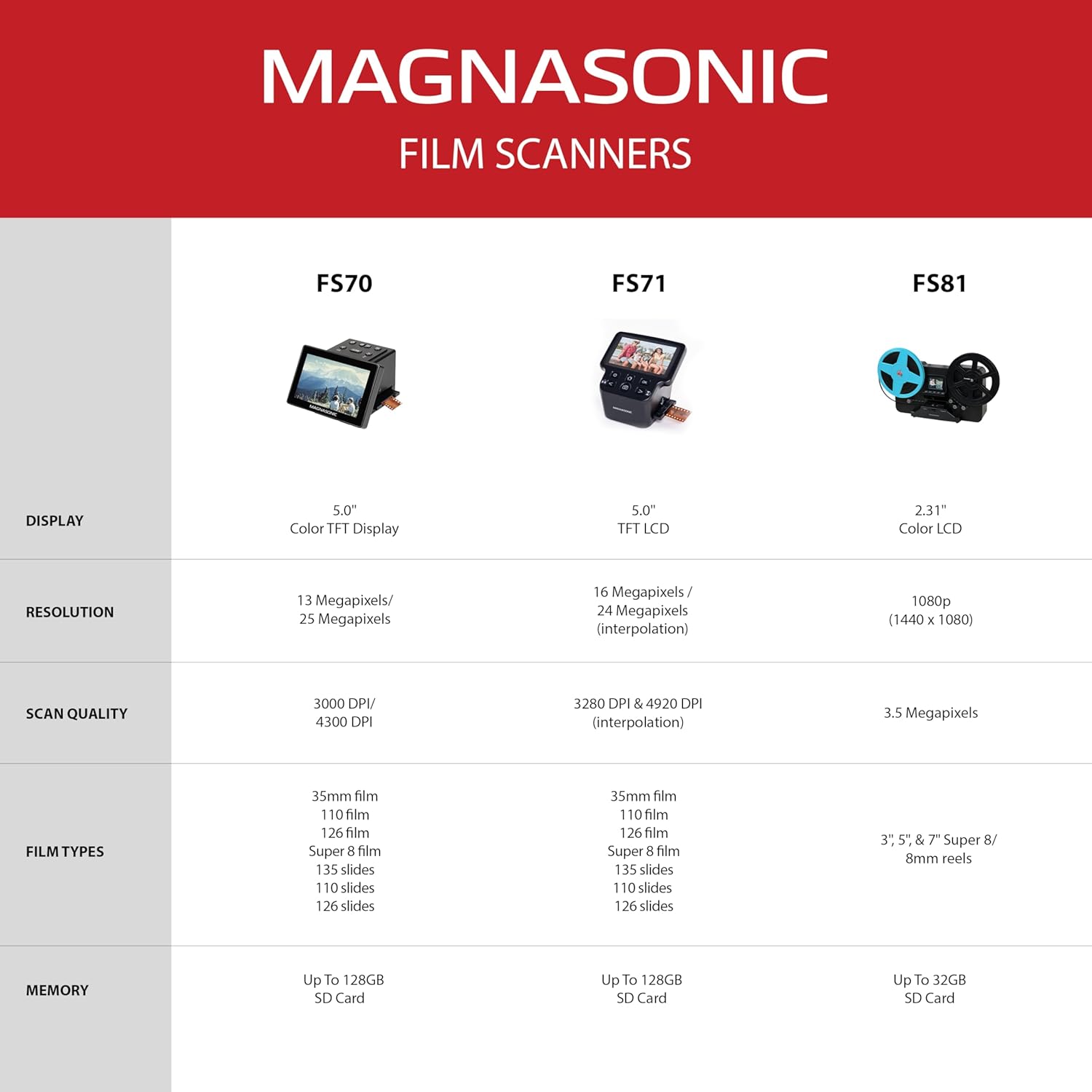
The Magnasonic FS81 is a super 8/8mm film-to-video scanner that digitizes old film into digital MP4 files. Scan 3”, 5”, and 7” film reels quickly and easily. View as you scan on the built-in 2.3-inch LCD display. Note: This scans video only, no sound.
Create Memories that Last Forever
Simply mount your 3, 5, or 7-inch film reel, choose your settings and start scanning your super 8/8mm film frame-by-frame. Scan 50 feet of film in just 30 minutes.
Multiple Viewing Options
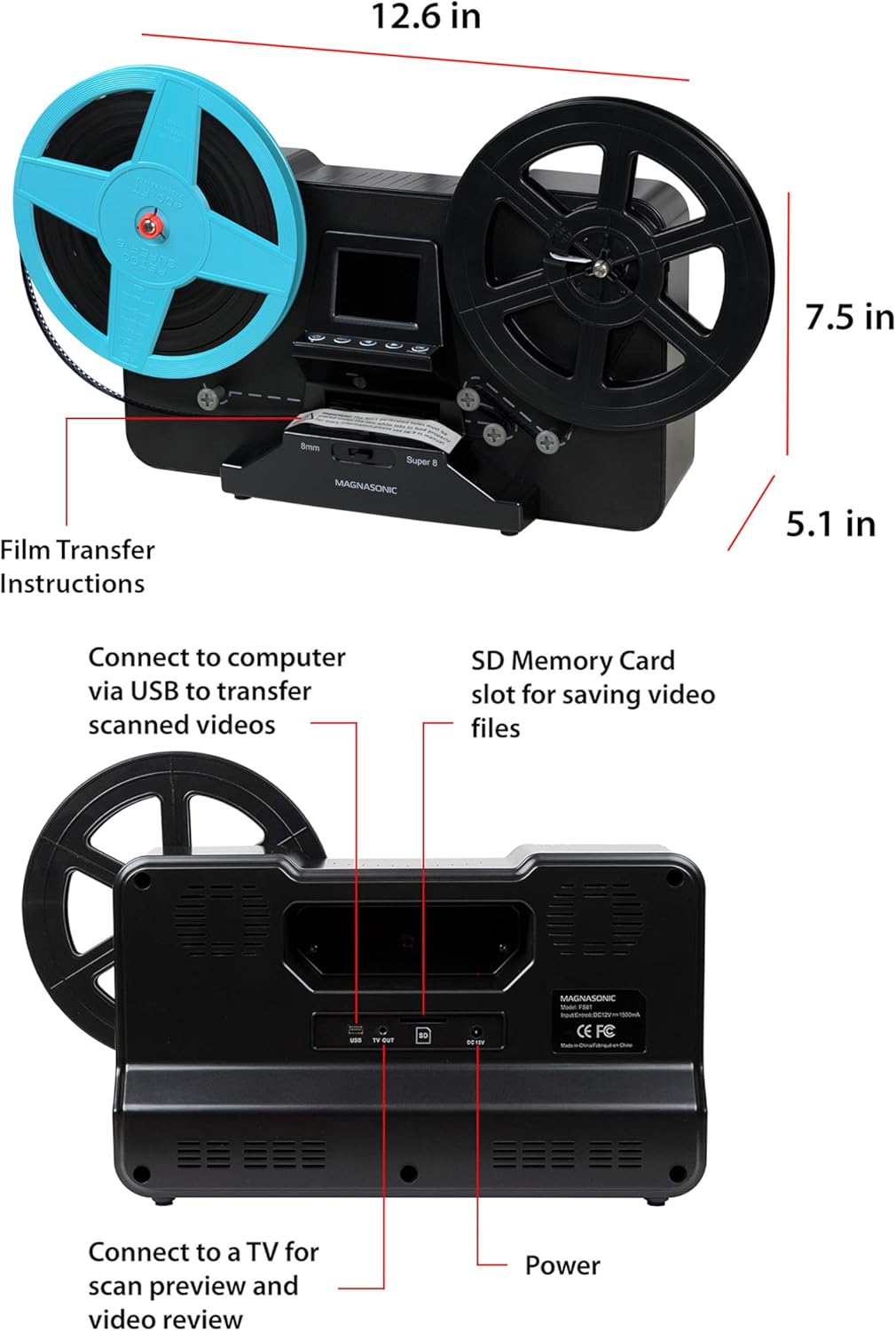
View your scanned film directly on the built-in vibrant 2.3-inch LCD screen. Or take your family and friends down memory lane when you view your scanned videos on your TV or monitor using the included RCA video out TV cable.
Scan and Save up to 120 Hours of Video on a 32GB SD Card
Use a SD card (not included) to save your scanned videos so you can easily download your digital files to your computer via the included USB cable. Share your videos with family and load onto a DVD for a thoughtful gift for a loved one.
No Computer Needed
No complicated video editing software needed. You can adjust the exposure, RGB, sharpness, and framing right on the super 8/8mm film-to-video scanner. When you’re ready, upload the MP4 video files to your computer for personal viewing or to bring to DVDs.
Scan Your Film in No Time
Forget going to expensive photo labs to digitize your old film. This scanner is fully automated, making it super simple to use. Just load your reel, feed the film through and press the start button. The scanner pulls the film through automatically and scans frame-by-frame to create a digital MP4 file that can be easily transferred to your computer.
BRING BACK THE MEMORIES – Automatically converts your 3″, 5″, and 7″ reels of super 8/8mm film into digital MP4 files with the push of a button. Scans video only, no sound.
MULTIPLE VIEWING OPTIONS – Playback your scanned video on the built-in 2.3” LCD screen or view on a larger TV/monitor via the included RCA video out cable.
SD CARD SLOT – Save your scanned videos directly onto an SD card up to 32GB (not included).
NO COMPUTER NEEDED – No complicated or expensive photo-editing software required, adjust the brightness, sharpness, and framing directly on the scanner.
EASY SCANNING – Simple setup for frustration-free operation and effortless scanning right out of the box (film transfer instructions found on the scanner and in the included user manual).
9 reviews for Magnasonic Super 8/8mm Film Scanner, Converts Film into Digital Video, Vibrant 2.3″ Screen, Digitize and View 3″, 5″ and 7″ Super 8/8mm Movie Reels (FS81)
Add a review
Related Products


£299.99
Ian B. –
Qualify bit of kit !
Much better than the next cheapest one that failed after a few days of scanning.If the focus is out you can easily remove the cover of the camera, then gently scrape the hot glue from the camera and then you adjust the focus ! Wis this was a proper feature but you would have to pay double the even get close !!!
andrew w leatham –
SD card
Need to source a class 4 32 GB SD card to use the digitiser. Simple to use thereafter ð
n.alexander –
Must read instructions
Must read instructions before using after that works really well
tivydale –
no card is included
pity, for the price, an s d card is not included
Barnadown –
This is just brilliant at what its intended for, 8mm and Super 8 Film digitization. The quality of the images is very good, but this is also dependent on your original film, my film was in an attic for decades where it was nice and cold. It is very simple to use, all you need is an SD card and then transfer it to your computer, as simple as that. So the menu on this asks what reel sizes are being used, 3″, 5″ & 7″. The 3″ reel can take upto 1.5hrs to convert. The 5″ is about 2.5hrs and the 7″, well i have not come accross a 7″ reel in my reels yet. The files produced are MP4 so these will be compatible with most devices if not all.
Mrantz –
Overall – I was pretty pleased with the quality of the product. Basically what is described is what you will get. It does take some patience for the first few reels to get the hang of it. Especially the frame adjustment portion of the process. The unit makes the adjustment pretty easy for you, but it’s just the nature of how the film has to be fed through the scanner. Since your really running through decades old film that can be breaking down, etc. that once you think you have the alignment right, you’ll see it won’t be after 20 or so frames into it. Plus breaks in the film, or any where the film has been taped together, it’s going to hang up, etc. It’s a project to have running in the background while you are nearby to check on it every once in a while.BEST TIP/SUGGESTION REGARDING REWINDING THE FILM:So, I didn’t have enough patience for the rewind process using the machine. Just slow, to much work swapping the reels around, and takes to long.TRY THIS TO REWIND AS FAST AS YOU CAN MAKE IT – Avoid the Written Directions All Together !! – When the film is done scanning, leave everything as it is. Be sure the film has run all the way through the unit (dangling free end from the right hand reel). Start the film back onto it’s original reel (on the left side of the machine – you may have to remove that reel to properly get it started and locked onto that reel and then replace back on the unit. You’ll see how you want to route the film around the knobs that help tension the film normally – I would use one of the one the right bottom and then feed to the one know on the left under where the original reel is hanging). Oh, basically you can turn the unit off – does not need to be on. Use a short but solid small rod, or for example a 3-4″ wood nail that you can place the tip of it in the original reel, and then basically start cranking that reel around and around feeding the film back on to it. What every you use for this, because it’s round, so the cranking goes really smooth. After some practice, I could a 3″ reel in about 20 -25 seconds. That’s it. Swap that reel for the next one to be scanned, and you are good to go ! Hope this helps !! Good Luck !COUPLE TIPS:1) I didn’t change any of the contrast/brightness settings, the default seemed to be just fine. You may find that same thing yourself.2) Depending upon the condition of your film/reels, you may want to clean the dust/debris from the film before running it through the process, because any of that will impact the final product.3) You might want to have one of those cans of Keyboard/computer Compressed air cans handy, and just give a small puff on the scanner plate after each film in case hair/dust/debris has landed in that scanning area.Overall Feedback & My Project: I’ve been very satisfied with your product and I’ve scanned in ALL 100+ Super 8 Reels that my parents had created many years ago. As a matter of fact, this was the first time I’ve ever seen these films, and since both my parents passed away several years ago, this was a very special project to me and my family. Many Thanks !
aurelio uccelli –
ottimo
JDR –
I highly recommend this Magnasonic 8mm capture unit. I almost did not buy this, read the reviews and was concerned about the issues brought up regarding the quality of the unit, the capture quality, the functions I can say that none of the concerns were valid. The unit is easy to use and the capture quality is good.Anyone who thinks that capturing 8mm film is plug and play is delusional. The film can glitch and the alignment can be lost. That is to be expected. Dealing with those issues on this unit takes a little patience and learning but it is to be expected and is no big deal.I have captured a couple of dozen 3 inch reels and 6 7 inch reels. When you start the capture you need to watch the image in the screen and make sure it is in alignment. If it is not then stop the capture, align and recommence. If is not complicated and can be dealt with easily in the first couple of frames. If there is a bad splice or tear in the perforations used to advance the film just pull through realign and continue. It is great that brightness and sharpness can be adjusted. Experimenting with the result takes some time but is worth it.I love this little inexpensive unit. Experiment a bit at the beginning and you will get a good result. In regard to complaints regarding the rewind, it is a little slow but a three inch reel rewinds in a minute or 2 not a big deal. The unit is a great, inexpensive way to capture all the old home movies. I love it. Am sending the captured films to siblings, aunts and uncles, cousins and there kids. Love this unit!
Carlos Alberto Gonzalez Flores –
Esta perfecto