

JOYUSING 14MP HD Portable USB Overhead Scanner – Scan Documents Multi-Language OCR, Fast Scanning, Convert to PDF/Word/Txt/Excel on Windows and PDF on Mac System
£114.10


Price: EUR114.10
(as of Jan 20, 2026 19:51:31 UTC – Details)
Product Description


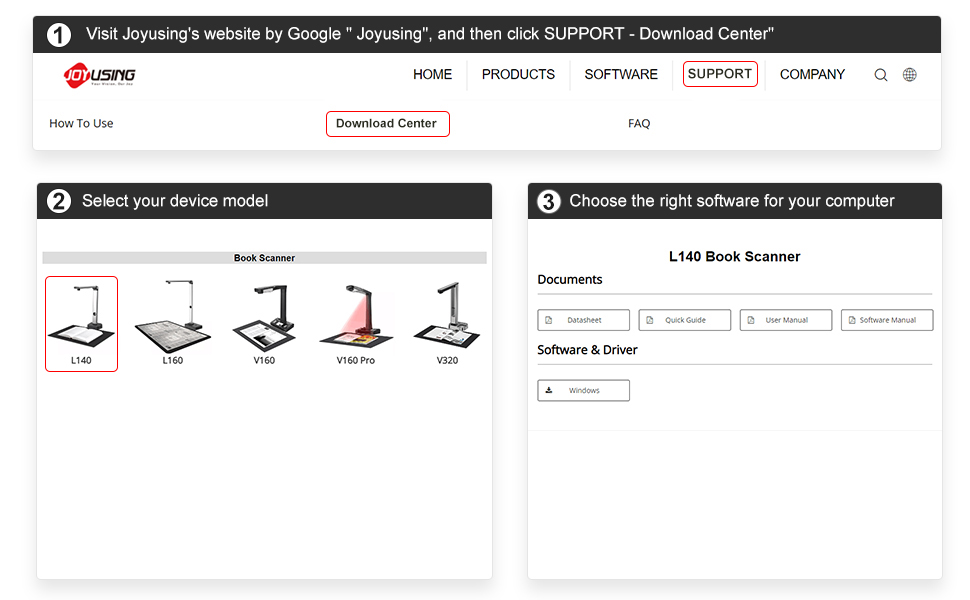
How to Download Joyusing Book Scanner Software

Portable Design
Can be doubled up for the portable taking.

Scanning Up to A3 in Size
Easily for A4, max. up to A3 in size

Intelligent Technology
Approved of Three-level LED lights, this book scanner can work even in dimly lit environments.
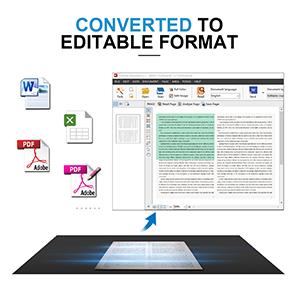
Converted to Editable Format
Scanned documents can be converted to an editable format, including Word, PDF, Txt, and Excel

Comes with Hand Button
More applications can be used and more convenient for our scanning.

Intelligent Technology
The new version of the book scanner software is divided into two parts: book scanner and file processing. After the shooting is completed, the pictures can be processed uniformly.
How to get the software: 1. Visit Joyusing’s website by Google ” Joyusing”, and then click SUPPORT – Download Center”. 2. Select your device model. 3. Choose the right software for your computer. If you have any questions, please contact us via Amazon Message, we will always be here to help.
Portable and Powerful: Take this 14MP HD document scanner with you wherever you go and scan up to A3 size documents in less than 3 seconds per page. Work with Windows XP/7/8/10/11 AND macOS 10/11/12/13/14. Suitable for a thickness of books ≤3cm
Scan in Any Environment: With 3-level LED lights, this scanner can work even in dimly lit environments, making it perfect for office or education use
Multi-Language OCR: Convert scanned documents into Word, Excel, PDF, or Txt files on Windows and PDF on Mac System, multiple languages making it easy to share and edit.
Easy to Use: Before scanning books, simply place the black pad in place first for optimal results.
13 reviews for JOYUSING 14MP HD Portable USB Overhead Scanner – Scan Documents Multi-Language OCR, Fast Scanning, Convert to PDF/Word/Txt/Excel on Windows and PDF on Mac System
Add a review
Related Products
![Scanners: (Limited Edition) [4K UHD / BD]](https://i1.wp.com/m.media-amazon.com/images/I/81KqcO26mcL._AC_SL1500_.jpg?w=300&resize=300,300&ssl=1)


£114.10
Jacko-Leeds –
This has saved me so much time
I bought this after reading the mixed reviews.I have LOADS of reference material for work and wanted to make them into searchable PDF’s. This scanner has done it to a very high standard.I downloaded the software from the website, scanned the file with Kapersky, then installed it.The scanner worked straight out of the box with no issues.Crackong bit of kit!!
Ian Banks –
Horrible picture
First the order process and delivery was spot on, no problem.The actual scanner itself looks good, well packaged, thick foam padding, cables named in their own boxes, and the main scanner unit is of good build quality, metal construction with a nice weighted base. There is also a large black scanning mat, which is non slip rubber backedI downloaded the software as instructed. Installed it on my PC, no problem. All was connected, software installed, do I gave it a go.Software opened and found scanner straight away.Now the problems start. I put my document on the mat, clicked scan, very fast at scanning, however the output was horrible. Very blocky, and poor quality, even a bit blurry.I tried another, document, better but still not very good.Next I tried book mode, with a magazine. Even worse, the picture was distorted, and the colours (if you can say that) were terrible, all blue and blocky.I tried another page in the magazine, the same, terrible blue colour.I tried document mode, this took the picture with the correct colours this time, but not the best quality.I have played around with settings and modes,but can’t seem to get a decent scan.In summary, I feel very disappointed with the quality of the output. I must say I wasn’t expecting fantastic pin sharp scans, but I was expecting the correct colours.I have emailed the makers, but as yet had no reply.
Alex Potter –
5 Stars
It is a perfect camera for scanning my colouring books very clear and very very easy to use buy it I would buy this if I didn’t already have one.
Kindle Customer –
Great camera
Software on CD could not be installed. Downloaded software from website in Chinese. Selected English and it installed OK. Ran software, despite requesting English during install, it was all Chinese. Managed to locate option to set UI to English. – Software appears to be quite capable, but the English translations of the buttons etc are far from having clear idiomatic English. Can use if from Windows 10’s ‘Camera’ app. Microsoft said that as the software was rarely downloaded, it was blocking download. Had to use the ‘Keep’ options to over-rule explorer’s decision. – Not a good way to encourage the installation of anything. Still I feel certain that it will do what I want it to do well.
GTP –
Good cheaper alternative to an A3 flatbed.
This product does appear to do what the sales info says with quite good quality.Pro’s:– Easy to set up and use.– The picture quality is very good, when you zoom in to a scanned image there is very little noise.– Scans slightly larger than A3.– Integrated LED light has 3 brightness settings.– Although it’s a fixed focus lens it has a rather wide focal range which makes it great for taking pictures of 3D objects and not just flat documents. Which is something a flatbed cannot do.– The software is easy to use and works well. OCR works well enough.– It takes good quality scans quickly and easily. Certainly a lot, lot faster than a flatbed.– The supplied scanning mat is quite heavy duty.– It says the scanner works with Windows only, but the device is seen as a webcam so the hardware does actually work on other system such as Linux. I think it is only the included software which needs Windows.Cons:– Had to play around with the advanced settings to get good colour accuracy, but when you get it right it’s good.– The OCR which is not quite as good as other products I have used, but works OK with plain fonts. Most of my scanning won’t be OCR though, so it’s not a problem for me.– The integrated LED light only works well with mat white documents. Anything else produces a white reflection down the center of the image. This is easily remedied though by scanning in a bright room or using 2 LED desk lamps, 1 either side.– The file formats the software can export is limited, PDF, JPG or TIFF. I use this mainly for creating web content and prefer to use PNG’s which means an extra step converting the images.– The scanning mat could do with some more alignment marks on it for different sizes.– The software is Windows only. I would love a Linux version. I will be trying to install it in Wine though and will update this review if it works.Overall this is a good product and works well. When you consider an entry level A3 flatbed costs 4x as much this is definitely good value for money.I think the 14MP camera helps with the good image quality. Many similar products at this price range are only 8-10MP.I have seen other reviews complaining about the software being difficult to use and not very good. Either they have improved the software enormously or those reviewers were chimpanzee’s. The software is very easy to use and better than many scanning software packages I have used in the past, particularly the one built into Windows. Microsoft…..this is how it should be done!It loses 1 star only because of the integrated light and lack of PNG file support.
Amazon Customer –
Easy to use
Easy to set up and to use. Good quality images. Saving and editing documents taking time to learn but fairly simple to navigate once you learn how to do it.
Diapason –
Hardware OK, software terrible
Scanner works OK. The software is difficult to use. It just about works with Windows 11 but keeps hanging. I’ve been unable to download an English version of the software for MacOS. Only Chinese. Would I recommend it? Hardware yes, software no.
ali –
top scan
best scan and images , it help if adding on /off switch on the device and add user manual in software
Ruben Fernandez –
Me hice la misma pregunta que se hace todo el mundo: ¿Para qué comprar un escáner de documentos si ya tengo un móvil con cámara de 108 MP? Aquà presento mis resultados. En la primera imagen, documento escaneado con impresora multifunción a 300 dpi. El resultado es bueno, pero es un engorro tener que cambiar las páginas. En la segunda imagen, foto tomada con Redmi Note 13 a 108 MP. Aun usando trÃpode, la nitidez varÃa en la superficie, además de la distorsión de la perspectiva. En la tercera imagen, foto del Joyusing L140 con su luz LED incorporada. En la cuarta imagen, uso un foco LED externo, que mejora la uniformidad de la iluminación y también la nitidez. En la última imagen, la foto después de ajustar el brillo y el contraste. El resultado es muy parecido al del escáner.
chouchen87 –
Il y a longtemps que je voulais un scanner de livre, mais je ne me décidais pas. Et là je pense avoir fait le bon choix. Facile à installer et à mettre en fonction. Toute les fonctions fonctionnent parfaitement, et il y a de quoi faire.Un petit bémol quand même, la notice uniquement en anglais… Mais on peut toujours traduire soi-même.J’ai acheté en même temps un support de livre qui permet de faire un scan de documents jusqu’au format A3.Me voilà donc avec un bel équipement pour un prix assez raisonnable.
Thomas D. –
Einfache Handhabung, leicht zu transportieren – die Ergebnisse entsprachen meiner Erwartung
Rick N –
Verouderde software, niet geschikt om boeken in te scannen.
Roberto Cipriani –
Con Windows 10 il software funziona. Il tasto di scansione non serve molto: se ne può fare a meno, riducendo lâingombro dei cavi da trasportare. LâOCR va bene anche se ha bisogno di qualche verifica del testo. Il manuale è solo in inglese ma comprensibile anche grazie alle immagini che lo accompagnano. Per aumentare lâilluminazione si possono aggiungere dei led laterali (costo: 10 euro). Risulta migliore la scansione di due pagine per volta (formato A3). Adatto al lavoro in biblioteca quando si devono acquisire testi lunghi o immagini. La curva delle pagine di libro viene modificata adeguatamente.