

USB C Docking station with 65W Power Adapter, 16 in 1 USB C Dock Quad Monitor Dual HDMI DisplayPort VGA Laptop Docking Station with 2 HDMI, USB A&C 3.1, 2*USB A 3.0, RJ45 Ethernet PD100W Audio SD/TF
Original price was: £105.99.£85.49Current price is: £85.49.




Price: £105.99 - £85.49
(as of Jun 03, 2025 16:16:18 UTC – Details)
PACKING LIST: 1*Docking Station Quad monitors + Power Adaptor +1 Meter USB C to USB C Cable
【Docking Station with 65W Power Adapter】Unlike most docking stations, this docking station dual hdmi is equipped with a 65W power adapter, which can charge the laptop and the docking station itself stably and safely when multiple devices are connected, reducing the need for laptop The computer’s power consumption and provide excellent performance for external devices. USB 3.0 port for charging with maximum 100W power input and 87W power safe output
【USB C Dock Quad Monitor & Ultra HD 4K】USB C docking station for easy dual, triple, quad monitor display with 2 HDMI (HDMI 1 resolution up to 4K@60Hz, HDMI 2 up to 4K@30Hz), DisplayPort (up to 4K@60Hz), VGA(1080P) only when your device supports 4K resolution, the video output is 4K. Make sure you are using an HDMI 2.0 cable or better. (NOTE: macOS system laptops only support SST mode and do not support MST expansion mode. all monitors will mirror the desktop interface A-AAA or A-BBBmode
【15 IN 1 Laptop Docking Station】This docking station with 2 HDMI ports, DisplayPort, VGA, 100W PD USB C port, 1000Mbps Ethernet network, 2*10Gbps USB 3.1, 2*USB 3.0 and 2*USB 2.0, 3.5mm Audio Jack, Micro SD/SD Card Reader. Plug and Play. This docking staton dual monitor can satisfy your work and life needs to the greatest extent, allowing you to have more efficient work. (NOTE:be sure to plug in the included 65W power adapter during operation
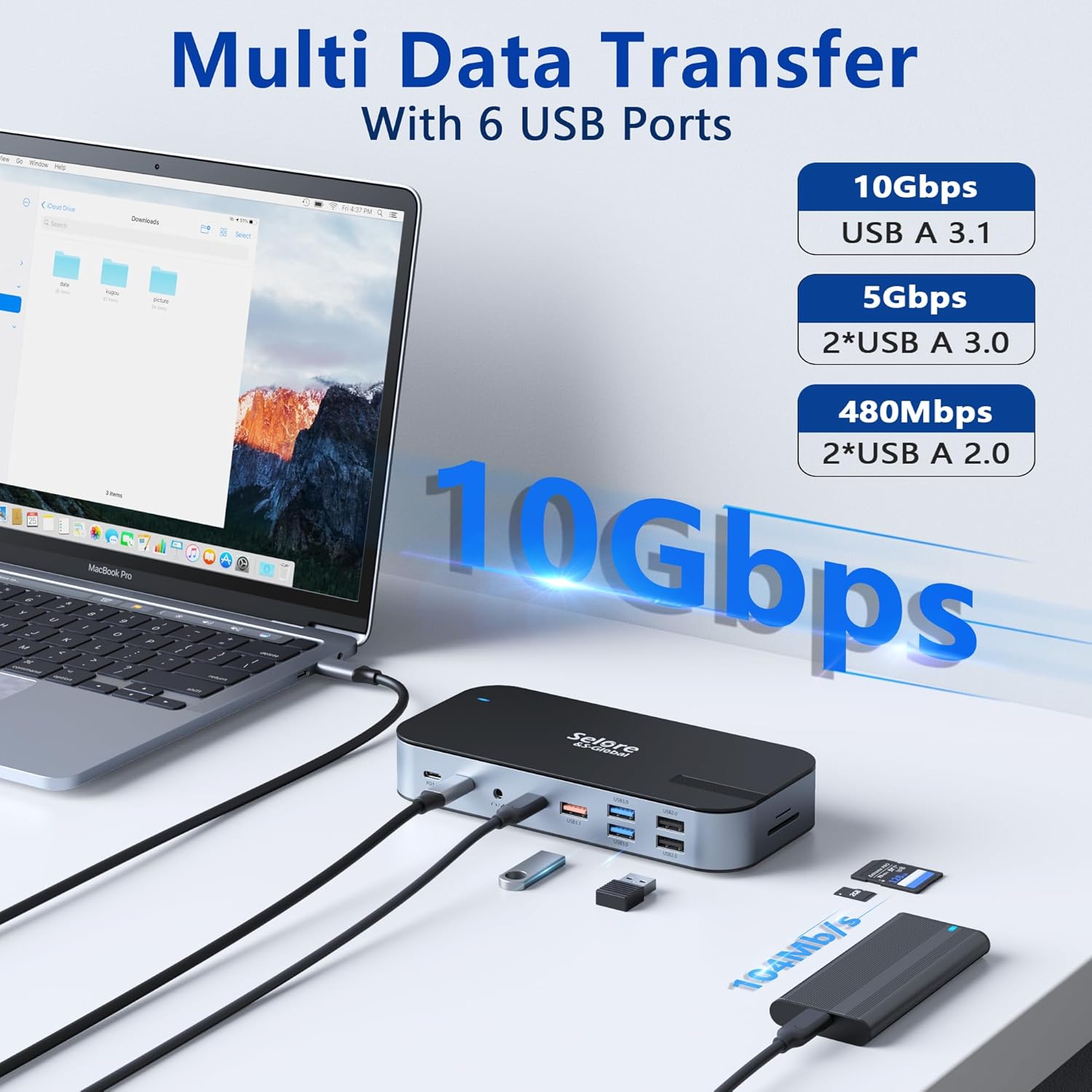
【10Gbps Transfer & Gigabit Ethernet】This docking station is equipped with USB A 3.1 and USB C 3.1 ports, which can provide up to 10Gbps data transfer speed for hard drives, flash drives, tablets, smartphones and any compatible external storage . The RJ45 Ethernet port has speeds up to 1000 Mbps for faster movie downloads and less gaming lag. 2*USB 3.0 and 2*USB 2.0 ports for keyboard and mouse. Audio jack with microphone for clear audio sync
【Wide Compatibility】The docking station dual HDMI is compatible with Thunderbolt 3 laptops, such as Dell XPS13/15, Dell Latitude 13 7000/E7370/Latitude 7400, Lenovo Thinkpad Yoga, HP EliteBook 840 G6, etc. Please make sure your host device supports video Transport or DP Alt mode to use all features. Note: HDMI DP function needs to confirm your host device supports video output or DP alt mode, not available for all laptops with USB C port. If you are not sure, please contact us to confirm
Customers say
Customers find the docking station works well straight out of the box and appreciate its multiple monitor support, allowing them to use monitors as independent displays. The device is easy to set up and use, is well-made, and offers good value for money. While the 16-in-1 connectivity options are impressive, some customers report issues with no signal on their monitors. The USB ports receive mixed feedback, with some customers finding them good for their needs while others report issues with them not working.
9 reviews for USB C Docking station with 65W Power Adapter, 16 in 1 USB C Dock Quad Monitor Dual HDMI DisplayPort VGA Laptop Docking Station with 2 HDMI, USB A&C 3.1, 2*USB A 3.0, RJ45 Ethernet PD100W Audio SD/TF
Add a review
Related Products


Original price was: £105.99.£85.49Current price is: £85.49.
Lynda Stanbridge –
Great
Easy to set up, works well to connect laptop to 2 external screens.
Dave –
Golden!
I’ve been using the USB C Docking Station with the 65W Power Adapter for a few weeks now, and I can honestly say it has been a game-changer for my workflow. The fact that this single docking station offers 16-in-1 connectivity options is impressive! Itâs not just a hubâitâs the command center for all my devices.The quad monitor support is particularly incredible. With two HDMI ports, a DisplayPort, and VGA, Iâve been able to set up multiple displays effortlessly. Whether Iâm running dual monitors for work or switching to a quad setup for multitasking, the docking station handles it like a champ. The video quality is crystal-clear, even when running multiple high-resolution screens.On top of that, the power delivery feature is a huge bonus. The 65W adapter is perfect for charging my laptop, while the 100W power pass-through ensures all my devices stay juiced up. I also appreciate the variety of USB ports. The combination of USB-C 3.1 and USB-A 3.0 ports makes it so versatileâeverything from external drives to peripherals connects without a hiccup.The RJ45 Ethernet port is another standout feature. Iâve enjoyed a stable and fast wired internet connectionâespecially useful when working with large file uploads or streaming. The built-in audio jack and SD/TF card slots add even more convenience. Itâs clear this docking station was designed with productivity in mind.The build quality is sturdy, and it fits nicely on my desk without taking up too much space. Honestly, it feels like this device has simplified my entire work setup. If youâre looking for a docking station that can do it all, I highly recommend giving this one a try!
MAK –
Sleek Design Meets Practical Performance
As an avid tech user who values both functionality and aesthetics, I was intrigued to try the Selore&S-Global Docking Station despite its stated incompatibility with Dell laptops. Here’s my honest take on this sleek and slender powerhouse of connectivity.Design & Installation:The docking station sports a modern, sleek look that’s quite appealing, albeit with a slight design oversight. The front-facing power display and USB slots necessitated an under-the-table setup to keep my workspace uncluttered. Thankfully, its slim profile lent itself well to a neat zip-tie installation, a minor but clever design plus for those who prefer invisible wires.Functionality & Performance:A significant highlight is the seamless integration with peripherals, such as the integrated camera/mic setup, which delivered exceptional performanceâcrucial for my virtual presentations and online interactions.However, it hasn’t been all smooth sailing. The screen blackouts, affecting one or both monitors occasionally, required some troubleshootingâreconnecting the host cables or, in some cases, a laptop reboot. Although a manageable hiccup, it’s a point of consideration for potential users who need uninterrupted service.Charging Capability:One surprising feature was its ability to charge my Dell laptop through the dock, despite the compatibility warnings. Although the laptop battery icon shows an error, the charging proceeds effectivelyâa reassuring aspect for those who, like me, are looking for workarounds that defy the norm.Conclusion:The Selore&S-Global Docking Station stands out as a robust, multi-functional device that’s mostly reliable, barring a few quirks. For Dell users and others who don’t mind the occasional tech troubleshooting, this docking station offers a compelling choice that marries sleek design with practical performance.
Woody –
Great dock for the right laptop.
Update: I bought this on 28th Jan 2023, and it has worked flawlessly until today. I have two HDMI and one DisplayPort monitors connected (all identical). First the one HDMI suddenly went blank, I fiddled with the cable and it came back to life. Then it went out again, and fiddling with the cable made both HDMI screens go blank. Computer still thought they were there, and the monitors were still active (didn’t go into sleep mode). Then a bit more plugging and unplugging and all worked, then the first HDMI one that had failed, failed again. Replaced the cable to that one and everything seemed fine for about an hour and then the dodgy HDMI one went blank again. having tried various cables I suspect that there’s something gone wrong inside that is affecting both HDMI ports, wiggling things sometimes brings one back to life, or kills both. I’d guess there’s a internal connection issue to the ports themselves, only affecting the HDMI ports. The DisplayPort is not affected and works fine. I’ve simply ordered a replacemnt unit as this is a business critical issue for me at the moment. I will follow up with the supplier at the weekend. Originally cost me £100, which is a bit over £50 per year for a very good working environment, so I hope the next one lasts as long (and it’s now only £79.99).————–I’m using this dock with three ASUS ProArt PA248QV WUXGA 1920×1200 16:10 monitors. Two are connected via HDMI and the third via DisplayPort. Iâve not tried the VGA port so have no idea if it could actually support a fourth display. I also have various other bits plugged into USB ports such as keyboard, mouse, camera, etc.I’m powering it with a 96W PD power block and it in turn provides ample power to my laptop, all through the same USB C cable (supplied) through which the data flows. Itâs a very convenient solution. It is also nicely made with a good feel to it, but it doesnât come with a stand or mounting clip, so Iâll probably end up using double sided tape to keep it neatly attached to the back of a monitor stand.It needs a modern laptop with DisplayPort over USB C capability. It did not work with a Lenovo X1 Carbon 5th GEN (2017 model) even though it supports DisplayPort over USB C â the two HDMI monitors were fine but the DisplayPort one would only display at 640×480 resolution. I think the DisplayPort version on that laptop is too old.It works perfectly with Lenovo X1 Carbon 9th GEN (2022 model), and it also works perfectly with a Lenovo L14 (2023 Model). In both of these cases the laptop screen also works, so I effectively have 4 screens including the laptop.Altogether it is a brilliant little dock but you do need to check the compatibility of your laptop.
Pe_Pedro –
Opera perfecto, lo llegué a probar con todas las salidas de vÃdeo y si tu hardware lo permite corre bien, el periferico cumple su función.
ems –
Works as it should. No issues. Great to connect to multiple screens.
Neil –
The USB C to Dual HDMI Adapter,7 in 1 USB C Docking Station worked great for several months. I was able to plug 2 monitors in the HDMI ports, my mouse and keyboard.After several months of use HDMI port #2 stopped working.I contacted customer service, did some basic trouble shooting and was sent a replacement unit when it was determined it was defective.Customer service responded in a timely manner and the replacement unit was received quickly as well.I would certainly buy from this seller again.
Amazon Customer –
Inexpensive and had worked well for me
Cal Oliver III –
Canât beat the price! Works great if youâre looking to have one adapter to connect all your electronics. Keeps cords out the way and connected to one hub.