

TJCXELE Displaylink Docking Station 3 Monitors with HDMI DP,19-in-1 USB C Laptop Docking Station Triple Display 4K 60Hz with PD 100W,10Gbps USBC/A Ethernet/Card Readers/Audio for M1 M2 M3/Mac&Windows
£149.99




Price: £149.99
(as of Jun 04, 2025 07:26:54 UTC – Details)
Product Description
The video showcases the product in use.The video guides you through product setup.The video compares multiple products.The video shows the product being unpacked. USB C DisplayLink Docking Installation Video Merchant video


1 Up to 4K60Hz
2 10Gbps Fast Data Transfer
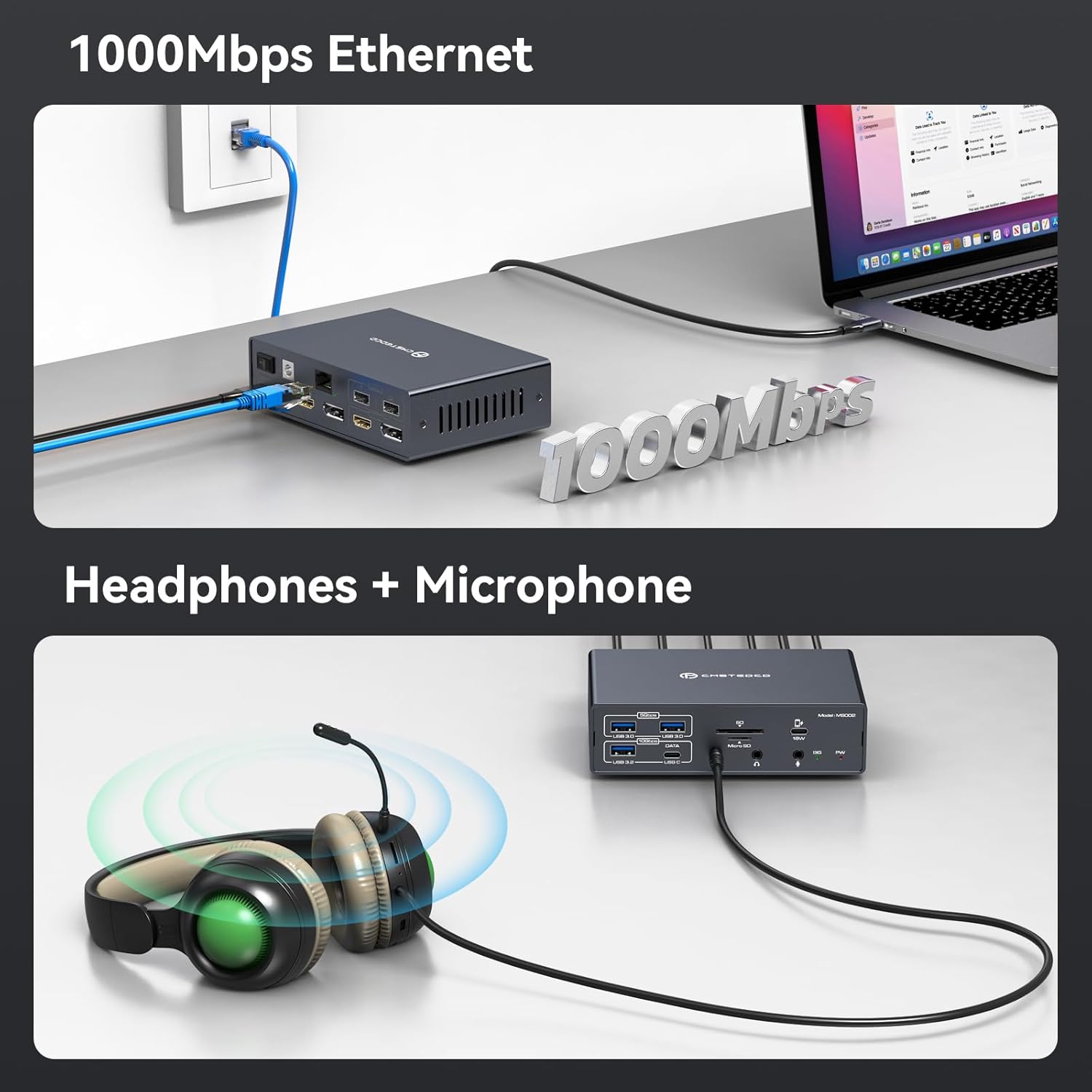
3 1000Mbps Etherent

1.Must I install a driver so that the USB C docking station can function for triple monitors?
Yes,the docking staton triple display requires downloading and installing a DisplayLink drver before use.
2.Why doesn’t my HDMI OUT1 display?
When connecting your laptop, ensure its USB – C port is fully functional (supporting data, video output, and charging), like Thunderbolt 3 or higher. Using a USB – C to A converter or adapter cable,HDMI OUT1 can’t work.
3.Can I use my own USB C cable to connect my laptop to the Docking Station 3 Monitors?
To ensure the normal operation of the laptop docking station, please use the full – function Type – C cable included in the package for connection.
4.Will this dock enable the use of three displays on base M1, M2, or M3 Macs?
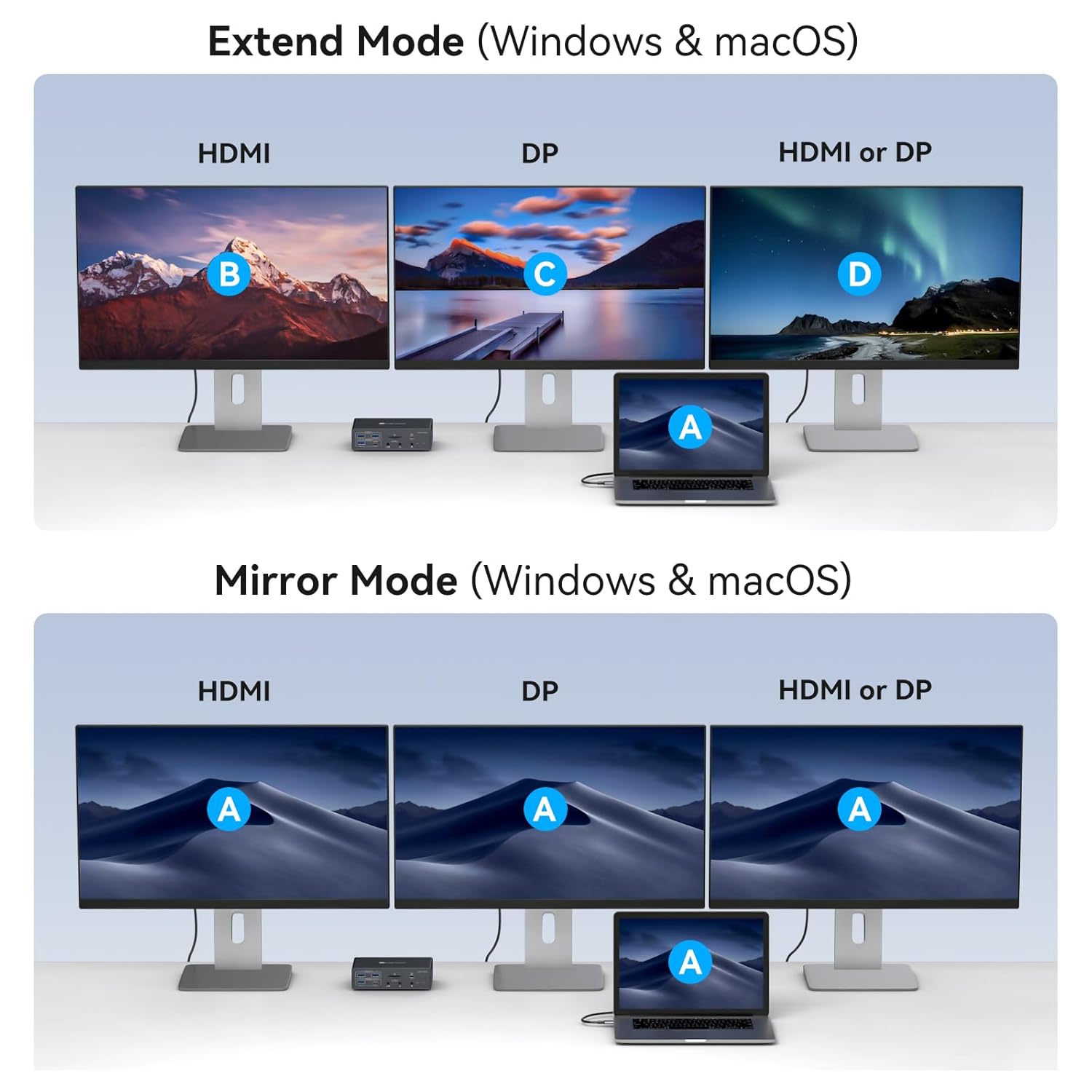
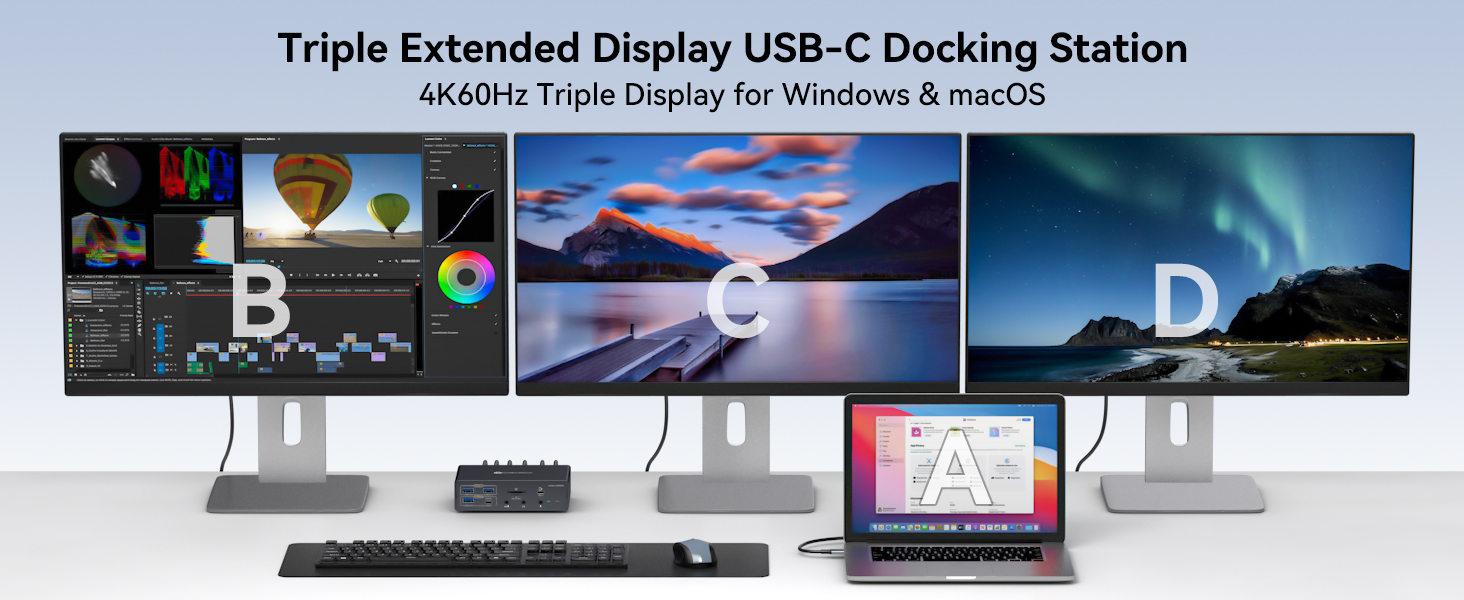
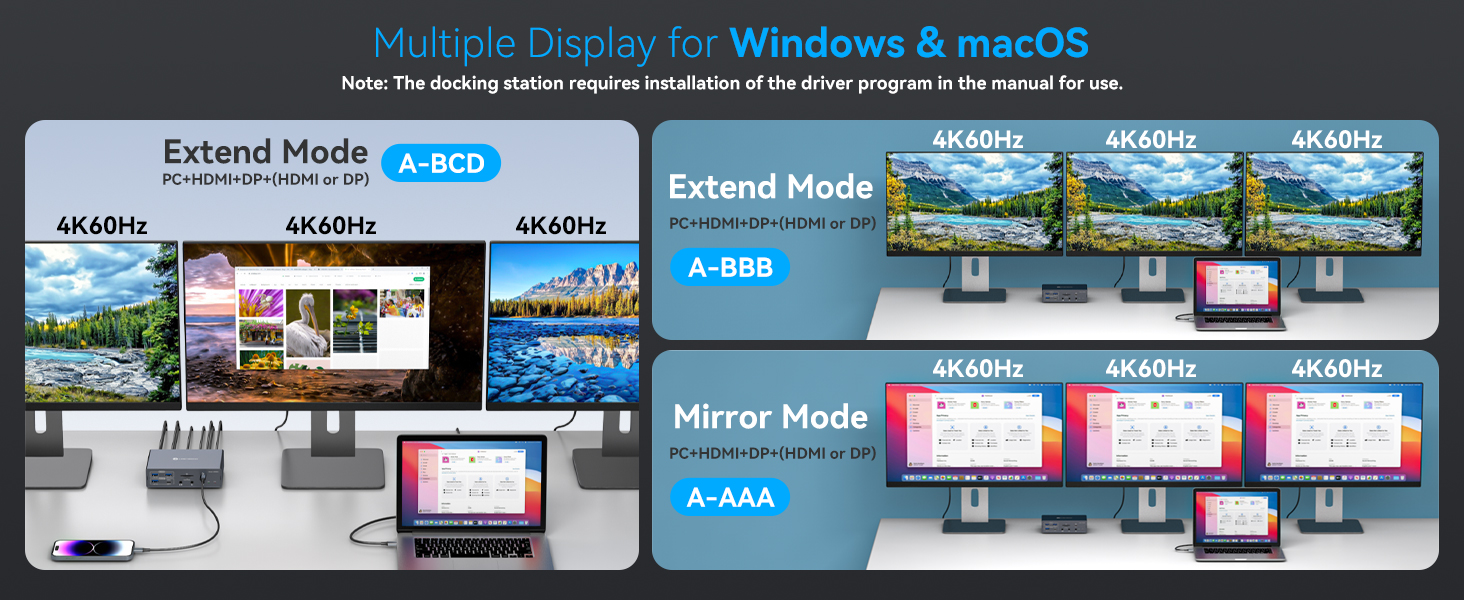
Yes. After installing the displaylink driver, even on MacOS systems, this triple display docking station can be connected to three monitors to display different content.
5.Is it necessary to connect both the DC12V power port and the PD charging port on the docking station simultaneously?
Connecting either one of them is sufficient for the device to operate properly. However, please note that if you only use the DC12V power adapter for power supply, you won’t be able to charge your laptop.
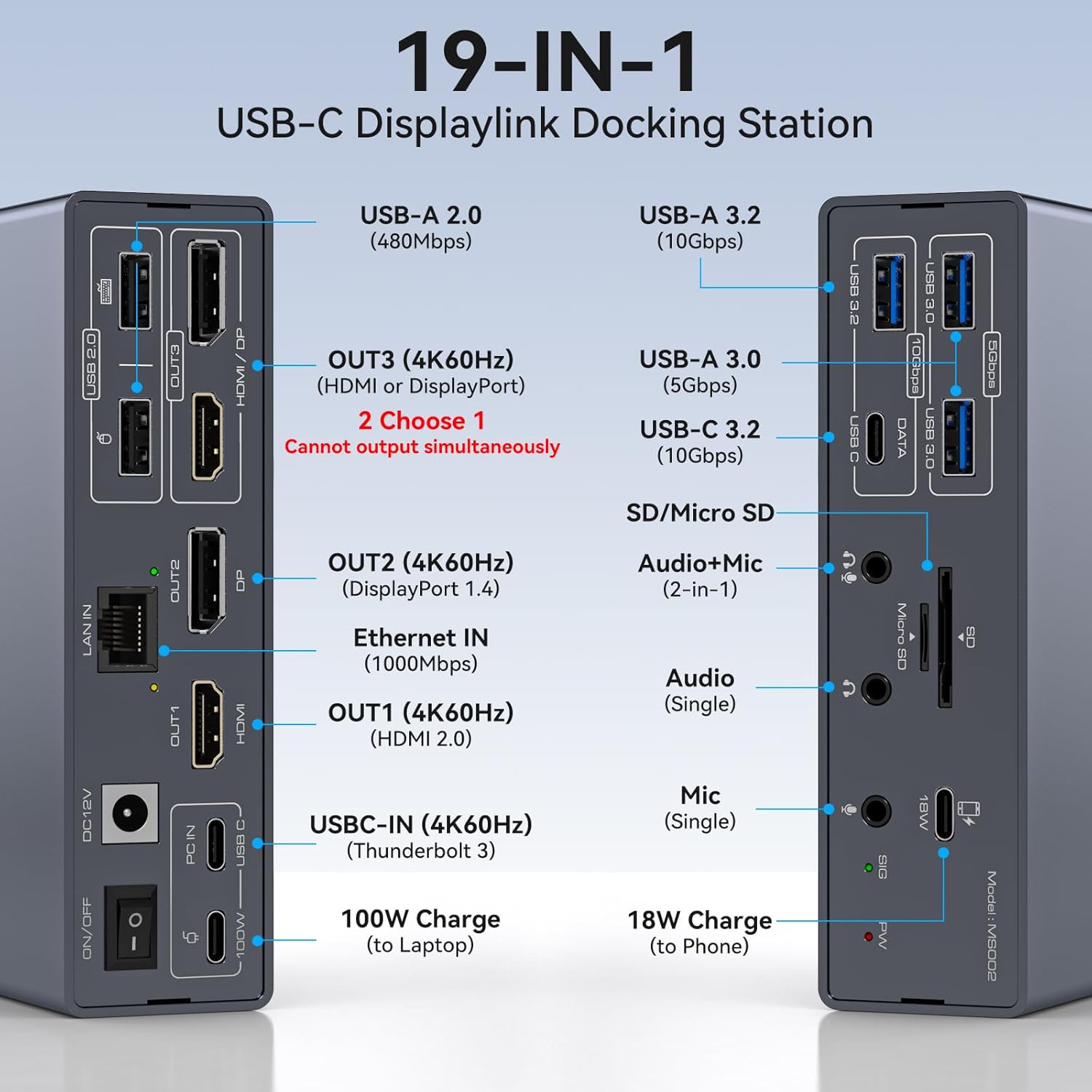
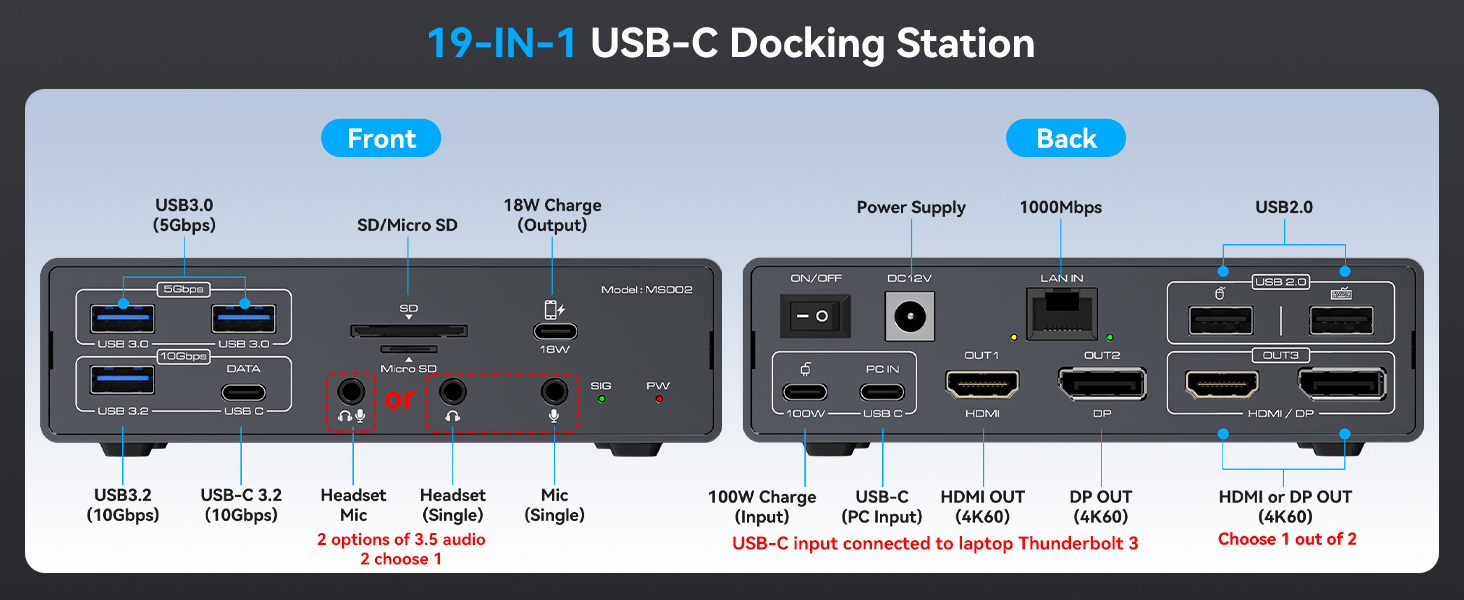
【Docking Station 3 Monitors】The Displaylink Docking Station is used to expand your laptop to triple monitors, you only need to connect one usb c cable to the docking station to realize the expansion of 19 ports for your laptop. Say goodbye to the complexity of connecting multiple different peripherals to your laptop. One docking station can be used to expand your laptop with three displays, multiple USB ports, LAN ports, audio+mic ports, SD/Micro SD Card Slot etc. Note: The displaylink driver must be installed when using the usb c docking station, otherwise OUT2 and OUT3 will not output images properly.
【Important Note】1.The USB C port of the laptop docking station must be a Thunderbolt 3 port or a higher version (not an ordinary data port) 2.When using the thunderbolt docking station , you must use the included power adapter or connect to a PD port for power supply. Using only the power adapter for power supply will not charge the laptop 3.The cable used to connect the laptop and the docking station must be the included USB C cable or a full-featured TYPE C cable.
【Support Ultra HD 4K@60hz Visuals】The Triple Monitor Docking Station supports resolutions up to 3840*2160@60Hz (4K@60hz).It breaks through macOS limitations, enabling three displays to operate in extended mode on both Windows and macOS systems, with each screen supporting up to 4K@60Hz resolution. The dock features one HDMI port, one DP port, and and HDMI or DP port(HDMI priority display when connected simultaneously).
【Wide Compatibility & 100W Charging】The The docking station with power supply suitable for laptops with Thunderbolt 3 ports or higher and the 3 monitor docking station compatible with macOS and Windows systems and supports HDCP. Connecting to the PD100W (PD Charger) port of this device enables powering the laptop while in use. It is equipped with a Type C port for mobile phone fast charging with a maximum power of 18W. This Type C port does not support any data transmission.Note: You must use the laptop charging cable to connect to the PD port.
【Displaylink Docking Station with Multiple USB Ports】The type c dock has 2*USB2.0, 2*USB3.0, USB3.2, USB C 3.2,Six usb ports offer 480mbps, 5Gbps, 10Gbps transmission speeds. Suitable for connecte keyboard, mouse, Printer, Flash Disk and so on. It is equipped with SD/Micro SD Card Slot,1000Mbps network port and 3.5mm Audio+Mic 2-in-1 port and 3.5mm Audio, 3.5mm Mic provide you with two kinds of audio/mic output methods.
【Package Contents & After-sales service】The package includes one laptop docking stations, one high quality USB C to USB C cable, one 12V/3A charger.If the device is abnormal within the 12-month usage period, we also provide return and exchange services.If you have any questions, please feel free to contact us at any time.We will give the most professional answers and give you a satisfactory shopping experience.
7 reviews for TJCXELE Displaylink Docking Station 3 Monitors with HDMI DP,19-in-1 USB C Laptop Docking Station Triple Display 4K 60Hz with PD 100W,10Gbps USBC/A Ethernet/Card Readers/Audio for M1 M2 M3/Mac&Windows
Add a review
Related Products


£149.99
Anon Customer –
recommended for any tech enthusiast
plenty of connectivity ports, plenty of features and the cables lose virtually no signal, very good product
DullButCorrect –
Docking Station
The TJCXELE DisplayLink docking station turns a single USB-C connection into a 19-port command centre, supporting triple 4K@60Hz displays along with Ethernet, audio, SD card slots, and a full set of USB ports. Itâs compatible with both macOS and Windows, even breaking past Appleâs usual extended display limitations by using DisplayLink technology. I liked that it includes fast-charging support up to 100W and delivers genuinely smooth multi-monitor performance. At £149.99, it’s definitely a premium-priced dock, but for power users juggling multiple displays and peripherals, the functionality justifies the spend.
Athos –
No lag, no signal drop, and no drivers needed
I got this USB 3.0 HDMI KVM switch to simplify my setup at home, where I use two computers but only one monitor, and itâs been a game-changer for productivity.The switch supports 4K at 60Hz, so video quality remains crisp and smooth when switching between devicesâperfect for design work, multitasking, or general office use. What I really like is that it also lets me share four USB 3.0 ports, meaning I can keep my keyboard, mouse, and external drives connected and usable across both PCs without constantly plugging and unplugging.Setup was fast and easyâit comes with two USB 3.0 cables, and once everything was plugged in, switching between systems was just a single button press. No lag, no signal drop, and no drivers needed.If youâre working with multiple computers and want to keep your desk clean and workflow smooth, this KVM switch is a reliable and efficient solution. Itâs compact, responsive, and makes transitioning between machines seamless.
Spooce –
Just what I needed
For some while I have been using my MacBook for routine computer tasks and a Raspberry Pi microcomputer for learning code and projects. Both computers are connected to my large monitor via their own inputs.The problem arises if Iâm reading a tutorial on my Mac and writing code on my Pi, I then have to select the appropriate input using the selector button on the underside of the monitor. This is both fiddly and time consuming. This device addresses this issue with both computers being connected to separate HDMI inputs on the switch.A single HDMI output from the switch connects via a cable to the HDMI input on the monitor.On the front of the switch are four USB sockets and a push button. Pushing the button selects the input from whichever computer I wish to view on the monitor. The swap between views has a short delay, this delay may well be a feature of my monitor, not the switch. A footswitch is also included which can be used instead of the pushbutton to change screens.It is my understanding that it is possible that only one mouse and one keyboard is all that is required, both mouse and keyboard operating on the screen being viewed. As I have two mice and keyboards already set up, I cannot comment on this feature. (See âNote Belowâ)Power is supplied to the switch from a robust mains transformer.Overall, I am very impressed with this device which I use daily, it fully meets my current requirements.Note:Since receiving this device, the listing appears to have changed to show a very different model with three monitor capability. My review is based on the two-monitor version, the listing and price being no longer available.
Mark –
great
Been using this docking station with my MacBook and itâs been a total game changer for my setup. Hooked up three monitors without any issues, and everything runs smooth. Like having all the extra ports in one spot, makes it so much easier to connect everything from USB drives to my speakers. Charging is super fast too, and I donât have to keep plugging things in and out all day.
Steven –
exactly what i needed
Setting up my workspace usually involves a fair bit of cable wrangling, a task I generally approach with a sigh. This device, however, simplified things considerably. Connecting multiple displays and peripherals felt surprisingly straightforward, and soon my desk looked considerably tidier. Having everything funnelled through a single connection to my laptop is rather convenient. The image quality across the three screens is sharp, which makes a difference during long work sessions. File transfers seem quick enough too. Itâs certainly made juggling various tasks across multiple applications feel more manageable. I appreciate not having to constantly swap cables when moving my laptop. It just sits there, plugged in, ready to go. For someone dealing with a lot of screen real estate and needing numerous connections, this has slotted into my setup rather nicely. It’s made the whole digital juggling act a touch less chaotic.
Merger306 –
great 2 PC 1 Monitor 4K60Hz KVM switch
I needed to connect three monitors to my laptop to make my workflow easier and boost productivity, so I decided to get a docking station. I often work with a lot of information at once, and having multiple screens is essential â this dock turned out to be the perfect solution.Setup was incredibly simple â I connected one USB-C cable, and all three monitors worked instantly. It streamlined my desk setup, since I used to connect each device separately.Now I have access to all the ports I need â USB, Ethernet, audio, and even memory card slots. Super convenient.The image quality on all three displays is excellent â the dock supports 4K on each monitor, which makes working with graphics and video much easier.Even under heavy system load, everything runs smoothly. The dock also supports up to 100W charging, so I donât need to worry about plugging in a separate charger.This docking station made my workspace more efficient and my daily tasks much easier.