

Wavlink USB 3.0 Universal Docking Station Dual Video Outputs Support HDMI/DVI / VGA with 6 USB Ports (2 USB 3.0 + 4 USB 2.0) / Gigabit Ethernet Port and Audio Jack for Laptop/PC and Mac
£69.99


Price: £69.99
(as of Jun 05, 2025 07:02:24 UTC – Details)
From the brand


Found in 2003, WAVLINK owns the expertise in comprehensive IT peripherals as well as being a worldwide leading manufacturer. Design, develop, and manufacturing all its product. As one of the only true designers & manufacturers in the industry, WAVLINK offers high quality design products backed by the service and support that consumer demand.The company distributes products throughout North and South America, Europe, Asia-Pacific.
Displaylink Dock
Hard drive dock/Enclosure
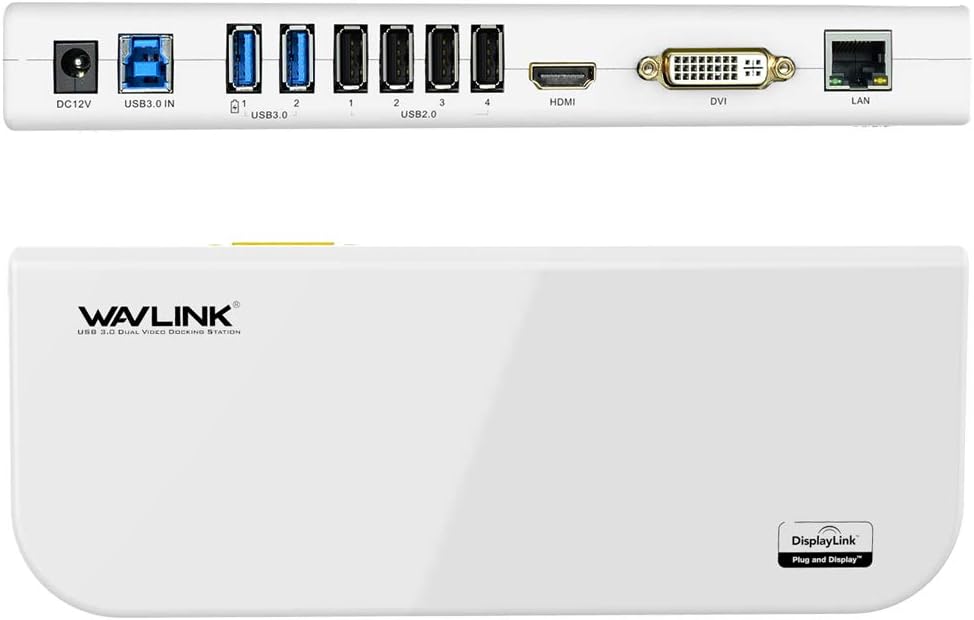
SuperSpeed USB3.0 up to 5Gbps for connecting your Ultrabook or laptop need to extend more external monitors( DVI, VGA or HDMI port ), offer 2 USB3.0 + 4 USB2.0 ports, Gigabit Ethernet port and audio output + Microphone input jack
Display resolutions for monitors support: single HDMI port up to 2560*1440 (50Hz refresh rate), DVI/ VGA port up to 2048×1152/ 1920×1200 (60Hz refresh rate)
2 USB3.0 ports backwards compatible with USB 2.0/ 1.1. Built-in Surge Protection keeps your devices safe and support hot-swapping. Gigabit Ethernet port backwards compatible 10/100 Mbps wired Ethernet connection
System Support: Windows 10, 8.1, 8, 7, XP systems, limited support for Mac OS 10.6 or later (see Display Link website for more details)(Mac OS Users Note: This docking station can’t currently support macOS 10.13.4 or later, we recommend that you stay at macOS 10.13.3 or earlier at this time and we will update the description as soon as the latest drive support macOS 10.13.4 or later).Linux/Unix are not supported.
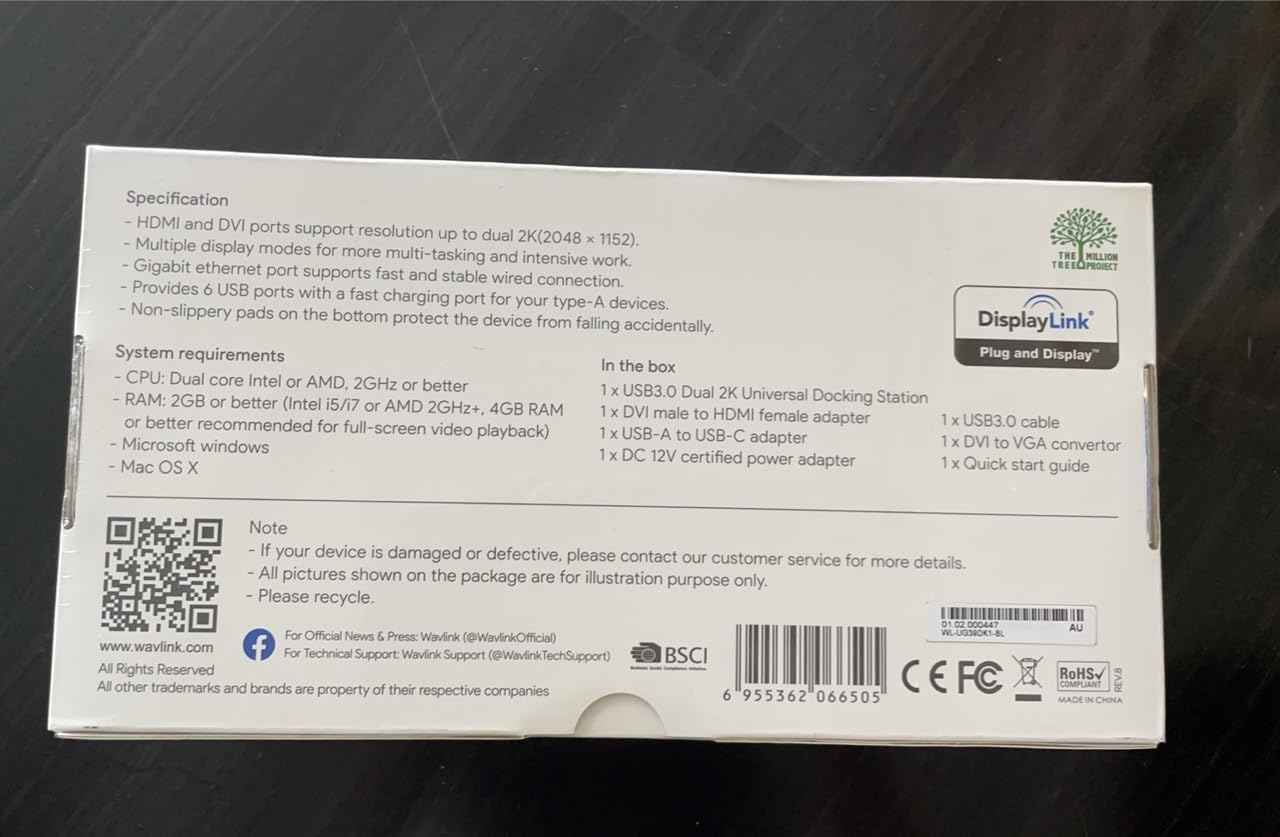
What in the box:1 x USB 3.0 Universal Laptop Docking station – 1 x 12V/2A power adapter – 1 x DVI to VGA converter – 1 x USB 3.0 cable – 1 x CD Driver – 1 x Instruction Manuel – 1 x 18 months manufacturer warranty Card.
Customers say
Customers find the docking station easy to set up and appreciate its functionality, with one customer noting it works well as an extra screen solution. The device receives positive feedback for its connectivity, with one customer mentioning it can handle up to 6 USB devices through a single port, and another highlighting its dual monitor capabilities. Customers describe the device as slick-looking and worth the money, with one noting its fast charging USB sockets.
13 reviews for Wavlink USB 3.0 Universal Docking Station Dual Video Outputs Support HDMI/DVI / VGA with 6 USB Ports (2 USB 3.0 + 4 USB 2.0) / Gigabit Ethernet Port and Audio Jack for Laptop/PC and Mac
Add a review
Related Products


£69.99
KIPH –
Quality Device & Easy To Use
Well this is something i was a bit unsure about as i have never owned/used one before but i have to say, i am extremely impressed! I thought i was going to struggle installing the device judging by a couple of the reviews that i read but it was not the case, i turned on the computer, connected the display link via usb, windows installed it for me and that was it…working!lolAs you can see from the pictures (which aren’t the best, sorry) i have connected a external HDD, a second monitor and connected to the internet via the LAN port on the device itself. Everything just worked!Main reason for purchase is it is being gifted to my bro who has a Microsoft surface book, they have next to no ports on it which he has found very frustrating! With this though, his problems will be solved when going away on work and having to connect to other peoples kit.Pros.. Everything just works, super simple, tidy box to store it when not in use and looks pretty slick.Cons.. Box it comes in is a bit bulky to use for travelling & the instruction slip included isn’t the best but to be fair i could understand it but didn’t even need to use it.I haven’t tried this with a MAC so no idea how the install process would be, but i can confirm it is a breeze on Win 10….Plug & Play.
Amazon Customer –
Laptop dock
Decided to get a laptop dock for home as have been using one at work. The parcel arrived on time from the seller and setting up was simplicity itself, connected it to my laptop, turned on the power and installation was plug and play. I’ve now got the monitor, printer, mouse, etc plugged into the docking station and when I want to use the laptop elsewhere, simply need to remove the supplied USB3 lead and I’m good to go. Also like the fast charging USB sockets, great for charging the phone.Definitely glad I made the purchase and would recommend it to anyone who wants to simplify the tangle of cables on their desks.
The Dogs Mum –
It works
This one was recommended by a new member of staff – this was a lot cheaper than the one we had previously bought so very happy with that. She says they are very easy to install and work without any problems.
Product Reviewer –
This gadget rocks
This item is fab as a single dock for all your connections, taking one USB port to run 6 usb items, your speakers, an ethernet connection and most importantly, two supplementary screens. Gone are the days when you want to run an extra screen as well as your laptop. These days we want two extra screens and this gadget allows you to have two extra screens each showing different output. Easy plug and play, it worked really well and it was the cheapest I could find. Really pleased with the purchase and the seller was both cooperative and efficient and the item literally arrived on Sunday after a Saturday evening order.
Lewes Preece –
Ok
Connected laptop to 2 stand alone screens with ease however the rate of data transfer is slow, an example is that if I plug the USB dongle for my mouse into it the delay between movement of the mouse and the cursor is significant, so I have to plug it direct into laptop.But I suppose you get what you pay for
GT –
Must have for Dual Station Set-up!
I had no difficulty setting it up and it has been working perfectly (All plug and play on my Windows 10 laptop. I am able to leave this at home with peripherals and ethernet cable attached. Dual monitor and all peripherals come alive once and connect to my laptop. Easily hooked up my laptop, extra monitors, wireless keyboard and mouse, external hard drive, speaker, and printer. This docking station really helped simplify my desk by having all the cables connected to one device. Definitely worth the money to easily turn my laptop into a full-sized desktop in seconds!
JPJ –
Cant use HDMI and VGA outputs at the same time
I was hoping to use both the HDMI and the VGA output at the same time but the VGA output uses the HDMI output with a HDMI to VGA converter (supplied). I therefore had to use the HDMI on the laptop for my second monitor making the wiring more messy. Apart from that it worked seamlessly. Very easy to get running.
Peppe –
What you need to expand a laptop connectivity
Bought to expand the connectivity of my laptop.As per product description, this docking station is able to add the following outputs:- 2 monitors outputs ( one via HDMI and another via VGA/DVI) and 2 USB 3 port , 4 USB 2 ports, 1 ethernetAccessories:It comes with a leafleft, with the essential instructions, a CD driver, a charger ( for UK socket), a DVI-VGA adapter and a USB cable.Installation:With Windows 10 (I have Windows 10 v. 18.03) the docking station is recognised immediately as soon as plugged in, so there is no need to install the drivers.Usage and Impression:Tried different monitor/tv configurationsAnd in all the conditions this docking station was able to deliver optimum performance ( I was able to play both YouTube and movies through the connected screen)I haven’t been able to test the gigabit Ethernet since my router is very far from my laptop and I don’t have a ethernet cable)Worth mentioning thatthis docking station works also with USB 2.0 ports, even though in this case you will see decent performance only during web browsing but some dealy in the video reproduction ( probably due to both my CPU speed and USB2 bandwidth)
Les Fuller –
This unit has plenty of ports that are immediately added to my laptop soon as I plug it in. My Wavlink usb3 dock drives two standard 24″ monitors in portrait orientation. 1080 x 1920. This allows me to have Outlook showing a long list of new email and a large preview pane. If I am editing a website, I’m able to see my changes displayed in very tall format while doing the edits on my 17″ laptop monitor. And also another 24″ monitor in regular landscape orientation standing just above my laptop for searches or other tasks. This dock also allows me to have my scanner, ethernet connection, an external storage USB drive and a high amperage charger by simply plugging in one usb3 plug into my laptop. Very convenient.Additionally, customer support has been great. I thought I had something wonky going on with the usb2 ports on the dock but customer support very satisfactorily resolved my problem… even after my warranty ran out.
Feefee –
Works great. I can interchange my personal laptop and my work laptop easily. It handles my laptops, headset and monitor, etc., all my charging needs, and itâs not hige so it fits well in small spaces. No complaints whatsoever.
RG –
Nachdem man den 2 unterschiedlichen Hinweisen zu den notwendigen Treibern gefolgt ist und diese unter Windows installiert hat, funktioniert das Gerät perfekt.
Nic –
Very happy with how it has helped connect everything in the office once setup easy to use
Duarte Family –
Love this thing! It has all the ports that I need. Super easy to install. I was able to plug in: USB camera, 2 monitors, laptop, keyboard and I can rapid charge my phone. Note—if you are looking to use dual monitors (NOT MIRROR) but be able to have your email on one screen and documents on another, and have the option of using your laptop as a 3rd screen, then this dock does the job. Its very sleek and fit easily in my undermount cable manager.