

4K KVM Switch HDMI 2 Port Box, Rybozen USB HDMI Switches for 2 Computers Share Keyboard Mouse Printer and one HD Monitor, Support 4K@60Hz, with 2 USB Cables and 2 HDMI Cables
Original price was: £19.99.£17.99Current price is: £17.99.



Price: £19.99 - £17.99
(as of Jun 08, 2025 11:21:53 UTC – Details)
Product Description
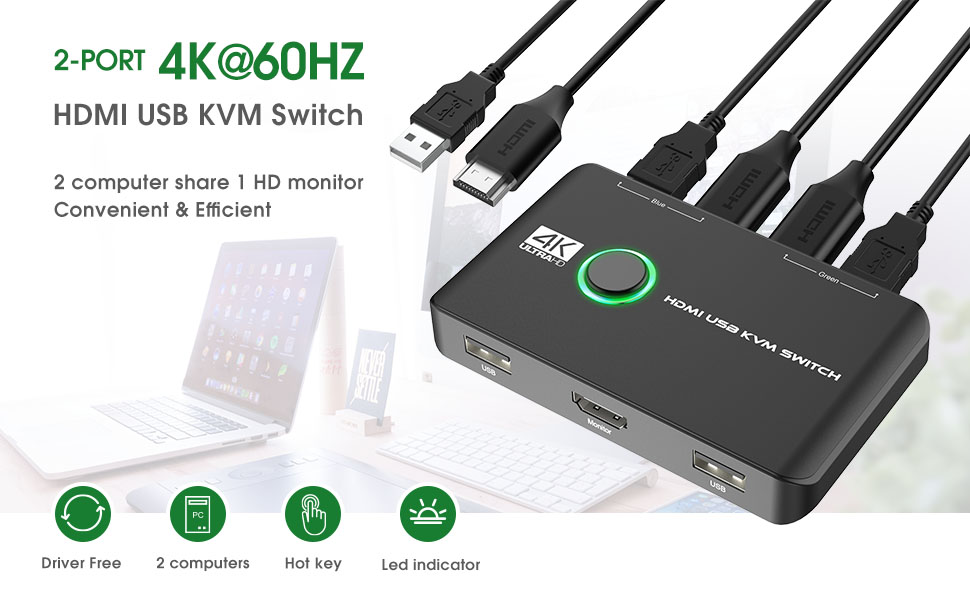
HDMI KVM SWITCH Connects 2 Computers to a Single Keyboard, Mouse and Monitor
Rybozen KVM HDMI Switch is an excellent choice to share 2 USB devices between two systems on one monitor. Allows you to share the mouse keyboard, display with two computers.A great accessory for a family, office or other workplaces. You can share a single USB keyboard, USB mouse and HDMI monitor with both systems, saving space on your desk and using your preferred display, keyboard and mouse with both computers.Also great for use at home if you have multiple PCs or Macs.
Button and LED Indicator Design
Easily switches between systems via push buttons with LED indicating the active computer.
Easy Installation
This KVM HDMI Switch is plug-and-play, with no additional driver installation needed. No power adapter required.
Applications
— Great for PC test/burn-in computer control, saving the desk space required for two monitors, keyboards and mice;
— Perfect for sharing computers and attached peripherals in the home or home office;
— Dual system control for single-user workstations increases user productivity in the office.


4K@60HZ RESOLUTION
Max support 4K high resolution and downward compatible with other resolutions.
Adaptive to different resolutions of different devices without manual setting.
Support 4K@30HZ, 3D and 1080P or lower resolution, pls make sure that both your computers support HDMI 2.0

BUTTON SWITCHING
Push button design, switch at one press, easily switch between two computers via the button.
You can just press the button to switch to another computer.
LED light color (Green or Blue) indicating the active computer.

NO NEED TO BUY CABLES
Package included:
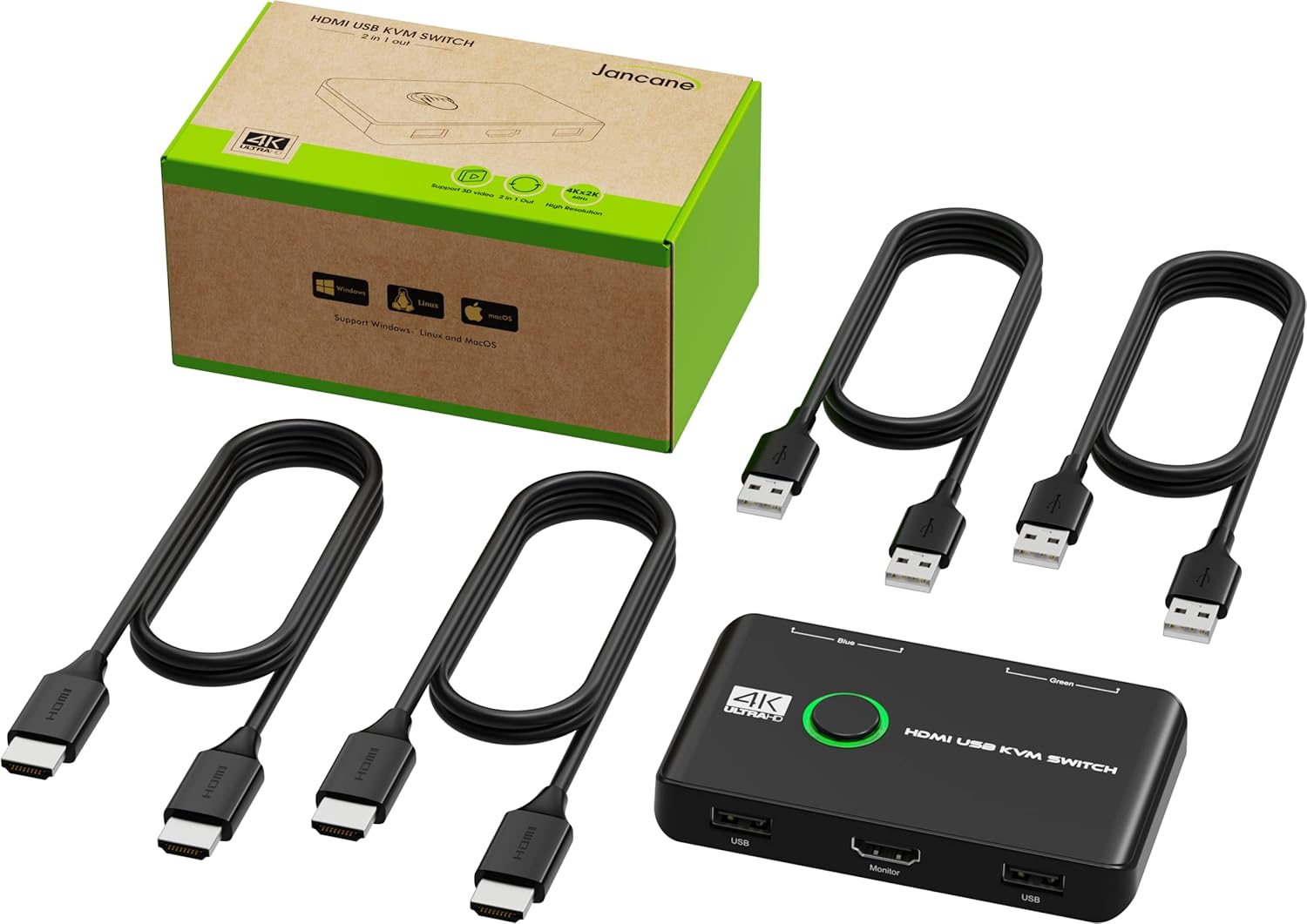
1PCS*KVM Switch HDMI
2PCS*HDMI Cables
2PCS*USB A to A Cable
1PCS*Manual
No need to buy USB & HDMI cables for your computers separately.
MORE INFORMATION
Feature 2 Computers Share 2 USB Devices and 1 Monitor Item Weight 0.55 lbs Package Dimensions 7.95 x 4.37 x 1.46 inches Operating System Mac os x, Linux, Windows xp, Chrome os, Windows vista, Windows 10 Resolution 4K@60hz, 4K@30hz, 1080P (pls make sure your setup and devices parameter support 4K) Interface Type USB & HDMI Indicator Light Blue & Green

Add To Basket
Add To Basket
Add To Basket
Add To Basket
Customer Reviews
4.3 out of 5 stars 1,301
3.8 out of 5 stars 16
3.7 out of 5 stars 66
4.1 out of 5 stars 50
4.2 out of 5 stars 28
4.3 out of 5 stars 1,301
Price
£17.99£17.99
— no data
£17.99£17.99 £19.99£19.99
— no data
£12.49£12.49
Interface Type
HDMI + USB HDMI + USB HDMI + USB HDMI + USB VGA USB
Input Ports
Max 2 Computers Max 2 Computers Max 2 Computers Max 2 Computers Max 4 Computers Max 2 Computers
Output Ports
2*USB + 1*HDMI 3*USB + 1*HDMI 4*USB + 1*HDMI 2*USB + 1*HDMI 3*USB + 1*VGA 4*USB 3.0
Monitor Connection Type
HDMI HDMI HDMI HDMI VGA /
Max Resolution
4K 4K 4K 4K 1080P /
Control Way
Button Switch Button Switch/Wired Remote Control Button Switch Button Switch/Hotkey Button Switch Button Switch
Features
2 Computers Share Keyboard and Mouse with 1 HD Monitor 2 Computers Share 1 Monitor and 3 USB Devices 2 Computers Share 1 Monitor and 4 USB Devices 2 Computers Share 1 Monitor, 1 Mouse and 1 Keyboard 4 Computers Share 3 USB Devices with 1 Monitor 2 Computers Share 4 USB Devices
【USB KVM Switch HDMI】This KVM Switcher help you use one set of keyboard,mouse,keyboard and printer to control 2 computers.You can easily switch between two displays.KVM switches keep your work space tidy and make your life simpler and more efficient.
【Ultra HD 4K@60Hz Visual Enjoyment】This HDMI USB KVM switch supporting resolution 4K@60Hz,make image display more exquisite and realistic,color is more bright and moving,really give a feast for your eyes.
【Support One-Key Switch】Rybozen kvm switch has a one-key switch button on the top, no need to plug and unplug, one-key switch 2 computers, share 3 USB devices. The best solution for people who need to use 2 computers.
【Great Compatibility,Driver-Free】This kvm hdmi switch works with great compatibility, driver-free for Windows 10/8/8.1/7/Vista/XP and Mac OS, Linux, and Chrome OS, simply plug and play.No external power required.
【Support for Multiple Devices】HDMI KVM switch box supports multiple input devices or signal source switching, such as PS4, PS4 Pro, PS3, Xbox One, TV Box, PC, laptop, Nintendo Switch, most of which support HDMI equipment.
Customers say
Customers find the USB switch works well with Linux and is easy to set up, taking just 2 seconds to switch between machines. The device effectively switches between two computers, comes with necessary cables, and takes up minimal space. Customers consider it good value for money. Build quality receives mixed feedback, with some finding it well-made while others describe it as flimsy.
7 reviews for 4K KVM Switch HDMI 2 Port Box, Rybozen USB HDMI Switches for 2 Computers Share Keyboard Mouse Printer and one HD Monitor, Support 4K@60Hz, with 2 USB Cables and 2 HDMI Cables
Add a review
Related Products


Original price was: £19.99.£17.99Current price is: £17.99.
wisebuyguy –
Excellent price and performance
I was frankly amazed at how well this performs given the low price and small size. It was really easy to set up and worked immediately, sharing mouse keyboard and monitor to one Windows 7 PC and one Windows 11 PC, without any problems. No grainy pictures or picture interference and switches quickly and reliably. All that at a very good price considering all cables are also provided, so extremely satisfied. The only puzzle to solve was which PC it was switched intitially to so I got a “no monitor input” message when I booted the first PC, but soon fixed when I switched it.BTW if, like me, you are wondering how it shares two USB ports (in my case keyboard and mouse) to each computer when there is only one USB output to each, the receiving computers work it out without any problem.
Tom –
Use 2 PCs with 1 monitor, keyboard and mouse
This worked well for my needs, enabling me to use my personal desktop and work laptop on the same monitor, using the same keyboard, mouse and other USB devices. As long as you read the manual as what to plug where it was simple to set up and worked first time. I also used a USB hub as an input, so although there are only 2 USB inputs I was able to use an existing hub to also connect other USB devices such as headsets as well as my keyboard and mouse. Would recommend!
Boroie –
It works
This does exactly what it is supposed to and works seamlessly. It switches monitor, mouse, webcam between a personal computer and a work laptop and has never failed to work. It is very simple to use with a big button to switch. The cabling situation is annoying as they connect on the front and the back of the device which leads to a mess of wires all over my desk, I would prefer if it could be more tidy. Also it seems that it doesnt support usb 3 which is not the biggest deal. Overall this is cheap and cheerful and definitely exceeded my expectations.
SmokeyJoe –
Cheap, small, lightweight – most importantly it works
I bought this to solve the problem of having 2 laptops (one work, one home) – I wanted to route both laptops through my large monitor and be able to switch between them easily.The USB’s are used for a wireless keyboard / mouse and a webcam.Happy to report it works a treat – press the button and the keyboard/mouse & webcam work on the laptop routed through the monitor. The other laptop then functions as if it had none of these things plugged in. Press the button again and it switches the monitor, keyboard/mouse & webcam to the other laptop. Simple.
Toastie –
Works well but some restrictions
It’s easy to connect up to 4 usb devices to share on two pcs (as pic I use a personal desktop pc and a work laptop). The laptop is tightly controlled by the company so memory cards can’t be used but this device still works fine. I did have to switch out my gaming keyboard for a standard non illuminated because the gaming keyboard didn’t work but this is likely to be due to the power output of the laptop usb port as the keyboard did work when running the desktop. The unit does need to plug into a 5v usb port (marked with a small lightning symbol)
Boris UK –
This KVM switch works perfectly
I am surprised how easy to install this KVM switch was and how reliably it works. I plugged everything in, tidied up the longer cables behind the desk and had everything running in 10 minutes. I have used the switch since then probably 500 times to switch between my two computers and one monitor/keyboard/mouse, and everything worked perfectly. For the fairly-low price I was expecting some reliability issues, the odd freeze and reboot every now and then, but this switch just works.
David –
In My Experience, An Unsuccessful Product — No Video Signal Recognised By My Monitor From This Unit
I was a little surprised at the number of positive reviews for this product.Perhaps I have been unlucky in my own case. Here is my (regrettably negative) experience with this product.===========================================Usage Parameters:I needed a simple KVM switch to allow me to switch quickly between my personal desktop computer, and my work laptop, while using the *same* keyboard, mouse and monitor for each. Hypothetically, this product *should* have allowed me to do that.===========================================PositivesThe unit is very simple and intuitive in its design.===========================================Negatives(1) Most importantly, the unit I received did *not* work properly for me. USB connectivity and signal over both my systems was successful. *However*, video output, to my monitor, was unsuccessful over both systems. My monitor would not recognise a video signal from the KVM switch unit.(2) Build quality, contrary to what I have read in other reviews, is cheap, light-weight, and plasticky. This is clearly a cheap unit, built to a price-point. It’s not the *worst* build quality on the market, but there are better built units out there. In particular, there are many other KVMs switches sold on Amazon with better build quality, at a similar price. Many of them have reasonably good quality metal housings for instance.(3) Port placement results in a messy overall solution on your desk. Ports and placed on the front *and* rear, resulting in messy cable routing. Admittedly, this is a problem with a number of KVMs on the market.===========================================Neutral Observations(1) The unit is *unpowered*, if that is important to you. (Personally, I don’t mind using either powered or unpowered KVM switches, as long as they are reliable and work properly.)(2) Bundled cables are cheap and generic. This is the case for all KVM switches on the market. This one is no different. Usually, I use the provided USB cables, but use my own (separately purchased) HDMI cables.(3) As the pictures indicate, the bundled USB-cables (and connectors on the unit) are USB-A to USB-A.(4) Some reviewers have asked for a better manual/documentation. (Personally, I don’t think you need an extensive manual for a simple KVM switch like this.)===========================================What I Did In The End, Plus Some General Commentary on KVM Switch UnitsSadly, this product was unsuccessful for me. In the end, I switched to an alternative KVM switch product, which worked successfully. I won’t advertise the other unit, as there are many different — and perfectly feasible looking units — on Amazon, from which you can take your pick.Overall, KVM switches can certainly be a mixed-bag in terms of product quality and reliability. In my own case, I have had to buy a small sample of units, then work my way through them until one of them worked reliably. Also, some have failed after about 1 year, and needed replaced. At time of writing, the KVM switch market is a strange one.