

Arteck Bluetooth Keyboard for Mac iPad Multi-Device Stainless Steel Full Size Wireless Keyboard Compatible with iPad, iMac, Mac mini, MacBook, iPhone, Mac OS, iOS, Built-in Rechargeable Battery
Original price was: £33.99.£28.49Current price is: £28.49.



Price: £33.99 - £28.49
(as of Jun 10, 2025 12:47:12 UTC – Details)
Mac OS, iOS, Compatible
Fully functional to Apple users operating system: Mac OS / iOS, and features system-specific function keys for each operating systems. The keyboard supports any version of the Mac OS, iOS . And it supports iMac, iMac Pro, Mac Pro, Mac mini, MacBook, MacBook Air, MacBook Pro, iPhone, etc.
Industry Leading Ergonomic Design
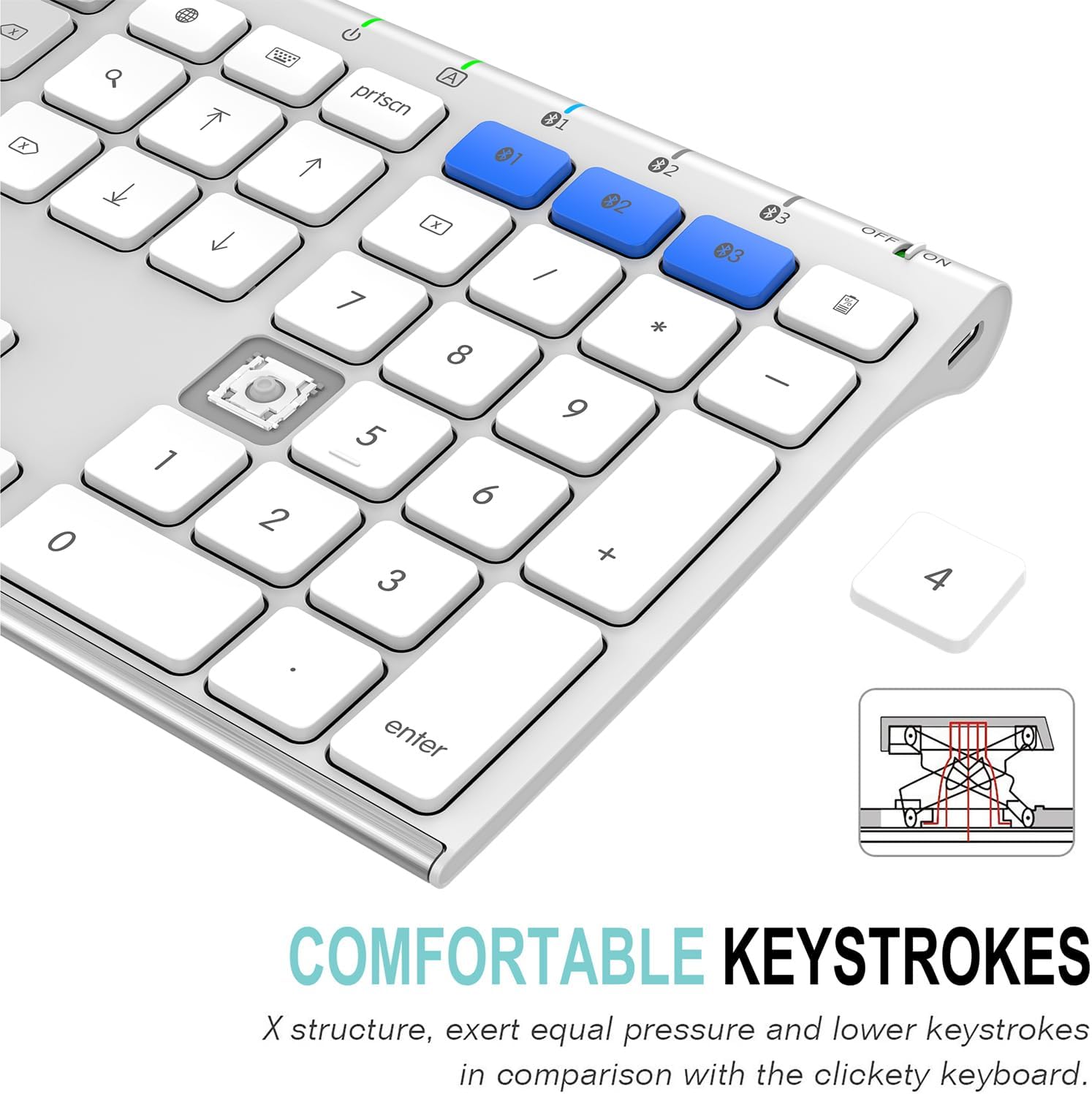
Stainless steel material gives heavy duty feeling and the low-profile keys offer quiet and comfortable typing.
It allows you to gain quick access to common functions, such as volume level, playback control, brightness, and more. It also provides arrow keys, number pad with slim and compact design.
Switch Between 3 Devices with A Single Clicking
This keyboard is able to connect to 3 devices at the same time. After you pair the keyboard with 3 devices by long pressing the blue key at the first time, you can simply switch the keyboard to type on any of the device with a single key clicking.
Comfortable, quiet typing
The whisper-quiet, low-profile keys bring a whole new level of comfort to your fingertips. What’s more, keep all your most-used functions and media controls closer than ever Windows-dedicated hot keys.
Keyboard with scissors kick construction can be used more than 3 million times continuously.
Rechargeable Battery
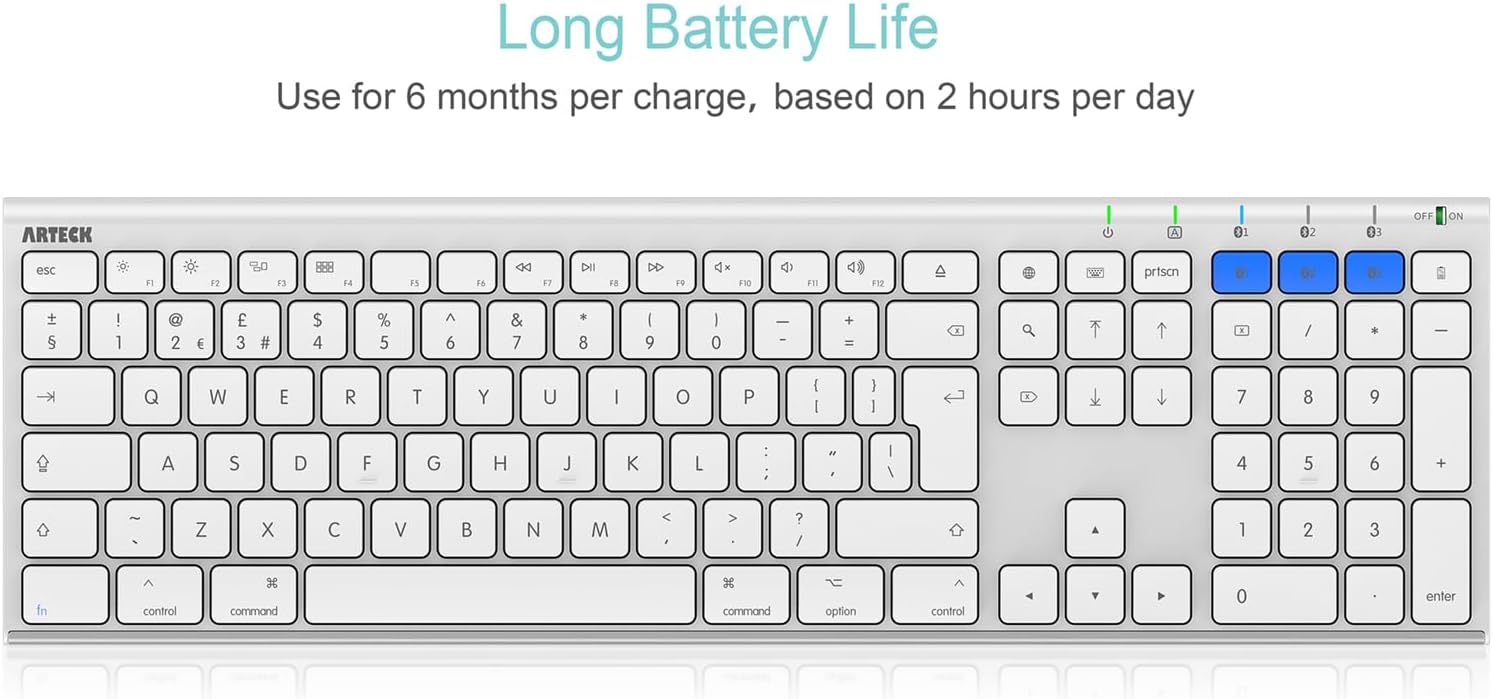
Built-in industry-high rechargeable Li-polymer battery provides 6-month use on a single charge. (based on 2 hours non-stop use per day)
Mac Layout: Similar with Mac Magic Keyboard layout so you will be familiar with it. The layout is friendly to iPhone users as well.
3 Devices Switch with A Single Clicking: This keyboard is able to connect to 3 devices at the same time. You can switch between 3 devices with a single key clicking.
Ergonomic Design: Stainless steel material gives heavy duty feeling, low-profile keys, full size keys, arrow keys, number pad, shortcuts offer quiet and comfortable typing.
6-Month Battery Life: Rechargeable lithium battery with an industry-high capacity lasts for 6 months with single charge (based on 2 hours’ non-stop use per day).
Package contents: Arteck Stainless Bluetooth Keyboard, USB charging cable, welcome guide, our 24-month warranty and friendly customer service.
Customers say
Customers find the keyboard to be a solid, sleek device that works well straight out of the box and is easy to set up. They appreciate its battery life and consider it good value for money. The connection strength receives mixed feedback from customers.
12 reviews for Arteck Bluetooth Keyboard for Mac iPad Multi-Device Stainless Steel Full Size Wireless Keyboard Compatible with iPad, iMac, Mac mini, MacBook, iPhone, Mac OS, iOS, Built-in Rechargeable Battery
Add a review
Related Products


![ASUS TUF Gaming K1 RGB Keyboard, 5-Zone RGB, Membrane Switches, 19-Key Rollover, Dedicated Volume Knob, Spill-Resistance, Side Light Bar, Programmable Macros, Black [UK Layout]](https://i3.wp.com/m.media-amazon.com/images/I/61FlfyGpDdS._AC_SL1500_.jpg?w=300&resize=300,300&ssl=1)


Original price was: £33.99.£28.49Current price is: £28.49.
Hairy Ears –
Decent keyboard
Bought this to replace an old and dirty wired keyboard.Pairing with my Mac Mini was straightforward, although you are going to need another keyboard to get yourself logged in first as this won’t pair automatically like an Apple Magic Keyboard.Compared to my previous keyboard (a genuine Apple one) the return key is only on a single row (adjacent to the quote key) and the backslash key is now where the top part of the return key used to be next to the right hand square bracket. Not a big deal for me, and I’ll get used to it.I like the feel of the keys, enough travel and tactile feedback for my preferences.There are some reviews that say that the function keys don’t work – for me, they work just fine (MacOS Sonoma 14.2.1) both as normal F1 to F12, and with the short cuts. (Obviously the brightness ones don’t because I am using external monitors).One minor quibble – USB micro B for charging?? I long for the day that those things get retired completely, but that’s just a personal bug bear of my own.All in all, this is a good solid affordable keyboard, which I have just used to type this review.
Nigel Robinson –
A respectable good looking keyboard.
I bought this keyboard when my windows desktop went into retirement and I decided that instead of investing in another Desktop I would use my MacBook Air linked to a monitor.Doing this meant all my work was on apple devices and navigation became a lot easier however the cost of an apple keyboard was, at the time out of my reach. Which is when I elected to purchase the Arteck Keyboard.Aesthetically this looks good and well it is easy to connect to my MacBook via Bluetooth and I can add a further two devices. In use I find the keystrokes are very responsive and quite quick. It took me a little while to get used to the apple keyboard and different strokes required but once I have got used to that typing was easy. Battery life is excellent and I have only charged it once in 10 months.Just into the new year I did experience a problem with connection drop outs lasting a few seconds and after trying all options this did not resolve.This is where the good bit came in on page 3 of the Instruction manual I found the email for support with a note saying “We will solve your issue with 100% satisfactory solution”. And how true that statement was.I wrote to support and received a response within a few hours requisition the Amazon order number which I submitted and again within a few hours I was then told that the keyboard would be replaced with a new one and requested my address which I sent immediately. So from submitting my initial request for advice to receiving a new replacement keyboard took 5 days.I believe the connection drop out was an unfortunate glitch which was irritating at the time was out mastered by the companies outstanding friendliness and customer service.I have no hesitation in in both recommending this product and the company who makes them.
Steve –
Works well, good value for money
I had to replace my original Apple Magic Keyboard when it developed a fault after 12 years. I was initially hesitant about this as it seemed so cheap but so far so good.All the function buttons work well which other reviewers have had issues with. It looks pretty decent, the keys feels good, you canât go wrong for the price.A word of caution⦠you need to pair the Bluetooth to your device before you can use it. In my case my iMac is password locked, so I had to try and get my old keyboard working in order to enter the password to log on and then pair the new keyboard. Without the old keyboard I wouldâve been stuck. Now that itâs paired it works as soon as the computer switches on without problems.
Argy Bargee –
Sturdy design
Bought this as a replacement for my wired Mac keyboard when a line of buttons stopped working (an all too common fault). Decided to opt for Bluetooth to free up USB-C ports on my MacBook Pro. I have the laptop on a stand on a desk where I use additional screens, so to use the MacBook keyboard is awkward.Connection was straightforward. The idea I could use the same keyboard for my iPad appealed, but Iâm yet to use it for that purpose. Itâs all connected and ready to go though.Iâve noticed a slight lag sometimes with keys, but not sure whatâs causing this. It could be stray cat hairs I guess, but Iâm not sure as I canât see anything. The battery lasts a decent amount of time, hard to say exactly as my usage varies from week to week.Reading reviews for other keyboards there seemed to be issues with plastic ones flexing but, being metal backed, the flex on this one is minimal. Also pleased to have the extended keyboard. My only slight gripe is the return button is one of those small ones so I often hit the wrong key.All in all itâs pretty decent, and you canât complain at the price.
P. van Win –
Does exactly what it is advertised to do
This keyboard was purchased for its ability to control 3 devices wirelessly. I use it with 2 PCs and an iPad. LED’s show which device it is connected to and a simple keypress switches to another device. It is quite hefty with the base being made of metal with a brushed aluminium finish. The keys are responsive and have no problem with keeping up with a touch typist with a speed of 50 wpm. All my devices were found and connected to via Bluetooth quickly and so far the connections have been rock solid.This replaces another very much more expensive which was said to offer much the same facilities but which performed very badly. All in all I am very pleased with this, only time will tell if I remain so.
Jonathan Sadler –
don’t waste your money – magic keys do not work
Bought this for my Mac M2 mini. Looks good, decent build quality but it just doesn’t do what it says on the tin. The magics keys do not function. I tried numerous ways of reinitialising it but it failed. It’s a return for me.
znepfiig –
Great service from the support team
I bought the keyboard from Amazon and initially, the Apple function keys did not work as expected. After contacting their support team, they proposed to sent me a replacement keyboard, which arrived in about 3 weeks. The new keyboard was perfect and all the Apple magic keys work as it should. Battery life for the keyboard is good too. Excellent purchase.
RetiredEE –
I’ve been looking a long time for alternatives to Apple’s keyboards, which I find to have a very horrible feel to them. True, they have very good battery life and work flawlessly with Apple products, but you expect that with them. It’s the everyday interaction with the keyboard that you must deal with, and Apple’s keyboard feel with their very short travel are simply awful.I took a gamble on the Arteck keyboard because of two keyboard layout features that appeal to me. First, the space bar is a bit wider than almost all the other non-Apple keyboards. I tend to hit the Space bar with my right thumb right under the M key. With other keyboards, such as the Macally, the Space bar’s right side coincides exactly with the M key’s right side. But with the Arteck, it extends another half inch to the right, under the mid-point of the Comma key. With the Macally keyboard, I found myself seemingly hitting the Space bar and getting no result, only to see that I was hitting the Command key instead. That is, my right thumb was a little too far to the right to hit the Space bar. This is no longer a problem with the Arteck layout due to its wider Space bar at the right hand side.Second, the placement of the Function key is located at the bottom row, left-most position. On many keyboards (but not the Macally), they move the Function key one position over to the right and push the Control key to the left-most position instead. Since I never use the Function key, but sometimes have to use the Control key, I prefer the positioning of the Control key next to the Option key.One minor annoyance are the 3 blue keys that stand out like blue sore thumbs. Their labels are black on a dark blue key, which make them almost impossible to read. I get their function. It’s just that they look awkward. These keys let you pair the keyboard to 3 different computers or tablets if you choose to.One oddity is that once you have paired the keyboard to your computer, then that key’s LED remains lit as long as the keyboard is awake. It goes off when the keyboard goes to sleep. I gather that they have used a highly-efficient blue LED that consumes only 50 microamps or the like, but still … it is wasted power that could be saved, increasing the length of time between battery charges. They could easily flash the LED once every second or two to indicate “still awake and connected!” which would save a lot of this wasted battery power. However, I have been using the keyboard for a week, and using it a lot, but when I hit the power key (top right hand corner) to check on the battery’s state of charge, I get four flashes of the three blue LEDs telling me that the battery is still “fully charged.” The visual readout of the battery’s state of charge is 4, 3 2, or 1 flash, indicating “full charge” down to “almost empty,” respectively. You have to interrogate the keyboard to get a visual indication of battery state of charge.I have had no problem waking the keyboard after it has gone to sleep. A single peck of a key awakens the keyboard. Another peck of a key wakes up the iMac, so you’re ready to go. Perfect! I have turned off the keyboard a few times (there is a switch at the very top right of the keyboard to do this) and when I slide it back on, the keyboard fires right up, a peck to wake up the iMac, and I’m good to go. Perfect again!The Bluetooth connection is excellent. I detect zero delay between my typing input and the response seen on the monitor, identical to what I would see with a wired USB keyboard.I very much like the rectangular keys. The two home keys (F and J) ridges are high enough that they can be felt when touched, but low enough to not be annoying. I can barely feel the Apple’s keyboards ridges, causing me to misplace my fingers and type away. My typing speed decreases significantly using the Apple keyboard.The back of the keyboard has a very nice-looking brushed aluminum or stainless steel look. It is quite elegant looking, not just some cheesy plastic back! Total weight is 15.5 ounces, just under one pound of weight, about 2 ounces LESS than my old Macally keyboard. It feels very comfortable on my lap, which is how I type.Now for the big negative of the keyboard, and this applies to ALL of the wireless keyboards out there: the markings on the keys are DECALS. Or printed on. I don’t know exactly what they are, but I can tell you this: if you type on one and the ends of your fingernails hit a key rather than fleshy bottoms of your fingertips, then as time passes, you WILL abrade away the markings on the keys! I burn through these keyboards at the rate of about one every 10 months. My Macally keyboard, which also has these printed on keys, has blanks on the following keys: E, D, K, L, C, V, J, K, and the Comma key. Wiped clean. Just white keypads. I have included a picture of my now-useless Macally keyboard to demonstrate the erosion of the printed on lettering. This is not an Arteck keyboard, but I am sure the Arteck will look like this in another year.That is why I started shopping for another keyboard and how I discovered the Arteck. Fortunately I am a touch typist and do not need to look at the keyboard to type, but this is an annoying problem. Apple’s keyboards use a more expensive “double-shot injection molding” process that makes the black markings on the white keys permanent â there is no wearing away of the black print! So in fairness, this issue is NOT confined to the Arteck keyboard. They ALL have this problem! Arteck has a 2-year warranty on their keyboard. Just record the Amazon order # and the date of purchase. I am going to wait for the usual keys’ markings to be scratched away and then see how good their warranty is! I won’t hold my breath.But overall, this is a very good keyboard, particularly for the price. You will NOT be disappointed with it. I’m going to buy a bunch of them and stockpile them away so that as the key printing starts fading, I’ll toss that one and replace it with a new one from my stored inventory. For this price ($21 minus a 20%-off coupon) they are like toothbrushes: use them until they no longer work right, then toss them and replace with another cheap one.And no, I was NOT paid to write this review!UPDATE 1/22/22: After 5 weeks of heavy use (often 8 hours per day), the battery finally reached “one flashing power light” and I put it on the charger. I cannot comprehend the review stating a battery charge lasts only a day or two. If that is the case, he has a bad battery. I like the Arteck so much that I have taken to buying another one with each Amazon purchase. It’s too good a value to pass up so I am stockpiling them!UPDATE #2 10/6/2024 After 3 years using the Arteck bluetooth keyboards, usually at the rate of about one year each, I remain very happy with them. I have bought several, “stocking up” on them while they are still available here on Amazon. The battery charge usually dies after about 6 weeks of use. I always let it put itself to sleep rather than manually shutting it off. My only gripe is one I was sure would be the case: the characters on the keyboard wear off after about a year due to my fingernails slowly scratching them off. I think all the low cost keyboards on Amazon suffer from this limitation, so it’s not unique to Arteck. That’s why I have bought several, knowing that I will eventually have to dispose of a perfectly-working keyboard only because I can no longer read the keys on the “home row.” It’s that time again, and I see the keyboard being discounted again, so I have just put another in my Cart!
Triz –
Update: I was contacted by the company and with apologies offered me a full refund for the original keyboard. I already have a new one of the same in place, and I have not changed my mind from my earliest review. This is the perfect keyboard in all ways. Especially the customer service that stood behind their product.Old comment.In December when this keyboard arrived, I knew I had found the perfect one. I have used it happily everyday until today, when in the middle of a big project, it began to type multiple characters that I did not type. I researched solutions online, tried them all, and it is just not working. Now, the delete function has stopped working as well. Everything about this keyboard was just what I wanted. Until today, less than four months later, it has died.
Christine M. Smith –
Some of the keys stopped working, then they worked again, then others stopped working. Communication with vendor was wonderful and they sent a replacement quickly. The new one is flawless so far.
Peter Tracy –
Had this for over a year. Works reliably and seamlessly between my Mac and PC. Love that itâs chargeable with USBC because I loathe buying batteries. Great keyboard.
Kristy D. Hester –
This keyboard works flawlessly with my iMac AND my 13â m4 ipad! Thereâs a switch on the keyboard that allows you to connect it to 3 different devices and the switch keeps the devices from competing for control of the keyboard if they are in the same area! I bought it to pair with my iPad, but my secondary reason was to also pair it with my iMac so I could utilize the number keypad that you donât have with magic keyboards. The battery life is outstanding, and I have NO issues with lag or connectivity. Solid product that pairs well with finicky Apple products, for a very budget friendly price!