

Arteck Universal 2.4G Wireless and Bluetooth Touch TV keyboard Multi-Device with Easy Media Control and Build-in Touchpad Wireless Keyboard for Smart TV, TV Box, TV-Connected Computer, Mac, HTPC
Original price was: £35.99.£31.99Current price is: £31.99.


Price: £35.99 - £31.99
(as of Jun 16, 2025 14:18:49 UTC – Details)
Wide Compatibility
This keyboard is compatible with your TV-connected computers, Raspberry Pi3, Xbox PS3, HTPC, etc.
And it’s compatible with Windows 10, 8, 7, Mac, Android, Chrome OS, etc.
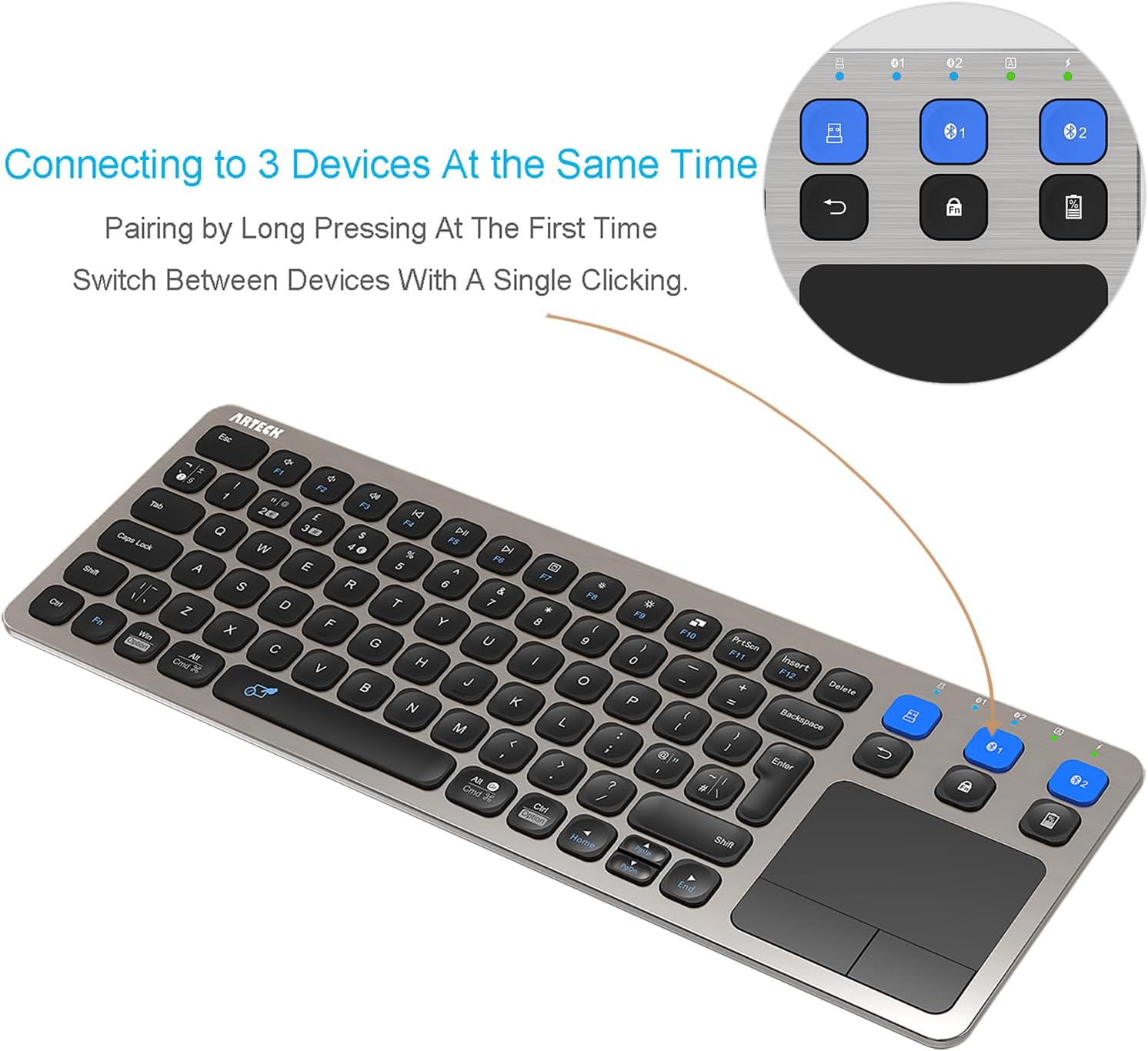
Switch Between 3 Devices with A Single Clicking
This keyboard is able to connect to 3 devices (2.4G USB Wireless + 2 Bluetooth) at the same time. After you pair the keyboard with 3 devices by long pressing the blue key at the first time, you can simply switch the keyboard to type on any of the device with a single key clicking.
The Keyboard will work up to 33 feet or 10 meters.
It allows you to gain quick access to common functions, such as volume level, playback control, copy paste text, and more. Touchpad allows you to move the cursor freely as the mouse.
Comfortable, quiet typing
The whisper-quiet, low-profile keys bring a whole new level of comfort to your fingertips. What’s more, keep all your most-used functions and media controls closer than ever Windows-dedicated hot keys. The construction of this scissors-kick keys can be used more than 3 million times continuously.
Enjoy Your Typing and Navigating in the Couch
The keyboard works up to 10 meters (33 feet) which allows you to sit in the comfortable couch and use the touch keyboard in the large room. Longer working distance makes the typing more enjoyable and trouble free.
3 Devices Switch with A Single Clicking: This keyboard is able to connect to 3 devices (2.4G USB Wireless + 2 Bluetooth) at the same time. You can switch between 3 devices with a single key clicking.
Wireless TV Keyboard with Touchpad: Enjoy the easily control of your TV connected computer or HTPC with the touchpad and the media hot keys.
10 Meters (33 Feet) Wireless Range: Enjoy trouble-free connection in the largest room and enjoy the TV control with the keyboard on the couch. (The range might be affected by the wireless environment, please plug the USB in the front of the computer to avoid shielding)
Wide Compatibility: Works with Windows 11, 10, 8, 7, Mac, Android, iPad, Chrome OS, TV-connected computers, Desktop, Laptop, iMac, Macbook, HTPC, etc.
What You Get: Arteck HD197 Wireless Keyboard with Touch Pad, nano USB receiver, USB charging cable, welcome guide, our 24-months warranty and friendly customer service.
Customers say
Customers find the keyboard well-designed with a nice layout and appreciate its functionality, build quality, and rechargeable battery that lasts a long time. The Bluetooth connectivity works well with both Apple and Android devices, and they like the buttons, with one customer noting the separate L/R mouse buttons. The touchpad receives mixed feedback, with some saying it works well while others find it not as good, and setup experiences are also mixed.
6 reviews for Arteck Universal 2.4G Wireless and Bluetooth Touch TV keyboard Multi-Device with Easy Media Control and Build-in Touchpad Wireless Keyboard for Smart TV, TV Box, TV-Connected Computer, Mac, HTPC
Add a review
Related Products


Original price was: £35.99.£31.99Current price is: £31.99.
David Evans –
Looks good, works good, by golly it IS good !
People who know me will tell you I don’t give 5 stars easily ! But this is a real exception to that rule. Rechargeable and the battery last days of operation. It has a simple one press, 4 light flashes (25,50,75,100 %) charge indicator. Charging cable is included, but it’s a standard micro-USB anyway. 37cm wide it fits (IMO) perfectly in your lap and is light but the keys are big enough to operate easily. I don’t know about you but I don’t like keypads that are too small and fiddly. As Goldilocks once said this is “just right” ! Simple connectivity by radio to USB dongle, need to be fairly close but no problems or Bluetooth. I’ve connected to ; PC, Fire-stick, iPhone, Android mobiles all with no issues whatsoever. Good looking black and brushed aluminum with built in mouse pad and left and right mouse buttons where the numeric keypad would be on a regular keyboard. Mouse pad again (IMO) is just right, not sluggish and not lightening fast that you can’t see it ! The fact it’s mobile and can be used with many different devices make this a great thing to have in a modern household, especially if (like me) you hate typing on remotes. Just get one or stick it on your Christmas list !
Woodgnome –
Saves a lot of desk clutter, easy switching between devices
With 2 PCs it is inconvenient littering a desk with 2 keyboards and 2 mice so I jumped at the opportunity to get this keyboard with trackpad because it supports 3 devices with easy switching between them.But really I would not have done so if it had not been for developing bad RSI from unavoidable over-use of a mouse, reason being that I am hopeless with trackpads, I always give up on them and use a mouse, but here I had a reason, the need to let my hand recover from mouse-induced RSI.So I eagerly set up the new keyboard and quickly had it working with 2 PCs. The non-Bluetooth connection with the dongle works well. Bluetooth connections to PCs I find are flaky because of the inadequacies of Microsoft’s Bluetooth implementation in Windows, leading to missed button-clicks, missed movement, and so on, so for my main PC I always use a non-Bluetooth connection.I made an effort to adjust to using the trackpad, which Windows sees as a mouse, so I adjusted the mouse options in the Settings app, which helped. But I quickly discovered why I never got on with trackpads in the first place. Firstly I find using a mouse is much quicker, I can’t get the knack of using a trackpad quickly, I’ve tried, but it just doesn’t work for me. The other problem is that occasionally my little finger would accidentally graze the trackpad, something which, with time, I might learn to avoid, but it caused me no end of confusion wondering where my text cursor had vanished to, as that light graze caused focus to switch to another app. Not the fault of the keyboard or its trackpad, just MY fault in not being able to re-train myself.So I persisted for a couple of days, by which time my RSI had lapsed somewhat, so I went back to my familiar keyboard (also an Arteck!!!) and (Anker) (vertical) mouse. But I keep the new keyboard handy for when I need it. It is always useful to have spare items such as this, you never know when you will need them.Incidentally the trackpad can be disabled and the keyboard itself has a nice action and a good layout. Not quite as quiet as my other (first) Arteck keyboard but good enough. I did notice however that on occasions I would press a key hesitantly and get 2 characters appear in my edit, which suggests debounce is not as good as it should be. Not a problem I have with my first Arteck keyboard.So I am glad I got this keyboard, and using it with the trackpad disabled is an option if I can’t fix my tendency to accidentally graze the trackpad. The trackpad incidentally responds to 2-finger movements for scrolling, which is good.I also like the fact that, as with my other Arteck keyboard, it is rechargeable, which saves a lot of hassle with batteries. And lastly, the keyboard is stylish, smart-looking, and it does not wobble or shake, as it has good resistive feet on the underside. As well as an on/off switch in case it is not being used for a while. AND a recess with a magnet to retain the USB dongle used for the non-Bluetooth connection.Overall, it’s a very versatile keyboard. Not often you get something this versatile.
roy simmons –
This Keyboard is Great!
The keyboard arrived with minimal packaging that was easy to get in to. A bonus nowadays. The keyboard build, although it is classed as a budget model, is first class. It is of steel construction and feels very substantial. All they keys work well and are similar to those on my laptop. When touched they depress a little so that you know that you have used them. The trackpad is very sensitive and responsive and has a left and right mouse key, as well as the ability to respond to a finger tap. I bought the keyboard to use with the internet etc., on my new Samsung Smart TV using Bluetooth. The only downside that I found with the keyboard was that the keyboard would not connect to the TV by using the instructions that came with the it. However, this was easily solved by looking on the web and finding a YouTube video that explained how to do it. The video instructions were easy to follow and I had the keyboard up and running in no time. Happy to report that it now works like a dream with my TV. A great buy 🙂
Amazon Customer –
Well made
I think it’s nicer than it looks in the ad photos.Easy to set up and works well.
Sean Fowler –
Clicky, poor range
The keyboard isn’t pleasant to type on, quite a poor feel. Maybe not surprising with such little travel.The most annoying thing is the range. The keyboard is pretty close to the receiver but still it’s all but unusable. The Bluetooth works better but still loses connectivity at times.The keyboard goes to sleep very quickly which means having to press a key to wake it up before you can use the trackpad. The pad itself is ok.Switching between devices works very well.
Nikita Yaschenko –
Low range — unusable
tl;dr: don’t waste time and money and listen to other reviews mentioning short working range.Biggest flaw — both Bluetooth and USB dongle working range are the worst I’ve ever seen. For USB dongle it will work ONLY in direct sight of it, and 2-3m max. Anything obstructing direct sight to dongle will make keyboard unusable — even if you put it on your laps in front of TV, it will stop working. If you turn it a bit, it will stop working. BT is a bit better but the same overall — won’t connect to my laptop under TV in a closet behind thin wooden door.Keyboard itself is pretty nice for this price (metal panel, good buttons, has touchpad, sturdy), and having two BT connections plus USB dongle is a big advantage but it is COMPLETELY ruined by the fact that nothing works unless the keyboard is <1m from the connection source.