

Canon PIXMA TS3452 Colour Inkjet Printer Multifunctional Device DIN A4 (Scanner, Copier, Printer, 4800 x 1200 DPI, LCD, WLAN, USB, Apple AirPrint, PIXMA Cloud Link, Duplex Printing), Black White
£85.00
Price: £85.00
(as of Jun 05, 2025 00:59:38 UTC – Details)
From the manufacturer

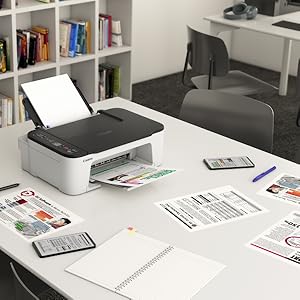
Very simple intelligent
With its compact, modern design and excellent value for money
you can print, scan and copy effortlessly. It’s very simple!
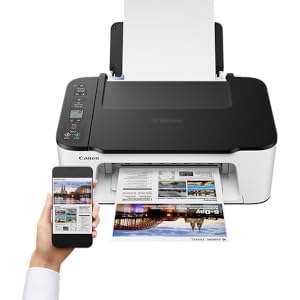
Compatible with mobile devices
You can print, copy and scan from your tablet or smartphone – everything wirelessly and with simple operation.

Easy to set up – just get started!
Thanks to the wireless one-touch connectivity and straightforward setup, you are ready to go in no time.

You must have seen this
Status updates are clearly visible on the 1.5 inch black and white LCD

Rimless prints
You can print borderless photos up to a size of 13 x 18 cm; a 10 x 15 cm photo is only approx. 65 seconds* done. You can also connect a camera directly to the system via WLAN PictBridge technology.
*The photo printing speed is based on the default setting according to ISO/JIS-SCID N2 and the photo gloss paper Plus Glossy II. The time the host computer takes to process the data is not taken into account.
Add To Basket
Add To Basket
Customer Reviews
4.2 out of 5 stars 544
4.1 out of 5 stars 1,694
4.2 out of 5 stars 503
4.4 out of 5 stars 981
4.3 out of 5 stars 809
Price
£85.00£85.00
— no data
£115.84£115.84
— no data
— no data
Available features
WiFi, printing, scanning, copying, cloud WiFi, printing, scanning, copying, cloud WLAN printing, scanning, copying, ADF, cloud WiFi, printing, scanning, copying, cloud WiFi, printing, scanning, copying, cloud
Printing technology
Inkjet printing, 2 fine print heads with ink Inkjet printing, 2 fine print heads with ink ChromaLife100 inks Inkjet printing, 2 fine print heads with ink ChromaLife100 inks Inkjet printing, 5 separate inks, ChromaLife100 inks Inkjet printing, 6 separate inks, ChromaLife100 inks
A4 print speed (documents) in ISO pages/min. (approx.)
7.7/4.0 ISO pages/min (SW/Colour) 13.0/6.8 ISO pages/min (SW/Colour) 13.0/6.8 ISO pages/min (SW/Colour) 15.0/10.0 ISO pages/min. (SW/Colour) 15.0/10.0 ISO pages/min. (SW/Colour)
Print speed 10 x 15 cm borderless photo (approx.)
65 seconds 43 seconds 43 seconds 21 seconds 17 seconds
Other printing functions
– no data
Automatic double-sided printing Automatic double-sided printing Automatic double-sided printing Automatic double-sided printing, multi-purpose insert, printing suitable discs and fingernail stickers
Optical scan resolution (max.)
600 x 1,200 dpi 1,200 x 2,400 dpi 1,200 x 2,400 dpi 1,200 x 2,400 dpi 2,400 x 4,800 dpi
Display
1.5″ Black and White LCD 1.45″ OLED Display 1.45″ OEL Display 1.45″ OLED Display 4.25″ Color Touch Screen4.25″ Color Touch Screen
Connection options
USB, WiFi Access Point Mode, WLAN PictBridge USB, WiFi, WLAN PictBridge, Wi-Fi Direct, Bluetooth USB, WiFi, WLAN PictBridge, Wi-Fi Direct, Bluetooth USB, WiFi, WLAN PictBridge, Wi-Fi Direct, Bluetooth USB, WiFi, Memory Card Slots, WLAN PictBridge, Wi-Fi Direct, Bluetooth
Paper supply (max.)
60 sheets (paper feed at the back) Rear: up to 20 sheets (photo paper) or up to 100 sheets (plain paper) front paper case: up to 100 sheets (plain paper) Rear: up to 20 sheets (photo paper) or up to 100 sheets (plain paper) front paper case: up to 100 sheets (plain paper) Rear: up to 20 sheets (photo paper) or up to 100 sheets (plain paper) front paper case: up to 100 sheets (plain paper) Back paper insert: up to 20 sheets (photo paper) or up to 100 sheets (plain paper) paper cassette front: up to 100 sheets (plain paper). Multi-purpose: Printable fingernail stickers (NL-101)/1 printable CD, DVD or Blu-Ray disc
Dimensions (W x D x H)
435 x 327 x 145 mm 403 x 315 x 148 mm 403 x 364 x 206 mm 376 x 359 x 141 mm 373 x 319 x 141 mm
Intelligent printing: the multifunctional printer has a compact, modern design, excellent value for money and allows effortless printing, scanning and copying. Connect button makes WiFi setup a breeze
Compatibility with mobile devices – wireless printing: print, copy and scan directly from the tablet or smartphone
Print without edges – the printer allows fast photo prints up to a size of 13 x 18 cm – a camera can also be connected directly to the printer via WLAN PictBridge technology
Everything at a glance – Status updates on the inkjet printer are clearly displayed on the 3.8 cm (1.5 inch) black and white LC display
Box contents: Canon Pixma TS3452 multifunction system black and white, fine colour inkjet print heads with ink PG-545 and CL-546, power cable, setup CD-ROM (CD only for Windows), quick start guides and other documents
Customers say
Customers find the printer easy to set up and operate, with good print quality and functionality for their needs. They consider it good value for money, with one customer noting its economical ink usage. However, some customers report issues with the printer being faulty and running out of ink quickly.
13 reviews for Canon PIXMA TS3452 Colour Inkjet Printer Multifunctional Device DIN A4 (Scanner, Copier, Printer, 4800 x 1200 DPI, LCD, WLAN, USB, Apple AirPrint, PIXMA Cloud Link, Duplex Printing), Black White
Add a review
Related Products


£85.00
Happy Customer –
Does the job.
It was very easy to set up and use.This is the 2nd one I have had and have found the quality and appearance to be good.It performs well, I have found the ink very economical, and I haven’t had any problems with jams on either printer.
Grampy Brace –
Great printer for the money.
Great printer for the money. Prints well and only has two ink cartridges (One Black and a multi colour ink Cartridge) Scans and photocopies too. There is no USB connection but connects easily through Wi-Fi. If you want to print double sided, you need to take the paper out (for example a four page document) and reinsert the paper already printed – odd pages to print the even pages – which is a bit of a bind. My old canon printer did this automatically. As I’m now retired I don’t do much document printing so this isn’t an issue for me. Over all, a great value for money printer.
Linsfella –
Set up soooo easy.
Great printer, great price. VERY easy to set up and run from my Samsung .
JN –
Good value & excellent tech support
If you want a neat tidy printer in your home that looks nice and doesnât have to churn out reams of paper everyday , then this is it. It isnât too swift though, and has a clicking language all its own. It does allow me to print seamlessly from computer, laptop and iPhone ⦠so perfect for me personally.
BeckyJ –
Easy set up
Well packaged for delivery. Lightweight. Small in size. Easy to set up and very easy to use. Good printer
Sally Lancs –
Useless
This is the worst printer I have ever had. Instructions are none existent and you have to search online to try and operate rectify error codes. I still haven’t been able to set it up correctly and the WIFI remote never works. I have to have it permanently hard wired with a USB cable. Its always throwing up errors and I have never been able to get it to work properly. I bought it it June 2023 and I have given up with it. In one word, Useless..
M. M. Simpson –
Didn’t last long
Purchased in Sept 23 worked well and wifi connectivity failed this week so now returning.
Tempo –
Good basic printer.
Print quality is good, and straight through back to front paper feed is excellent – no convoluted paper path. Only gripe is that when used as a stand alone photocopier it cuts approximately 1cm off the top and one side of the paper. (Fortunately, I also have a near identical TS3100 that works perfectly).
Martin Koors –
Ok
biancacavallini –
mi piace
Pablo –
La instalación en chromeOS no fue posible de forma automática, pero al final se consigue usando la dirección IP de la impresora.Primero instalé la app en el móvil y una vez conectada a la wifi de casa fue fácil de instalar en el Chromebook con la IP.La tinta que trae preinstalada dura bastante poco.
Aurore Buyst –
L’Imprimante ne fonctionne plus au bout de quelques semaines seulement
IRIS SPENGLER –
Preis- Leistung bist super