

DisplayLink Docking Station for MacBook M1/M2/M3/M4, VENTION 11-in-1 USB C Docking Station Dual Monitor 4K@60Hz, Laptop Dock with 10Gbps USB A/C, HDMI, DP, PD 100W, SD/TF, RJ45
£81.66


Price: £81.66
(as of Jun 02, 2025 03:07:30 UTC – Details)
Product Description
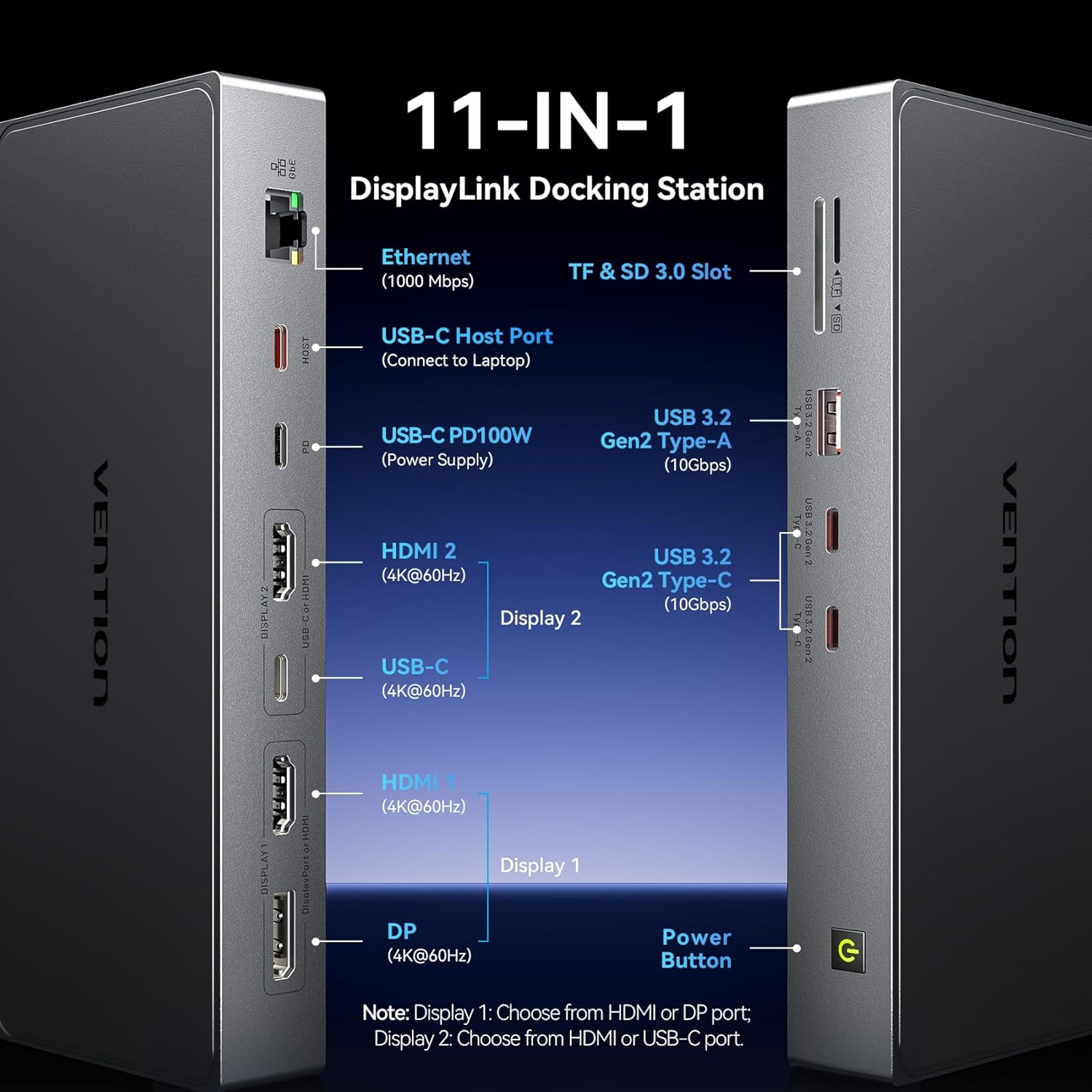
11-IN-1 DisplayLink Docking Station
The video showcases the product in use.The video guides you through product setup.The video compares multiple products.The video shows the product being unpacked.
11-in-1 USB C Docking Station Merchant video


1 Multi-Display Mode 2 11-IN-1 Docking Station 3 Dual Monitor 4K@60Hz


1 Multi-Display Combination 2 10Gbps Data Transfer 3 PD 100W Charging 4 Gigabit Ethernet 5 SD/TF Card Reader


I plugged my docking station but my screens aren’t coming up. Do I need drivers?
Yes, it does not support plug & play. Please install DisplayLink driver.
Can two ports in “Display 1” or “Display 2” be used at the same time?
No, the two ports in “display 1″ or “display 2” cannot be used together, please select one port in “display 1″ and one port in “display 2” together.
Can the USB-C port on Display 2 also be used for data transfer?
No, the USB-C port on Display 2 can only be used for screen expansion but not for data transfer.
Why won’t my laptop charge via the docking station?
– Confirm the power adapter is plugged into the docking station’s
PD port, and the laptop is connected to the USB-C port.
– Check if your laptop’s USB-C port support charging
– Reconnect the docking station to your laptop.
Does the docking station get hot?
Yes. At full load, the surface temperature may reach 38°, the exact temperature will be related to the ambient temperature as well, this is normal for such devices.
Product Dimensions : 19.1 x 8 x 2.5 cm; 450 g
Date First Available : 6 Dec. 2024
Manufacturer : VENTION
ASIN : B0DPQR4Y2M
Item model number : TPWH0
Guaranteed software updates until : unknown
【Docking Station Dual Monitor 4K@60Hz】The VENTION laptop docking station allows you to connect dual monitors with ultra-clear 4K@60Hz resolution: Display 1: Choose from HDMI or DP port; Display 2: Choose from HDMI or USB-C port. Note: The two ports in “display 1” or “display 2” cannot be used together.
【11-in-1 DisplayLink Docking Station】The VENTION docking station combines 11 versatile ports to enhance your productivity: 2x 4K@60Hz HDMI ports, 4K@60Hz DP port, 4K@60Hz USB-C port, 2x 10Gbps USB-C ports, 10Gbps USB-A port, 100W power delivery port, SD/TF 3.0 card readers, 1000Mbps Ethernet port, and a PC host port. Designed for seamless multitasking and efficient connectivity.
【Overcome MacBook Limitations】Equipped with a powerful DisplayLink chip, this USB-C docking station eliminates the screen duplication restriction on MacBook models. By installing the DisplayLink driver, you can enjoy dual-screen functionality with independent content on each monitor, while ensuring stable signal transmission.
【10Gbps Data Transfer】Enjoy blazing-fast data transfer with 2 USB-C and 1 USB-A ports supporting up to 10Gbps speeds. Transfer 1GB of files in just 1 second, saving time and boosting work efficiency.
【100W Power Delivery】Stay powered up with up to 92W laptop charging via the 100W USB-C PD port, ensuring uninterrupted operation even when multiple peripherals are connected. (Power adapter not included)
【1Gbps Ethernet Port】Connect to a wired network with the Gigabit Ethernet port for a fast and stable internet experience, perfect for video calls, downloads, and online streaming.
【Universal Compatibility】The VENTION USB-C Dock is designed for laptops with Thunderbolt 3/4/5 or USB-C 3.1 full-function ports. Compatible with MacBook M1/M2/M3/M4 Pro/Max and Windows laptops.
【What You Get】1* Displaylink Dock, 1*0.5m USB 4.0 USB-C cable, 7*24h Customer Service. Boost productivity with dual monitors and ultra-fast data transfer. Ideal for office setups, content creation, and mobile workstations.
13 reviews for DisplayLink Docking Station for MacBook M1/M2/M3/M4, VENTION 11-in-1 USB C Docking Station Dual Monitor 4K@60Hz, Laptop Dock with 10Gbps USB A/C, HDMI, DP, PD 100W, SD/TF, RJ45
Add a review
Related Products


£81.66
Joseph B. –
Works perfectly
This works really well – I needed a duo display for macbook air M2 – It worked straight away (needs to download displaylink software but thats fine)
David –
excellent
so far so good
works well, plug and play for my windows laptop and works well with display link for my work macbook
Mr D Bacon ReGen Engineering –
Sorts the Mac’s out!
Allowed my Mac Pro to run very smoothly with two large remote screens! Disappointed with Mac but highly delighted with this product.,
Ari –
Great with max m4 max
Does the job well as there are no tb5 hubs around much at moment and they are silly prices. All the ones on apple site seem a bit useless so I chanced this. It works fine. Even does a hdmi. 1 star off as it gets very hot and that worries me as any usb I put into the front gets super hot, like too hot to touch. But for general use its fine. I moved my hdmi to another port and have this doing all my basic stuff and ethernet and it’s warm and seems OK rather than super hot. I also have a ssd 3.2 drive in and its fine. Fast read and write. All good. For 180 it’s bargain. I can’t see what else you could get for that price. Build qaulity is nice. So yeah apart from it getting a bit hot, it’s fine. And I’ve had it a few days and so far it’s all good
Philip S –
Too hot to handleâ¦
Get extremely hot. Untouchable hot. Then once itâs hot enough to cook an egg on it starts to fail, intermittent monitor connections followed by turning itself on – which is better than starting a fire but not really why we spend a small fortune on these things.
One other thing, which is not advertised anywhere, is that display link does not support HDR so if you do get it to work, and not melt your desk, your expensive Mac and priceless Mac screens donât get to look good anyway.
Afra Walton –
Brilliant
Very easy to use. A very good upgrade of my old usb hub. This is an all in one thing. Perfect for travel or for home office use. Looks and feels sturdy. So far it’s been excellent.
Cora Monroe –
Powerful docking station
For those needing to expand their laptop’s connectivity, this is a powerful USB-C docking station, enabling you to connect up to two 4K displays via DisplayLink. It also can charge my laptop.
Gladys Whitman –
Easy use
Easy plug and play on my windows laptop. Had to download software on my MacBook. Now it’s simple to swap between my two computers for multiple displays.
Amazon Customer –
As described and excellent value
GeekyGuy –
Works well, tested ports they work. I purchased this for my new laptop which did not have an ethernet port and it works.
It is an inexpensive fix. It has a card reader but the laptop does as well. It is nice to have the additional USB ports. Also the power passthrough charges the laptop. This is the 9 in 1 as the other doesn’t include the ethernet port. Did not try the HDMI slots as I didn’t need them. Build quality seems OK
Ravi Lavania –
Vention. Products are very good and robust ,my macbook ethernet speed increased by 80 % with this product ,all ports are working fine and seller service I best .
joe –
Works good
Modan –
I needed this product to replace an aging USB hub I use on my laptop. The description of the product states it is a 4 in 1 with one USB3 and 3 USB 2 ports. The product works as advertised but all 4 ports are blue, indicating they are all usb3 high speed ports. Only the port on the end of the hub is actually USB3. I give it 4 stars instead of 5 only because it is not clear which is the USB3 port which tests out twice as fast at data transfer as the others (as it should). All ports are working and I like the fact that one of the ports isn’t in line with the others. I have some devices with larger USB plugs that need more room and the plug at the end of the hub allows for this.