

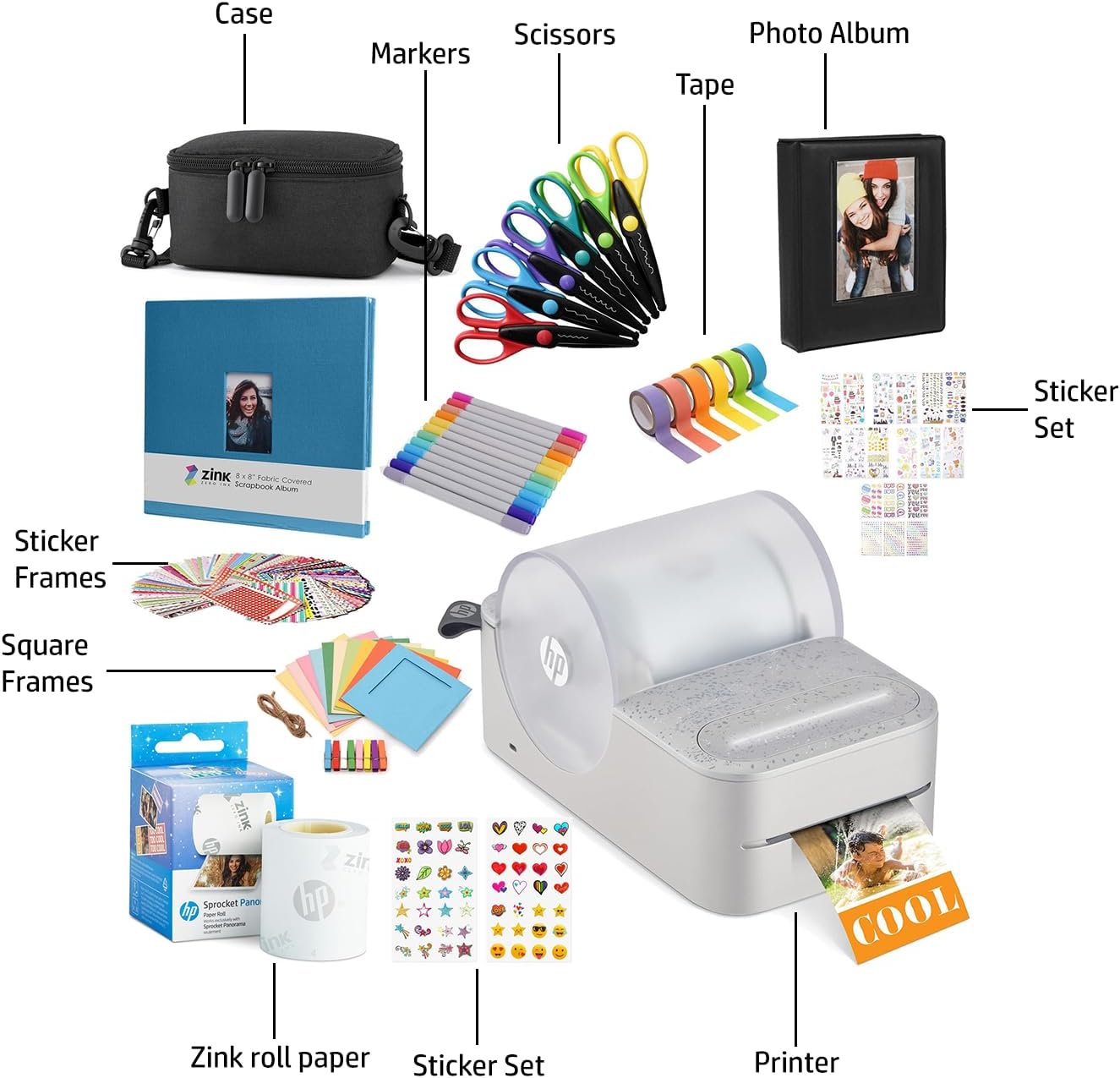
HP Sprocket Panorama Instant Portable Color Label & Photo Printer (Grey) Craft Bundle with case, Zink roll, photo album, markers, scissors, tape, stickers and frames
£239.99




Price: £239.99
(as of Jun 20, 2025 15:51:30 UTC – Details)
From the manufacturer

The Perfect Gift for Kids and Adults

Experience the Panorama Fun
The video showcases the product in use.The video guides you through product setup.The video compares multiple products.The video shows the product being unpacked.
Create Custom Photobooth Strips, Labels & Designs
 Wireless printing at your fingertips
Connect to any iOS or Android smartphone via Bluetooth and instantly print from the Panorama app.
 Get creative with tons of options
Use stickers, borders, filters, and customizable text to turn your photos into artwork.
 Mesh memories together with style
Put photos on the canvas your way or print consecutive pictures with the photobooth feature.
 Tons of ways to print
Make sticky-backed creations and use them as scrapbook stickers, labels, wall décor, and more.
 Palm-sized device for various sizes
Print custom creations anywhere from 0.5” to 9” long on 2” wide Zink sticky-backed paper rolls.
1 Bluetooth connectivity
2 Creative customization
3 Collage
4 Versatile usage
5 Adjustable sizing
ZINK ZERO INK technology
 Built to last
Zink brings you tear-resistant, water-resistant, and blot-proof paper that is made to make photos last for years.
 Adhesive paper
Print your creations on Zink sticky-backed paper and stick them to your scrapbook, journal, photo wall, locker, and more.
 Print without ink
Made with colors embedded inside the paper so that the need for expensive ink, toners, and ribbons is no more.
 Various sizes
Load in a Zink paper roll and print out creations as stickers, labels, or photos of different sizes from 0.5” to 9” long.
 Labeling and scrapbooking
Print out photos as label-sized stickers for organizing belongings or enjoying an afternoon of scrapbooking.
Start Creating in an Instant
 Download app
Download the HP Sprocket Panorama app and connect the printer to your phone via Bluetooth.
 Clean printer
Insert the cleaning sheet and place the cover on the printer for the sheet to automatically feed
 Load paper
Place the roll on the holder, feed the paper into the slot, and fasten the holder into the printer
 Cut barcode
Once the barcode is scanned, press the cutting button to cut off the barcode sticker evenly.
 Print creations
Use the app to personalize your photos with stickers, filters, frames, and text before you print.
1 Step one 2 Step two 3 Step three 4 Step four 5 Step five
What do you do if streaking appears on your photos?
If streaking appears in the photos, use the cleaning sheet. You can improve print quality by cleaning the paper path rollers with the cleaning sheet. Keep the cleaning sheet for future maintenance.”
How do you load paper in the HP Sprocket Panorama?
First, remove the cover and place the paper roll on the holder. Next, remove the red sticker from the roll, roll up the paper, and stick the end of it into the slot. Finally, insert the holder and place the cover back on the printer.
Which paper can you use with the HP Sprocket Panorama?
The HP Sprocket Panorama is compatible with the HP Sprocket Panorama ZINK paper roll. This paper is specially designed to work with the HP Sprocket Panorama. Use the HP Sprocket Panorama Zink paper roll to avoid paper jams and malfunctions.
How do you properly cut paper once the photo is printed?
The printer will alert you when printing is done. Once the printing is done, firmly press down the center of the cutter button with two fingers using an appropriate amount of strength to ensure that labels are cut fully and evenly.
What do you do to fix a paper jam?
If the cutter button LED is blinking red, then the printer is out of paper, overheated, or has a paper jam. For paper jams, the printer should clear the jam automatically. For a manual fix, pull the paper roll out of the printer and reset it.
PRINT FUN PHOTOBOOTH STRIPS AT HOME Making Memories is Faster & Easier Than Ever with the HP Sprocket Panorama Printer! Adorable Palm-Sized Device Lets You Print 0.5 to 9 inches Long Full-Color Photographs, Labels, Stickers & Other Paper Creations on 2 inches Wide Sticky-Backed Paper
AMAZING ZINK ZERO INK TECHNOLOGY Produce Vibrant, Glossy Prints Without Expensive Cartridges, Messy Ribbons or Toners! Unique Printing Process Uses Color Crystals Built into the Paper Itself, So You Never Run Out of Ink & Always Enjoy Fabulous Smudge-Proof & Fade-Proof Performance
Free HP Sprocket Panorama App to Make All Kinds of Printable Projects. Besides Ready-Made Photobooth Strips, Get Creative with Fun Filters, Sticker Designs, Custom Text, Frames & More
UNLIMITED CREATIVITY Exercise your imagination with multipurpose photo paper that works great for scrapbooks, art projects, greeting cards, school projects, bullet journals, and more.
Built-in Storage Store your Zink Roll paper, USB cable, and other accessories in the convenient mesh pocket. The spacious built-in compartment keeps your photos and essentials perfectly safe and organized until you get home. Keep everything well organized and easy to find whenever you need it.
User Reviews
Be the first to review “HP Sprocket Panorama Instant Portable Color Label & Photo Printer (Grey) Craft Bundle with case, Zink roll, photo album, markers, scissors, tape, stickers and frames”
Related Products


£239.99
There are no reviews yet.