

IDEAO DC400 4K USB Document Camera, Webcam & scanner, 3-in-1, 13MP, 4K/30fps 1080/60fps, Autofocus, Built-in Mic and LED lamp, OCR, Win, Mac, Chromebook, Meetings, Distance Learning & Teaching
£99.00



Price: £59.36 - £99.00
(as of Aug 19, 2025 15:55:36 UTC – Details)
Product Description

 Fits in various scenes
Perfect for Remote Learning, Online Teaching & Coaching, Video Conference, and Classroom
 Pocket-sized and portable
The slim design with the thickness only 13mm when folded. You can easily carry it between conference rooms or classrooms or put it in the carry bag and take it with you on the go.
Ideao DC400 is a 2-in-1 document camera/visualizer & webcam featuring crystal clear 4K resolution.
2-in-1 camera features  Use as a document camera/visualizer
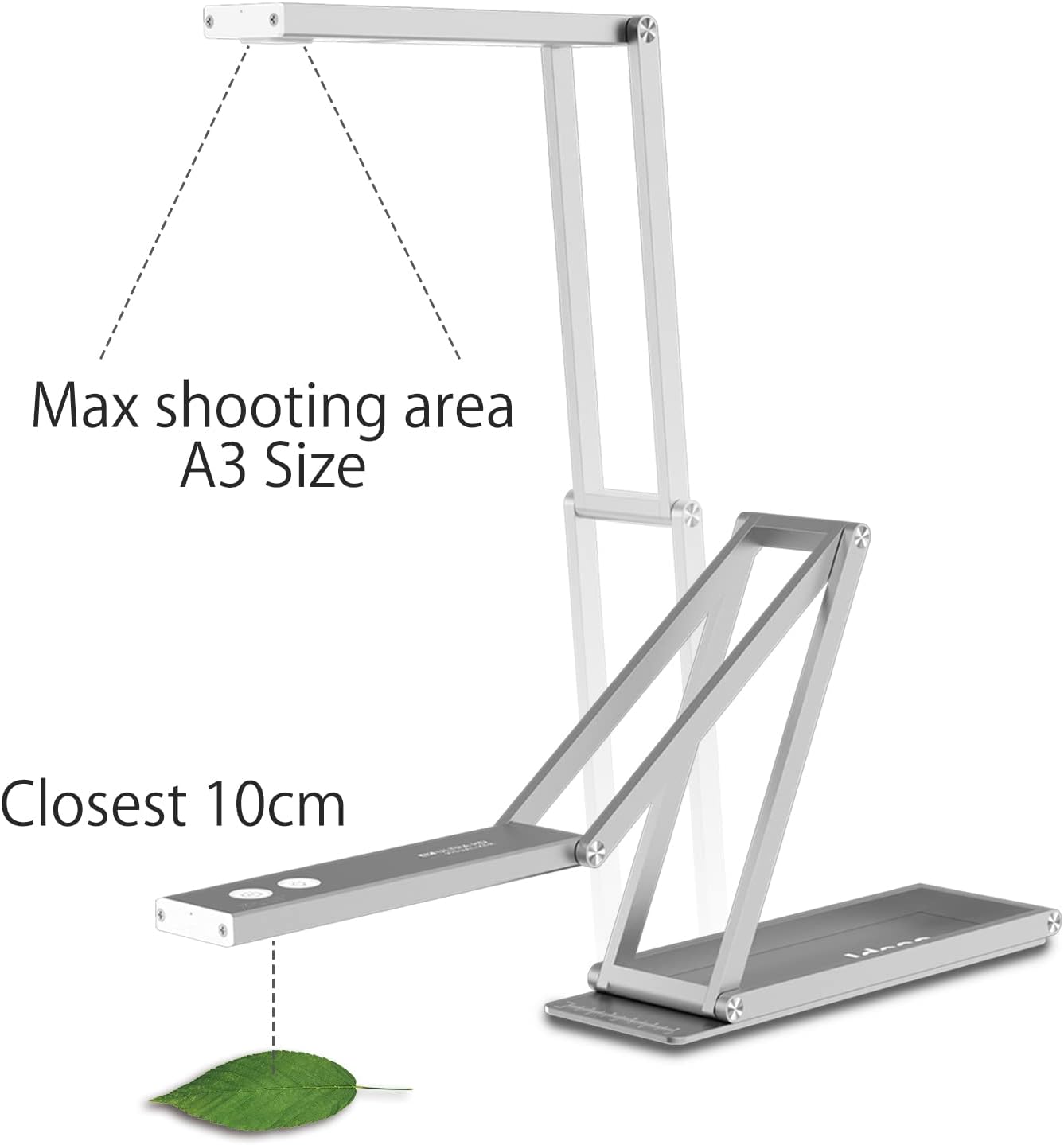
The flexible arm and high quality camera lens let you easily capture the whole page of a book (17.3”x13”, A3-size shooting area); or focus at just 10 cm close so that you can show the very detail of the art etc.
 Use as a webcam
With the built-in microphone, you can use Ideao DC400 as a webcam as well. Unlike the other webcams, which need to be mounted on a monitor or laptop, with the flexible arm, you can set the height as you want. You can have face-to-face-like video calls.
Beyond 4K Resolution Ultra-Crisp Visuals with 13MP Sony Sensor for Unmatched Clarity
Sharing intricate details—whether in paintings, technical drawings, or hand-written notes—can be difficult when resolution falls short. The Ideao DC400 delivers ultra-high resolution up to 4160×3120, powered by a premium 13MP Sony sensor, enabling you to showcase even the subtlest textures and lines with incredible precision. Go beyond 4K and bring your work to life with clarity that captivates, even from a distance.
 True-to-Life Video with Ideao DC400 Show objects, notes or any work with high clarity and vibrant color
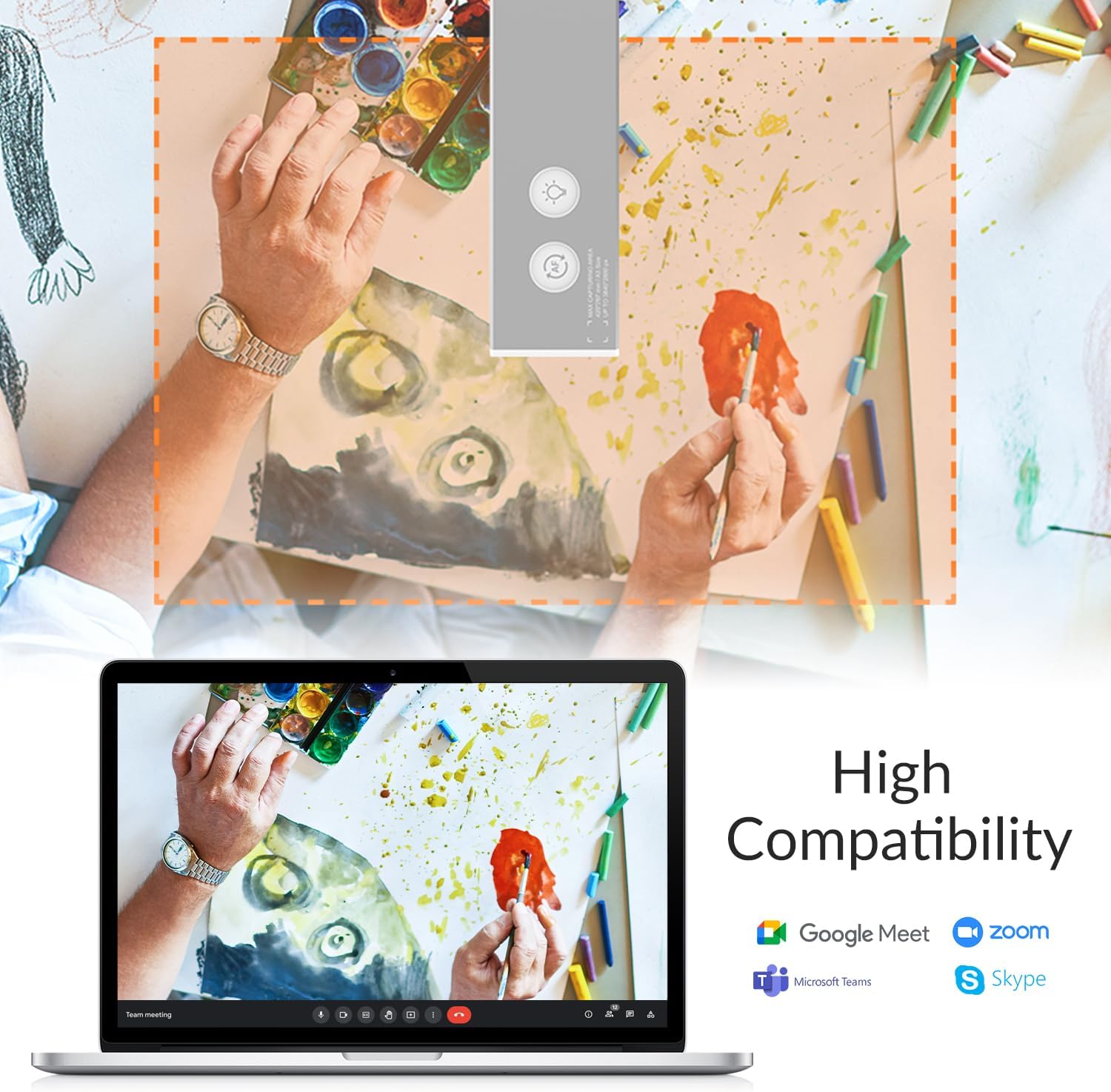
Operating System: Window 11, 10. macOS 10.15 or above. Chrome OSWork with any video conference software of your choice, including Zoom, Google Meet and Microsoft TeamsPackage includes Ideao DC400, USB cable (With the cable guide), Carry bag, and Quick guide  10cm close shot See clearer than with naked eyes
The Ideao DC400 supports 10 cm close-up shot. Even such as insect specimens can be clearly displayed and shared with remote participants.
The video showcases the product in use.The video guides you through product setup.The video compares multiple products.The video shows the product being unpacked. video Merchant video
Large shooting area Maximum A3 shooting area to give you enough space demonstrating your content.
The Ideao DC400 supports up to A3 size projection. It is possible to project an A4-sized book such as textbooks spread at once, or project a large-sized art work.
 1080P@60fps Smooth Movement Capture
Whether you’re sharing a complex knitting process or demonstrating any other intricate activity, the Ideao DC400’s 1080P at 60fps smoothly captures every movement. It’s perfect for real-time or recorded virtual teaching and learning.
Just set up the resolution and fps in our software to get started!
The video showcases the product in use.The video guides you through product setup.The video compares multiple products.The video shows the product being unpacked. video Merchant video
Stays sharp and crisp with autofocus Autofocus with one touch to stay sharp
The Ideao DC400 is equipped with autofocus. Even if the object changed from a document to a sample, the focus can be adjusted with only a single touch. Objects are always captured with a sharp image.

 Project documents and samples also use as a webcam
Such as documents and samples can be easily and clearly shared in real time from various angles.  For both online/hybrid and onsite education
For paper contents, text book, 3D objects and experimentFor the process for solving math problems  Sharing surprises and a sense of accomplishment
For showing the process roboticsFor chemical experiment  For the crafts, which hands and processes matter
For showing the processFor recording the session
1 Meetings
2 Education
3 STEAM Education
4 Online Learning
Ideao DC400 Complimentary software Document camera software Ideao VisualCam
Snapshot & RecordZoom in/out, rotate, pauseSplit screen, annotation, whiteboardOS: Windows 11/10/8/7, Mac OS (Currently not supporting M2 Mac)
The video showcases the product in use.The video guides you through product setup.The video compares multiple products.The video shows the product being unpacked. video Merchant video
Chrome Extension app IdeaoCam
As a Chrome extension app, IdeaoCam works with Windows, Mac, and Chromebook.
Featuring: take snapshot, record video, create stop motion, zoom, flip, and so much more! With Google account integration, you can log in and save picture and video directly onto your Google Drive or Google Classroom.
The video showcases the product in use.The video guides you through product setup.The video compares multiple products.The video shows the product being unpacked. video Merchant video
Share the screen in video conference Sharing the image from DC400 cleaerly and easily
Using VisualCam/IdeaoCam and share the screen in Video conference software such as Zoom, WebEx and Teams, you can not only share the clearer image with remote participants, but also can utilize the tools such as split screen and annotation.
The video showcases the product in use.The video guides you through product setup.The video compares multiple products.The video shows the product being unpacked. video Merchant video
OCR function Create searchable PDF files with OCR
The OCR feature in Ideao VisualCam converts scanned images into searchable PDF files, allowing you to search, copy, and export text with ease.

Lots of ingenuity in hardware, too Stay tight, stay precise Adjustable hinge (New feature)
Tightness of the 3 hinges is easily adjustable with a screw driver
*This new feature is available from the 2024 January delivery

The video showcases the product in use.The video guides you through product setup.The video compares multiple products.The video shows the product being unpacked. video Merchant video
Only 4 steps to start using Plug & Play
1. Remove the fil at the lens (Only for the first time)
2. Push a finger through an opening at the base to slightly lift up the camera part, then pull & flip the camera head and adjust the hight
3. Connect to a laptop with a USB cable
4. Start projection with your favorite software
1 tap to activate Autofocus botton
Light press on the ‘AF’ button to trigger the autofocus when the height of the target changed and need to adjust the focus.
The video showcases the product in use.The video guides you through product setup.The video compares multiple products.The video shows the product being unpacked. video Merchant video
Long press and rotate the image 180° Image rotation
Long press on the AF button to rotate image, when using Ideao DC400 as webcam.

 3-Level LED Light for Dim Environments LED light
The Ideao DC400 comes with a built-in LED light that features three levels of adjustment, ensuring that you always have the perfect amount of light for your needs.
With a simple ruler Stabilizer
The unique stabilizer design can effectively prevent Ideao DC400 from falling forward in some certain angles.

Innex’s Conference Camera lineup
Add To Basket
Add To Basket
Add To Basket
Add To Basket
Add To Basket
Add To Basket
Customer Reviews
4.0 out of 5 stars 249
4.1 out of 5 stars 54
4.3 out of 5 stars 224
4.3 out of 5 stars 224
4.3 out of 5 stars 224
4.3 out of 5 stars 224
4.3 out of 5 stars 224
Price
£99.00£99.00
£155.00£155.00
£499.00£499.00
£267.00£267.00
£199.00£199.00
£109.00£109.00
—
Resolution
UHD 4K/3840×2880
UHD 4K/3840×2880
4K (3840×964)
UHD 4K
UHD 4K
UHD 4K
FHD 1080P
Field of View/Shooting Area
82°/A3 size/min distance 10cm
82°/A3 size/min distance 10cm
360°
180°
120°
120°
71°
Microphone
✔
✔ (AI Noise reduction mic)
✔
✔
✔
✔
✔
Autofocus
AFS
AFC/AFS switchable
✘
✘
✘
✘
✘
G-sensor
✘
✔
✘
✘
✘
✘
✘
AI Autoframing
✘
✘
✔
✔
✔
✔
✘
AI Gallery Mode
✘
✘
✔
✔
✘
✘
✘
Remote Control
✘
✘
✔
✘
✔
✘
✘
Product Dimensions
195x66x13mm
197x51x20mm
65x65x66mm (Camera only)
146x33x74mm
81x76x53mm
117.9x51x55.7mm
89x35x60mm
Product Weight
380g
450g
260g
240g
190g
203g
81g
【4K Video with Vibrant Colour】Its 13MP SONY sensor ensures your picture and video quality always crisp and clear. Maximum output 3840×2880 pixels for large still image capture, and 1920×1080 at 60fps for smoother visual experience. 【Note】Watch our video tutorials if you see mirrored video during video conferencing.
【2-in-1 Document Camera and Webcam】The adjustable stand design enables flexibility to shoot overhead as visualiser, or front-facing as web camera for video calls. Perfect for hybrid learning, online coaching, live demo, and video conferencing.
【Extra-Wide Shooting Area. Extra-Close Focus Distance】The flexible arm and high quality camera lens let you easily capture the whole page of a book (17.3”x13”, A3-size shooting area); or focus at just 10 cm close- almost like macro videos. From online-class to product demonstration and designing, Ideao’s flexible shooting distance ensures outstanding video quality!
【Pocket-Sized Portability】IDEAO DC400 weights only 380g, and it can be folded completely at 1.2cm thin- like your smartphone! It comes with a travel pouch to carry around. Yet the build is sturdy and balanced- even when the arm is fully extended. No matter you are using it at home, at work, at school or on the go, DC400 is a reliable gadget in all scenarios.
【Unleash Creativity with IDEAOCAM (Chrome Extension for Mac, Windows, Chromebook) 】Taking snapshots, recording a video, zooming for close-up shots, creating stop motion videos, and connecting with your Google Drive or Google Classroom account to organise your files easily!
POWERFUL OCR FUNCTIONALITY: Unlock the full potential of Ideao VisualCam with built-in OCR support for over 100 languages. Easily convert scanned documents into searchable PDFs, extract and copy text, or export content for editing and sharing—perfect for digitizing books, handouts, and notes with ease.
13 reviews for IDEAO DC400 4K USB Document Camera, Webcam & scanner, 3-in-1, 13MP, 4K/30fps 1080/60fps, Autofocus, Built-in Mic and LED lamp, OCR, Win, Mac, Chromebook, Meetings, Distance Learning & Teaching
Add a review
Related Products


![Scanners [Blu-ray]](https://i0.wp.com/m.media-amazon.com/images/I/81LRrjJhvbL._AC_SL1500_.jpg?w=300&resize=300,300&ssl=1)

![Scanners: (Limited Edition) [4K UHD / BD]](https://i1.wp.com/m.media-amazon.com/images/I/81KqcO26mcL._AC_SL1500_.jpg?w=300&resize=300,300&ssl=1)
£99.00
Bham –
Quality of image.
Easy to use and very adaptable. Used during Zoom meetings .
Kiran –
Not Bad
Quality of image/video is not badLooks good as wellMay not work with all types Webcam software.
christhekiwi –
Awesome design, Quality feel.
Great piece of kit. Looks great with my hyper expensive stupidly well designed MacBook Pro.Camera image quality reasonable. Love it, excellent value for the mullah.
FizzyMoe –
Great
Though quite expensive, it’s easy to set up, and image quality is excellent. The resolution is more than sufficient to scan text documents while keeping everything perfectly legible.
martin –
Never ending problem with the microphone driver, but really quite a good little camera
The camera is great, it works well in it intended config, not quite as A3 accurate as they claim but much better than rigging something up yourself. The autofocus works very well when using as a webcam, but only moderately well when pointing at a white page of A3 – sadly.The MOST annoying thing is that the sound driver seems to have a random problem where it just mutes and you can’t recover, you have unplug and replug – I’m on teams for at least 5 hrs a day, and everytime I spark up a meeting I’m never sure that the microphone will work. – GRRR
Gaz –
Plug and play device with great auto focus, 4k, super slim and compact
This is a sleek Multifunctional device that has many uses , I’m very impressed with the auto focus and versatility of this device, it’s great for distance learning , using as a webcam for meetings , online learning, meetings for students or teachers.The build quality is superb , it folds down to a very compact and slim size , just a bit thicker and longer than a mobile phone , which makes it perfect to take anywhere , it’s very portable.The image quality is very clear , 4k with 13mp camera quality and Sony sensor , it’s also very easy to set up and use , it’s a plug and play device with good compatibility with other devices, pc, laptops.You can visualise an area of A3 max but it can also focus as low as 10cm with macro quality, I’m not sure I will ever use every feature of this device but it is a very sophisticated and clever piece of kit that has many uses , it’s very impressive for the price, I’m sure we will find a lot of uses for it.It also has good quality built in mic and LED , it’s easy to fold out and it feels nicely balanced even when shooting at max , it folds away with ease to a very compact size and weighs just over 300g so it’s very lightweight.An impressive document camera, organise documentation easily and share, use Web cam with built in mic , a camera with crystal clear image and video quality, it’s packed with features and technology , i would recommend.
DIY-errr –
Not recommended for use with macbook
Product seems fine but the extension to use it on macbook is no longer supported. Using it with photos app won’t work with displaying text as its a mirrored image.
Mr D J Meadows –
Good camera and software combination
IDEAO DC400 4K, 13MP USB Visualizer, Document Camera and WebcamThe Ideao DC400 camera comes well packed in a sturdy box. Inside you will find the camera packed securely in cut-outs in the polyethylene foam. Below this is the USB connection lead, a fabric carrying pouch and the instructions.The Ideao DC400 cameraâs frame is a quite heavy gauge aluminium which means its 380 gram weight is hefty enough for it to stay put on the desk. The frame can be unfolded and used at varying heights depending on the area coverage you want. The built-in Sony 13 megapixel sensor gives the camera a resolution of up to 3840×2880 pixels for still pictures and provides clear 1920×1080 video images at 60fps.The Ideao VisualCam software which can be downloaded from the Ideao website compliments the DC400 cameraâs performance with a set of functions first of all for taking photos and videos, then there is a whole host of other utilities for presentation and video calls. Ideao VisualCam software can split the screen to operate up to four cameras at a time or you can show photos and cameras in different windows.My Ideao DC400 camera is going to serve two main purposes, one as a fixed camera to take images to be traced and imported to a 3D CAD program and the other is better images for reviews. Another suggestion that caught my attention in the listing is âcreating stop motion videosâ, I think I may also have a go at that sometime.It is undoubtedly the combination of the Ideao DC400 camera and the Ideao VisualCam software that make this such a complete package. Either one can stand alone as a good product but together they really shine.
Gary –
better than I expected.
Max –
J’utilise cet appareil pour filmer/photographier ce qui est posé sur le bureau, avec un MacBook sous Sequoia (macOS 15.x).Il fonctionne bien, l’image est de qualité acceptable, et l’appareil est transportable une fois replié.Je l’utilise avec les applications Photo Booth (incluse dans macOS) et Ideao VisualCam (livrée avec la webcam).L’appareil n’est pas parfait mais il mérite quand même 5 étoiles puisque c’est un petit prix.Voici les améliorations qu’il mériterait pour faire une version haut de gamme :1) Prise USB : l’interface actuelle, micro-USB (côté caméra) et câble USB type A (côté ordinateur) est dépassée, il faudrait passer en USB-C des 2 côtés,2) Drivers : devoir installer des drivers est nuisible car ça limite la compatibilité et la durée de vie de l’appareil (si Fun Tech cesse de mettre à jour les drivers, l’appareil deviendra inutilisable), alors que ce type de webcam devrait fonctionner sans drivers, les drivers devraient être une option offrant des fonctions supplémentaires, mais pas une nécessité pour fonctionner.3) Boutons et emplacement : il y a 2 boutons sur le bloc caméra, éclairage et rotation de 180°.- il manque 2 boutons: 1 bouton photo (pour capturer l’image) + 1 bouton température de couleur (chaud/froid) car par défaut la couleur est blafarde,- les boutons devraient être sur le socle et non sur le bloc caméra pour ne faire bouger l’image en appuyant sur un bouton.4) Eclairage : la LED d’éclairage n’est pas d’intensité réglable ce qui oblige à utiliser une autre lampe. Il faudrait plusieurs niveaux de luminosité, réglable en appuyant plusieurs fois sur le bouton d’éclairage.5) Poids de la base : il manque un contrepoids à l’extrémité de la base pour que la lampe ne bascule pas si on l’étire. Il suffit à l’utilisateur de placer un poids, mais intégrer une masse de 50g ou un peu plus à l’extrémité de la base aurait suffit pour que la lampe ne bascule pas.
Ron Molenaar –
op eigen computer spiegelbeel en bij ontvanmger juist beeld. `Zeer verwaarend en kost veel tijd voor je het door hebt!!!!
ODO_CO –
Usato per inserire foto di oggetti in un personale database! Con app fotocamera di Windows non sempre la messa a fuoco risulta ben fatta! Purtroppo non conosco una app diversa che possa utilizzare questo strumento, anche per perfezionare la messa a fuoco!
Guardian –
è¦ãç®ããã£ãããã¨ããã®ã¯ä½¿ã人ã«ã¯å¤§å¤å¤§äºãªãã¤ã³ãã§ãããæ°ã«é¢ããã¾ã(ç¬)ã¹ã¿ã¤ãªãã·ã¥ã§ã¢ã«ãã®è³ªæããããé«ç´æãããã¾ããã¢ã«ãããã£ãªã®ã§é©åº¦ãªéã¿ããã£ã¦ãæ®å½±ã®æã«ãå®å®æãããã¾ãã解å度ãæé«38400Ã2880ã§4Kã«ã対å¿ãã¦ãã®ã§è©³ç´°ã«æ®å½±ã§ãã¾ããæ¸ç»ã«ã¡ã©ã¨ãã¦ã¯åããç»åãè¥å¹²æªãã§ã¾ãããã¬ã³ãºã®ä½ç½®ãè§åº¦ã«ãããã¨æãã¾ããããããé¨åã«å°ããªæ°´å¹³å¨ãä¹ãã¦ãå°ãæªãã§ã¾ãããæ®å½±ã®ä»æ¹ã工夫ããã°å¤å°æ¹åããããããªæ°ã¯ãã¾ããæ大A3ã¨ããã¾ãããã«ã¡ã©ãå°ãªã©ã«ç½®ãã¦å°ãé«ãä½ç½®ããæ®å½±ããã°A3ãã大ããç¯å²ãæ®å½±ã§ãã¾ãã解å度ã ãã§ããã¨å°å·ã«ã使ããã¬ãã«ã§ãããæªã¿ãããã®ã§å°å·ã«ã¯ä¸åãããªã¨æãã¾ããWEBä¸ã§ä½¿ç¨ããã«ã¯ååã§ãããã©ã¼ã«ã¹ã®ã¬ã¹ãã³ã¹ã¯ããã¨æãã¾ãããµã¤ããããã¦ã³ãã¼ãã§ããã¢ããªã¯ããªã使ããããã§ããç®±ã«ãã¦ã³ãã¼ãã®QRã³ã¼ããã¤ãããªã©ãã¦èªç¥ãã¦ããããããããã«ããªãã¨ãã£ãããªããªã¨æãã¾ããç»é¢ã®ãã©ã¤ããæ¹åããã¢ããªãããããã§ããããµã¤ãã®ãªã³ã¯ãåãã¦ãã¾ãããç·åçã«ã¯è²·ã£ã¦ããã£ãã¨æãã¾ãããã®ä¾¡æ ¼ã§ããã ãã§ããã°ååãããªãã§ããããã