

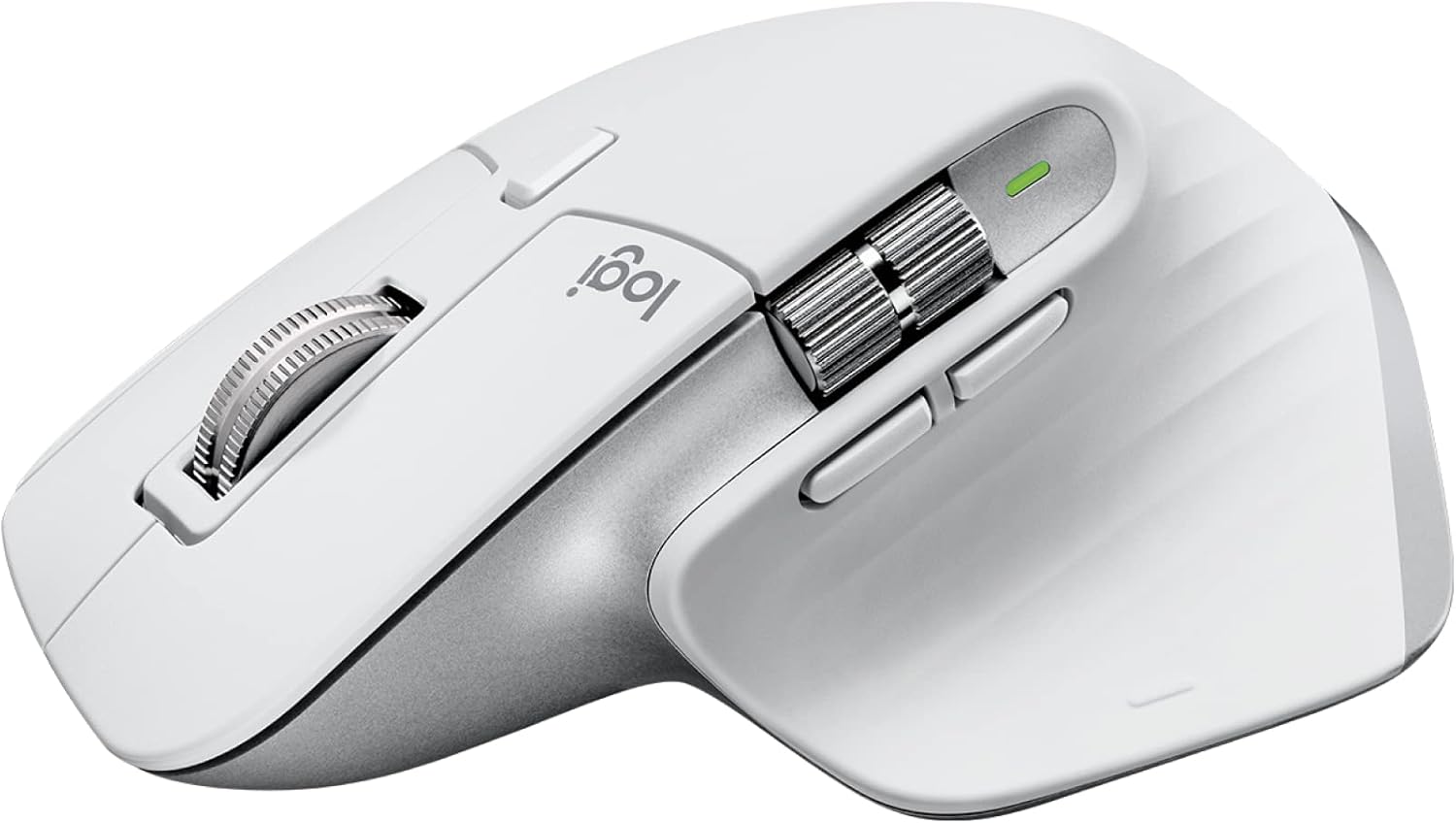
Logitech MX Master 3S – Wireless Performance Mouse with Ultra-fast Scrolling, Ergo, 8K DPI, Track on Glass, Quiet Clicks, USB-C, Bluetooth, Windows, Linux, Chrome – Grey
Original price was: £119.99.£113.23Current price is: £113.23.




Price: £119.99 - £113.23
(as of Jun 25, 2025 20:13:34 UTC – Details)
From the manufacturer
The video showcases the product in use.The video guides you through product setup.The video compares multiple products.The video shows the product being unpacked. hero-video Merchant video
 NOW WITH 8K DPI TRACKING
Work on any surface – even glass (1)– with an 8K DPI sensor with customisable sensitivity.
 MAGSPEED SCROLLING
Ultimate speed and precision. Scroll 1,000 lines per second and stop on a pixel.
 QUIET CLICKS – 90% LESS NOISE
Quiet Clicks deliver the satisfying feel you love with 90% less click noise(2).
 WIRELESS CONNECTIVITY
Robust wireless connection via Bluetooth Low Energy or Logi Bolt receiver(6).
 MULTI-DEVICE, MULTI-OS
Pair with up to 3 devices – Windows, macOS, Chrome OS(8), Linux(8), iPadOS(8) and Android OS(8).
 QUICK CHARGING, LONG LASTING
USB-C quick charge in 1 min for 3hrs of use – full charge lasts up to 70 days(7).
 COUNTLESS CUSTOMISATIONS
Customise buttons and optimise workflows with app-specific profiles in Logi Options+(5).
 COMPLETE YOUR MX SETUP PAIR WITH MX MECHANICAL
Enjoy a next-level typing experience with fluid mechanical switches so you feel every moment of your workflow and a numpad for increased productivity.
 PAIR WITH MX MECHANICAL MINI
Enjoy a next-level typing experience with fluid mechanical switches and a minimalist form factor.
 GET BRIO ULTRA HD WEBCAM FOR SHARPER CALLS
Level up your calls and videos with 4k video, streaming optimisation and adjustable field of view settings. Optimised for streaming. Wide, adjustable field of view.
 GET PREMIUM AUDIO WITH ZONE WIRELESS
Get premium audio for your music and calls, reliable Wireless connectivity, and a background-noise cancelling mic.
 SPOTLIGHT PRESENTATION REMOTE
Present like never before with intuitive slide navigation, advanced digital pointer modes, and smart time management.
Any-surface tracking – now 8K DPI: Use MX Master 3S cordless computer mouse to work on any surface – even glass (1) – with the upgraded 8000 DPI sensor with customisable sensitivity
Introducing quiet clicks: MX Master 3S Bluetooth mouse features Quiet Clicks – offering the same satisfying feel but with 90% less click noise (2)
Magspeed scrolling: A computer mouse with remarkable speed, precision, and near silence – MagSpeed scrolling is 90% faster (3), 87% more precise (4), and ultra quiet
Ergonomic design: Work comfortably with a precision mouse featuring a silhouette crafted for more natural wrist posture and optimally placed thumb controls
Upgraded customisation software: Customise buttons and optimise your workflow with App specific profiles in the improved Logi Options+ (5)
FLOW cross-computer control: Work seamlessly on multiple computers or laptops, and transfer text, images, and files – between Windows & macOS (5)
Multi-device and multi-OS: Connect the comfort mouse with up to 3 devices via Bluetooth or the included Logi Bolt USB receiver (6) on Windows, macOS, Chrome OS or Linux
Plastic parts in MX Master 3S include certified post consumer recycled plastic (Graphite and Black: 27%, Pale Gray: 22%(10).
Customers say
Customers find this mouse to be the best for productivity, praising its comfort with vertical and horizontal scroll features, and build quality that minimizes strain during extended use. They appreciate its responsiveness, with one customer noting its smooth cursor control, and its ease of connection to Mac computers. The design receives mixed feedback, with some finding it very nice while others say it looks shabby, and opinions on value are divided between those who find it well worth the money and those who consider it expensive.
9 reviews for Logitech MX Master 3S – Wireless Performance Mouse with Ultra-fast Scrolling, Ergo, 8K DPI, Track on Glass, Quiet Clicks, USB-C, Bluetooth, Windows, Linux, Chrome – Grey
Add a review
Related Products


![ASUS TUF Gaming K1 RGB Keyboard, 5-Zone RGB, Membrane Switches, 19-Key Rollover, Dedicated Volume Knob, Spill-Resistance, Side Light Bar, Programmable Macros, Black [UK Layout]](https://i3.wp.com/m.media-amazon.com/images/I/61FlfyGpDdS._AC_SL1500_.jpg?w=300&resize=300,300&ssl=1)
Original price was: £119.99.£113.23Current price is: £113.23.
EdSkeleton –
Best mouse I’ve used
Perfect ergonomics. Fits better in the hand than any other mouse I’ve used. Endless scroll wheel comes in handy more often than I thought. Side buttons and sidescroller work well. Software is easy to use and presents a lot of versatility. Perfect for a home office set up where you need to be able to quickly switch between devices. Battery life is completely absurd. Goes for months without a charge. Also use it for gaming although it’s probably slightly too heavy for most gamers. My only regret is buying it in white as a) its a bit flashy to take into the office and b) it’s a dirt trap that needs to be cleaned very often.
Phil –
Best mouse I have ever used on a Mac
Lets be honest, one of the best features of a Mac is the gestures, and unless you are using an Apple Magic Mouse, you have always felt like you are missing out when using a mouse with macOS. And of course all generations of the Apple Magic Mouse are too small and for most people are just plain uncomfortable to use as a daily driver.So here comes the Logitech MX Master 3S to neatly solve all of those problems. As a mouse, its great, accurate, comfortable to use, has more buttons that I can remember what to use them for, and my wrist and knuckle joints are already feeling better at the end of a work day vs just using my Apple Magic Trackpad.For gestures, there is a small button on the thumb rest which you press and hold, and then move the mouse pointer to emulate gestures within MacOS. Once you have installed the Logi Options+ app everything (to borrow a line from Apple) “just works”.
Bry & Liz –
The Logitech MX Master 3S is a true masterpiece
The Logitech MX Master 3S is a true masterpiece in the realm of wireless performance mice. As a user who spends countless hours at the computerâwhether for work, creative endeavour’s, or entertainmentâI’ve come to appreciate the meticulous engineering that goes into a high-quality device, and this mouse is no exception. Its array of features makes it a standout choice for professionals and enthusiasts alike, and hereâs why.First and foremost, the ergonomic design of the MX Master 3S is unparalleled. Crafted to fit comfortably in your hand, it minimizes strain during extended use, making it an ideal companion for long work sessions. The sculpted shape and strategically placed buttons reduce fatigue, allowing for smoother navigation and more precise control. This ergonomic focus not only enhances comfort but also boosts productivity, as you can work longer without discomfort.One of the most impressive aspects of the MX Master 3S is its ultra-fast scrolling capability. The mouse features a hyper-fast scroll wheel that effortlessly glides through long documents, web pages, and spreadsheets. Whether you’re reviewing extensive reports or browsing the internet, the ultra-fast scrolling feature saves precious time and provides a seamless experience thatâs hard to match with conventional mice.The 8K DPI sensor paired with advanced glass tracking technology ensures that every movement is captured with incredible accuracy. This high resolution is particularly beneficial for tasks that require precision, such as photo editing, graphic design, and detailed spreadsheet work. With such a high DPI setting, even the slightest movements are translated into smooth cursor control, giving you the confidence to tackle any project with precision.Another noteworthy feature is the silent click mechanism. The quiet, nearly noiseless clicks of the MX Master 3S make it an excellent choice for open office environments or any workspace where noise can be a distraction. This silent operation enhances focus and allows for discreet use during meetings or while working in shared spaces.Connectivity options are another area where this mouse truly excels. Equipped with USB-C charging and Bluetooth compatibility, the MX Master 3S seamlessly integrates with multiple operating systems including Windows, Linux, and Chrome OS. This versatility means that regardless of your preferred platform, you can enjoy a consistent, high-performance experience. The wireless connection is robust and reliable, ensuring that there are no interruptions during critical tasks.The thoughtful design extends to its customizable buttons. With programmable functions accessible via Logitechâs software, you can tailor the mouse to your specific workflow. Whether you need shortcuts for design software, quick access to commonly used commands, or enhanced navigation features, the customization options empower you to work smarter, not harder.Battery life is another strong suit of the MX Master 3S. With a long-lasting rechargeable battery and efficient power management, you can rely on this mouse for days on end without frequent recharges. The USB-C charging capability further simplifies the process, ensuring that youâre always ready to dive back into your work.In conclusion, the Logitech MX Master 3S is more than just a wireless mouseâitâs a powerful tool engineered for efficiency, precision, and comfort. Its ultra-fast scrolling, 8K DPI sensor with glass tracking, silent clicks, and multi-platform connectivity make it an indispensable accessory for anyone looking to enhance their productivity and elevate their computer experience. Whether you’re a creative professional, a data analyst, or simply a user who values comfort and performance, the MX Master 3S delivers on every front. This is a premium device that truly redefines what you can expect from a performance mouse.
Burt775 –
Oh my goodness this mouse is fabulous!
I wore my earlier version of this mouse out yesterday after a good 3 years of 10 hours a day 5 days a week minimum for work, it was so good i thought I’d get the newest version to replace it… we’ll it was the best decision I’ve made in ages!The smoothness and the softness and the speed!!! Absolutely outstanding! Worth every penny. I’ve only been using it for a couple of hours today, but I love it already!Can’t wait to use it again tomorrow ðð¤©ð.
-R-J-L- –
Ich habe mir die “Logitech MX Master 3s” primär für mein Macbook Air gekauft, weil ich die Apple-Maus nicht mag.Diese Maus hingegen liegt hervorragend in der Hand und reagiert schnell und präzise.Angeblich verwendet auch der Apple-Chef Tim Cook diese Maus.Die Kopplung mit meinem Macbook Air (2024) verlief schnell und problemlos.Die Kopplung erfolgt direkt über Bluetooth. Es ist also kein Sender-Dongle am Computer notwendig.Die Aufladung des Akkus erfolgt über USB-C an der Vorderseite der Maus.Es wird zwar die Verwendung der Logitech-Software empfohlen, aber die Maus funktioniert auch ohne diese Software einwandfrei. Lediglich einige Sonderfunktionen stehen nicht zur Verfügung.Insgesammt kann die “Logitech MX Master 3s” mit 3 Geräten per Bluetooth gekoppelt werden.Es gibt dafür einen Umschalter an der Geräte-Unterseite.Ich habe die Maus derzeit mit meinem Macbook Air und meinem Windows-Arbeits-Laptop gekoppelt.Es gibt wohl auch eine “…für MAC” -variante dieser Maus die angeblich NUR mit Mac-geräten gekoppelt werden kann.
Marko –
Det som främst sticker ut är att tumknapparna sitter perfekt, inte för långt bak som är fallet med många liknande möss.Glider superbra på de flesta underlag och har en superskön scroll och är tyst, varken knappar eller scrollern låter.
Manuel Cintura –
1. IntroduzioneTra le tante ricerche, mi sono imbattuto in questo mx master 3s, che la versione aggiornata del suo fratello minore.2. Confezione e Primo ImpattoLa confezione è completamente di carta è presenta vari accessori tra cui il cavo usb-c per la ricarica e il single usb per la connessione a 2.4 Ghz.3. Qualità Costruttiva e DesignIl mouse è molto solido con un rivestimento gommato antiscivolo. Lâergonomia è molto buona (una via di mezzo tra il verticale e il classico).4. Prestazioni e Funzionalità Tutti i tasti si possono personalizzare con il software di Logitech ed è comodissimo per velocizzare il workflow nei programmi. Il puntatore è super preciso e i tasti sono molto silenziosi.5. Pro e Controâ Pro:Funziona anche sul vetro, ergonomia, precisione, batteria, personalizzazione.â Contro:Nessuno6. Esperienza dâUsoOrmai sono un poâ di mesi che lo uso e il polso non mi ha mai fatto male, lo trovo veramente comodo e professionale.7. ConclusioneA volte si trova sotto gli â¬80 ed è un vero affare, per un uso professionale è il top. Voto 5/5 âï¸
Cliente Amazon –
Herramienta de trabajo excelente, con baterÃa impresionante y algún detalle de acabado mejorableLlevo tiempo usando el Logitech MX Master 3S como ratón principal para trabajar, y sin duda es uno de los mejores periféricos que he tenido.Rendimiento y baterÃa:La precisión es excelente, incluso sobre superficies como cristal, y los clics silenciosos son perfectos para trabajar en entornos tranquilos. Pero lo que más destaca es la baterÃa: dura semanas sin cargar, y con solo cinco minutos de carga rápida puedes usarlo durante más de una semana (usándolo 8 horas al dÃa). Además, puedes seguir utilizándolo mientras lo cargas por USB-C, lo cual es muy práctico.Diseño y durabilidad:Es cómodo, ergonómico y tiene todos los botones bien colocados para uso intensivo. Yo ya habÃa tenido el modelo anterior y me duró más de cinco años con uso diario intensivo. Cuando se estropeó, no lo dudé y compré este modelo.El único punto negativo es que, al ser gris claro (casi blanco), se ensucia con bastante facilidad. El acabado gomoso, aunque agradable al tacto, no se limpia del todo bien, y con el tiempo puede llegar a despegarse ligeramente. En mi caso, lo solucioné fácilmente con una gota de loctite, pero es algo a tener en cuenta.Conclusión:Un ratón excelente para trabajo profesional, muy fiable y con autonomÃa sobresaliente. Aunque el acabado exterior puede deteriorarse con el uso intensivo, su rendimiento lo compensa con creces. Recomendado sin dudarlo si pasas muchas horas frente al ordenador.
The tool is very loud . The noise is very shrill. My ear started hurting because of the sound . –
Ich nutze diese Maus jetzt seit über einem Jahr und bin absolut begeistert. Sie liegt sehr angenehm in der Hand , gerade wenn man den ganzen Tag programmiert, ist eine komfortable Maus wirklich wichtig. In dieser Hinsicht ist sie definitiv ihr Geld wert. Klare Empfehlung für alle, die viel am Rechner arbeiten.