

Logitech MX Master 4, Ergonomic Wireless Mouse with Advanced Performance Haptic Feedback, Ultra-Fast Scrolling, USB-C Charging, Bluetooth, Windows, MacOS – Graphite
£119.99




Price: £119.99
(as of Nov 05, 2025 06:32:02 UTC – Details)
From the manufacturer
The video showcases the product in use.The video guides you through product setup.The video compares multiple products.The video shows the product being unpacked. MX Master 4 Merchant video
 Immerse yourself with the Haptic Sense Panel
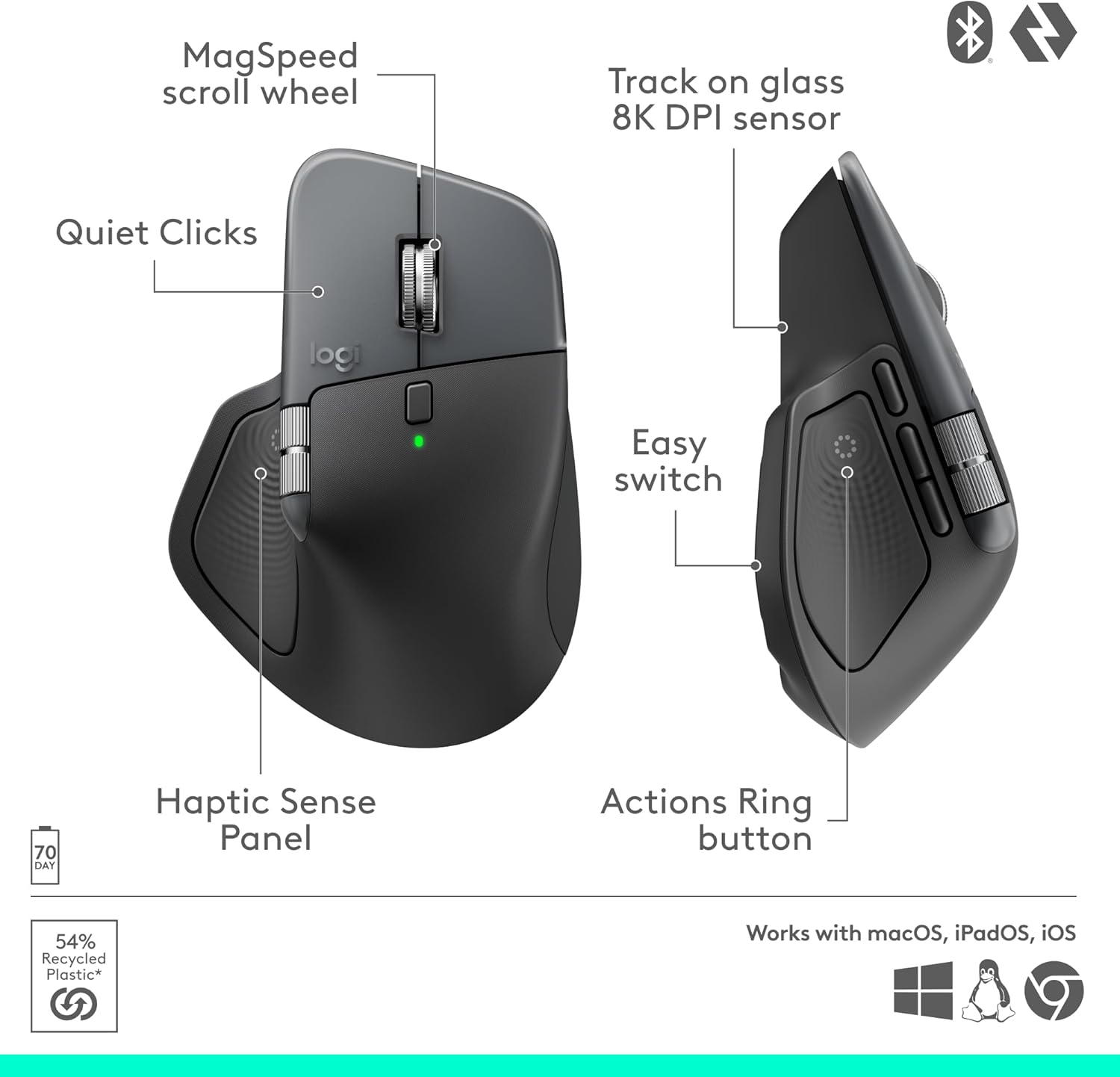
Experience tactile feedback, offering precision and customisable control (1) for an immersive workflow.
 Personalise haptic feedback
With Logi Options+ (1). Assign haptic feedback to the Actions Ring, Smart Actions and more. Use plugins for 3rd party apps and adjust feedback intensity.
 Save up to 33% of time with Actions Ring (2)
Your favourite tools, shortcuts, and actions at the tip of your cursor through a dynamic overlay that adapts to the app you’re using (1).
 Reduce mouse movements by up to 63% (2)
Streamline navigation by cutting time from searching menus for shortcuts, tools, and actions to stay immersed in your workflow.
 Create shortcuts that work for you
Tailor your Actions Ring with plugins for third-party apps and personalised shortcuts, tools, and actions designed for your workflows (1).
 Scroll 1,000 lines per second
With the MagSpeed scroll wheel, enjoy 87% more precision (3) and 90% more speed (4). Switch between ratchet and hyper-fast modes for smooth, hyper fast scrolling.
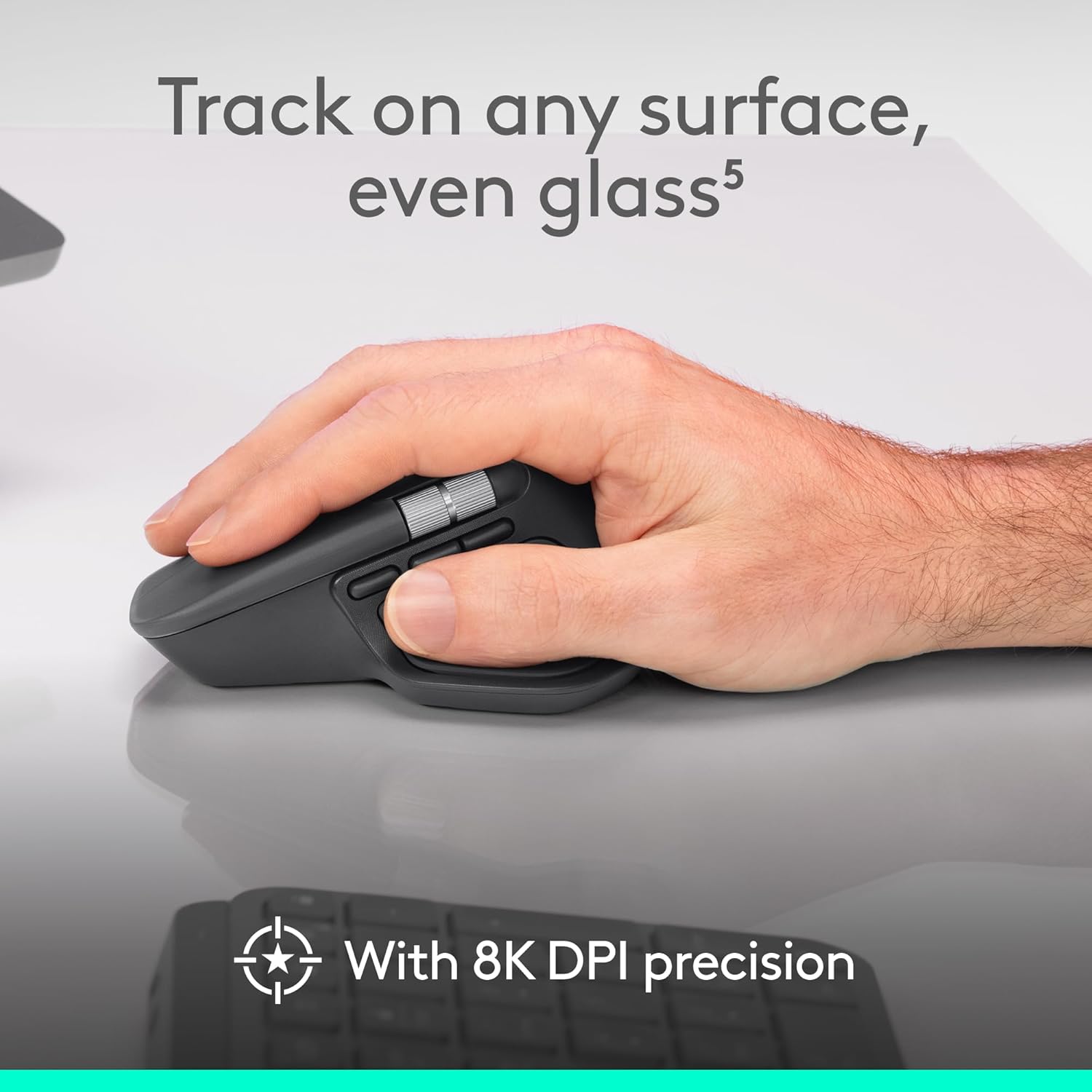
 Track even on glass (5) with an 8K DPI sensor
Logitech’s most accurate sensor is 5x more precise than a basic mouse (6). High DPI tracking with customisable sensitivity (1) ensures precision on large screens.
 Experience 2x times more powerful connectivity (7)
Enjoy enhanced connectivity for faster, more reliable performance. Powered by an advanced radio chip, optimised antenna placement, and a new USB-C dongle.
 Deeper flow with 90% less click noise (8)
Quiet clicks, perfect for creating, coding or collaborating, reduce noise by 90%(8) while maintaining the expected performance, precision, and reliability for a comfortable and focused experience.
 Customise your workflow with Logi Options+ (1)
Tailor every detail — from tracking speed and shortcuts to app presets for editing, designing, or coding. Automate workflows with Smart Actions and expand functionality through powerful plugins.
 More comfort, deeper focus
MX Master 4’s optimised tilt angle supports natural arm posture, while intuitive button placement reduces strain — helping you stay comfortable and focused for longer hours.
 USB-C quick charging, long lasting
Stays powered for up to 70 days on a full charge – and gets 3 hours of use from a 1-minute quick charge (10). Work while you recharge with an USB-C cable (not included).
 Work seamlessly across devices and OS
Connect with up to three devices and switch between them via Actions Ring or Easy-switch buttons on the mouse and transfer your files across devices seamlessly with Logi Options+ (1).
 MX + Adobe Creative Cloud
Get a complimentary 1-month Adobe Creative Cloud subscription with your purchase of MX Master 4.
 Be more productive with MX Keys S
For those who prefer laptop-like typing made even better with keys shaped for your fingertips and smart illumination. The keyboard follows the mouse automatically when switching devices.
 Get MX Brio Ultra HD webcam for sharper calls
Level up your calls and videos with 4k video, streaming optimisation and adjustable field of view settings. Optimised for streaming with a wide, adjustable field of view.
 Get MX Creative Console
Access tools, shortcuts, and actions effortlessly with the customisable LCD display keypad and take control with precise tactile analog controls on the wireless dialpad.
 Get premium audio with Zone Vibe 100
Get premium audio for your music and calls, reliable wireless connectivity, and a background-noise cancelling mic.
Precision you can feel with the Haptic Sense Panel; customisable (1) haptic feedback on specific actions, shortcuts, notifications enhancing productivity on this wireless Bluetooth mouse
Effortlessly access favourite tools with Actions Ring (2) on this MX Series mouse—a dynamic, customisable overlay adapts to each app, placing most used filters, adjustments, shortcuts at your cursor
Scroll 1,000 lines per second and stop on a pixel with the MagSpeed scroll wheel—Logitech’s fastest (3), quietest, and most precise (4) scrolling experience
Enjoy 2X more powerful connectivity (7) with a USB-C dongle, advanced radio chip, and optimised antenna for faster, stronger, reliable performance—or use Bluetooth for more versatility
Ergonomic mouse designed for comfort, MX Master 4 keeps you in flow with a natural tilt, intuitive buttons, and a thumb scroll wheel that reduces hand stress for fluid navigation
Quiet Clicks on MX Master 4 reduce noise and distractions, offering a soft, satisfying feel with 90% less click noise (8)—perfect for focused workflows
Get a complimentary 1-month Adobe Creative Cloud subscription with your purchase of MX Master 4
Designed for a positive future: Plastic parts include recycled plastic – 54% Graphite; 48% Pale Grey (12); 100% recycled cobalt in the battery; built to last with improved stain resistance (7)
Customers say
Customers find the mouse’s build quality excellent, with positive feedback about its ergonomics, feel, and fit that matches the previous model. They appreciate its appearance and connectivity features, with one customer noting it can connect to three devices simultaneously. Customers like the noise level, with one mentioning near-silent scroll bumps. The functionality receives mixed reviews.
10 reviews for Logitech MX Master 4, Ergonomic Wireless Mouse with Advanced Performance Haptic Feedback, Ultra-Fast Scrolling, USB-C Charging, Bluetooth, Windows, MacOS – Graphite
Add a review
Related Products


![ASUS TUF Gaming K1 RGB Keyboard, 5-Zone RGB, Membrane Switches, 19-Key Rollover, Dedicated Volume Knob, Spill-Resistance, Side Light Bar, Programmable Macros, Black [UK Layout]](https://i3.wp.com/m.media-amazon.com/images/I/61FlfyGpDdS._AC_SL1500_.jpg?w=300&resize=300,300&ssl=1)
£119.99
Dan Whitaker –
Easily the Best Mouse For Mac
As someone whoâs used a plethora of different mouses for my Macâ including the previous generation MX Master 3â this is the most ergonomic, comfortable mouse Iâve had the pleasure to use.It fits perfectly in my hand, has less rubber than the previous version, which hopefully means itâll look better for longer, and has improved and almost silent buttons.The MX Master 4 can connect to 3 devices at once, so you can have it connected to your desktop, laptop, and iPad at once if youâre lucky enough to own multiple devices. Itâs super easy in Mac Settings to change the scrolling speed, so you can make this mouse work for your particular work style.The Logi+ app allows you to increase its functionality, using the new side pad on the mouse to launch macros, such as adding emoji, playing or pausing media, or launching apps.While Iâve only had the mouse for a couple of weeks, Iâve absolutely loved my time with it. Itâs infinitely better and more comfortable than the Apple Magic Mouse, and thatâs coming from an Apple fanboy!
Colin McKean –
Great new mouse
Owned previous iterations of mouse, was due a new one so upgraded to this. Works and feels great. Not had an issues with connection. Fits in hand just like previous model.
Mil –
Great mouse but relying on Logitech’s software to configure is annoying
This is my first ‘premium’ mouse and so far as been a positive experience. Ergonomics, silence of the clicks, build quality, the metals used on the scroll wheels, quick connectivity via Bluetooth (I haven’t used the 2.4ghz dongle yet).Couple of points to note, some of it negative:1. You need the Options software (Logitech suggest the “Plus” version) to actually configure additional features like the thumb button, haptics and gestures. It’s free software BUT makes it tricky to get the best out of it if you are using it with a work-provided machine that is locked down.2. It doesn’t have on-board memory so any settings you choose are set to that computer specifically – this is annoying if you switch between multiple machines.3. It’s heavier than you might expect – I don’t mind it personally.4. The “Pale Grey” is definitely more “off white” in reality – the photos online on Logitech’s website or Amazon make it look more grey than it actually is.
iZian –
Nearly perfect, and the best mouse Iâve owned for the office
After owning different mice, and also the MX master and MX Master 3 for Mac; the changes in this generation are superb.The shape is slightly altered from last time, it was already very comfortable, now it seems a slightly longer shape and fitting more in to the palm.This will mean the mouse wonât fit properly in some protective cases but at some point the shape was bound to change.The scroll wheel is as good as ever, with the near silence scroll bumps, paired with the new clickers which make more of a thud than a click, itâs less clicky clatter at your desk. The mouse clicks still feel tactile enough, not mushy, despite their dulled sound.The new thumb button for the action wheel adds a range of new possibilities to the mouse, and ergonomically has been brought up, to be pressed with thumb tip not the side of thumb. So much more comfortable; but I feel that moving the gesture control to a button means Iâll have some getting used to not having gestures on the thumb.That can be configured though; so I could swap them, but I want to get used to the intended layout first.Customising the wheel and buttons and sensitivity and controls per app was always a win and remains so.The software copied my MxM3 settings over to the 4; so setup time was near instant thankfully.The mouse drops support for the USB unifying receiver to connect to my monitor, instead supporting their new connector standard, but still Bluetooth remains as a solid option.Iâve been using Bluetooth paired with an iPad, MacBook M3 Pro, and Iâve noticed no issues to speak of.With iPad, the latency is acceptable, but iPadOS is notorious for lagging mouse pointers. Nothing of note on the MacBook as youâd expect.Theyâve swapped out the soft plastics which seem to melt and degrade in the 3, for newer materials now. Harder back, but still a textured finish. The sides / thumb area now feels like a smooth silicone. Initially appealing but can feel sticky quite quickly with grime. The trade off here is hopefully much longer longevity due to the materials not degrading. Weâll know more in a few years.For those who donât already have MX Master; there are so many functions to note. The scroll wheel can switch to an âinfiniteâ free wheel scroll, at the click of a button (or change that to click the scroll wheel itself), or even dynamically based on how fast youâre scrolling it can transition to free wheeling and back again when you stop it. Hard to explain but absolutely excellent.The new haptics that are added feel a bit like a gimmick but will grow on me.The default level of medium is so strong that you can hear the mouse shake if youâre not holing it. Far too high, but customisable to low, and even lower to subtle. I prefer low or subtle and itâs great you can change it.Too early to speak to battery life. Other than itâs been this long and itâs still above 90%. That is on track with the MXM3 before it so no better no worse on average.Thai horizontal scroll is slightly more accessible now, and itâs a lovely firm scroll, on a capacitive wheel. The wheel being capacitive means that macOS knows youâre still holding your thumb on the wheel; so when youâre doing âslideâ interactions like deleting or pinning a note or email; the action doesnât happen until you let go of the wheel, just like it wouldnât happen until you let go of a touchpad where you were doing the same.This lets you scroll to see the action and scroll back to avoid taking that action. Just like a swipe.Gesture controls default to what youâd expect with desktop shifting. More use for those who donât use stage manager. But can be customised to nearly anything. I have screenshots on up and down, and desktop switching on left and right as youâd expect.I think for the price tag; itâs nearly as good as you can get. Iâm unhappy about the drop in support for unifying receiver. And not sure I like the feel of the silicone yet, without perfectly clean hands.If it was priced at 80% of its current price it would be 5 stars; but at the current price point you expect perfection. And it is very nearly perfect. But not.It remains the best mouse Iâve owned. For productivity⦠not for gamingâ¦The âfor macâ variants merely offering a colour choice difference. I like the darker colour, otherwise you can pick either and they work the same.
Mr Barnett –
Buy it if you want the best.
Best mouse ever.
Patricia Lemos –
Me encantó este ratón. Es muy funcional, cómodo y preciso. Los botones personalizables facilitan muchÃsimo el trabajo diario, y el diseño ergonómico hace que sea un placer usarlo durante horas. Sin duda, una excelente compra.
Martin R. –
Um 10 Uhr bestellt am selben Tag um 17.30 Uhr geliefert. TopBisher hatte ich die MX Master 3 (nicht S) fast 5 Jahre im Einsatz. Zugegeben vom Gefühl des Anfassens ist die neue MX Master 4 ein echter Sprung (vielleicht auch weil meine 3er schon gut abgenutzt war). Richtig gut gefällt mir das haptische Feedback beim Action Ring. Was aber sehr schade ist: ich nutze viel Excel: das ich die Action Buttons nicht mit Excel Funktionen belegen kann. Hier ist viel für Designer, Editoren etc. ausgelegt. Excel fehlt hier gänzlich im “Logi Marktplace”. Hier wäre eine Nachbesserung wünschenswert und wäre eine echte Zeitersparnis im Job.das click-Geräusch ist wirklich sehr leise und das click gefühl sehr angenehm. Wer also die Master 3 hat, dem würde ich einen wechsel empfehlen. Wer eine 3s hat (die schon um einiges besser ist), weià ich nicht ob die mehr als 100 EUR ausgeben sollte.Wünschenswert wäre es aber, wenn Logitech das zweite Mausrad per Software endlich umfangreich nutzbarer machen würde.AuÃer dem Gefühl des anfassens und dem clickempfinden ist nicht viel unterschied zu Master 3s. Natürlich eine tolle Maus mit Kaufempfehlung – mit Ausnahme von Personen die sich kürzlich erst eine 3s gekauft haben, ich denke da lohnt sich der Umstieg nicht!
Philippe Goffin –
Superbe évolution par rapport à la Master 3. J’espère qu’elle va bien supporter le temps avec sa nouvelle matière
Luca M –
Da appassionato della serie MX Master, questo è il terzo mouse che acquisto e posso confermare che, con questa ultima versione, Logitech ha davvero perfezionato il comfort dâuso. Dopo molte ore di lavoro, la mano e il polso risultano decisamente meno affaticati rispetto ai modelli precedenti e il posizionamento del pollice è sorprendentemente più naturale, contribuendo a una presa ottimale anche durante sessioni prolungate.Ergonomia e comfortLa forma ergonomica è ulteriormente migliorata e permette di mantenere una posizione rilassata, riducendo la tensione muscolare. Lâaccesso ai tasti laterali è più semplice e intuitivo, il che rende lâutilizzo ancora più fluido.Prestazioni e precisionePer quanto riguarda la precisione, resto pienamente soddisfatto: il sensore offre la stessa reattività elevata che già caratterizzava il precedente MX Master 3S. Non ho notato differenze né passi indietro nellâuso su superfici standard. Da testare ancora la performance su materiali particolari come il vetro.SoftwareNon ho ancora iniziato a sfruttare appieno le possibilità di personalizzazione offerte dallâActions Ring, ma la considero una delle novità più interessanti, in quanto potrebbe aprire nuovi scenari di utilizzo e velocizzare molto alcune routine, soprattutto grazie alla possibilità di gestire le automazioni tramite Logitech Options+, che si conferma stabile anche con questo modello. Tuttavia, segnalo che su macOS la ghiera di scorrimento orizzontale occasionalmente smette di funzionare, un piccolo difetto che spero venga risolto con futuri aggiornamenti software.Batteria e ricaricaLâautonomia del mouse appare molto buona: non ho ancora avuto modo di esaurire una carica completa. La presenza della porta USB-C rende la ricarica davvero comoda e attuale.Materiali e costruzioneDal punto di vista costruttivo, il mouse trasmette subito una sensazione di robustezza e qualità . Il peso aggiuntivo contribuisce a questa percezione di solidità , garantendo sempre un controllo preciso dei movimenti. Particolarmente apprezzata la nuova copertura dei tasti, che dovrebbe resistere meglio allâusura.Rumorosità Un ulteriore punto di forza riguarda la silenziosità dei tasti: rispetto al già silenzioso MX Master 3S, il MX Master 4 migliora ancora, rendendo lâesperienza di utilizzo discreta e piacevole anche in ambienti tranquilli o durante chiamate online.Funzioni avanzateNon ho ancora avuto modo di testare la funzione Flow per il passaggio rapido tra dispositivi, ma resto curioso di provarla, visto il livello di attenzione che Logitech dedica allâintegrazione multi-device.In sintesi, il Logitech MX Master 4 rappresenta un ulteriore passo avanti per chi cerca un mouse di fascia alta. Consigliato sia a chi lavora molte ore al computer sia a chi vuole la massima personalizzazione e comfort.
Christophe Dumontoy –
La série MX Master est et reste au top avec cette nouvelle génération 4.L’ergonomie est toujours parfaite, on passe à un revêtement qui ressemble plus à du plastique basique, mais sans cette effet collant à long terme. La longévité de la souris sera donc sûrement meilleure.Le retour haptique est amusant, à voir si c’est utile ou non ?Enfin une souris de qualité et SILENCIEUSE !Fini les clics qui résonne, place au silence et c’est un gros plus pour le confort.Pour finir, le récepteur en USB-C, c’est pas incroyable si on à un pc ou hub sans cette prise.De plus, même pas de câble de fourni pour le chargement ! à 129.90⬠la souris, je trouve ça limite !Malgré ses derniers points, je la recommande fortement ð