

Magnasonic All-In-One 24MP Film Scanner with Large 5″ Display & HDMI, Converts 35mm/126/110/Super 8 Film & 135/126/110 Slides into Digital Photos, Built-in Memory (FS71)
Original price was: £303.99.£119.99Current price is: £119.99.




Price: £303.99 - £119.99
(as of Jul 09, 2025 02:22:56 UTC – Details)
Product Description

Change your slides and negatives into digital, shareable files with the Magnasonic Digital Film Converter. This all-in-one film scanner creates high quality 24-megapixel JPEG images and takes just seconds to scan. View your film and slides on the extra-large 5” LCD display.

Scan a Large Variety of Film & Slides
Turn your valuable negatives and slides into high resolution 24-Megapixel jpeg images. With just the touch of a button, you can quickly scan and convert 35mm/110/126/Super 8 film & 135/126/110 slides. Super quick 5 second scanning lets you get through that pile of film and slides in no time.

Multiple Ways to View
Watch as you scan directly onto the scanner using the extra-large 5-inch LCD screen. With its HDMI output you can view your scanned images directly on an HDMI-compatible TV or monitor. Gather friends and family together and re-live old memories in slideshow mode.

All-In-One Scanning, Converting, Editing & Viewing Device
There’s no need for a computer because you can adjust brightness and color (red/green/blue) or mirror and flip your images directly on the full color LCD screen. Choose one of the 7 film format options for precise scanning and eliminate the need for time consuming and expensive editing software.
Converts 35mm/126KPK/110/Super 8 Films, Slides, Negatives into Digital Photos

Scan & Save Up to 20,000 Images with an SD Card (Not Included)
Boasting 128MB of built-in memory, easily store up to 50 images on the scanner until you’re ready to download to your PC/MAC via USB cable. Expand up to 20,000 images with the SD card slot (Compatible with SD cards up to 128GB). SD card not included.

Share Your Favorite Memories with Anyone, Anywhere
Once you’ve scanned and transferred your digital photos to your computer, share your images on social media such as Facebook and Instagram, email them to friends and family, save them to your phone/tablet or even print them and place into photo albums or picture frames.

What’s Included
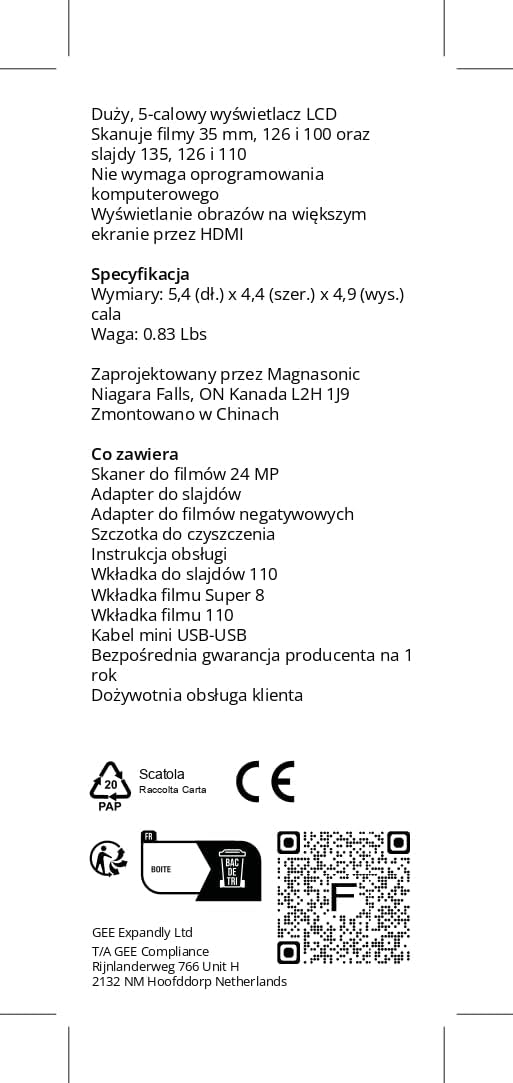
FS71 Film Scanner, Slide Adapter, Negative Film Adapter, 110 Slide Insert, 110 Film Insert, Super 8 Insert, Mini USB-to-USB Cable (40.5”), Cleaning Brush, Instruction Manual
FS50 SPECIFICATIONS

Display: 5” TFT LCD
Focus Range: Fixed
Exposure Control: Automatic/Manual (-2.0EV ~ + 2.0EV)
Recording Resolution: 16 Megapixels/24 Megapixels (interpolation)
Scan Quality: 3280 Dpi & 4920 dpi (interpolation)
Picture Aspect Ratio: 3:2
Scan Method: Single pass

Film Types: 35mm/126/110/Super 8 film & 135/126/110 slides
Light Source: LED Backlight
File Format: JPEG
Image Playback: Single
TV Out Type: NTSC/PAL
Built-in Memory: 128 MB
External Memory Card: SD card up to 128 GB

Scan Speed: 3-5 Seconds
Power Supply: DC 5V/1A
Image Sensor: 16 MP (4490*3412) 1/2.33” CMOS sensor
Lens: F/NO. 3.6, f = 4.83mm, field angle = 72°
Language: English/French/German/Italian/Spanish/Japanese/Traditional Chinese/Simplified Chinese

Unit Dimensions: 4.4 (L) x 5.4 (W) x 4.9 (H) inches
Unit Weight: 0.83 lbs
Unit Color: Black
UPC: 061783270400
Add To Basket
Add To Basket
Add To Basket
Customer Reviews
4.4 out of 5 stars 102
4.2 out of 5 stars 2,749
3.6 out of 5 stars 57
Price
£123.00£123.00 £119.99£119.99 £295.52£295.52
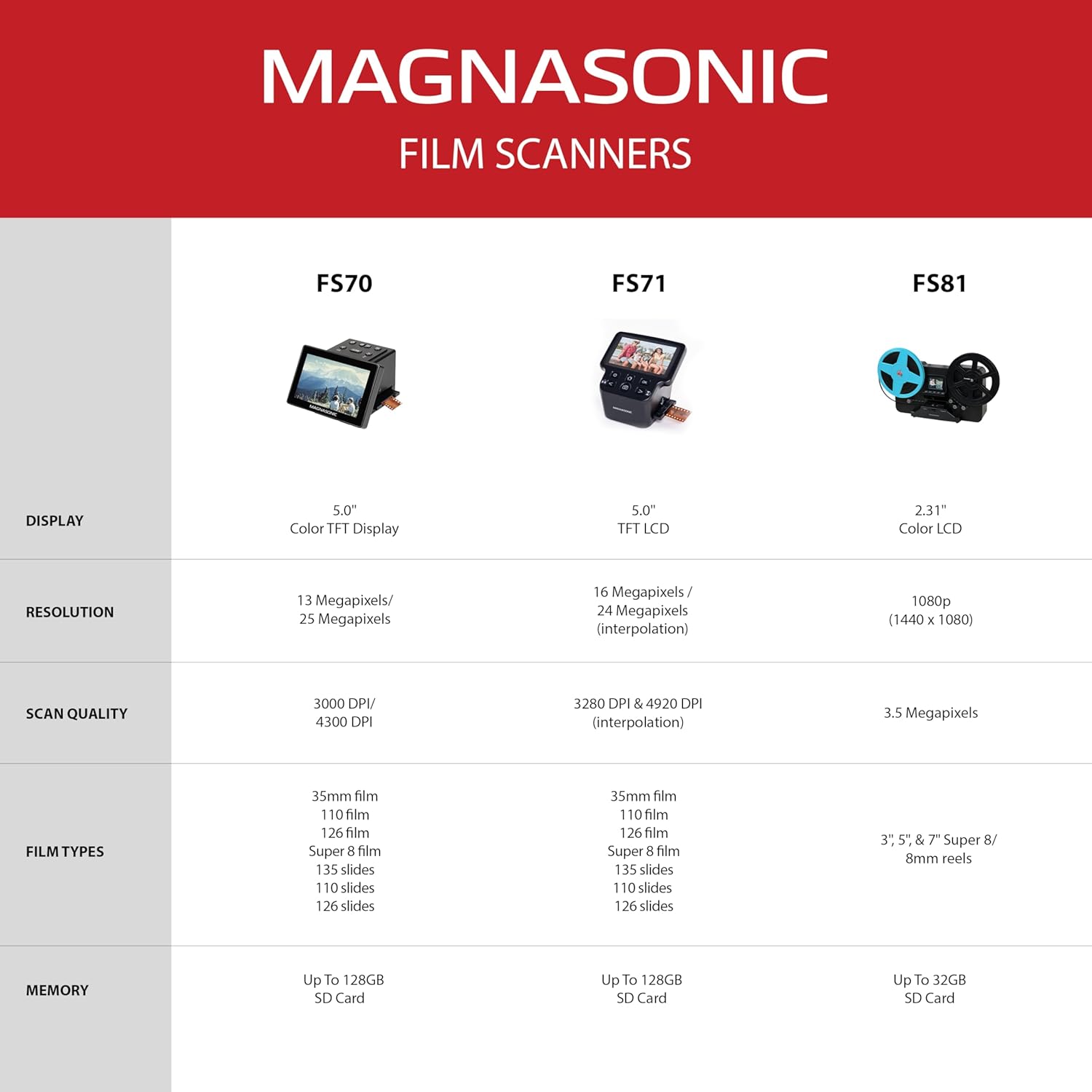
DISPLAY
5” Color TFT Display 5” TFT LCD 2.31” Color LCD
EXPOSURE CONTROL
Automatic/Manual Automatic / Manual Automatic / Manual
RESOLUTION
13 Megapixels/25 Megapixels (interpolation) 16 Megapixels/24 Megapixels (interpolation) 1080p (1440 x 1080)
SCAN QUALITY
3000dpi/4300dpi 3280 dpi & 4920 dpi (interpolation) 3.5 Megapixels
PICTURE ASPECT RATIO
3:2 3:2 16:9
FILM TYPES
35mm/126/110/Super 8/8mm film & 135/126/110 slides 35mm/126/110/Super 8 film & 135/126/110 slides 3”, 5”, and 7” Super 8/8mm reels
FILE FORMAT
JPEG JPEG MP4
IMAGE OUT
NTSC/PAL NTSC/PAL NTSC
BUILT-IN MEMORY
64MB 128MB None
EXTERNAL MEMORY CARD
Up To 128GB SD Card Up To 128GB SD Card Up To 32GB SD Card
PRESERVE OLD MEMORIES – Quickly and easily converts 35mm/110/126/Super 8 film negatives & 135/126/110 slides into high resolution 24MP digital JPEG files
MULTIPLE WAYS TO VIEW – Using the stunning 5” LCD screen, view your film, slides & scanned images directly on the scanner or use an HDMI cable (not included) to view on your TV or monitor
BUILT-IN MEMORY & SD CARD SLOT – With a convenient 128MB internal memory and an SD card slot for up to 128GB of expandable memory you’ll be able to scan and save a lifetime of photos
NO COMPUTER NEEDED – No complicated or expensive photo-editing software or driver installation required, you can adjust brightness, RGB color correction, flip and mirror directly on the scanner
FAST & EASY SCANNING – Simple setup for frustration-free operation to effortlessly scan your photos in less than 5 seconds each with the included fast-loading film trays
Customers say
Customers find the film scanner straightforward to use, with no software needed, and appreciate its good value for money. The device performs well and is easy to connect to a computer, with one customer noting its fast upload speed. The brightness and resolution receive mixed feedback – while many find the images clear and bright, one customer mentions issues with dark shots, and while the resolution is generally good, one notes significant noise and artifacts. The design receives criticism, with multiple customers describing it as poor.
13 reviews for Magnasonic All-In-One 24MP Film Scanner with Large 5″ Display & HDMI, Converts 35mm/126/110/Super 8 Film & 135/126/110 Slides into Digital Photos, Built-in Memory (FS71)
Add a review
Related Products


Original price was: £303.99.£119.99Current price is: £119.99.
Maxine –
Excellent viewer, easy to use
I bought this to look through some old slides that I found at my mum’s house whilst clearing it out. I wanted an easy way to view a large bag of slides from the 1960s – 1980’s. This is so easy to use. You put the slide in the adapterprovided, and then manually push the slide through the viewer with the next slide. It’s easy to change the colour and brightness if you need to. Then just 1 press will capture the image onto the SD Card for you. It’s only a few seconds per scan, and they are good quality. The picture above is from 1972, I did not edit any colour balance. I think the Magnasonic has produced a brilliant image. It is cheaper than other viewers out there, but it is certainly not lacking in quality. Again, as others have said, if your source image is faded or poor, then you won’t get a brilliant scan, but otherwise I have absolutely no issues with it.
Simon Ganderton –
Very quick and easy.
I was very impressed by this product, it was very easy to set up and gave a great quality of scan. I have only used it for slides and the slide feeder included made very easy work of a few hundred slides, probably taking less than 10 seconds per slide to load and scan. The only issue that I encountered was that some of the thicker slides were too tight to pass through and I needed to make an adapter to enable this. Being able to scan without a computer and then just transfer them through the SD card was easy and quick. Just don’t expect 1960s slides to compare with a modern camera phone.
A. Hadley –
Highly recommended
This is an excellent product, easy to set up and use, with great results. I had previously tried scanning old slides with an Ion âslides foreverâ device, but the quality was terrible because of low resolution. This Magnasonic is more expensive but thereâs no contest when it comes to quality. The resulting images are clear and bright. You have to feed slides manually but itâs quick and easy – each slide pushes the previous one out the other side. Exposure or colour can be adjusted when (rarely) needed, though not in detail. The device has a very small internal memory so itâs advisable to buy some standard SD cards for bulk processing. Important note: it will only work with lower capacity cards – 2GB recommended (which will hold a few hundred images). Files can be transferred to computer via card reader or direct from the device. No software needed.
Felly –
Photo negatives veiwer
This is a great way to save you photos to SD cards
Patrick J. Campbell –
Just what I wanted.
I had a bundle of old negatives, never knowing what or who they were about. This equipment allowed me to see full colour positive photographs and to save them to an SD card. It was just what I wanted.
Chris Romain –
Beware of the limitations
I was hoping that this scanner would produce images which were good enough for using in powerpoint presentations. Unfortunately, even on 25MP resolution, the images were very grainy whereas the original slides when projected onto a screen were sharp. The scanned images were also significantly darker than the originals.
Mr Sparticus –
Life saver
This is an awesome bit of kit, if you have old negatives, then it’s really easy to use.
Ian McWilliam –
Did over 1000 slides in a week – Served me well
It did all my Dads slides but there were a couple of Super slides (same shape as a 35mm slide but the margin is about 5mm from the edge and as this scanner cant zoom out you wont get all the image.So you do need an sd card for this scanner but as it also has the USB cable for the PC to import onto the PC I came up a method to import one box at a time, rename the export folder to the box number. then it creates the export folder again the next time.As it has settings for all the standard slides it will do 95% of everything you need to scan if you collection is anything like my Dads where its mostly stock 35mm slides with some superslides extrachrome ones he got from other people over the years.Scanning slides is bit of an artform, Most of these slides had been written on with who and what date the slide was about. The trick i found that made it quicker was to number the boxes and then take photos of the whole slides and then scan those slides and add them to a folder on my PC one box at a time – then I named the folder the number of the box and then later i would import all the photos i took and ad them as a subfolder to the numbered folder so i had a reference to refer back to later where i could match the slide number to the slide and then name the slide image correctly.So the scanned images would go in the folder namedBox 22 – 1967 – wedding anniversaryThen inside that folder i would import all the scanned slidesthen i would make anothe rsubfolder in that folder calledBox 22 – RawIn there i would put all my photos of the slidesthen I could go back to them later and name the slides correctlyI also noticed that some slide had the images back to front and writing was backwards or number plates on cars were backwards, it was then i realised that whoever had originally mounted the slides at the photo shop did not always put them the right way around.So taking the slides and then photos of the surround allowed me to get all the info i needed and then the slide can back in storage and i had all the info of both the slide and its surround to go back over later with more care and name correctly and reverse the image when required. That second stage has taken a few months here and there at my own leisure. Hope this helps anyone new to scanning slides.
ã¨ãã¹ã£ã¼ –
é«è§£å度ã¯æå¾ ããªãäºã°ï¸â¨ããã¾ã§ã大éã®ãã£ã«ã ããå¿ è¦ãªã¢ãããã§ã¤ã¹ã軽ãæ°æã¡ã§é»ååããç¨ã¨èããâ
Attique A. –
Very good item, highly recommended.
OMO –
It’s easy to use and good quality
Rajedra Vadnere –
I was looking for this product for long. I had tried to convert my negative to digital format using digital camera and home made projector using various DIY publications and they didnât work for me. Using the Panasonic converter I have converted around 700 negatives to digital format.Only problem comes when the picture is of snow or very bright objects. The middle parts of such photos show yellowish tint.The professional positive hard copies are much better.
Anthony Wu –
At first I was unsure as to which type to buy as I read so many bad reviews. Finally after much consideration I decided to buy an established brand though there were much cheaper ones available. I didn’t regret buying it and it was a breeze scanning away plus the quality was good.