

Portable Document Scanner, 900DPI Hand Held USB Image Scanner A4 Colour Photo Mobile Scanner Handy Scan (JPG/PDF Format, High Speed USB 2.0, Micro Need SD/TF Card But Not Included)
Original price was: £52.99.£49.13Current price is: £49.13.



Price: £52.99 - £49.13
(as of Oct 24, 2025 04:38:38 UTC – Details)
Product Description
AOZBZ scanner portable recto verso

Why Choose AOZBZ Handheld Scanner?
Because it can be carried around, it can easily be put in a briefcase/bag so you can use it anytime, anywhere. It is equipped with a driverless installer and supports Windows XP/7/Vista/Mac OS 10.4 or above. Compatible with your system is appropriate. It can adjust 3 modes according to your file resolution need. 300dpi/600dpi/900dpi, you can record in the clearest way, images and documents are displayed clearly.
3 resolution modes for your options


A good helper in the office
Go to work, portable little helper. The weight is only 150g, which is lighter than cellphone.Size: 25.5*2.5*2.5cm/10*1*1″(L*W*H)

Scan Format Support: JPG/PDF
The scanning format is JPG/PDF, and it can support up to 32G SD card. Fully meet your business travel or daily use needs.

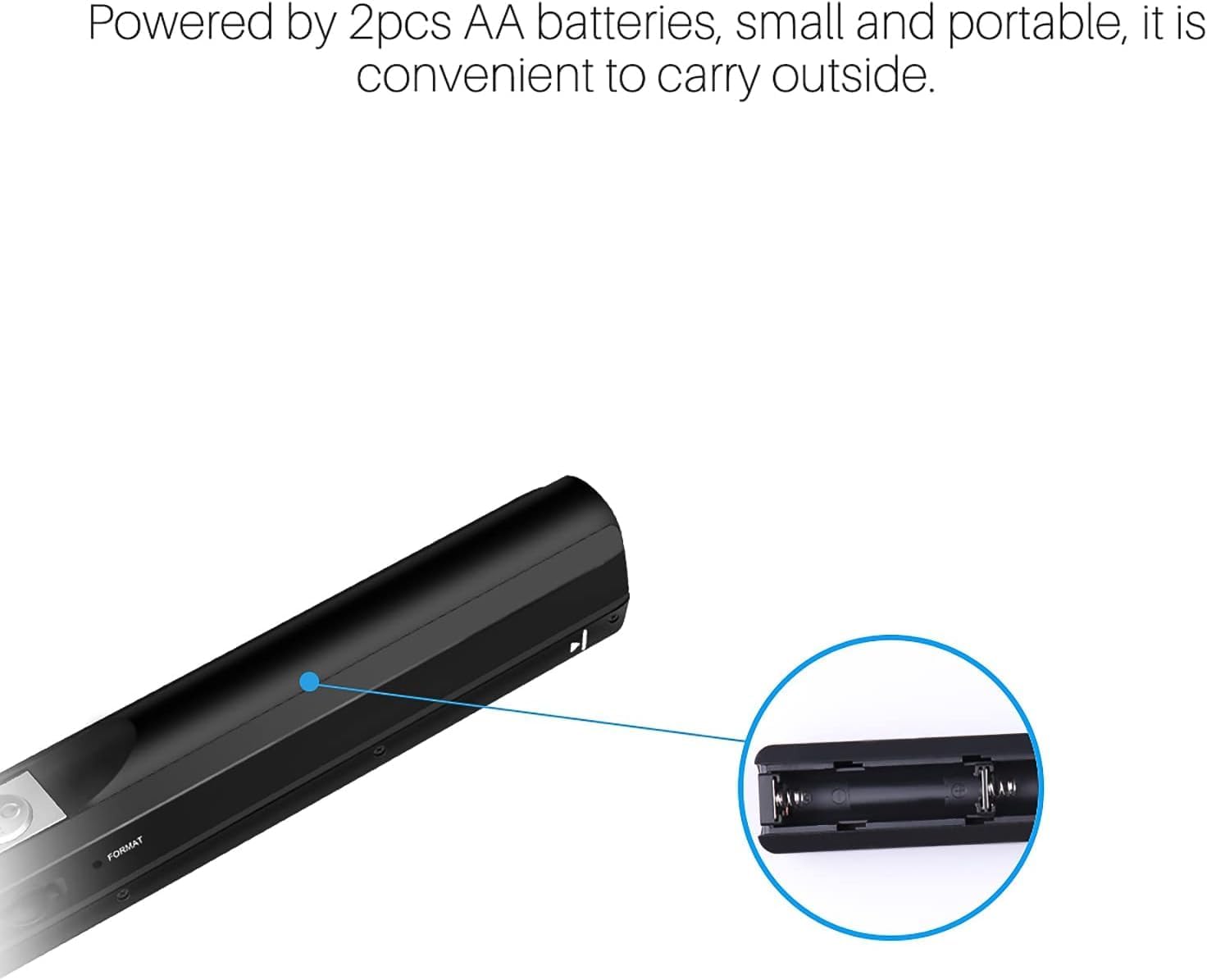
Just 2 * AA batteries
When fully charged, you can easily scan ≥200 sheets (default A4 paper: low resolution color). A full charge is enough to scan the text of a book.

Automatic fault identification

Perfect for banks, insurance companies, lawyers, real estate agents, scan your important documents and save them instantly without having to find a print shop. Confidentiality is stronger.
Learn more
Question : How many images can be stored in 2G memory Response : (Based on 2GB SD card. Scan A4 size file, quantity of scans varies depending on content complexity) 900 DPI Color: 300 pieces / JPG or PDF (Min.) 600 DPI Color: 400 pieces /JPG or PDF (Min.) Color 300 DPI: 1500 pieces / JPG or PDF (Min.) Question : How to judge scanning speed. Response : In the instructions, red light on means that you are scanning the document too quickly. Go gently over the document, when the green light comes on, the scan is good. Question : How to convert scanned jpg format to word format? Response : With the increase of OCR text conversion software. You can quickly convert to suitable formats.
WIDE COMPATIBLE – Compatible with Windows XP/7/Vista/Mac OS 10.4 or above version. Scan images or pictures quickly and store files within seconds, plug and play, no need any software preinstalled.
3 IMAGE RESOLUTION – 3 modes of resolution for your options: 300dpi/600dpi/900dpi, you can save it in the clearest way, picture and document are showed clear as it is. Freely choose your suitable resolution.
UP TO 32GB STORAGE – Great storage capacity as it supports 32G Micro SD card, JPEG/PDF format is all available, total meet your need for business trip or daily use. Store and Share your scans and information via searchable PDF files or JPEG into a micro SD/TF card.
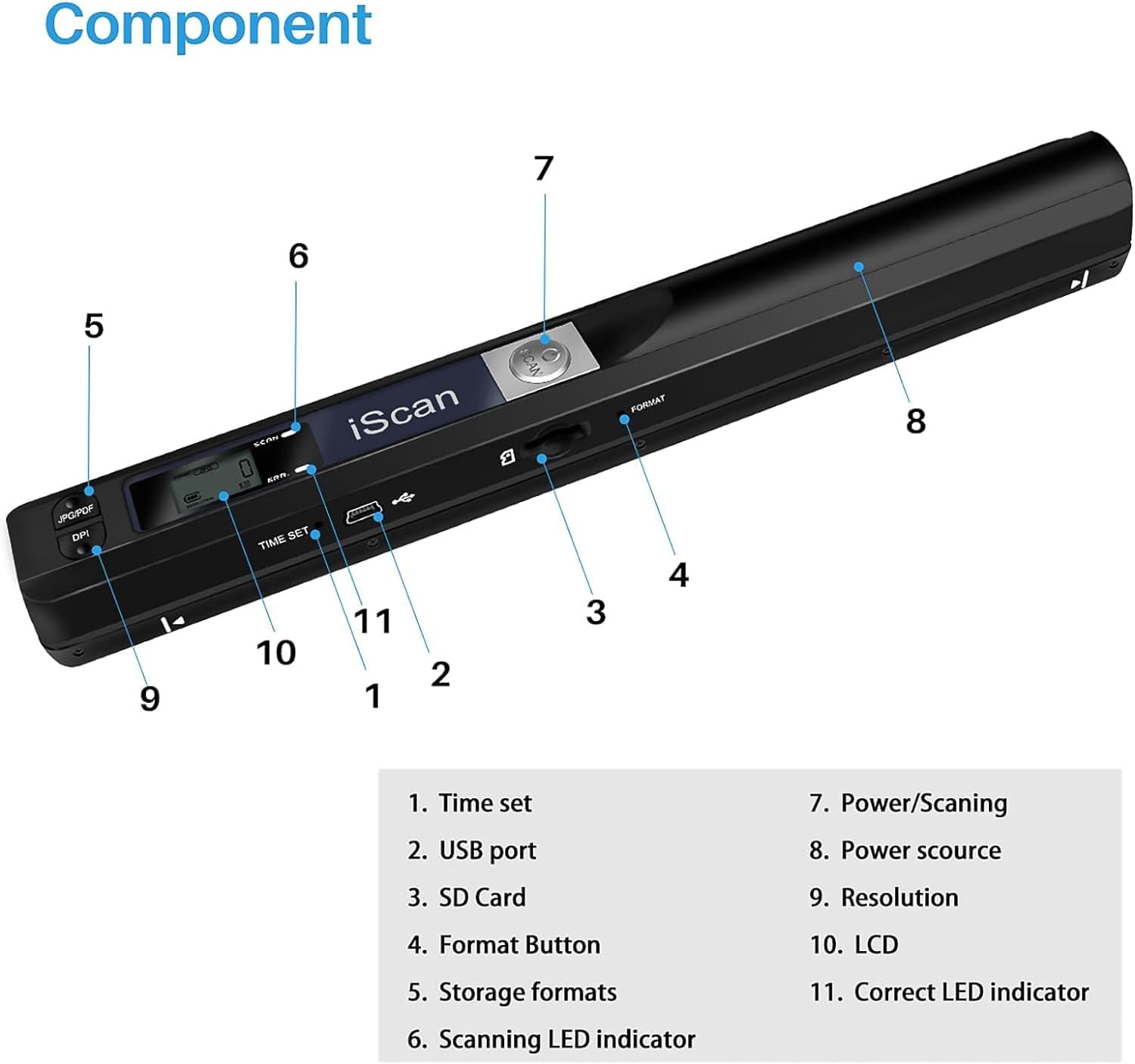
EASY OPERATION – Switch on, select color mode and resolution, press the “SCAN” button until the green LED lights up, scan the document, press it over (finished automatically after 3 minutes without operation).
MULTI PURPOSE – It is applicable in bank, insurance business, real estate agency,home, office, library or outdoors. suitable for lawyer, businessmen, students, travelers and amateur archivists. Scan your important files and save them immediately, no struggling in finding a printing shop, keep it confidential.
Customers say
Customers find the scanner easy to use, with one mentioning it’s great for scanning old photos and documents. The quality receives positive feedback. However, the functionality receives mixed reviews, with some saying it works great while others report it doesn’t turn on.
13 reviews for Portable Document Scanner, 900DPI Hand Held USB Image Scanner A4 Colour Photo Mobile Scanner Handy Scan (JPG/PDF Format, High Speed USB 2.0, Micro Need SD/TF Card But Not Included)
Add a review
Related Products


![Scanners: (Limited Edition) [4K UHD / BD]](https://i1.wp.com/m.media-amazon.com/images/I/81KqcO26mcL._AC_SL1500_.jpg?w=300&resize=300,300&ssl=1)

Original price was: £52.99.£49.13Current price is: £49.13.
J. Gleeson –
Easy to use, great quality
Excellent for scanning old photos and documents. Easy to use and compact to store. Great quality if you scan carefully
Kindle Customer –
Easy to use.
Cannot set the Date, Time etc. However it’s probably not necessary for my usage. There’s no tool supplied with the product for this purpose. Had to use tool for mobile phone. Otherwise suites my needs.
a bland –
Scanner
This is great to use. It’s very easy but you must keep a steady hand as you scan ir it comes out blury.
Angela Stack –
Don’t waste your time.
Don’t waste your time. I’ve sent multiple messages for support to get it to turn on – still waiting for that to happen. Amazon aren’t much better.Doesn’t turn on, tried format, tried youtube videos and a total waste of time.
E ric JAMES –
Unfortunate snafu with instructions
The first problem was the instruction sheet was in French. GCE O level French was a long time ago, but Google translate managed to get most of the basic information. I suppose to a Chinese box packer, French and English look pretty much the same. When scanninng text, which is what I wanted it for, you have to keep the scanner parallel to the lines and this can be quite difficult. Otherwise it works as expected and transferring the scans to the computer is simple enough.
geoff irving –
It is good
Brought this as a replacement and is doing a great job no issues at all
muhammed –
How Easy to use
I don’t know about others, for me worthless.1⢠battery runout fast2⢠not easy to scan3⢠isn’t crystal clear4, shaking image5. Not value for moneySorry it’s honest feedbackWith peace
Jason Logan –
brilliant hand held scanner
What a handy little hand scanner.Simply swipe over document.Stores to sdcard. Connect to PC via USB cable supplied.
Maep –
Fenomenal
jipnb –
Article bien fini, est livré avec un mode d’emploi en Anglais approximatif, sans doute traduit automatiquement du Chinois. Cette traduction douteuse ne facilite pas les manipulations mais on finit par comprendre. Il est nécessaire d’insérer une carte micro-SD non fournie. il faudra aussi 2 piles AA (non fournies). Leur logement se trouve sous un couvercle semi-cylindrique qu’il faut faire glisser en l’éloignant du bouton de mise en route. Aucune indication sur cette manipulation dans le mode d’emploi ou sur la boîte. Il faudra ensuite disposer d’un trombone ou d’un cure-dents pour manoeuvrer deux petits boutons encastrés, un pour le formatage de la carte SD, l’autre pour le réglage date/heure. Bien lire la notice pour ce dernier réglage car ce n’est pas très intuitif. Le réglage de calibration n’est pas évident non plus. Une fois tout réglé j’ai trouvé les scans bien détaillés et faciles à faire. Pour quelques dizaines d’euros je trouve ce produit satisfaisant et bien pratique, avec une bonne qualité des résultats.
Férey Géraldine –
Uniquement scanner
Finja –
Sehr cooler praktischer Scanner. Funktioniert gut und die Qualität ist auch gut. Manchmal bricht der Scan jedoch ab und es ist nicht ganz ersichtlich warum. Trotzdem eine Kaufempfehlung weil es nicht so sehr stört.
Zukunft –
Die Lieferung ging schnell – 1 PunktDer Scanner ist Plunder – hierfür gibt es keine Empfehlung. Schaltet sehr schnell vom Scannmodus aus – es gibt im Vorfeld keine Kontrolle ob überhaupt gescannt wurdeLeider benötigte ich erst noch eine Speicherkarte und kam insgesamt nach einer möglichen Rückgabe erst zum testen. Ich bin nun super enttäuscht, da der Scanner ja auch nicht ganz kostenlos zu haben war und für meine Zwecke unbrauchbar ist