

Surface Pro 11 Docking Station: Surface Pro 11 Copilot+PC/Pro 10/Pro 9 USB Hub Adapter with Thunderbolt 4 (Display+Data+100W PD), 4K HDMI, USB 3.0, SD/TF Reader, 3.5mm Audio Surface Pro 11 Accessories
Original price was: £995.00.£29.99Current price is: £29.99.





Price: £995.00 - £29.99
(as of Jun 21, 2025 16:56:25 UTC – Details)
Product Description


Expand your screen
Use Surface 9 Hub to extend Surface Pro11/10/9/X to HDTV, monitor or projector for ultra-high-definition visual experience.
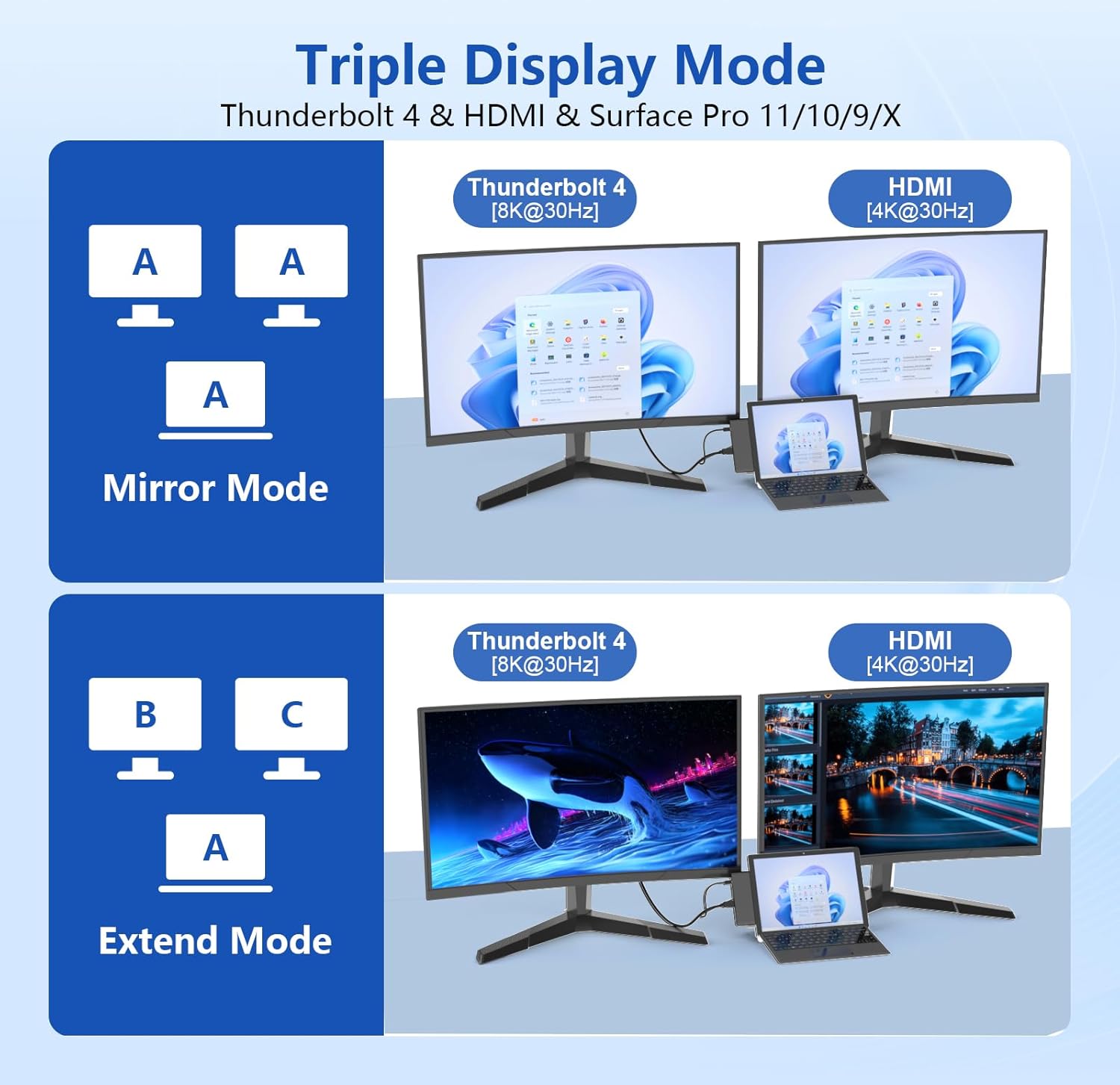
4K HDMI port: supports up to 4K@30Hz HD video resolution, and supports 2K/1080p/720p/480p/360p resolution downward.USB-C Thunderbolt 4 port: supports up to 8K@30Hz HD video resolution, and supports 2K/1080p/720p/480p/360p resolution downward.

Triple display (UHD 4K HDMI + USB-C Thunderbolt 4) + Surface Pro 9 mode allows you to extend 2 displays and supports extended or mirrored mode. You can run different projects on different displays. With split-screen display on Surface Pro 9 USB-C docking station, you can enjoy a clearer dual screen.


USB-C Thunderbolt 4 Port (Video Display + Data + PD Charging):
Transfer 1GB files in 1 second using Thunderbolt 4 port (supports 40Gbps data transfer speed).Provides 100W fast charging for Surface Pro 9/10/11/XUSB-C Thunerbolt 4 resolution up to 8K@30HzSupports forward and reverse insertion

3.5mm Audio Port
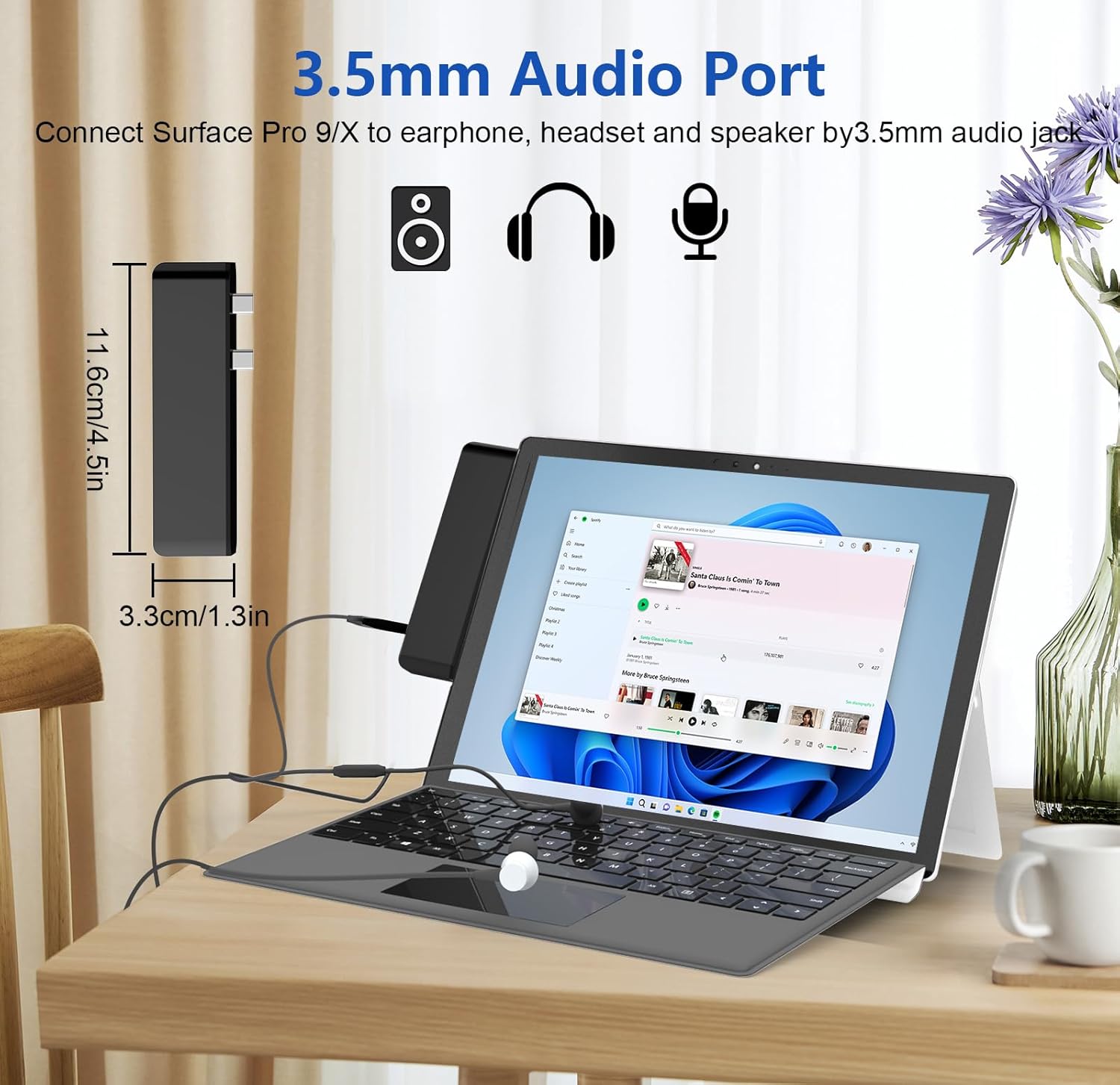
Supports audio input and output, allowing you to easily make video calls, listen to music, and watch movies.

Aluminum Housing and Tilted Design
With its specially tilted sides and compact design, this Surface Pro 9 Dock fits your Surface Pro 9/X/10/11 perfectly.

Easy to Carry
Lightweight, perfect for travel or business trips.
Package Dimensions : 15.8 x 6.6 x 1.8 cm; 59 g
Date First Available : 17 Dec. 2024
Manufacturer : Cbcuyle
ASIN : B0D6YBNY2J
Item model number : SP9-HDMI-02-B-C
Country of origin : China
Guaranteed software updates until : unknown
Multi Port Design: Surface Pro 9/10/11 docking station turns 2 USB-C ports into 7 ports, including 4K HDMI port, USB 3.0*2, 3.5mm audio, USB-C port (display+data+100W PD charging), SD slot, and TF slot. It is plug-and-play, driver-free
4K HDMI Port and 3.5mm Audio Port: The HDMI port of the Surface Pro 11 adapter supports 4K@30Hz UHD resolution, allowing you to enjoy a clearer visual experience. In addition, the Surface Pro 11 Hub is also equipped with a 3.5mm audio line interface, which supports audio input and output, allowing you to easily make video calls
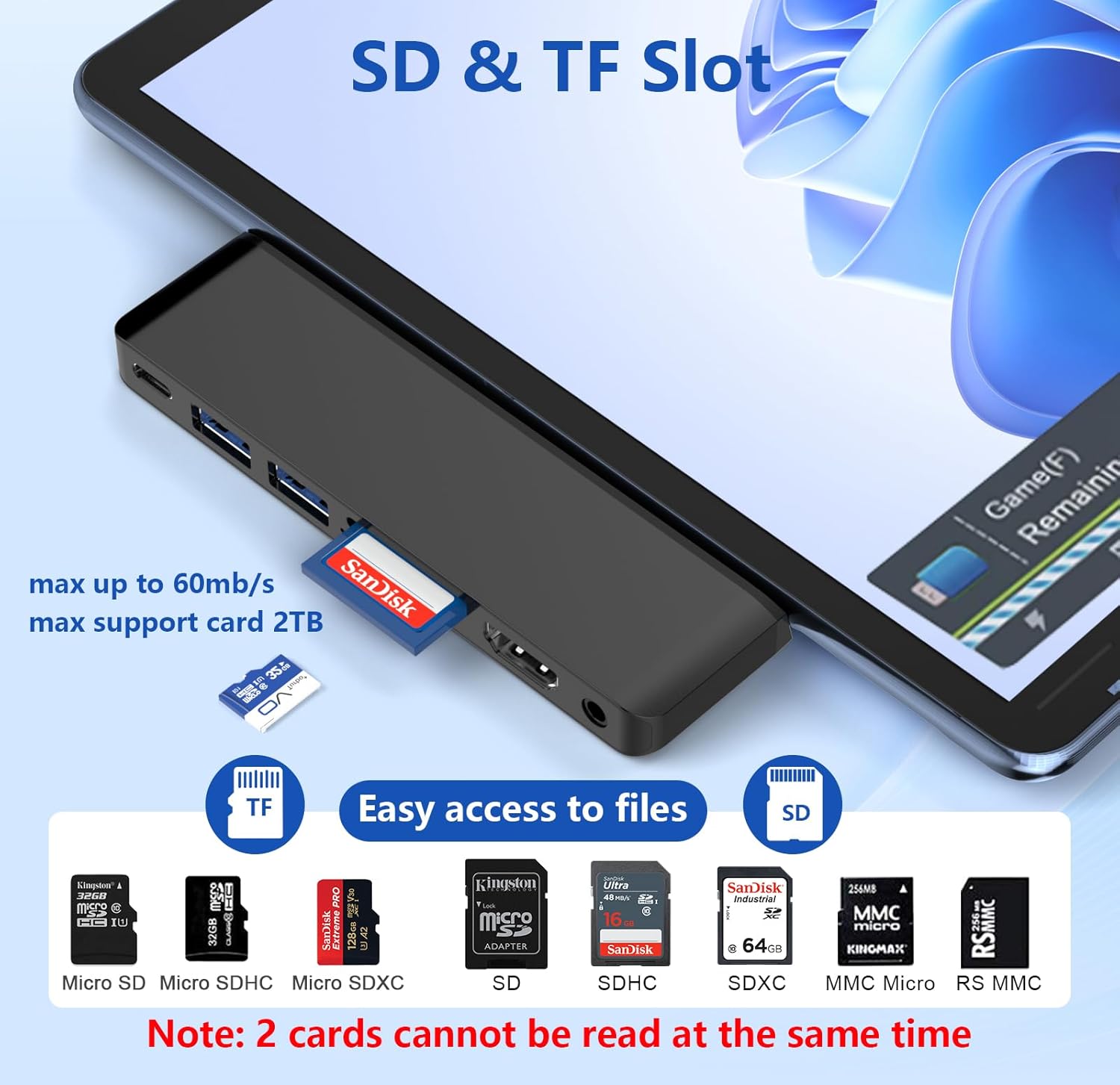
SD/TF Card Slot: The Surface Pro 10 docking station is equipped with an SD/TF card slot for easy access to files on the memory card. It supports card capacity up to 2TB and is compatible with SD, SDXC, SDHC, Micro SD, Micro SDXC and Micro SDHC cards. Note: SD and TF cards cannot be read at the same time
Fast data transfer: The Surface Pro 11 Dock USB-C Thunderbolt 4 interface supports data transfer speeds of up to 40 Gbps, and the USB 3.0 interface supports transfer speeds of up to 5 Gbps. Whether you are transferring large files or performing high-speed data transfer, our docking station can meet your needs
Triple Display Surface Pro 9 Adapter: The split-screen display function of Surface Pro 9/10/11 Hub allows you to expand two screens (4K@30Hz HDMI + 8K@30Hz USB-C Thunerbolt 4). Supports Enhanced or Mirror Mode
Easy to Carry: This Surface Pro 9 Dock has specially angled sides and a compact design, perfectly fits your Surface Pro 9/X/10/11. Lightweight, perfect for travel or business trips
13 reviews for Surface Pro 11 Docking Station: Surface Pro 11 Copilot+PC/Pro 10/Pro 9 USB Hub Adapter with Thunderbolt 4 (Display+Data+100W PD), 4K HDMI, USB 3.0, SD/TF Reader, 3.5mm Audio Surface Pro 11 Accessories
Add a review
Related Products


Original price was: £995.00.£29.99Current price is: £29.99.
Customer Review –
Dock for Surface Pro
This review is for Surface Pro 11 Docking Station: Surface Pro 11 Copilot+PC/Pro 10/Pro 9 USB Hub Adapter with Thunderbolt 4 (Display+Data+100W PD), 4K HDMI, USB 3.0, SD/TF Reader, 3.5mm Audio Surface Pro 11 AccessoriesI received this to review as part of the Amazon vine program.I found this very snug to fit. However with a push it did fit and I can see how it would be useful. The main issue I have is that I use a case on my surface pro and even though the case is very thin and has cutouts for the usb-c ports, this docking station wonât fit while the case is on as it is very close fitting. Now that I have had the opportunity to try this, I feel that it looks messy at the side of my screen, and what would work for me is a dock attached to a long wire that I can position behind the computer. However this does work, it may be perfect for you if you donât use a case with your surface pro.
Alex –
Good quality, but looks messy hanging from side of Surface Pro if using with a keyboard
This dock/hub has a nice quality feel to it with an aluminium body and sleek design that suits the Surface Pro well. I have used similar devices on laptops and found doing away with the short cable in favour of mounting directly to the devices two USB-C ports is a neat idea especially if using it on the go as it can be left fitted. In this instance however Iâm not so convinced. If using the Surface Pro with a keyboard – the most likely scenario where a docking station will be required – then unlike on laptops where it sits flush with the desk this of course sits next to the screen making for a bit of a messy setup when lots of cables are connected, I found myself thinking this would be much better with a short cable so it could sit on the desk.Obviously this hub also isnât going to fit if you are using a case on your Surface Pro.There is a good selection of ports that will cover you for almost all scenarios, including PD 100W charging to still permit USB-C powering of you Surface Pro. Although this doesnât really work for me it is good quality and fairly priced at just under £23 (£24 with 5% voucher) if you think it will work for you.
Customer Review –
For the price, it’s excellent
It’s an interesting design, plugging into both USB4 ports on the side of the Surface Pro. From testing, I can see that one of the two Surface Pro ports this hub plugs into is just a straightforward passthrough to the Thunderbolt 4 port on the hub.The other Surface Pro port that is being utilised is being sent to a simple hub that gives two USB 3.0 ports, an SD card reader, an HDMI out and a 3.5 millimetre audio out, all of which work absolutely fine. Without a case, the hub connects securely and gives the best of both worlds – retaining access to a high speed USB4 port but adding all the flexibility that the additional ports provides.With a case, this hub doesn’t really fit anywhere nearly as well. Bear this in mind if it sounds like you. But in terms of the price (£19 at the time of writing, very fair) and performance, it’s great.
Malcolm –
Great docking station
This is a great idea if you own a Surface pro 9 or above. You just plug it in to the two USB-C ports on the side of the surface, and your good to go. no need for any drivers. You then get a HDMI port, two USB-A 3.0 ports, card reader ports, and a Thunderbolt 4 port. The only downside is, as it has only one USB-C port, so you cant use the port and charge at the same time, without adding anouther docking station to it.
Steves Reviews –
Specific to the Surface Pro utilising the two USB C ports
This dock is specific to the Surface Pro utilising the two USB C ports and will provide 7 additional ports.It does match up snug and just looks like an extension – connection is solid with no issues whatsoever and all ports tested and work exactly as described.I especially like the SD card reader and external monitor capability.Currently on offer with a 20% discount and that represents excellent value for money.
Deelightful99 –
Perfect
This is similar to how some MacBook Pro USB C port adaptors work, it plugs into the two USB C ports on the side of the surface Pro and voila, you have 7 ports! You get HDMI, 2 USBA, SD & Micro SD cards and an audio jack, and “regain” one of the USB C ports lost to plug this thing in with power delivery.So this fits perfectly and functions as intended and is good build quality of aluminium. The only thing this is really only useful if you have a strong need to plug into two USBA devices and don’t mind sacrificing the two existing USBC ports. If so, this is a good buy and works great for that purpose.This is a useful extension to cover bunch of bases for the Surface Pro, for me it’s most useful to be able to quickly connect a monitor and external drive and card reader.
egako –
A Useful Upgrade
This docking station makes the Surface Pro 11 much more versatile. It adds seven ports, which is helpful when working with multiple devices.Charging through the USB-C port is convenient. It keeps the Surface Pro powered while using other ports, so I donât have to unplug anything to charge. The Thunderbolt 4 support makes it future-proof.It fits well without feeling bulky. The angled design blends with the Surface Pro, and itâs light enough to slip into a bag. Itâs been reliable during work trips, and setting it up takes secondsâjust plug it in.For the price, it delivers solid functionality. Whether for work or travel, it helps get more done without carrying extra adapters. If you use a Surface Pro daily, this is worth considering.
KG –
Super convenient as a docking adaptor
This i use as a docking adaptor. I plug all my bits into it and then when i want to work at a desk i just plug this into my surface and everything is there without any faff.The convenience is also the thing that i think lets this down. You’re limited to just a few machines. I personally think having a single or dual wire connection would work better. I used 2 short usbc extensions to put this on the desk which defeats the purpose but i was much happier without all the strain being on 2 small usb ports from all the wires.
Customer Review –
As devices become more compact, they often sacrifice essential ports like USB-A and HDMI. This docking station resolves that issue seamlessly, providing a versatile array of ports in one sleek package. Thanks to its dual-USB-C reinforcement, the dock feels solid and secure, making it a perfect companion for my Surface Pro 11. Setup was effortlessâmy Surface detected the dock instantly, enabling true plug-and-play functionality for USB flash drives and other peripherals. The aluminum build adds a premium touch, with clearly labeled ports ensuring convenience. Given its performance and design, this dock delivers impressive value at its price point.
dekagon –
sehr gutes Produkt!
TheSerialReviewer –
Compatibilità : Compatibile con Surface Pro 9, 10, 11 e Surface Pro X.Espansione delle porte: Trasforma 2 porte USB-C in 7 porte, che includono:Porta HDMI 4K (fino a 30 Hz)2 porte USB 3.0Porta USB-C (Display + Dati + Ricarica PD fino a 100W)Slot per schede SD e TFJack audio da 3,5 mm (supporto input/output)Supporto video avanzato: La porta HDMI supporta una risoluzione fino a 4K a 30 Hz, mentre la porta Thunderbolt 4 permette la trasmissione fino a 8K. Il supporto per triplo display consente di usare fino a tre schermi, massimizzando la produttività .Trasferimento dati rapido:Thunderbolt 4 (fino a 40 Gbps)USB 3.0 (fino a 5 Gbps)Supporto per schede di memoria: Slot SD/TF compatibili con schede fino a 2TB di capacità , perfetto per l’accesso rapido ai file multimediali.Design: Inclinato e compatto per adattarsi perfettamente ai modelli Surface, è leggero e adatto ai viaggi o agli spostamenti lavorativi.
Erich B. –
Bricht die usb, keine Kaufempfehlung.
Juan More Media –
The USB connectors break internally, and the headphone jack does not work properly without fiddling around. If you’re using these for music, know that sooner or later this will happen. It’s like the USB connectors lose connection: you can still hear audio but it sounds like it’s from a tape player. You have to move the dongle front and back to get the USB connectors to fully connect and then the audio comes back to normal — that is, until you move your Surace again and the audio loses grip again.