

TECKNET Bluetooth Mouse, 4800 DPI Wireless Mouse, Cordless Mice Ergonomic Portable Mouse for Laptop, Computer Mouse with 6 Adjustable DPI, PC Mouse with 24 Month Battery Life, Battery Indicator, Grey
Original price was: £19.99.£12.91Current price is: £12.91.




Price: £19.99 - £12.91
(as of Jul 05, 2025 13:19:39 UTC – Details)
From the brand

TECKNET Wired Mouse
TECKNET Bluetooth Mouse
TECKNET Mini Mouse


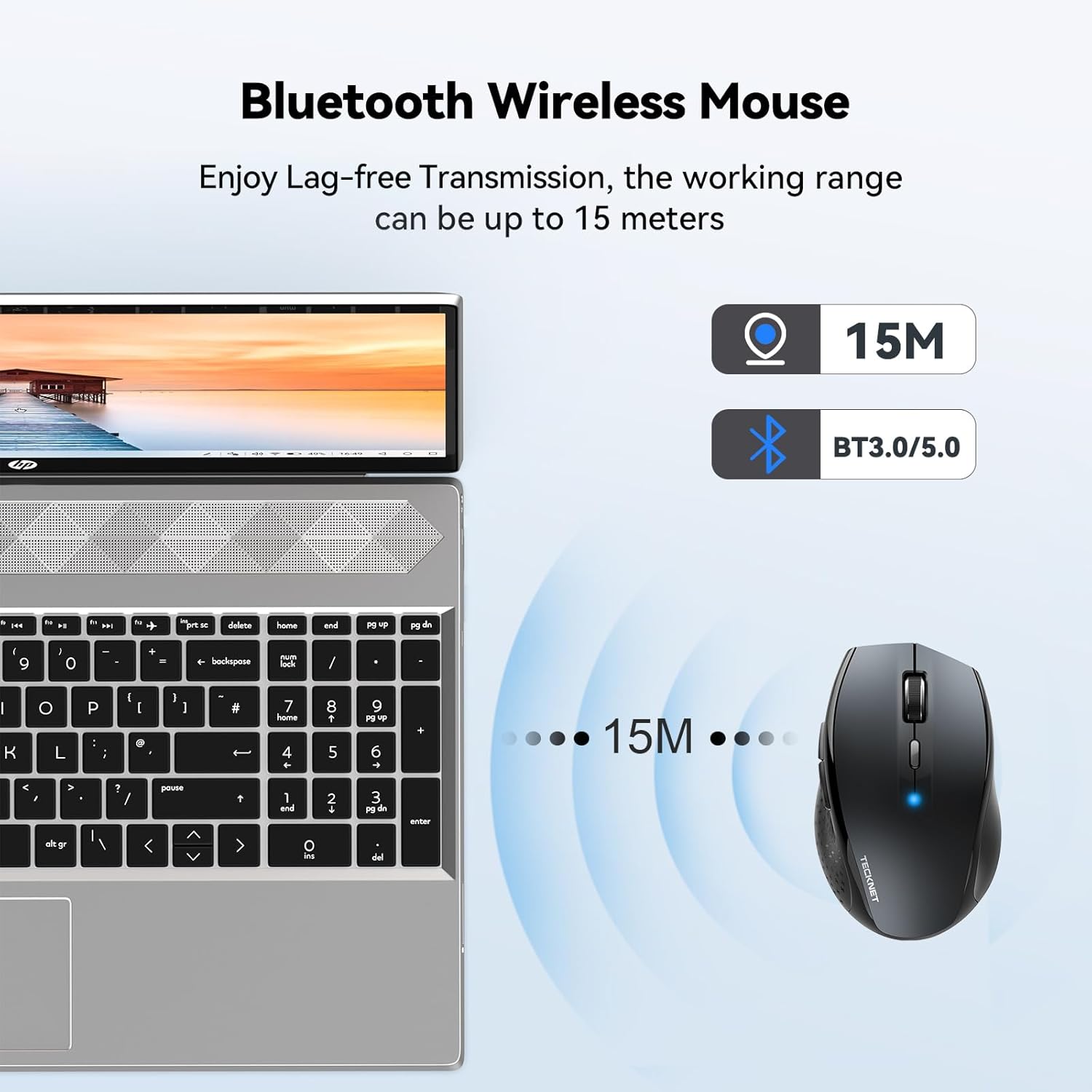
【Wireless Bluetooth Mouse】: BT3.0 / BT5.0 Two Bluetooth modes support the TECKNET Bluetooth mouse, which can be directly connected to a Bluetooth-enabled laptop or PC without a receiver. The connection is stable, and the wireless distance can reach 15 Meter
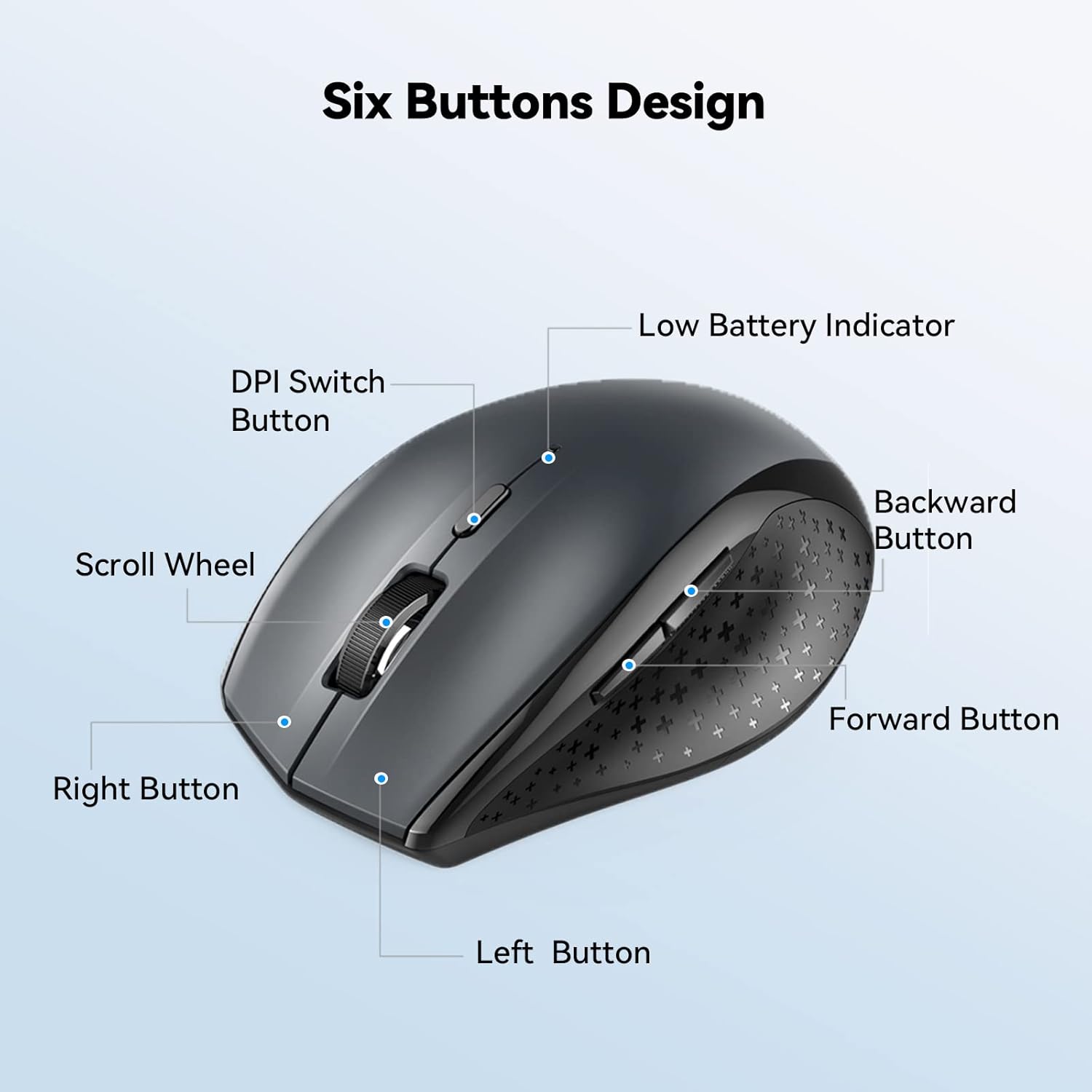
【6 Adjustable DPI Levels】: True technology for precise, smart cursor control over many surface types. 6 DPI Selection: 4800/3200/2400/1600/1200/800. The DPI adjustment button can adjust the laptop mouse DPI with one click, you can adjust the mouse speed according to your needs
【Durable Construction】: The TECKNET computer mouse is tested with 10 million clicks to ensure a long lifespan and is specially designed to deal with harsh conditions
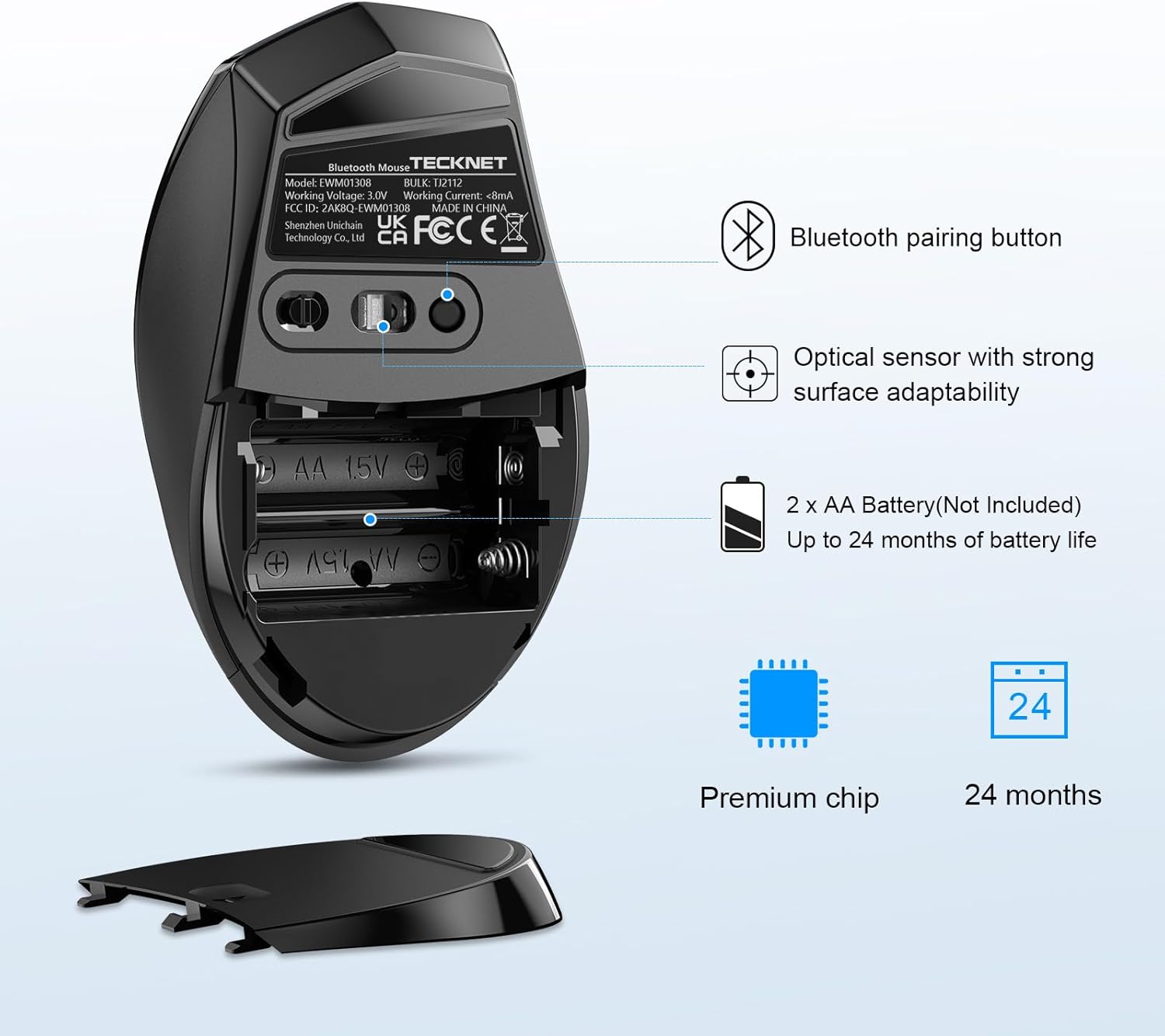
【Power-saving and Long-lasting】: Energy efficiency features like an on/off switch and smart sleep mode help reduce power consumption, and 2 AA batteries can run this cordless mouse for up to 24 months with smart energy savings. The battery indicator can remind you to replace the battery
【Universal Compatibility】: Well compatible with most systems including Windows 2000, 2003, XP, Vista, Win7, Win8, Win10, Win11, Mac, etc. (Note: side buttons cannot be used in Mac OS) Fits for desktop, laptop, PC, Macbook, tablet and other devices—a universal laptop computer mouse designed for office, family, travel, business meetings, etc.
【What You Will Get】: 1 x Wireless Bluetooth mouse, 1 x User Manual;36 Months Warranty(Registered Only) and satisfactory service. Battery Type: 2 x AA size battery (NOT INCLUDED)
Customers say
Customers find the Bluetooth mouse works well on almost all surfaces and is easy to set up with Bluetooth. They appreciate its comfort, ergonomic design, and build quality, noting it goes strong after months of usage. The mouse offers good value for money, and customers like its battery life, with one mentioning it goes into standby mode when not used for a few minutes.
10 reviews for TECKNET Bluetooth Mouse, 4800 DPI Wireless Mouse, Cordless Mice Ergonomic Portable Mouse for Laptop, Computer Mouse with 6 Adjustable DPI, PC Mouse with 24 Month Battery Life, Battery Indicator, Grey
Add a review
Related Products


Original price was: £19.99.£12.91Current price is: £12.91.
mythterp –
Solid and feels good in the hand
Been after a bluetooth mouse for a while so after much researching bought this one. Worked straight out of the box without needing to use the adaptor which comes with it. Paired via my existing bluetooth hook up. This is a really solid mouse which feels very positive and sturdy when using it. Buttons are silent but again very positive when clicking and unlike other cordless mice they dont feel clunky. For the price point altogether a very nice piece of kit. So much so that I’ve ordered up the bluetooth keyboard to match
Mr S. –
Another great mouse from Tecknet
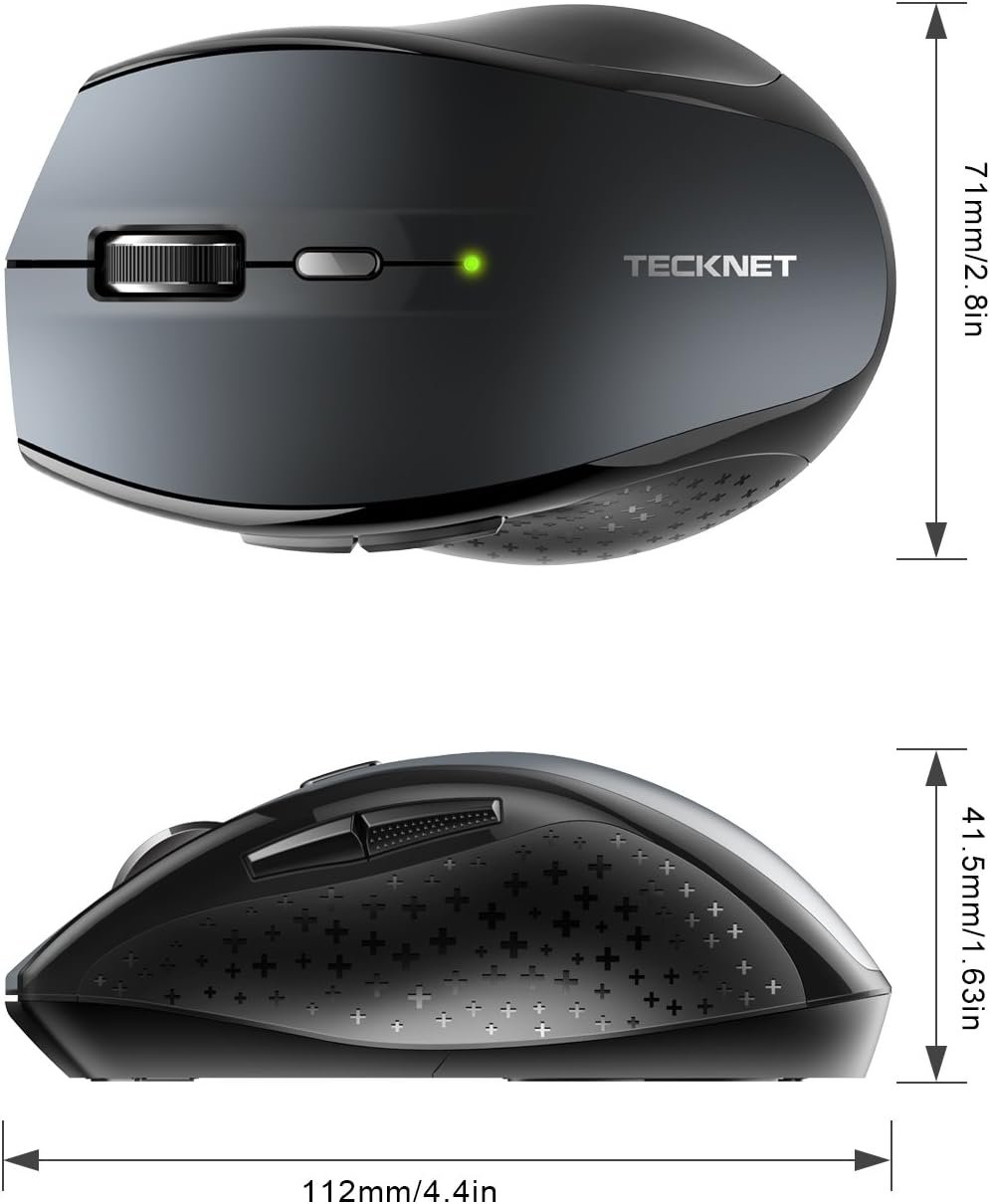
I bought this mouse (BM308) to use with my Dell Latitude 5290 and I must say it works a treat. I chose the grey colour and it matches perfectly with the laptop.The mouse is a decent full size unit designed for a right handed user so sorry to the lefties out there (see photos – and size compared with an iPhone 6 and a credit card). And I like the fact that it is Bluetooth enabled as it means I can free up a USB socket on my laptop which was previously used to house the receiver for a 2.4 GHz wireless mouse (which used to be a very good yet smaller Tecknet portable mouse).I like the fact that there are 5 different DPI settings available is an added bonus and I think most will use the 1200 or 1600 DPI settings unless working with a large screen estate and desk which allows for a bit more wider movements when using the mouse. And given that the button is high up and away from the scroll when fingers; you are unlikely going to be pressing that button accidentally. I also like the fact that there is a forward and back button on the left side of the mouse. Gosh, I havenât used extra buttons on a mouse in a long time but I they are useful for sure.The on/off button is a bonus as sometimes I donât use the mouse and just popping it into my bag can mean the mouse is accidentally left on and moving/clicking away. So a quick slide of the button and itâs all off which is just simple but highly effective. The sleep feature works quite well and it wakes easily with movement or a simple click. Battery life is great too and 2xAA batteries should last a good while (I am using rechargeable batteries). . And with a good Bluetooth range, it has saved my bacon a few times when I have forgotten to pack my presentation pointer when presenting to an audience.Overall a cheap and cheerful mice which will serve me well in the office like it has done already. And just as good, if not better than the Logitech/Microsoft equivalent.Grab yourself one of these mouse as you wonât be disappointed.
robbo –
bluetooth mouse
good mouse and not to small,works great on bluetooth and design is goodhad a bit of a problem colour wise but was quickly sorted
ShopSmartReviewer –
Great Ergonomic Mouse with Amazing Performance!
Iâve been using the TECHNET Bluetooth Mouse for a few weeks now, and Iâm thoroughly impressed! The sensitivity gives me precise control, over whether Iâm working. The ergonomic design fits perfectly in my hand, making it comfortable to use for long hours without any strain. It’s incredibly easy to set up with Bluetooth, and the wireless connection is stable with no lag. I also love how portable it is, making it perfect for travel. Overall, this mouse is a fantastic choice for anyone looking for a reliable, high-performance wireless mouse at a great price!
MJ –
Excellent mouse with no setup or dongle required!
Highly portable but not on the small side, which is exactly what I wanted!The main reason I bought it was because you don’t have to plug anything in to the USB to make it work. It connects via bluetooth 3.0 or 5.0 and as long as your device has bluetooth 3 or 5 then it should be detected easily.I have tested and used this mouse on my Android phone, Fire Stick, Steam Deck, Laptop and my main PC with no issues whatsoever!You get 2 side buttons, which are a great addition for gaming or even just for extra handy hotkeys in photoshop or other programs. The buttons and mouse-wheel are solid and not flimsy/loose like a lot of cheap mice are. It also has a decent weight to it, which is due to the thickness and high quality of plastic used. I like that and hate to feel cheap thin flimsy rubbish which is what most bluetooth mice are made of.So I feel you get the best of all worlds with this mouse as it’s more than good enough to be a permanent fixture either as a desktop mouse or just leave it on your armchair and use it to control your Smart TV/Fire Stick etc. The things you can use it for are limitless.The switch underneath turns it off and conserves the batteries while you store or transfer it. The batteries will last you an awful long time too, which I was quite surprised by as bluetooth devices usually drain quite a lot of power. But as long as it’s in close range to your device, you’ll get a lot of time from your batteries. In my experience if you’re more than a couple of feet or so away then you may see them drain quicker. Which goes for all BT devices.I only have one slight criticism and that is that the side grip isn’t rubber, it’s just hard plastic with a matte texture. But for the price of it you can’t really complain, and it feels comfortable enough for me for even long gaming sessions!As a PC gamer of nearly 30 years I’ve had loads of mice, but I think you could easily spend a lot more than this and get a lot less in return. So I’d say it’s quite a bargain!I’m very happy with mine and even bought 2 more as gifts for family members.
Zingaro Felice –
Il mouse si connette immediatamente. Non dà alcun tipo di problema. E’ comodo e facile da utilizzare. Funziona anche su superfici “difficili” – io lo uso direttamente su un tavolo in legno, senza tappetino, e va alla grande. E’ dotato di pulsanti “indietro” e “avanti”, comodissimi in numerose situazioni, soprattutto durante la navigazione sul web. Tasti che rispondono bene, rotellina che funziona perfettamente, leggero, ergonomico e affidabile. Al momento, nessun difetto da segnalare.
Touhid –
The back and forward button only work while browsing internet. These two buttons do not work in Microsoft apps such as word
John M. Hammer –
For some reason, Technet is still using this same listing on Amazon that used to be for their discontinued BM306 mouse for this fairly new model, the EWM01308 (it will be identified by your computerâs Bluetooth module as âBT5.0 Mouseâ). The old BM306 was a good value, this mouse is about the same price but even better. It is a little larger, has better heft because it uses two AA batteries instead of just one, there are six DPI settings instead of three, and the color of the side buttons is an undistracting black instead of red. It tracks smoothly, the buttons are slightly noisy but all work well (fully compatible with my Mac and the BetterTouchTool driver software I use), the scroll wheel is smooth and fairly quiet but has nice tactile stops. I canât comment on the battery life yet. I especially like that the mouse generates basic Button 3, Button 4 etc. values instead of the buttons being hard-coded for Page Up, Page Down, etc. as are Logitech and many other mice because the basic Button X values make using third-party mouse drivers much easier. This mouse is a great upgrade relative to the old BM306 and at the current price of between $11 and $16 depending on what color you choose and what discounts are currently being offered, it is a fantastic value. If Technet revised this mouse again I hope they add a third thumb button and a tilting scroll wheel but itâs quite nice as it is.Below is my old review of the BM306 from about 6 years ago:âââââ âââââ âââââOver the last 25 years I’ve owned a bunch of mice and and similar input devices ranging in quality from the crappy hockey puck that shipped with the first iMacs to some really nice Logitech units. I currently spend most of my time using an Apple Magic Mouse supplemented by an Apple Magic Trackpad and sometimes an Apple Bluetooth Mighty Mouse.Recently I’ve been playing some games and while the input devices I have were working OK I really wanted a few more buttons and physical buttons rather than just a touch surface over one big button. I gave some thought to pulling out one of my old Logitech MX1000 mice, which are really great, but while wireless they rely on a base station that has to be plugged into AC and a USB port, neither of which I wanted to bother with. I looked at Logitech’s current offerings and all the mice I like use a unifying receiver which fits into a USB port and I didn’t want to dedicate a USB port for this purpose.Just browsing mice on Amazon I saw this one, the TeckNet BM306. Bluetooth, 5 buttons (left click, right click, scroll wheel/middle click, and a pair of thumb buttons), a scroll wheel, and it seemed to be normal size, i.e. not huge but not made to be especially portable/tiny, either. The price caught my eye, too: Under thirteen bucks. The reviews were mixed but I decided to give it a try.The tracking is smooth and it works on my bare desk, my mouse pad, my thigh, and the arm of my leather lounge chair. I didn’t spend time testing it on other surfaces such as mirrors; why would I ever want to use it on a mirror? All the buttons click and register with a good feel but a bit more volume than you might desire if using it in a shared space.The tracking speed, even at the lowest resolution, is faster than my Magic Mouse but tolerable so I don’t have to adjust system settings every time I pick up the TeckNet mouse or resort to third-party drivers which allow tracking speed to be set on a device-by-device basis. I’ll never use the button on the mouse to change the resolution but for those who find that useful you press that button once and the resolution changes and then the button flashes between one and three times to tell you which resolution setting you just changed to. If this were a function I was going to use I would prefer a slide selector on the bottom of the mouse rather than a button on the top with a flashing light indicator whose meaning has to be memorized.The scroll wheel works very nicely with a perceptible but smooth click as it rotates. Nothing’s as good as scrolling with a touch surface but as physical scroll wheels go the one on this mouse is fine. I liked the scroll wheel tilt/left-right scroll/left-right buttons on my Logitech MX1000 mice but if I wanted more buttons I guess I would have looked at some other mouse instead of the BM306.I have a bit of third-party software on my Mac called BetterTouchTool which allows me to assign pretty much whatever functions I like to my mouse buttons. By default, the thumb buttons are back and forward which, in a web browser, will take you to your previous page or the reverse. I prefer to have them work as page down and page up in most applications (although it barely matters since I’m only using this mouse for a few games). Something like USB Overdrive would allow even more customization but BetterTouchTool is good enough for my current purposes and I have it running all the time for other functions, anyway.I wish the thumb buttons were a muted silver or black because the mouse is very professional-looking except for those red buttons on the side. A very minor quibble to be sure but the mouse would look less cheap with a different color choice on these parts.I haven’t owned this mouse long enough to verify the claimed battery life but the mouse has three progressive, automatic, and very aggressive sleep modes so I wouldn’t be surprised if a single AA battery were to last 15 months. I use rechargeable batteries so it will be a bit shorter for me but as long as it lasts a few weeks I’ll be satisfied. In fact, I wish I could disable or at least adjust the mouse’s power-saving behavior because while it wakes up with a click and reconnects to my Mac in just a second or three I’d rather that it not go into sleep mode in the time it takes me to walk to the bathroom, do number one, and walk back to my office. This is the only real complaint I have with the mouse and it’s a very minor issue. I imagine that it might be more of an issue for users of non-Mac computers which tend to have less reliable communication with Bluetooth devices and I think that’s likely the cause of the connection issues reported in most of the low-scoring reviews here. Less aggressive activation of power-saving sleep modes would probably eliminate most of these complaints.At this price I’m quite satisfied with my purchase. The mouse is a great value and if you can live with the infrared rather than a laser, it has enough buttons for your needs, you’re right-handed, and you don’t have baby or gargantua hands; it’s well worth a try especially with Amazon’s guarantee backing up your purchase.
Amr –
Rests the wrist
Paul Mack –
Comfortable to use but laggy, not good for gaming.