

TECKNET Wireless Keyboard and Mouse Set, Ergonomic 2.4G Cordless Keyboard & Mouse Combo Silent, Full-Size, Spill-Resistant with Nano USB Receiver for PC, Laptop, Computer – QWERTY, UK Layout
Original price was: £21.99.£18.68Current price is: £18.68.



Price: £21.99 - £18.68
(as of Jun 18, 2025 19:24:06 UTC – Details)
From the brand

TECKNET Ergonomic Mouse
TECKNET Wrist Rest Mat
TECKNET Keyboard
TECKNET Wrist Rest Mat
TECKNET 2 Pack Mouse Mat
TECKNET Wrist Rest Mat
TECKNET Mouse Mat

Spill -resistant


Is discontinued by manufacturer : No
Product Dimensions : 44 x 15 x 3.2 cm; 792 g
Date First Available : 22 Dec. 2010
Manufacturer : TECKNET
ASIN : B001B2T3SG
Item model number : TK-KM003
Guaranteed software updates until : unknown
ENJOY WIRELESS CONVENIENCE: 2.4G Wireless technology provides a stable connection up to 13 meters (43ft). Plug and play. Keyboard and mouse share a Nano receiver which stored at the bottom of the mouse
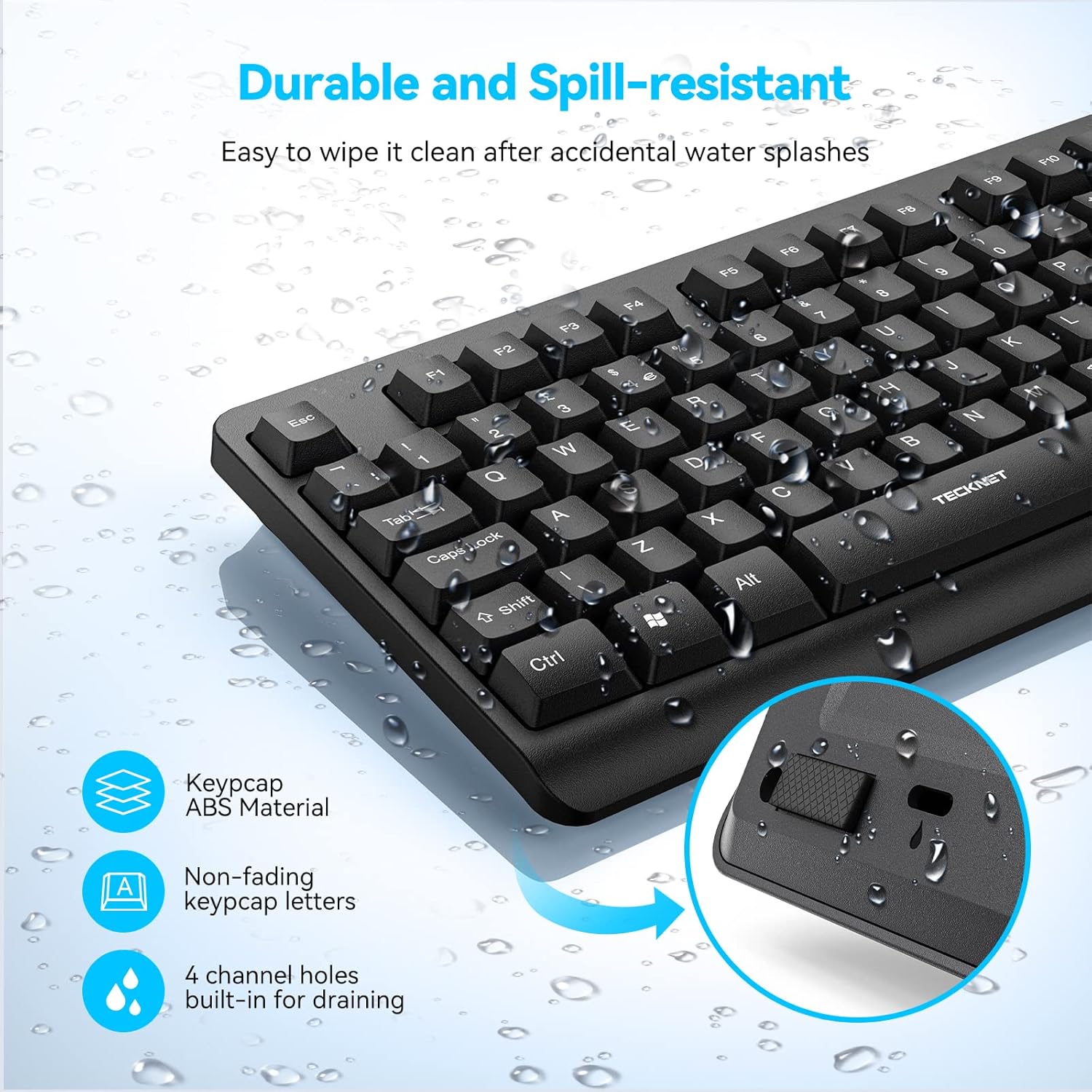
SPILL RESISTANT: This full-size wireless keyboard features 4 draining holes design. So don’t worry about spilling tea or coffee on your keyboard while you are typing. Simply wipe it off
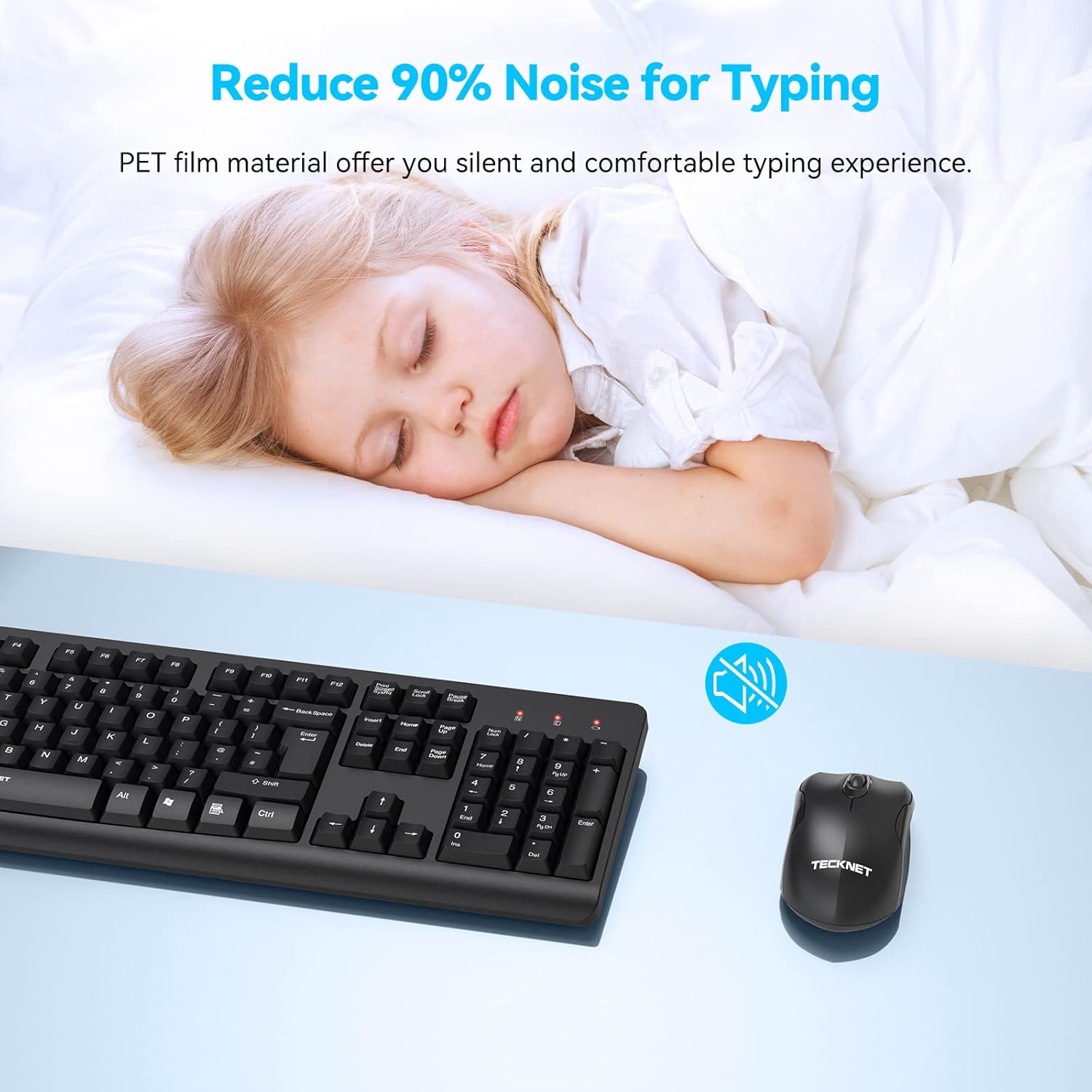
SILENT TOUCH TECHNOLOGY: The wireless keyboard’s key uses PET film material, reducing noise up to 90%, which provides you with silent and comfortable typing experience
HIGHLY RESPONSIVE MOUSE: The wireless mouse uses top class optical IC and a high-precision tracking engine to ensure more accurate movement. The cordless mouse adapts to a variety of office desktops, allowing easy navigation on most surfaces
POWER SAVING DESIGN: The wireless keyboard and mouse set features auto sleep mode, which saves power and extends battery life. With the On/Off switch on the mouse to help conserve power, you can go for months without the hassle of changing batteries. On standby mode, the mouse lasts up to 18 months, and the keyboard up to 36 months
CONVENIENT FUNCTION KEYS: 105 keys full size keyboard layout includes a numeric keypad and 12 function keys, which provide easy convenience on work
PACKAGE CONTENTS: Wireless Keyboard x 1, Wireless mouse x 1, USB receiver x 1, User Manual x 1 and Support available for 36 months (Registration Required)
Customers say
Customers find the keyboard and mouse set works well on all surfaces, with a sturdy central wheel and reassuringly solid key strikes. Moreover, the product is easy to set up and offers good value for money, with a perfect size that fits large hands well. However, the battery life receives mixed feedback – while some say it uses batteries very sparingly, others note that batteries are not included. The keyboard quality also gets mixed reviews, with some finding the keys nice to type on while others report missing keystrokes.
12 reviews for TECKNET Wireless Keyboard and Mouse Set, Ergonomic 2.4G Cordless Keyboard & Mouse Combo Silent, Full-Size, Spill-Resistant with Nano USB Receiver for PC, Laptop, Computer – QWERTY, UK Layout
Add a review
Related Products


Original price was: £21.99.£18.68Current price is: £18.68.
Gina Mello –
Mouse
Mouse is left handed but Iâm working with it
Amazon Customer –
Good Quality
This is excellent and very sturdy
Paul J. Fleming –
Nice Keyboard, not too taken with the mouse
I do a lot of typing, and not just procrastinating and posting random stuff on Facebook either, although that does seem to happen quite often! In my everyday attempts to craft inane thoughts from my tiny brain onto the virtual page in the form of stories, I find myself staring into the screen as my fingers fly across the keyboard – and I’m very particular about the feel of the keyboard I am using. If you ever frequent Currys superstore, I am the mad person typing out short paragraphs on the keyboards they have out on display. I’m always trying them out, just to find that one that feels ‘right’.This one is a bit ‘plastic’ for my liking. There’s a definite ‘plastic’ tak tak tak sound as I’m typing, but I would say that in respect of criticism, that is the only one I shall level at this keyboard. The actual travel of the keys as they are depressed is quite nice and (to date) the thing has kept up with the speed at which I type.I point this out as there have been one or two other keyboards that miss out the odd letter here and there, but maybe I was going too fast for them – they were wireless too. This one has not missed a single letter yet and the gentle travel of each key means I don’t have to hammer the thing home for it to be realised and sent through the air to the computer.The shortcut buttons across the top functioned perfectly ‘out of the box’ with Windows 10 and all I had to do was plug in the small adapter into a free USB port and windows did the rest – the keyboard picked up and I was typing within a few short minutes. As I said, the shortcut/media keys required no further adjustment or software. They just worked! Big bonus!One point to note – the keyboard and mouse do require batteries (obviously) and in the one I was sent, these were NOT included. The keyboard takes a single AAA battery while the mouse requires a single AA. I mention it here so you can be ready when you unpackaged your new device.In short, I quite like the keyboard.The mouse? Hmmm…. I’m not sold on it. I mean, it works well enough straight out of the box and Windows has no trouble recognising it – but it keeps ‘going to sleep’ on me. I’ve had wireless and Bluetooth mice before which I can leave for a time when typing, then just move and click with the cursor responding accordingly.This one needs me to click to wake it up before I can move the cursor. Also, that click is quite noisy.If you’re after a quiet mouse, this one is not for you. The scroll wheel is quiet enough, but the click is most certainly there.It’s not a ‘small’ mouse either. It fills the palm of my hand fully (from the base of wrist to tip of the finger) when I am using it as opposed to others I have which rest neatly under my fingers and reach about halfway to the centre of my palm. I know this is preference, but for me it just feels a little oversized and the wholesome click means that it seems quite … cheap?In honesty, I have put the mouse to the side for ’emergencies’ and reverted to my old, smaller HP mouse which has an almost silent and soft click – but I’m continuing to use the keyboard.I’ve not been using them long enough to comment on the battery life, but I have been using this keyboard (on which I am typing this review) for about 12 days straight, for many hours each day and have not noted any degradation in signal due to the single AAA battery giving out. If it’s of interest to anyone, the battery I have shoved in is a Tesco extra long life AAA battery which was new from the pack. No expense spared ;-)So, in summary :-The feel and noise of the keyboard could make it seem a little bit tacky and cheap, but in terms of performance it has not let me down and I’ve been hammering the poor thing for about 12 days with hours of spurious drivel. In contrast, the mouse has been set aside because the clicking sound became rather annoying and it actually feels quite hollow and plasticky. Also, the mouse becomes unresponsive after a short while of being left alone and you have to click to wake the thing up and use. It may be to conserve power, but found it to be annoying as I just want to grab the mouse and scroll, or move the cursor up or down.Get this for the keyboard.It feels good in use and simply works out of the box. Put the mouse in the drawer as a spare.
Mandy –
Easy
East to set up and use with comfort
thang –
Good based on the price.
It’s okay for using.
Kieran Brown –
Very low quality.
20 pounds is just too much for this. Even 10 would seem steep in retrospect.The keys rattle and have an absurd amount of play when typing, making the cheap keyboard I picked up from my local supermarket even look good. It is literally like a musical instrument when you slightly shake it from side to side it’s that bad (no, keyboards shouldn’t do that).You can’t actually turn the keyboard off, only the mouse… There is no physical button for the keyboard meaning that if you need to clean it, you better ensure it’s not on anything important prior.To top it all off, the keyboard and mouse have this annoying power saving feature… Which will turn either of them off if a button is not pressed within a period of time, this would normally be fine, but if you hold a key down… Well guess what, it doesn’t care, it will provide input until that time limit has passed, then you will have to press it again.
Joe Pritchard –
OKish…but potentially unreliable….
Review for TECKNET Wireless Keyboard and Mouse SetLooks and feels OK, but I ended up consigning it to the attic and bringing my old wired keyboard and mouse out of their short retirement. I was using the keyboard with Windows 10, adapter plugged in to a front USB socket, keyboard and mouse both within 2 feet of the PC.Initially seemed fine, but within a few days I started getting serious intermittent lagging on the keyboard and, worse, characters being missed or duplicated. Mouse-clicks were also a bit sticky, and the Ctrl key on the keyboard used to select multiple entries in dropdowns and lists, etc. just stopped being reliable.I put up with it for a while, changed batteries, etc. but no good. Anyway – bit the bullet and swapped back to my wired keyboard and all is well.
alessandro –
Bel prodotto, leggero, compatto e comodo da usare. il rumore nell’uso dei tasti è veramente minimo, i piedini dietro ti aiutano a tenere la tastiera curvaIn origine ho presto il set solo per la tastiera, sono due giorni che provo anche il mosuse che pero mi fa scaricarre con grane rapidità la batteria, ma nell’uso comune va piu che bene
Edoardo Frola –
Ho acquistato la tastiera gaming meccanica TECKNET e devo dire che sono rimasto estremamente soddisfatto del mio acquisto. La tastiera è estremamente robusta e resistente, grazie alla sua costruzione in materiale ABS e metallo di alta qualità . La finitura opaca la rende anche antigraffio, il che la rende ideale per gli utenti che cercano una tastiera resistente all’usura.La tastiera presenta una disposizione di 88 tasti anti-ghosting, che permette la pressione simultanea di molti tasti senza perdita di segnale o ritardi. Questa funzione è perfetta per chi gioca a giochi d’azione o competitivi in cui la velocità di risposta è fondamentale. Inoltre, la retroilluminazione arcobaleno con 15 modalità di illuminazione personalizzabili aggiunge un’atmosfera coinvolgente al gioco.Il design ergonomico compatto è un altro grande vantaggio di questa tastiera. Non solo permette di risparmiare spazio sulla scrivania, ma anche riduce la pressione delle dita e consente di digitare comodamente per lunghe sessioni di gioco o di lavoro. Inoltre, i tasti media, accessibili tramite la combinazione di tasti FN + F1-F12, semplificano l’accesso alle applicazioni più utilizzate, come la calcolatrice, il browser web o i media.In generale, consiglio vivamente questa tastiera a tutti i giocatori, programmatori e dattilografi che cercano un’esperienza di digitazione di alta qualità , reattiva e confortevole. La compatibilità con diverse versioni di Windows e Mac OS è un altro grande vantaggio, mentre l’unica nota negativa è che non è compatibile con PS4. In definitiva, la TECKNET Tastiera Gaming Meccanica è un’ottima scelta per chi cerca una tastiera affidabile e di alta qualità .
renatko1 –
consigliato se non avete particolare esigenze. comunque funziona tutto bene
Anna Moiseeva –
parto dal presupposto che non è una brutta tastiera, anzi buona a livello di qualità anche perchè 5 anni fa l’ho acquistata e per 2 anni non l’ho più utilizzata, senza trovare alcun problema apparente. l’unico problema della tastiera che ho riscontrato in questo tempo è che i tasti sono un po’ “pesanti” diciamo, ho notato che per premere i tasti ci vuole un po’ più di forza rispetto ad altre tastiere meccaniche.tutto sommato non è male come prima tastiera.
Antonello –
Premetto che non uso la tastiera per giocare. Sono uno scrittore e scrivo con dieci dita. La tastiera del mio notebook non era più affidabile, mi raddoppiava alcune lettere e mi costringeva a numerose correzioni. Ho dovuto comprare una tastiera esterna. Mi parlavano di queste meccaniche che, secondo alcuni, consentivano una digitazione più veloce e sicura, anche se più rumorosa. Ho deciso quindi di provarle, anche in considerazione del prezzo davvero esiguo dei modelli di questa marca. Mi sono documentato e ho scoperto che le tastiere meccaniche, sotto ogni tasto, utilizzano degli switch di tipo diverso. A seconda del loro colore danno risposte e sensazioni tattili e uditive diverse. Per non farla lunga ne ho provati di molti tipi incominciando da quelli meno rumorosi (red e brown) e per finire per quello più rumoroso (i blu). Per mia esperienza devo concludere che gli switch che preferisco sono proprio i blu che danno feedback sonori e tattili più soddisfacenti per una scrittura sicura. In seconda battuta i brown che sono un po’ più silenzioni. Questa tastiera monta i blu ed è diventata la mia preferita anche per la compattezza. Secondo me ha la dimensioni perfette perché non supera le dimensioni del notebook ed è come avere una tastiera normale senza il tastierino numerico (se non lavori di contabilità se ne può fare a meno).Il risultato è stato questo: non credo che riuscirò mai più a utilizzare la tastiera non solo del mio ma di qualunque altro notebook. La retroilluminazione è un po’ chiassosa ma efficace, i colori si possono rendere stabili e regolare in luminosità . Per me promossa a pienissimi voti.