

Tera Mini 1D 2D QR Bluetooth Barcode Scanner Wireless Portable 1D USB Wired Bar Code Reader 3 in 1 2.4G Wireless & USB Wired & Bluetooth Pocket Barcode Reader 1200
£39.89


Price: £39.89
(as of Dec 23, 2025 21:31:16 UTC – Details)
Product Description

Tera Upgraded Version Mini Portable 2D QR Bluetooth Barcode Scanner
Tera is an international pioneer brand designed in Germany that specializes in barcode scanners with research centers in Berlin and Munich. Tera Pro Series has assembled the essence of design, R&D and production of Tera barcode scanners during the past 6 years. It is a brand-new professional generation of upgraded products by Tera.
If you need a PDF version of the manual, please go to Tera official website to download it yourself.Please do not charge the scanner gun with a cell phone charger.
Dustproof & Shockproof & IP66 Waterproof

IP66
Completely protected against dust ingress and protected against heavy waves (certification tests require at least 3 minutes of heavy water spray without water ingress to achieve this rating)
Tera 3-in-1 Bluetooth 2D QR 1D Mini Portable Barcode Scanner

The Model 1100-2D(EVHK0049) is the latest version of Tera 3 in 1 (Bluetooth + 2.4G Wireless + USB cable) 1D / 2D QR mini barcode scanners.
This waterproof barcode scanner is suitable for digital screens and paper 1D 2D QR barcodes.

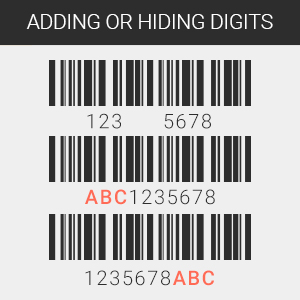
Supports Adding or Hiding Digits
This scanner allows to add/hide characters before or in the middle of or after the barcode.Prefix and/or suffix of max. 20 digits can be added to the scanned barcode.

Supports 25 Languages
Supports multiple languages including English, Spanish, German, French, Italian, Japanese, etc.To get the correct output, make the scanner’s keyboard language consistent with your computer’s keyboard language.The scanner’s factory default language is English.

Two Scanning Modes
Key Trigger ModeContinuous Mode
Add To Basket
Add To Basket
Add To Basket
Add To Basket
Add To Basket
Add To Basket
Customer Reviews
4.8 out of 5 stars 10
4.2 out of 5 stars 379
4.1 out of 5 stars 908
4.4 out of 5 stars 246
4.6 out of 5 stars 28
3.8 out of 5 stars 23
Price
£54.89£54.89 £29.89£29.89 £44.95£44.95 £59.99£59.99 £39.89£39.89 £36.89£36.89
Characteristic
Large Smart Display Mini 2Mini, Waterproof, Dustproof D QR Finger Ring Portable Bluetooth Scanner Battery Level Indicator Digital Screen Charging Cradle Heavy Dute Design Back Clip, Attach to Phone
Barcode Type
1D 2D QR Digital/Printed Barcodes 1D Printed Barcodes 1D 2D QR Digital/Printed Barcodes 1D 2D Digital/Printed Barcodes 2D QR 1D Screen/Printed Barcodes 1D 2D QR Digital/Printed Barcodes
Scanning Technology
640*480 CMOS Global Laser 640*480 CMOS Global 640*480 CMOS Global 640*480 CMOS Global 640*480 CMOS Rolling
Connection Mode
2.4G Wireless/USB Wired/Bluetooth 2.4G Wireless/USB Wired/Bluetooth 2.4G Wireless/USB Wired/Bluetooth BT & 2.4G Wireless/ USB Wired USB Wired 2.4G Wireless/USB Wired/Bluetooth
Plug & Play
✓
✓
✓
✓
✓
✓
Package Dimensions : 16.8 x 11.4 x 4.4 cm; 150 g
Date First Available : 1 Dec. 2020
Manufacturer : Tera
ASIN : B08PCZMCF5
Item model number : 1200 2D
Country of origin : China
Guaranteed software updates until : unknown
Best Sellers Rank: 55,330 in Stationery & Office Supplies (See Top 100 in Stationery & Office Supplies) 31 in Barcode Scanners
Customer reviews: 4.2 4.2 out of 5 stars (379) var dpAcrHasRegisteredArcLinkClickAction; P.when(‘A’, ‘ready’).execute(function(A) { if (dpAcrHasRegisteredArcLinkClickAction !== true) { dpAcrHasRegisteredArcLinkClickAction = true; A.declarative( ‘acrLink-click-metrics’, ‘click’, { “allowLinkDefault”: true }, function (event) { if (window.ue) { ue.count(“acrLinkClickCount”, (ue.count(“acrLinkClickCount”) || 0) + 1); } } ); } }); P.when(‘A’, ‘cf’).execute(function(A) { A.declarative(‘acrStarsLink-click-metrics’, ‘click’, { “allowLinkDefault” : true }, function(event){ if(window.ue) { ue.count(“acrStarsLinkWithPopoverClickCount”, (ue.count(“acrStarsLinkWithPopoverClickCount”) || 0) + 1); } }); });
【Package Includes】 Tera Barcode Scanner x1, USB Cable x1, 2.4G Dongle x1, User Manual x1
【Upgraded Mini Pocket 1D 2D QR Scanner】Just bring this scanner with you. If you want to collect data, simply connect it to your device via Bluetooth or use the storage mode.
【3-in-1 Connection Mode: Bluetooth + 2.4GHz + USB】Wireless Bluetooth mode, the transmission range is about 15 m. The transmission distance can be 200 m in a barrier-free environment and 30 m in an environment with obstacles, if that 2.4G USB dongle is used. In USB 2.0 cable mode you can simply connect the USB cable to the PC.
【Strong Decoding Ability for 2D QR 1D Barcodes】This bluetooth barcode scanner can easily scan 1D 2D barcodes on labels, paper, smartphone and computer screen. It supports Codabar, Code 11, Code93, MSI, Code 128, UCC / EAN-128, Code 39, EAN-8, EAN-13, UPC-A, ISBN, Industrial 25, Interleaved 25, Standard 25, 2/5 Matrixl , QR, PDF417, Data Matrix, Aztec code, Maxi Code etc.
【Two Upload Modes】Instant upload Mode + Storage Mode. Scan and save up to 50,000 barcodes in the scanner’s built-in memory and then upload any saved data to your device if necessary.
【Vibration Alert】When you need a quiet work environment, just turn off the volume and the vibration function will let you know when a barcode is detected.
Customers say
Customers find the barcode scanner easy to set up and use, appreciate its handy size, and praise its quick read speed and battery life. Moreover, the connectivity is positive, with one customer noting the simple Bluetooth connection process. However, the scanning accuracy receives mixed feedback, with several customers reporting it doesn’t scan QR codes. Additionally, the manual receives criticism for being unhelpful and tiny.
13 reviews for Tera Mini 1D 2D QR Bluetooth Barcode Scanner Wireless Portable 1D USB Wired Bar Code Reader 3 in 1 2.4G Wireless & USB Wired & Bluetooth Pocket Barcode Reader 1200
Add a review
Related Products


£39.89
ReviewMan –
Great for quick barcode reading for pc or mobile devices.
Perfect addon to my Seaward PAT tester to be able to quickly recall tesing records without having to search or type in the id. Took a while and the included manual isnt the most helpful but google is your friend. The read speed on the 2D codes I read is super quick and I’ve had no mis scans or it unable to read the code. The size is perfect for the pocket or in my case my Testers bag as its about the size of a credit card in length and no more than 4 pound coins stacked tall. There is also a USB dongle included to connect it to your PC/Laptop if you need it for there but I am using Bluetooth and that works fine. Honestly it is probably one of the best value mini barcode scanners on the market under the £50 mark.
MR MICHAEL KENWORTHY –
Compact, accurate, battery lasts, connectivity great
Works perfectly for me. I use this for key-to-scan in Kardex software. Cannot see any negatives.
Fazal Majid –
OK for the price, but understand the limitations
Disclaimer: I am not a barcode, retail or POS specialist, but I have written driver software for barcode scanners similar to this.This scanner is tiny, the size of a box of Tic-Tac mints. It’s also remarkably cheap for a scanner that supports 2D barcodes. The plastic casing seems a little flimsy. Yay, it’s got USB-C, not the nasty micro-USB connector that needs to die yesterday!It emulates a keyboard, which is a unidirectional protocol, unlike the bidirectional protocols used by higher-end scanners. The good thing is, it’s universal and doesn’t need any drivers or special software. On the flip side, that and the single-button UI makes it somewhat clunky in practice.You can use it in real-time mode, where it types in the barcode into your device as it scans them, or in storage mode where it accumulates the barcodes in memory, useful for doing a quick check of shelves, then coming back and pouring them into your computer. Unfortunately, the real-time mode is not very smart. If the bluetooth connection is down, I would expect it to automatically switch to storage mode so scans are not lost, but that’s not what it does. Storage mode has its own issues: you need to scan a special bar code to make it pour them into the computer, and then another code to clear them from memory. I would have preferred a UI where double-clicking the button triggers the upload to the computer.Finally, it enters data at a fairly painful rate, maybe 10 CPS or so, like an inexperienced hunt-and-peck typist, even if you select “High Transmission Speed”. I don’t know if the BT HID profile is potentially lossy, but that is getting old really fast.Unlike some, they have the PDF manual available online (important, as like most scanners you program its features by scanning bar codes). I would suggest you download and read the manual before buying.
Zesty –
Efficient, Small, Easy setup
I’ve bought this product to be able to quickly collect inventory stock and it does this in a very efficient way! It scans codes swiftly with no hassle, and you can even change the beep volume or just turn it off completely.It came with a little manual that has hundreds of barcodes allowing you to customise the scanner as you wish.My favourite feature is being able to configure it to go into sleep mode after 30 seconds, meaning it doesn’t waste battery!
RICHARD LEE JONES –
Scanner
Fantastic for the money
Darren. –
Doesnât scan qr codes
Doesnât scan qr codes only bar codes unfortunately
Harold Steele –
Accuracy not great
Ran out of time to return this as the accuracy was not great as the scans where coming out incorrect if the angle was not spot on.
Crooky –
Very easy to use
A really nice device. Very easy to set up by scanning the QR codes in the provided good-quality paper manual. Build quality is excellent and operation the same. I can’t fault this product at all. I have been using it as a Bluetooth scanner rather than using the cable, connects very quickly.
Góngora –
Me ha encantado que sea pequeñito, reconoce los codigos sin problema. Se conecta mediante bluetooth al móvil, conectado siguiendo los pasos, se registra los códigos y luego se pasan. Todo perfecto.
XS –
Le scanner de codes-barres a été livré rapidement. Il était bien emballé car protégé par une mousse. Il est à peu près aussi petit quâune clé de voiture. Ce scanner est très pratique, léger, sans fil, donc idéal pour une utilisation mobile. Après avoir suivi le mode dâemploi le scanner et lâordinateur sont vite interconnectés. Ensuite la lecture des EANs et des QR codes sont sans problème. Quand la lecture de codes-barres est réussi et le résultat est enregistré, le scanner émet un bip sonore et vibre en même temps. En outre, ce scanner peut se connecter avec mon téléphone portable. Cela facilite encore lâutilisation mobile. Peut-être en raison de la taille de lâemballage, la notice est plutôt petit. Ce nâest pas facile à lire. La fin du mode dâemploi français est écrit en espagnol. A part de ça je suis satisfait de ce petit scanner. Un bon rapport qualité-prix!
Serazara –
Compacto y muy efectivo. No tiene dificultad para su uso. Resulta muy cómodo el usarlo sujeto a la muñeca.
Luca Tuzzolo –
Ottimo prodotto
TIGLAYT –
Bonjour Tout d’abord je tiens à donner mon avis sur cet appareil il est mini pratique et ergonomique l’envoi a été rapide impeccable seulement lorsque j’ai ouvert le manuel d’utilisation on ne comprend pas par où commencer. J’ai écrit au service client dans le numéro est marqué sur le livret en dernière page ils m’ont répondu au bout de 4 jours mais ils m’ont répondu j’avais déjà solutionné le problème toute seuled’abord sachez qu’il arrive tout paramétré mais si par malchance vous avez commencé à scanner les codes car je précise le manuel ne contient que des code-barre et du coup on ne sait pas quoi scanner alors voici les étapes pour le faire fonctionner1) tout d’abord si vous ne mettez pas l’anglais en tant que langue de saisie vous n’y arriverez pas il faut décocher tout autre langue de votre clavier il faut qu’il y ait l’anglais uniquement2) ensuite avant de scanner quoi que ce soit il faut vous rendre à la page numéro 8 vous scannez le code barre (enter)3) là vous commencez par scanner les codes que vous allez souvent utiliser personnellement j ai scanné bookland EAN(pour lea livres) sur la page 3 ensuite ean8 ensuite EAN13(le plus commun) ensuite upc/ean adenda ensuite upc-a dans la page 1.Ne scanner pas tous les codes présents car cela affecte la lenteur du scanner4) si vous voulez que le scan(l infra rouge) se déclenche manuellement c’est-à -dire en appuyant à chaque fois sur le bouton toujours sur la page 8 vous mettez le code barre manuel trigger mode/ pour le laisser activé en continue vous scannez celle a coté sur la meme page (continuous scan mode)Si vous voulez que le scanner soit silencieux vous allez sur la page 10 et vous scanner le mot code barre (off) dans beeper volumeSi vous voulez que l’appareil se met en veille au bout de 30 secondes toujours dans la page 10 vous scannez le mot code-barre (30s)dans sleep timerEt si vous voulez simplement l’éteindre là vous scanner le mot (immédiately) sur la page 11Pour l’encodage du caractère vous choisissez (gbk notepad Excel) sur la page 11 donc vous la scannezVeuillez également scanner le code barre real time mode sur la page 12 pour que le transfert de ce que vous allez scanner se fasse immédiatementPour l’apairage avec le téléphone aller sur la page 17 et scanner le mot (on) ensuite avec votre téléphone vous scanner les appareils autour et vous allez retrouver un appareil nommé barcode scanner vous cliquez dessus et ça va vous demander de valider l’appairage.Pour que le scan fonctionne rapidement et détecté rapidement les code-barre veuillez scanner le mot code-barre (fast) sur la page 18Personnellement pour qu’il n’y ait pas d’incompatibilité veuillez scanner sur la page 20 le mot United States pour la langue du clavierVoici quelques informations à savoir il est normal que l’infrarouge disparaisse rapidement lorsque vous scannez les codes barres et rappelez-vous également que avant de scanner les codes nous avons cliqué et scanner le mot (enter) et de ce fait il va falloir sauvegarder tous les codes qu’on a scanné pour que ça soit appliqué et reconnu donc voici l’étape suivante5) il faudra absolument appuyer sur le code barre (Exit )sur la page 8 juste en bas de Inter qui veut dire sortir des paramètres et lorsque vous allez le faire le scanner va vibrer ensuite l’étape la plus importante c’est de sauvegarder les paramètres qu’on a fait pour commencer à l’utiliser de suite et là il faut scanner le mot (custom default) sur la page 9 ce dernier scan est impératif car il sauvegarde tous les codes et paramètres que vous avez scanné auparavant.Voilà j’ai mis tout ce que j’ai appris pour tout ce qui est préfixe je ne sais pas faire et je n’en ai pas besoin n’hésitez pas à écrire au support il répondent vraiment tardivement mais il répondent quand même mais c’est vrai que le manuel a besoin de quelques amélioration j’ai failli deux fois le retourner mais finalement je m’en suis sortie toute seuleEt enfin dernier point concernant l’autonomie perso il me dure 2h et pas 6h on continue comme stipulé cela reste un produit correct qu’on peut avoir autour de 25 à 40 â¬j’espere vous avoir ete utile. cordialement