

THUSTAND 8MP Visualiser/Document Camera, Webcam 4K with A3 format, LED Light, Image Invert Function, Fold, Dual Microphones for Mac OS, Windows, Zoom, OBS work (black)
Original price was: £49.47.£38.51Current price is: £38.51.





Price: £49.47 - £38.51
(as of Jun 02, 2025 03:29:00 UTC – Details)
From the brand

Visuliser for teaching
THUSTAND is the go-to brand for teachers and professionals presentation tool, work in-class around the world including the US,UK,DE etc

Video recording-live streaming

Remote experimental teaching

Online Teaching

Class Teaching

Live Demonstration
USB Visualiser with adjustable image reversal: The camera that can manually adjust image reversal. In video chat or image output, the image can be freely adjusted left/right and up/down; you can also manually adjust the reversed image that appears in the device to a normal image. THUSTAND visualiser can not support zoom and HDMI function, also not support iPad, it can only connect to computer via USB 2.0 cable.
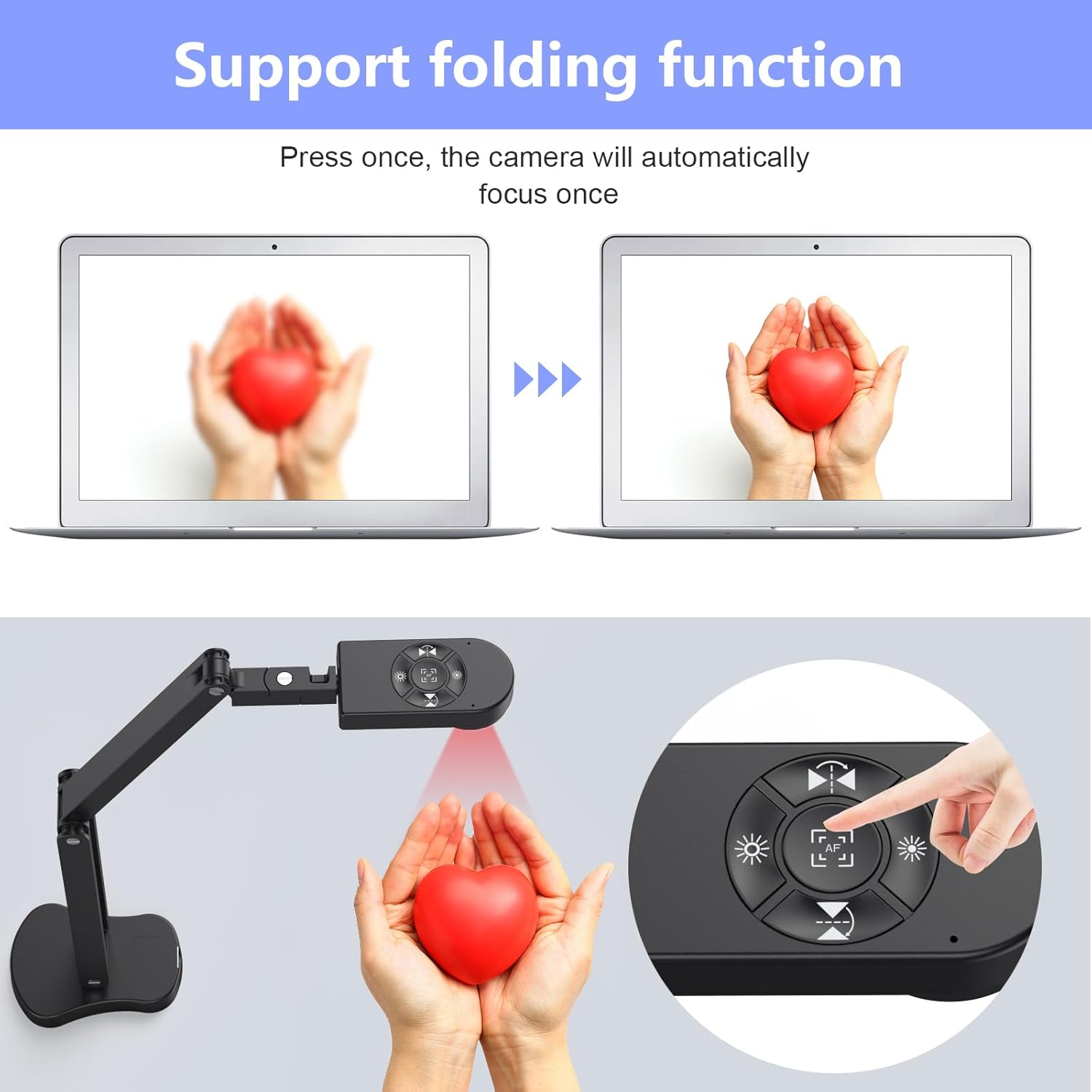
8MP/2448P Visualiser with 30fps: It output ultra-high-definition images and videos live transmission, up to 2448P megapixels. Press the focus button once to automatically focus the document camera once. Moving the object under the lens, the camera will not be arbitrary automatic focus and the image dance. Macro can capture objects as close as 3.94″
Visualiser for teaching with Adjustable Image Brightness : the usb camera has brightness (plus) and brightness (minus) buttons, you can manually adjust the image brightness with 10 degree, to make sure that you can get the clear image. Camera comes with 14 ring lamp beads, 3 levels of brightness adjustable, which can eliminate shooting problems under difficult lighting conditions, allowing you to capture objects in dark and bright environments, and can also achieve Selfie fill-in function
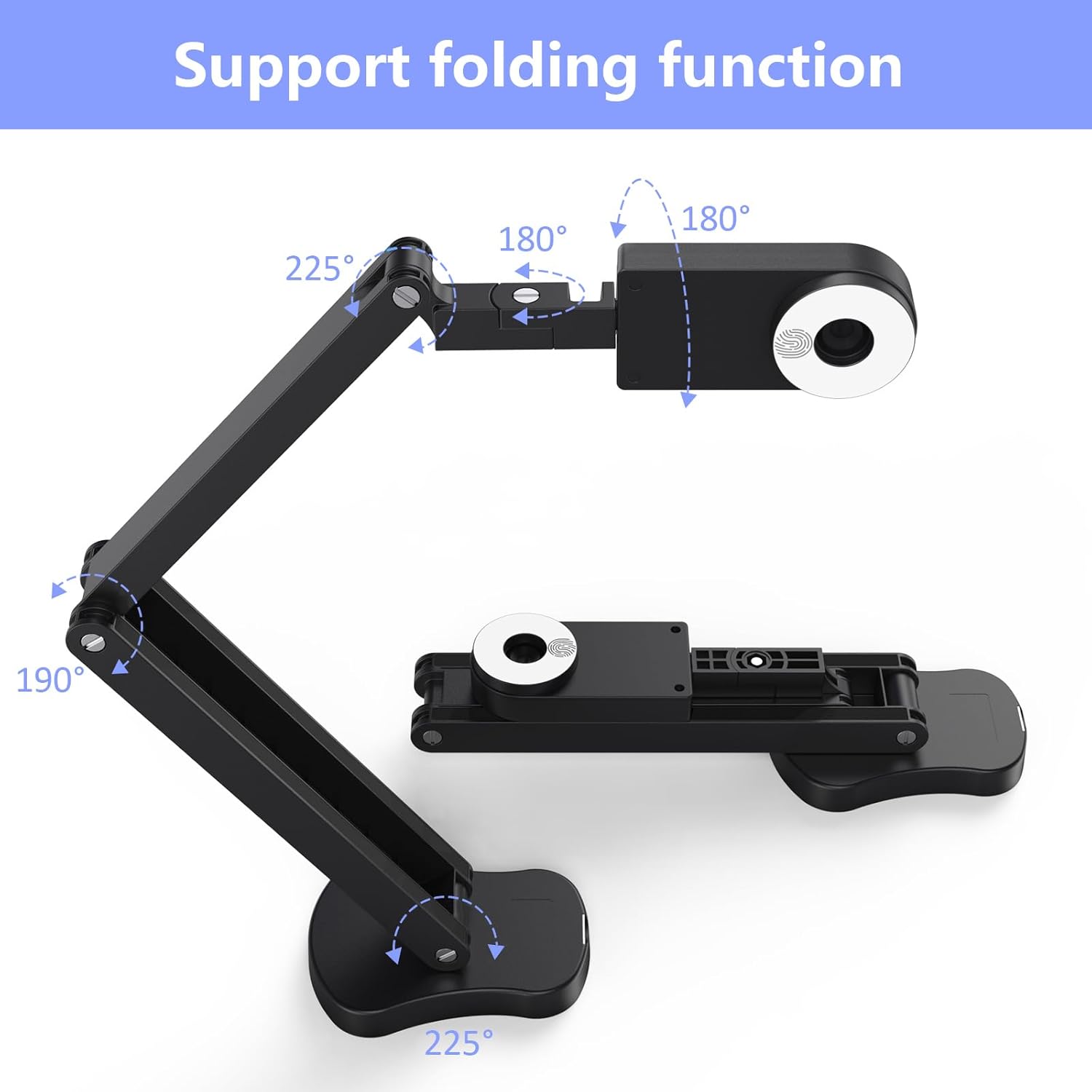
Foldable Visualiser for classroom/teachers: embedded design, occupies a small space after folding, easy to carry; Multi-joint support with multi-angle rotate freely usb camera can capture 2D and 3D objects better and shooting high-definition images and videos. Maximum covering area: 16.5″ x 116″ in. (A3 paper)
USB Camera with highly compatible: THUSTAND visualiser is not plug and play, you need to select ” USB Camera ” in the system of your computer. The USB-C cable in the visualiser box, applicable to Windows PCS, Macs, and Chromebooks, automatically installs drivers when the device is plugged in, compatible with Tiktok, Google Meet, Skyp-Microsoft Teams, Zoom; it has built-in dual silicon microphones, which can reduce noise and improve sound quality. If you have any problem with the item or the computer does not recognize the camera, please contact our friendly support team for a quick solution.
Customers say
Customers find the document camera well-built and easy to set up, with controls that are intuitive and useful. The camera produces excellent quality images and works well in class settings, with one customer noting it functions perfectly with Teams. They appreciate its value for money and its effectiveness as a classroom tool, particularly for online teaching. Customers like the auto focus feature and angle adjustment capabilities, with one mentioning it can be positioned over tables.
AI-generated from the text of customer reviews
8 reviews for THUSTAND 8MP Visualiser/Document Camera, Webcam 4K with A3 format, LED Light, Image Invert Function, Fold, Dual Microphones for Mac OS, Windows, Zoom, OBS work (black)
Add a review
Related Products


Original price was: £49.47.£38.51Current price is: £38.51.
Magnus –
It is indeed the best multipurpose camera in this price range
Bought this almost two weeks ago after doing some online research to find a multipurpose camera suitable for different use cases. Build quality is sturdy and feels well-made, however, they could improve on cable management (a minor gripe) as the embodied hooks do not grip the cable really well. Hope in their next design iteration they will make cable enclosed within the body of the stand. I am happy with the purchase and must say that in this price range, you cannot find a better device than this one. In my opinion, it is a no-brainer and if you are lucky you may get a discount that Amazon offers from time to time.
The versatile design allows its use at different angles. Even though it does not have auto-focus functionality, however, the auto-focus button resolves this issue and if you are not changing the camera position, you will not need to worry about pressing the focus button again. Dual microphones are sensitive enough to record the audio, although you may prefer to use a better external mic while streaming or recording. Its maximum height is 15.5 inches approx. (measuring from the base of the stand/desk to the camera facing downwards), wish it was 18 inches or more so it could share a larger area.
If it is of any help, I am adding the different camera modes supported in Windows 11 below as I was unable to find these details before ordering it.
Video Resolution supported:
– 1080p 16:9 30fps
– 720p 16:9 30fps
– 2448p 4:3 30fps
– 1944p 4:3 30fps
– 1200p 4:3 30fps
– 480p 4:3 30fps
Photo Resolution supported:
– 2.1MP 16:9 (1920×1080)
– 0.9MP 16:9 (1280×720)
– 8.0MP 4:3 (3264×2448)
– 5.0MP 4:3 (2592×1944)
– 1.9MP 4:3 (1600×1200)
– 0.3MP 4:3 (640×480)
It does not come with a software application, however, it is ‘Plug and Play’ and videos recorded using OBS were smooth, and pictures taken through the Windows Camera app came out good with plenty of detail. I would strongly suggest having good lighting before you intend to use it. I have not yet tried to live stream, however, I will get back and add further info once I get to do it.
Hope this helps 🙂
Emily –
â Reliable Document Camera â Perfect for Online Tutoring! â
This document camera does exactly what it promises, and Iâm quite satisfied with it! I bought it for my daughterâs online math lessons so her teacher could clearly see what she was writing, and it works perfectly for that purpose.
One of the biggest highlights was the effortless setup. I was rushing (as usual) to start a Zoom meeting and set up this brand-new piece of equipment. To my pleasant surprise, there was no complicated setup requiredâeverything worked instantly!
The manual was clear and easy to follow, and the included connection cable for Mac made things even simpler. Within seconds, the camera was ready to use, with no hassle at all.
As for the image quality, it is more than sufficient for my needs (online tutoring), but I canât evaluate it from a professional perspective.
If you’re looking for a reliable, user-friendly, and efficient document camera for online lessons, this is a brilliant choice. Highly recommend! âââââ
Alan –
Excellent adjustable camera for hobby and online meetings alike
I purchased this camer as my aging laptop although still reliable had a rubbish camera, I’d looked at the over the top clip on type ones but I do a lot of miniature painting as a hobby, occasionally I like to paint on hangouts with folk and it seemed like a cool idea to be able to have a camera that could do top down or even over the shoulder type shots so I gave this camera a shot.
It plugged and played with both Mac os and windows with out extra software and is selectable on teams, zoom discord and rooms with out issue, the picture quality is far superior to my old Mac and I love the fact it can be moved around and articulated into any position. The hardware buttons for focus and flipping pictures have actually been really good giving you really great versitility in how you position it. The base is a decent weight but not massive so have yet to have it trying to topple over.
Only negatives if you can call them that is the cableing path isn’t the best with the cable sometimes hanging loose from the camera down the arm but I resolved this using some small silicone hair bands to keep it on the body with out flapping around and the head of the camera adjustable arm was a little looser on arrival meaning it tried to droop on rotating into a 90 degree position but again this only required a tighten of an easily accessible flat head screw to get the desired resistance needed to behold firmly but still be easily adjusted.
Over all I’ve not been disappointed having used it several times in a variety of positions and different computers far more useful then the smaller clip on type.
José MarÃa GarcÃa Pérez –
Aunque se vende como “cámara de documentos”, yo la compré para usarla como cámara web.
Hay un modelo similar de Kitchbai que también se denomina KB-700 (al igual que este de Thustand). Supongo que se trata de la misma cámara con ligeras diferencias estéticas (la Kitchbai tiene una pequeña pieza en la base que se puede usar para apretar los tornillos). También he visto algún modelo con una botonera en la base.
La calidad de imagen me ha sorprendido. Hay en internet algún vÃdeo sobre la Logitech C-920 y se ve que la calidad de esta cámara es comparable o mejor. Con las ventajas adicionales:
1. Incorpora el pie para usarla como escáner documental
2. Tiene una luz con tres niveles de intensidad con lo que tu documento (o tu cara) quedan bien iluminados.
Incorpora un par de botones para girar la imagen por su eje horizontal y vertical (lo que permite que si muestras texto, éste sea legible).
Y por último mencionar que no requiere instalar ni drivers ni software adicional para que funcione.
De momento, muy satisfecho con la compra.
Thomas Conner –
Look, I’m going to make this short and sweet… This is the one you want. I did a lot of research and bought two of these and they have only exceed expectations.
Exceptional document camera, great clarity, and as easy to use as they come. I use them from scanning TCG cards and playing remotely (spelltable) and it is clear I have the best setup of my friends.
These things are also durable, I have knocked them off a high table at least a dozen times with no noticeable effects to its function and quality.
Finally, I was forced into utilizing one of them temporarily as a webcam to film some YouTube videos as my typical camera (OMSO 4 action) was away from repairs… now I know the OSMO is much better for action applications than studio shooting, but I was shocked at the significant quality improvement by using this document cam instead. Now I have since upgraded to a real Lumix primary camera setup, but “misusing” this document cam as a webcam was the inspiration from the upgrade.
Antonio –
Dato il periodo ho deciso di acquistare tale prodotto dato che lavoro con questa fotocamera come insegnante (lezioni online) e sono stupito di come tutto funzioni semplicemente. L’istallazione è rapida ,una volta inserito il cavo USB istalla il driver dopo pochi secondi. Dopodiché, tutto funziona come precisione inoltre non occorre un alimentatore tutto tramite cavo USB. La fotocamera è facile da trasportare anche in uno zaino stretto. La qualità dell’immagine mette in ombra tutte le fotocamere per documenti con cui ho lavorato finora sopratutto anche quelle più costose . Un altro punto di forza che tale camera può essere ha la possibilità di posizionare nel suo insieme come desideri e ti è più comodo lavorate, esso poggia su una base solida. Posso dire che si tratta uno dei miglior acquisti che ho fatto quest’anno. Altamente raccomandato, soprattutto per chi lavora online(un investimento utile)
David Xie –
It works well if you have enough light in the room. The camera will focus on its own. But if you see it on PC monitor not very clear, you can try to refocus by press the button in the center.
The image quality is so-so, well you don’t need that high resolution anyway to read doc. The image pixel seems unnoticeably moves while reading, perhaps it is the nature of EV camera. You will forget about it after reading over 5 minutes. When you focus on book content, it is only a small minor thing.
While other products have app to read the docs in which you could tune the image a bit. But not this one, and in my view, it is all right. Because when I read, I just want it to be very simple to use by launching your PC camera app, you are ready to read. But if you are sensitive to ISO, or changing it to warmer color etc, then you might have to think again.
Mario Muñoz Bagnis –
No tiene una aplicación para administrarlo, eso limita sus aplicaciones. Las imágenes tienen buena resolución.