

USB C Docking Station,Minthouz 12 in 1 Triple Monitor Thunderbolt4 & 100W PD USB C Hub for Dell/HP/MacBook Pro, 4K@144Hz DP+2×HDMI, 4×USB, Gig LAN/SD/TF Multiport Adapter for Win11/MacOS+Linux
Original price was: £66.69.£50.39Current price is: £50.39.



Price: £66.69 - £50.39
(as of Jun 20, 2025 16:17:02 UTC – Details)
Product Description


1 Mirror Mode 2 Non-Mirror Mode 3 Extend Mode 4 Type-C Check 5 Aluminium Material


1 Fast Charging 2 Data Transfer 3 Gigabit Ethernet 4 Card Reader 5 Headphone Jack
Can this USB C Hub replace multiple USB C Dongles and an extender for my MacBook Pro?
Yes!Unlike USB C Dongles or Extenders,our 12-in-1 Thunderbolt4 Hub integrates triple 4K displays, 100W PD charging, 4 USB ports, Gig LAN & SD/TF slots–replacing multiple adapters. Aluminium casing improves heat dissipation, ideal for compact spaces.
Will this USB C Hub work with Windows laptops like Dell XPS and gaming laptops (e.g., ASUS ROG)?
Yes! Designed as a universal USB Hub, it’s compatible with Windows 11/Linux/Chrome OS and all Thunderbolt3/4/USB-C laptops. For gamers, the 144Hz DP port and dual HDMI 2.0 deliver ultra-smooth gameplay on ASUS ROG or Legion series.
Does the 100W charging require a UK-specific PD charger?
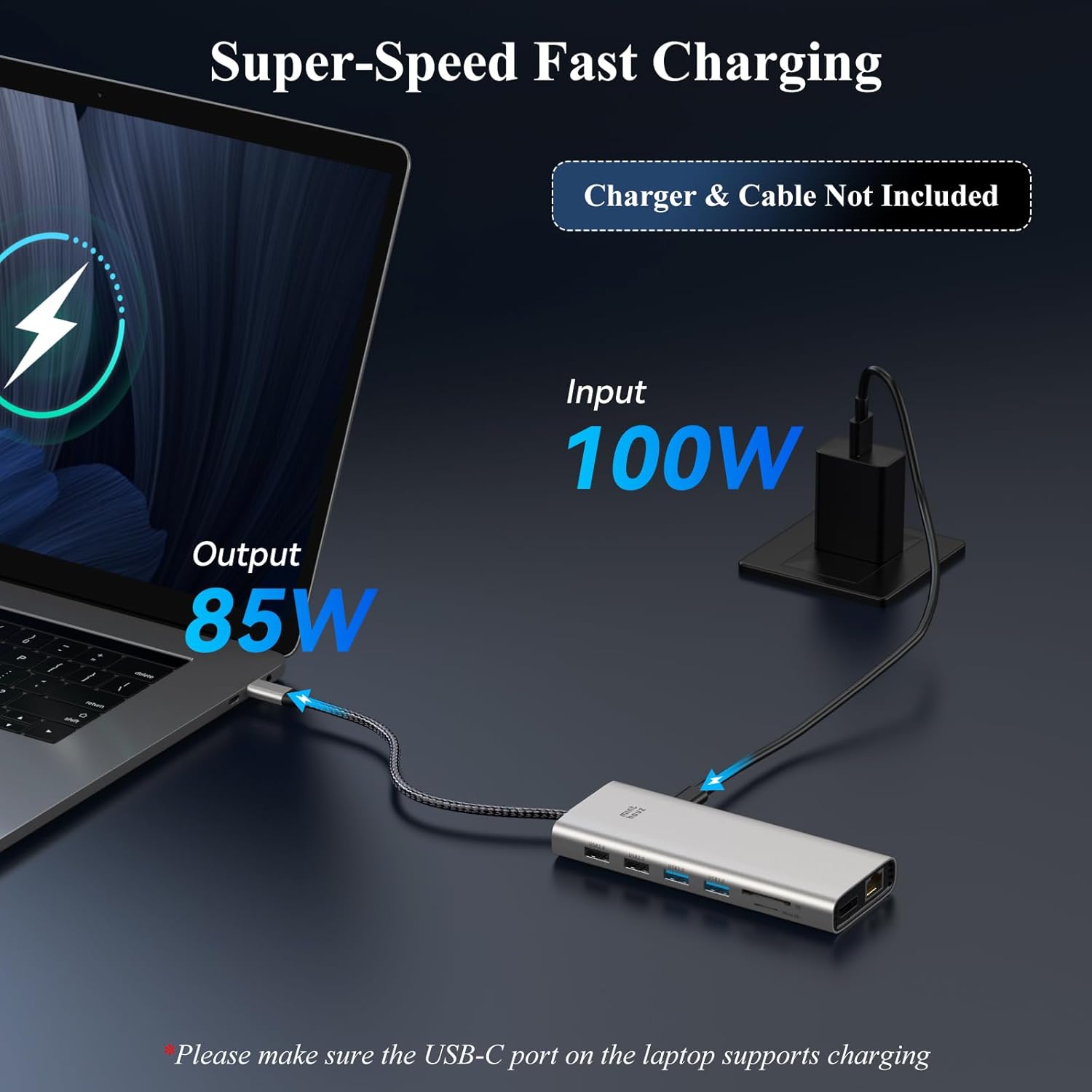
The hub supports any 100W PD charger (UK plug recommended). Note: The hub itself delivers 85W to your laptop (sufficient for MacBook Pro 16 + 15W for peripherals, making it ideal for UK travellers needing a single hub for work and hotel setups.
Does this DP port support variable refresh rates?
Not supported, firmware update required
How does this compare to cheaper USB C Hubs
While budget hubs may cut corners (plastic casing, slow USB 2.0 ports), ours prioritises premium UK user needs:
1.Aluminium alloy body
2. Nylon-braided cable
3. Dual HDMI + 144Hz DP
4.1-year friendly Technical Support
Product Dimensions : 13.97 x 5.59 x 1.78 cm; 63.5 g
Date First Available : 18 Dec. 2024
Manufacturer : WINSTARS TECHNOLOGY LTD
ASIN : B0DQS8DYSM
Item model number : MT-UMD312
Country of origin : China
Guaranteed software updates until : unknown
【⭐12-In-1 Ultimate ExpansionThe Minthouz 】12 in 1 Thunderbolt4 USB C Dock: 4K@144Hz DP 1.4 + Dual HDMI 2.0 (4K@60Hz) can bring you the ultimate gaming and viewing experience as well as creativity | 85W Laptop Charging* 15W Peripheral Power | 4×USB (2×5Gbps 3.0 + 2×2.0).*Requires 100W PD Charger (Not Included).
【⭐Broad Compatibility & Plug-and-Play】The laptop dock compatible with Windows, Mac OS, Chrome OS, Linux, iPad OS, iOS, Harmony OS, and Android with OTG capability. Ideal for Thunderbolt 3/4 laptops or USB-C devices supporting charging and video output. No drivers to install, just plug in and easily use your MacBook Air, MacBook Pro, Dell XPS, Inspiron, Precision Series, HP Spectre x360, Envy, EliteBook, ZBook Series, Lenovo ThinkPad, Yoga, Legion series, ASUS ZenBook, ROG, ProArt series Microsoft Surface series and other mainstream laptops.
【⭐Triple 4K Video Output】Designed for visual creators and gamers, the laptop dock delivers ultra HD images with triple 4K (under DP1.4 & DSC1.2) through HDMI1/2 and DP ports. And the DP port of this USB C to hdmi adapter has a refresh rate of 144HZ.Ensure your laptop’s USB-C port supports video output. Note: Mac OS only supports extending one external monitor with different content; others will be mirrored.
【⭐Dual Bandwidth Boost】The USB C to USB adaptor have dual USB 3.0 ports provide a 5Gbps data rate, complemented by dual USB 2.0 ports for increased connectivity options. The SD/TF card slots support speeds of up to 104MB/s, ideal for camera and monitor users. The Gigabit Ethernet port ensures stable network connectivity at up to 1000Mbps.
【⭐Exquisite Design】This USB C hub multiport adapte is compact and portable for carrying and travelling, the ports are very well designed, the aluminium alloy case is somewhat good for heat dissipation and recyclability, and the nylon cables are sturdy and not too flexible.Minthouz offers you a one-year guarantee and responsive customer service!
9 reviews for USB C Docking Station,Minthouz 12 in 1 Triple Monitor Thunderbolt4 & 100W PD USB C Hub for Dell/HP/MacBook Pro, 4K@144Hz DP+2×HDMI, 4×USB, Gig LAN/SD/TF Multiport Adapter for Win11/MacOS+Linux
Add a review
Related Products


Original price was: £66.69.£50.39Current price is: £50.39.
Stevie Doogan –
Impressive array of available ports
I got this Minthouz 12 in 1 docking station for use with both Mac and Windows devices.First impressions of the device were very good. The construction being of aluminium alloy stands out instantly as being superior to the cheaper, plasticky type of dock. The other factors that really attracted me to this particular model were the availability of dual HDMI ports and also the inclusion of a Gigabit Ethernet port. These are features that are rarely available at the cheaper end of the market.I’m personally a Windows user, whilst other family members lean towards the Mac side. In both cases, use of the dock has been a breeze and without hiccup. Unfortunately my laptop is unable to take advantage of USB C power, however a MacBook Pro at home is and this also works well.It is a wonderful little dock that ticks many boxes in terms of connectivity requirements and functions very well indeed. Recommended.
G. Davies –
Almost perfect – DP output is excellent
I’m using this docking station as my the main USB hub for my PC.I’m also using it when connecting my MacBook to a monitor.I like it so much that I’m considering buying another one so that I don’t have to swap between PC and Mac.The DP port connection is outstanding. It allows me to obtain 4K at 144Hz with a single monitor with a quality that, to my eyes, is indistinguishable from the dedicated DisplayPort cable I usually use to connect my MacBook directly to my monitor.The four USB A ports are great and are heavily used with connections to a 4K webcam, an SSD, a USB microphone and a DVD writer. I use the two USB 3.0 ports for the SSD and the webcam. The USB 2.0 ports work very well with the USB microphone with no quality issues.The SD card slots are very useful – I used the Micro SD slot today to download a webcam video to PC.The slots are smooth with no rough edges and it’s easy to plug and unplug devices and cards.The only negative is that aside from the USB C PD port, there’s no USB C data port. This means that for USB C devices I have to use a USB C to USB A adapter.Otherwise the dock has a great selection of ports including Ethernet which works perfectly at 1Gbps with Mac and PC, two HDMI outputs and a USB C PD port.Thec instructions are very good with a useful tips and Q&A section that provides unusually good answers to common problems and questions including advice that it’s better to connect USB power to a device’s built-in USB power port rather than using the PD port on a dock.I would recommend this dock. The excellent DP port means that I’m considering buying a second unit so that I don’t have to switch the dock between two computers. The lack of a second USB C port for data aside from the USB C DP port is the only disappointment and one for which there’s a fairly easy workaround involving use of a USB C to USB A adapter.
spaceprobe –
A nice device, well made, works really well – good data speeds.
I use this dock (why are we calling these things a “dock” now – why aren’t they a “hub” any more?) day to day for data transfer via USB drives and an NVMe drive connected via USB3. Copying about 12Gb of video to the drive from a Mac Mini M4Pro takes about 20 seconds! Occasionally I use the HDMI output when making a presentation, and I have used the DisplayPort – all good. I have used the ethernet with a MacBook Air – it worked flawlessly and data speeds were super-fast. I’ve used the audio out facility on this device, it sounds great. Basically it’s very convenient to have everything I need in one dongle – card readers (not sure if it’s my imagination but these seem a little bit slow), USB sockets etc.I also use it with various Macs sometimes and it will only extend the desktop to one monitor – if I plug in another it’s mirrored – this is probably the biggest downside of this device. I’ve used it for power delivery for a MacBook. It sometimes gets a little warm, but nothing to write home about.In itself, it’s a really nice device: very speedy data transfers, useful connections and it’s really well made: Metal cased, it feels really robust. Nice thick cable and good quality Thunderbolt plug.It also works really well with my Linux laptops. Data transfer and sound output is great, but I haven’t had the opportunity to try a Linux machine using the monitor connectors.I have used this with a ChromeBook for data transfer – works fine; nice and speedyOverall a really nice device, however a device of this size has space for more USB sockets – I’d have liked a few more or/and some USB C/Thunderbolt sockets. It’s a little bit spendy – at the time of review it’s £67 – but this probably reflects its capabilities and build quality.
Lydia –
Versatile and High-Performance Docking Station
I recently purchased the Minthouz 12 in 1 USB C Docking Station for my MacBook Pro, and it has significantly enhanced my workstation setup. The docking station offers a comprehensive range of ports, including dual HDMI, DisplayPort, USB-A, USB-C, Gigabit Ethernet, SD/TF card readers, and audio output, providing seamless connectivity for various peripherals.The 4K@144Hz display support is a standout feature, delivering crisp and vibrant visuals across multiple monitors, which is ideal for multitasking and content creation. The 100W Power Delivery ensures that my MacBook Pro stays charged even during intensive use, eliminating the need for additional chargers.The build quality is robust, and the aluminum alloy casing provides effective heat dissipation, keeping the docking station cool during extended usage. The compact and portable design makes it convenient for travel, allowing me to set up my workstation effortlessly wherever I go.
S K –
This hub works excellently to adapt my laptop to my home office. It helps to leave my external drives and monitors plugged into the hub, so one cable sets up my workspace. It gets somewhat warm, but not too hot, so good heat dissipation. It’s working well, thank you~
Protagonist –
Ich habe die Minthouz 12-in-1 Dockingstation Modell MT-UMD312 im Rahmen des Amazon Vine Programms getestet und möchte meine Erfahrungen mit euch teilen. Vorab: Ich bin wirklich positiv überrascht, was man hier für einen fairen Preis bekommt.Das Gerät kam gut verpackt an und machte schon beim Auspacken einen hochwertigen Eindruck. Das Aluminiumgehäuse sieht nicht nur edel aus, sondern fühlt sich auch stabil und robust an – kein billiges Plastik, sondern etwas, das man gerne auf dem Schreibtisch stehen hat. An den Seiten gibt es zwar Kunststoffabdeckungen, aber das stört überhaupt nicht. Das fest verbaute USB-C-Kabel ist dick, stabil und sitzt fest im Anschluss. Auch das ist für mich ein Pluspunkt, da ich bei anderen Geräten schon öfter Probleme mit wackelnden Steckern hatte.An Anschlüssen ist wirklich alles vorhanden:- Zwei HDMI-Anschlüsse- Ein DisplayPort (unterstützt 4K bei 144 Hz – perfekt für Gaming oder hochauflösende Bildbearbeitung)- Vier USB-A-Anschlüsse (2x USB 3.0 für schnelle Datenübertragung und 2x USB 2.0 für Maus, Tastatur etc.)- SD- und MicroSD-Kartenleser- Gigabit-LAN-Port- 3,5 mm Klinkenbuchse für Kopfhörer/Mikrofon- USB-C Power Delivery Port (100W Input, 85W Output)Ich habe die Docking Station an meinem MacBook getestet und obwohl unter Mac OS nur der so genannte SST-Modus funktioniert (alle externen Monitore zeigen das gleiche Bild), konnte ich problemlos zwei Monitore anschlieÃen. Wer also auf einen echten Extended Desktop am Mac hofft, sollte das vorher bedenken. Bei Windows-Geräten hingegen wird der MST-Modus unterstützt – dort funktioniert das mit mehreren verschiedenen Bildschirmen super.Was das Laden über USB-C betrifft: Es funktioniert einwandfrei. Ich konnte mein MacBook problemlos mit bis zu 85W laden – vorausgesetzt man hat ein starkes Netzteil mit PowerDelivery (100W) zur Hand. Das ist übrigens nicht im Lieferumfang enthalten, man sollte es also separat haben oder nachkaufen.Was mir besonders gut gefällt, ist die Vielseitigkeit dieser Dockingstation. Egal ob ich eine externe Festplatte anschlieÃe, die Speicherkarte meiner Kamera auslese oder im LAN-Netzwerk arbeite, alles funktioniert problemlos. Die USB 3.0 Ports sind schön schnell, der Kartenleser ist nicht der schnellste, aber für normale Fotoübertragungen reicht es. Bei der LAN-Verbindung hatte ich die ganze Zeit eine stabile 1 Gbit/s Verbindung – perfekt fürs Homeoffice oder wenn man mal gröÃere Datenmengen durchs Netzwerk schieben muss.Ein kleiner Nachteil ist, dass das Gehäuse nach längerem Gebrauch etwas warm wird. Es wird aber nicht unangenehm heiÃ, also aus meiner Sicht kein Problem. Auch dass der Hub aufgrund des glatten Aluminiums gerne mal leicht verrutscht, ist eine Kleinigkeit, die man mit einem kleinen Antirutschpad schnell beheben kann.Mein Fazit: Die Minthouz 12-in-1 Docking Station ist ein echter Allrounder. Sie sieht gut aus, bietet viele Anschlüsse, funktioniert zuverlässig und macht einen hochwertigen Eindruck. Wer wie ich viele Geräte gleichzeitig nutzt oder einfach einen aufgeräumten Arbeitsplatz haben möchte, wird hier fündig. Gerade für Windows-Nutzer mit mehreren Monitoren ein echter Geheimtipp – aber auch für Mac-Nutzer durchaus brauchbar, wenn man den SST-Modus akzeptieren kann.Für mich ist dieses Produkt eine klare Kaufempfehlung, besonders wenn man nicht bereit ist, ein Vermögen für eine Marken-Dockingstation auszugeben – aber trotzdem Wert auf Qualität, Leistung und Anschlussvielfalt legt.Was den Sound über die Audiobuchse betrifft: In Ordnung. Nicht überragend, aber zum Telefonieren oder Musik hören während der Arbeit völlig in Ordnung.
J –
As far as a docking hub, this works fine. No weird pops or unexpected glitches, etc. I let it run for a few hours once connected to a smartphone with videos queued up, among other things. It’s fairly plug and play and has no problem keeping up with the various ports, so long as a decent input is supplied to the Power Delivery (PD) interface. This can make it easy to use with computers for extending or mirroring displays. I feel this is best as a docking hub to increase display capacity and other functionality to a computer, similar to what it says on the product package. It would be nice if it had at least one USB-C output, but inexpensive adapters and hubs are available if need be. I noticed my smartphone barely charged when used with this. The PD port is highly recommended to make use of, as otherwise it can drain a decent phone’s battery fairly quickly, depending on how many outputs are used.I was hoping for something easier to use with phones and other devices. The main reason I mention that is the lack of USB-C ports, which I noticed after testing it. This does work with the devices I’ve tried, many needing PD input to function. The audio/video quality reproduction is good with both the graphics ports I’ve tried, mainly HDMI with the 3.5mm audio output. The DisplayPort aligned perfectly with a high-resolution monitor and did look better, but, of course, that is video-only. This device does allow pass-through for audio via any of the four (4) USB-A ports if one wishes to avoid the 3.5 stereo jack. I noticed with the subtraction or addition of an (often video) device, and depending on the program, the Samsung DEX pauses. KVM switches can not only add to the hassle of that but also make cable management an ongoing task until everything is “just right.” I was hoping for a plug-and-play on-the-go device to use with smartphones to watch podcasts (or even just listen to them). It works for that, but there are other devices that may be able to handle that in a smaller package. It’s a good device for what it does. With computers, I sometimes needed a separate USB connection (separate hub) for it to function properly in most situations. That means either a decent USB power block or possibly an add-on computer card for that. There are ways around that, but not easily and without additional cable complexity. The USB 3.0 card reader works as it should and is quite responsive with this device.I may have over-tested this device, which may show in this review. This does do a nice job with colors, better than some onboard computer graphics cards. It obviously provides a larger screen than a smartphone. The graphics look good and haven’t caused issues yet. It can also add additional features like gigabit Ethernet and everything else mentioned via a single USB-C slot (and a proper PD connection). I did end up using an additional USB bar for its USB-C ports, but that also disabled some of the features of the additional bar. That worked fine for a basic mouse and keyboard while freeing up ports on this device. One other caveat: the main supply cord is not detachable. I would have preferred a detachable cord. Just a thought. I can still think of a few computers (and other devices) that could make use of this.
Fred –
Die USB C Docking Station wurde gut verpackt und blitzschnell geliefert. Man könnte fast meinen, sie hätte einen eigenen kleinen Warp-Antrieb!Hier die inneren Werte und äuÃeren Merkmale meines neuen Gadget-Buddys:- Hardwareschnittstelle: USB-C â der moderne Anschluss für alle Fälle.- Besondere Merkmale: Hot Swapping (AnschlieÃen und Abziehen ohne Neustart â wie im Formel-1-Boxenstopp für Geräte!), schnelle Datenübertragung (rasend schnell, versprochen!), hitzebeständig (hoffentlich überhitzt er nicht beim Multitasking-Marathon), kompakt, tragbar und leicht (passt in jede Hosentasche, fast!), Plug and Play (einstecken und loslegen â Technik für Dummies, yay!).- USB-Anschlüsse insgesamt: 4, davon 2 x USB 3.0 (die Flitzer) und 2 x USB 2.0 (die gemütlichen Arbeiter).- Anschluss-Vielfalt: 1 x 4K@144Hz DisplayPort (für gestochen scharfe Bilder), 2 x 4K@60Hz HDMI (doppelt hält besser?), 1 x USB-C PD In (zum Aufladen des Laptops mit bis zu 100W), 2 x 5Gbps USB 3.0 (für externe Festplatten und Co.), 2 x USB 2.0 (für Maus und Tastatur), 1 x Gigabit Ethernet (für die stabile Kabel-Internet-Party), SD/TF-Kartenleser (für die Foto- und Datenjonglage), 1 x 2-in-1 Audio/Mikrofon-Buchse (für den klaren Ton).- USB-C Ladeleistung: Nimmt bis zu 100W entgegen und gibt sichere 85W an den Laptop weiter, unterstützt Thunderbolt 3/4 für extra schnelles Laden.- Kartenleser: Für SD- und Micro-SD-Karten â der Schweizer Taschenmesser-Effekt lässt grüÃen!.- Audioanschluss: 3,5 mm für Kopfhörer und Mikrofon â für ungestörte Telefonate oder das Abtauchen in Klangwelten.- Kompatibilität: Ein wahrer Freund für Windows (von 7 bis 11), Mac OS, Chrome OS, Linux, iPad OS, Harmony OS, Android (mit OTG-Funktion), iOS sowie Laptops und Geräte mit Thunderbolt 3/4 oder USB-C, die Laden und Videoausgabe unterstützen.- Treiber benötigt? Nö! Einfach anstöpseln und staunen.- Abmessungen: Winzige 13,97 x 5,59 x 1,78 cm.- Gewicht: Federleichte 63,5 Gramm.Die Glanzpunkte (Pros):- Ein echter Anschluss-Künstler! Macht aus einem einzigen USB-C-Port eine ganze Kommandozentrale.- Kann bis zu drei Monitore gleichzeitig befeuern â Multitasking-Träume werden wahr.- Lädt den Laptop schnell und zuverlässig auf.- Ist klein, leicht und somit der ideale Reisebegleiter für digitale Nomaden.- Braucht keine komplizierten Treiber â einfach einstecken und loslegen.- Versteht sich mit vielen verschiedenen Betriebssystemen und Geräten.Die kleinen Stolpersteine (Cons):- Für die Steam-Konsole im Spielemodus scheint er nicht der beste Freund zu sein, da nur ein Bildschirm erweitert werden kann und die Ladeleistung gering ist. Da muss wohl noch nachgebessert werden.- Hat nur einen USB-C-Anschluss für die Stromversorgung und keinen weiteren für Daten. Wer also noch ein USB-C-Gerät anschlieÃen möchte, braucht eventuell einen Adapter.- Das Aluminiumgehäuse ist zwar schick und leitet Wärme gut ab, könnte aber preislich eine kleine Hürde darstellen.- Kann bei intensiver Nutzung etwas warm werden â aber solange er nicht glüht, ist alles im grünen Bereich.Mein digitales Urteil:Die Minthouz USB C Docking Station ist ein äuÃerst praktisches kleines Kraftpaket, das den Kabelsalat auf dem Schreibtisch elegant löst und die Anschlussmöglichkeiten des Laptops enorm erweitert. Wer viele Peripheriegeräte nutzt und Wert auf eine kompakte und transportable Lösung legt, die auch noch mehrere Monitore unterstützt und den Laptop lädt, der wird hier definitiv fündig. Trotz kleinerer Einschränkungen wie dem fehlenden zusätzlichen USB-C-Datenport und der nicht optimalen Steam-Deck-Kompatibilität überwiegen die Vorteile für den täglichen Büro- und Multimedia-Einsatz deutlich. Ein tolles Gadget, das sein Geld wert ist und den Schreibtisch-Dschungel ein ganzes Stück übersichtlicher macht!
Chan –
I recently got my hands on a USB hub that’s an absolute powerhouse for multitasking. It features a solid metal case and a braided cable, which scream durability and reliability. This thing feels like it’s truly built to last.The functionality is top-notch, with three display ports (two HDMIs and one DP), a 3.5mm audio aux port (yes, I still need this!! thank goodness!), two USB 2.0 ports, two USB 3.0 ports, an Ethernet port, a USB-C PD charge port, and even an SD and micro SD card reader (did I miss anything??) – it’s an all-in-one connectivity dream. And with plug-and-play simplicity, there’s no hassle in setting it up.What really stands out is its performance. I can now extend my work laptop across three monitors (old 19-inch, 27-inch, and a glorious 34-inch ultrawide). The experience has been seamless, making my workflow much more efficient. Plus, it allows me to connect all my gadgets without constantly swapping cables. Itâs pure convenience!The only minor drawback is that the hub gets warmer during extended use, which seems common for multi-display USB hubs. But overall, this is a small trade-off for the immense versatility it offers.If you’re in need of a robust, feature-packed USB hub, this is one I’d definitely recommend. It’s a game-changer for anyone juggling multiple devices or looking to maximize productivity.