

USB C Hub, uni USB C 8-in-1 Docking Station with 90 cm Detachable Cable, Multiport 4K @60Hz HDMI, 1Gbps LAN, 100W PD, 5Gbps USB 3.0, Suitable for iPad Pro, MacBook Pro/Air, Dell XPS, Galaxy etc.
Original price was: £81.98.£46.99Current price is: £46.99.



Price: £81.98 - £46.99
(as of Jun 13, 2025 21:14:03 UTC – Details)
From the brand

uni, a dedicated USB-C Accessories brand.

USB 3.1 HUB Up to 5Gbps
USB HUB with Ethernet

Product Dimensions : 10.12 x 5.52 x 2.06 cm; 190 g
Date First Available : 23 Aug. 2023
Manufacturer : uni
ASIN : B0C3GDT9XN
Item model number : 8 in 1 pro
Country of origin : China
Guaranteed software updates until : unknown
[90 cm Detachable Cable] Easily connect to your iMac or a computer with a detachable cable. Experience increased flexibility and convenience with uni hub usb c. Say goodbye to cable restrictions and enjoy worry-free connection.
[4K@60Hz HDMI Video] Enjoy an enhanced visual experience with support for ultra-high-definition video at up to 4K@60Hz resolution. Enjoy crisp, smooth images on your 4K TV and exceed the previous limit of 4K@30Hz.
[100W Power Supply] uni USB C Hub provides safe, fast charging of up to 100W for USB-C laptops/smartphones/tablets. Achieve maximum charging speed for your MacBook Pro 16″ (with an Apple 96W charger).
[Ethernet 1Gbps] Enjoy faster downloads, reliable online group meetings, and better group-project synchronization. Stable network speeds up to 1 Gbps (backward compatible with 100 Mbps/10 Mbps networks).
[Reliable 18-Month Warranty] uni offers a worry-free 18-month warranty and 24/7 customer service for the uniquely designed 8-in-1 docking station. We’re confident in our products and our customers.
Customers say
Customers find the USB hub works well with devices like iPad Pro and Chromebook, and appreciate its sturdy construction with a rubber case and high-quality cable. The device is compact, taking up minimal desk space, and features a removable USB C output cable. While the design and functionality receive positive feedback, customers report mixed experiences with port functionality, with some reporting issues with the USB C port not working. The connectivity aspect also receives mixed reviews, with some customers experiencing connection issues.
9 reviews for USB C Hub, uni USB C 8-in-1 Docking Station with 90 cm Detachable Cable, Multiport 4K @60Hz HDMI, 1Gbps LAN, 100W PD, 5Gbps USB 3.0, Suitable for iPad Pro, MacBook Pro/Air, Dell XPS, Galaxy etc.
Add a review
Related Products


Original price was: £81.98.£46.99Current price is: £46.99.
monki –
High-performance, good quality, well-designed hub
This was one of the more expensive hubs, so I was curious to see what justified the price. The ports that I need in a hub are USB-A 3.0, SD-Card UHS-I, HDMI 4K (ideally 4K60 – but only Apple’s new USB-C/HDMI hub has managed to achieve that) . Other nice-to-haves would be USB-C (data transfer, not just PD), ethernet.This hub ticked most boxes (apart from 4K60 and USB-C data) so I gave it a shot. First impressions are that it’s well-designed and feels nice and weighty. The bumper gives it a unique look, as well as some added durability. It comes with a detachable USB C-C cable which creates a USB 3.1 Gen2 connection between the hub and laptop (10 Gbps). As advertised, this then gives 2 USB 3.0 ports at 5gbps, SD card at UHS-I speeds, 1Gbps ethernet, HDMI 1.4 (i.e. 4K60, sadly).Unlike some other hubs I’ve tried which become ‘overloaded’ when you use all (or many) ports, this hub worked fine with all 3 USB ports, both SD card slots and USB-C (charging) in use – and it seemingly kept them at their maximum rated speeds.Overall, this so far seems to be a high-quality well functioning hub. The downsides (for me, no 4K60) seems to be something only Apple have cracked with their hub, so can’t hold that against this too much. The only other nice-to-have would’ve been easier indications for which port is the slow USB 2.0 one, but as it’s on the other side of the hub it’s easy to remember. Expensive – but easy to recommend!
Alistair –
Nailed it ⢠I always carry Uni cables, adaptors and a hub
In the past, Belkin held the crown for the best non-Apple accessories for Macs.But now the top spot is firmly in the hands of Uni Accessories. The combination of performance, aesthetic and cost-effectiveness of their products is second to none. In my experience of purchasing cables and accessories for myself, colleagues and family members: If Uni make it, it will be the best.I am a particular fan of this 8-in-1 hub for a couple of specific features (though all of the above is still perfectly true):- Detachable main USB-C cable. This makes storing it in a rucksack (where mine basically lives) neat and safe. On my previous hub, the main cable experiences a lot of stress because I had to bend it to put in order to put it in a logical pocket in my rucksack.- The rugged build AND lovely silicone sleeve. This gives you the option of safety and/or pleasing look. It’s a nice touch and I can’t imagine why others have not added this…- Space Grey colouring – bang on!Overall performance has been great. I just love the fact that I only need one cable into my mac and I have extra display, ethernet, lightning cable (for iPhone) and the rest in a lovely little package.Highly recommend.
Jon –
Perfect hub albeit with some power delivery problems
TLDR – Premium price but stellar quality and construction, comes with protection. Perfect accompaniment to any USB-C devices. Some issues with power delivery but probably not dealbreaking.Really nice quality hub. Construction is beautiful, no imperfections or seams to be seen. Every port works as expected. While not all USB-C devices will be able to use the HDMI port (requires DisplayPort Alt mode support on the host, usually present on laptops but more rare on phones or tablets), the USB ports and card reader work on everything. It comes with a short cable and sleeve which both function well. The bundled sleeve is good for peace of mind if a little loose. It’s a shame the USB-C cutout in the sleeve is so slim, but the sleeve can always be removed if your cable doesn’t fit.The power passthrough functionality of the hub is hit or miss though. I notice that if high current devices are plugged into the hub, plugging in power sometimes won’t charge the host device even if there is sufficient power. Also note that plugging in power will temporarily disconnect all connected devices so make sure you aren’t using anything critical when you swap from power. You get used to this behaviour quickly though so I don’t mark the hub down for it. Great hub overall once you get your head around the charging port quirks.Update: Not a fan of the power delivery passthrough on this hub. From a power bank, it will refuse to passthrough fast charging and the device will discharge. From a charger, power passthrough kind of works but the hub gets too hot to touch and the device barely charges. If you’re using this hub on the go I would maybe reconsider it for this use case as power passthrough doesn’t work consistently.
IanB –
All the hub my MacBook & I currently need.
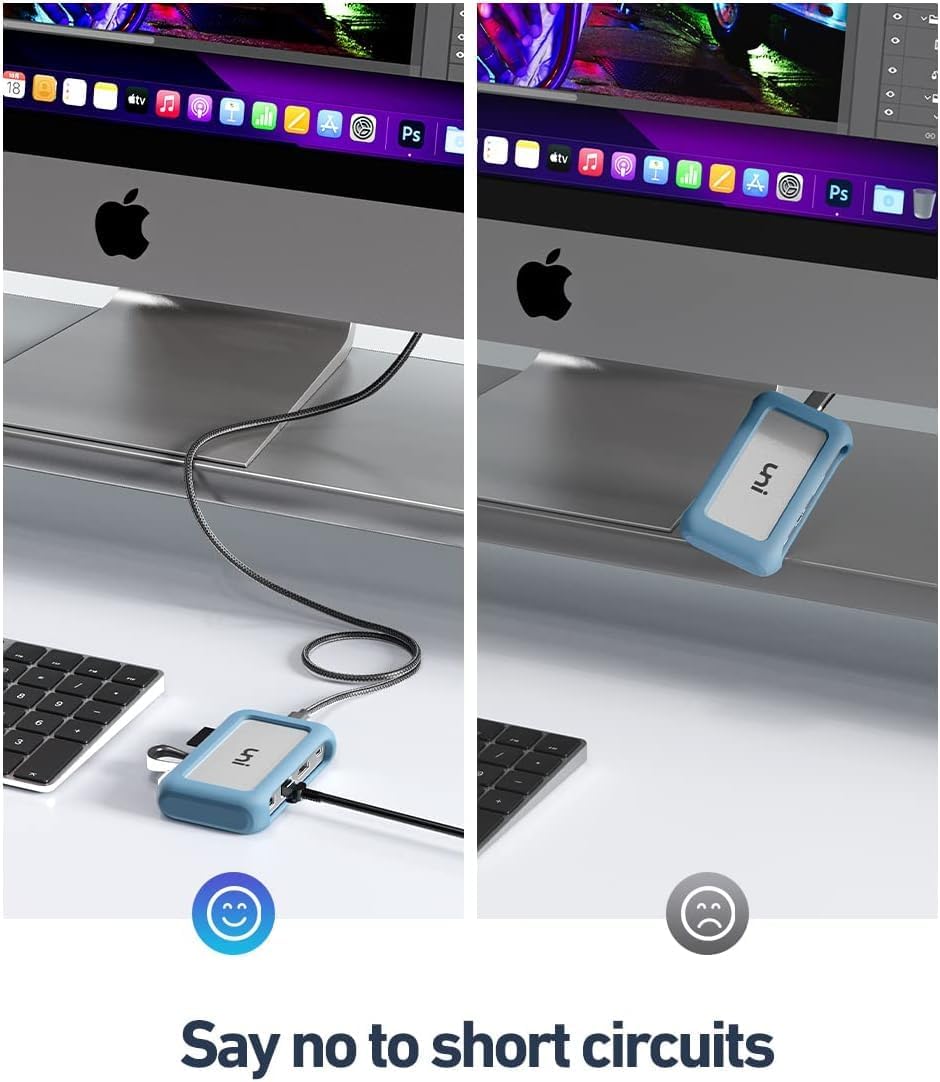
Overall the Uni Hub feels like a pretty decent product and certainly made to a similar quality to any much better known brand names out there. Small and light enough to be popped in a bag (when we can travel again!). The rubber bumper feels pleasant enough and has enough grip to stop it sliding around the desk. This can be popped off and the metal casing is well constructed with no sharp edges. While not very important, it has a pretty good colour match for my 2019 MacBook Pro – generally it has a premium enough look not to appear out of place next to the MacBook.I’m not a power user by any description, but the ethernet connection, via a gigabit switch to my router, does the job without any issues. Both the SD and micro-SD card slots transfer video and photographs quickly. The USBs provide a reliable connection. Power comes through the hub to my MacBook without any issues and the hub runs a little warm, but I expect that with a small hub and it doesn’t cause me any concern.If I needed one, I’d buy another, and I’d happily recommend the Uni hub to friends/family – So I’m recommending it to you!
roberto –
Bastante completo la verdad , tiene lo necesario
Barthomeuf –
Ayant passé à un MacBook Pro 16″ de 2019 j’ai du chercher un hub usb-c pas trop cher. Je suis tombé sur ce hub de la marque Uni. Dès que j’ai reçu le colis, on m’a envoyé un mail avec un logiciel qui permet de résoudre certains problèmes de la carte réseau (je n’avais pas ces problèmes)Ce hub possède 2 prises USB 3.0, une prise USB 2.0, un port de carte SD et de carte micro SD. Il possède aussi un port RJ-45 ainsi qu’une prise pour charger mon Mac.Ce que j’aime avec ce hub c’est la possibilité de brancher en un seul câble, une multitude d’appareils tel qu’un écran externe jusqu’à 4K/60, des disques durs, claviers, souris, clés usb… tout en rechargeant mon macbook pro avec 100W. Un point positif est la possibilité de pouvoir changer le câble usb-c ce qui est plutôt rare pour un hub usb-c.La coque de protection permet de le transporter facilement sans avoir peur de l’abimer. Le colis a été reçu très rapidement (en moins de 24H), très bien emballé.Si vous cherchez un hub usb-c, n’hésitez pas, alliant solidité, rapidité et design, je recommande.
orçun tenker –
Video edit icin yuksek boyutlu dosyalari taransfer etmek icin kullaniyorum. Kucuk kullanisli ve hizli. Ä°sinmaSorunu yasamadim.
Tord –
Pros: This portable multi purpose usb-c hub (model Uni Pro Plus) connects external 4k screen, Gigabit ethernet, USB-A 3.0 (5gbps) and 2.0 ports, and sd card reader in a compact well built case. It has usb-c PD input at 100W, feeding power to every attached device, including Ipad Pro. Ipad connects via 10Gbit usb-c port. With a 65W power supply I havenât run out of juice yet with every port connected. Iâve had zero issues with connecting class compliant usb audio and MIDI equipment. Hub is USB OTG ready. More than I can say of the many usb OTG adapters Iâve tried. It just works. If for some reason my audio interface isnât recognized, (once a month), I just pull and reinsert the cable, and good to go. USB-A 3.0 ports at 5Gbit streams several hundreds of MB/s depending on ssd construction. (EDIT. OBS This is with self powered ssd. Bus powered ssd enclosure has problems with getting enough juice and behaves erratically. Beware of this shortcoming. Look below). Havenât tested the HDMI at 4k/60Hz maximum, but my 2k screen automatically extends the iPads built in. It just works. (iPadOS 16/17). If Uni says 4k/60 is fine, I belive them. Support is fast and very helpful, and genuinely seems interested in helping the customer. Seems they are proud of their products. One of the best support Iâve come across. (Thanks Amrich). I also think the 65$ I paid is money well spent.Cons: No usb-c device port. Only usb-a. For those occasions I use a proven (otg) Graugear A to C adapter. The power fed through the 5gbps USB3 ports is only 5V 0.9A 4.5W. This is NOT enough for powering externel ssd or other storage enclosures. Enclosures has to be self powered to work as expected. This should have been pointed out in the overview of the hub. The very efficient bus powered nvme ssd and enclosure I bought (around 5W total) didnât work. This seems to be the case with all budget usb-c hubs. Way to weak power feed out of bus powered usbA ports. Not just this Uni Pro Plus. So expanding iPad with external usb storage is definitely not easy even in iPadOS 17. I had to complement a OWC Thunderbolt hub to get my setup running fine. (Look for my coming review on the owc, when testing is done).The only other flaw I know of is the usb-c dataport going to iPad is a bit flaky. Itâs a shame the fit is not completely tight with certain usb-c cable connectors. The high quality, thick 90cm cable thatâs in the box fits fine. If you buy one, Uni is a bit discerning about wich cables to use. As long as the usb-c connector entering the hub is the same size as Unis provided, all is fine if you ask me. At least 20gbps transfer rate. The plug shall fit tightly the hole in the rubber case thatâs around the hub case. Then it doesnât wiggle so easily. During a performance this could be a problem. A pity uni usb-c port isnât as tight as the iPads. If it had been, I would have given it 5 stars. Now 4.5 is more to the point.Edit NOTE: You canât daisy chain devices to Uni 8-1 that has to communicate directly with the host. For instance another Uni 8-1 or other hub that has connected devices to it. It canât pass through buspower or talk to âhost likeâ devices. Traffic gets intermittent or just stops working. I had to solve my setup issues with a proven daisy chain Thunderbolt4 hub from OWC. That solved all issues I had with other hubs. See my other review on the OWC TB4.
nexus6 –
âºPERCHà UN HUB USB-C e COME SCEGLIERNE UNO ð¨âð»ð¨âð»ð¨âð»A seguire qualche consiglio sulla scelta di un hub usb-c. Se già sapete orientarvi nel settore e volete saperne di più su questo articolo in particolare potete saltare questo paragrafo e andare direttamente al punto 1ï¸â£â Le porte usb-c stanno diventando uno standard universale, soprattutto se parliamo di portatili, e in particolare dei nuovi macbook, che ormai hanno adottato le porte thunderbolt3/usb-c come unico accesso per le nostre periferiche. à evidente tuttavia che vengano ancora utilizzate tecnologie con connettori di ogni tipo, di cui a volte non esiste nemmeno la versione usb-c, oppure device più datati ma perfettamente funzionanti che non possiamo semplicemente prendere e buttar via. Qui entra in gioco la necessità di un hub usb-c. Ce ne sono di tantissimi tipi, che si differenziano per portabilità , numero e tipo di connettori/tecnologie supportati, oltre che per la qualità costruttiva ovviamente.Trovare ciò che fa al caso nostro può rivelarsi più difficile del previsto. Dobbiamo rispondere a certe domande sulle nostre necessità e in base a questo scartare certi dispositivi e valutarne altri. La prima distinzione da fare è quella tra hub portatili e hub da scrivania. Quelli da scrivania, meglio noti come docking station, sono in genere più grandi e costosi, hanno sicuramente un numero di connettori superiore e un proprio alimentatore, indispensabile per connettere più device ad alto assorbimento energetico senza impattare troppo sulla batteria del portatile, senza contare che alcuni device hanno bisogno di un’alimentazione separata per funzionare, e quella fornita dal portatile non è sufficiente. Dopo aver letto diversi articoli e recensioni posso consigliarvi di dare un’occhiata a questo modello per farvi un’idea https://www.amazon.it/CalDigit-TS3-Plus-Thunderbolt-DisplayPort/dp/B07CVP5HMP/ref=sr_1_1?dchild=1&keywords=CalDigit&qid=1615742261&sr=8-1â Ovviamente se lavoriamo in portabilità dobbiamo optare per qualcosa di più piccolo e leggero e soprattuto assicuriamoci che sia USB POWERED, o BUS POWERED, ovvero che non abbia bisogno di un alimentatore esterno ma assorba energia dal pc a cui è connesso tramite la stessa porta usb che trasmette i dati. Anche se non è direttamente specificato, quasi tutti gli hub usb-c portatili sono bus powered, ma se ancora non se siamo sicuri basta controllare le immagini: se non è presente nessuna porta per l’alimentatore esterno allora siamo a posto.Riguardo alla qualità costruttiva, se abbiamo un computer nuovo e costoso eviterei di acquistare un prodotto economico. Ci sono aziende che lanciano prodotti con campagne di marketing molto aggressive, ovvero che offrono hub 10 in 1, 12 in 1, con tutte le connessioni possibili e le ultime tecnologie ad un prezzo ridicolo…ecco, eviterei proprio questi prodotti. Meglio meno connessioni dedicate ma di alta qualità in un guscio solido che un pezzo di plastica che si surriscalda e si brucia rischiando di danneggiare anche il portatile o le periferiche. Non è che sia contro la plastica solo perché sembra cheap, è anche una questione tecnica. Gli hub usb-c producono una discreta quantità di calore quando sono in piena attività , ed è sempre meglio disperderlo il più velocemente possibile per non far surriscaldare i componenti interni. La plastica come materiale non disperde il calore bene quanto il metallo, anzi essendo un isolante termico fa esattamente l’opposto, lo trattiene. Già basterebbe adottare questo parametro qualitativo per escludere il 90% degli hub usb-c in commercio.â Ovviamente la scelta dipenderà anche dal tipo di porte di cui abbiamo bisogno. In commercio si trovano adattatori singoli per quasi ogni tipo di connettore. Se ad esempio dobbiamo solamente collegare un hard disk usb-A alla porta usb-C allora possiamo valutare un adattatore del genere https://www.amazon.it/uni-Adattatore-telelavoro-Compatibile-OnePlus/dp/B086JKTYCR/ref=sr_1_7?dchild=1&keywords=uni&qid=1615745487&sr=8-7Se invece abbiamo la necessità di collegare diversi tipi di dispositivi tutti allo stesso momento allora comincia ad avere più senso optare per un hub piuttosto che avere 3 o 4 adattatori diversi.Le esigenze personali possono variare molto ma un buon hub usb-c deve avere COME MINIMO:- 2 porte usb-a con tecnologia 3.0 da 5Gbps- 1 lettore sd/micro sd- 1 porta hdmi 4k 30hz- 1 porta usb-c PD (POWER DELIVERY)Chiariamo un attimo questi dati.â¼ï¸ Sulla questione della velocità delle porte usb è facile fare confusione e finire per acquistare prodotti di cui non abbiamo bisogno. Premessa fondamentale, per funzionare alla massima velocità tutti i dispositivi e i cavi devono supportarla. Sembra banale come affermazione ma se acquistiamo un hub usb-c per una questione di retrocompatibilità coi nostri hdd con usb 3.0 (che arriva al massimo a 5Gbps) allora è inutile acquistare un costosissimo hub thunderbolt, perché se acquisto un ssd thunderbolt lo vado a collegare direttamente al pc, non lo faccio passare per un hub! Ci basterà un hub usb-c con porte da 5Gbps o al massimo da 10Gbps. Tutto ciò che va oltre questa velocità nasce già con connettori usb-c o thunderbolt, quindi ripeto, nella stragrande maggioranza dei casi non è necessario farli passare per un hub, quindi non ci serve un hub così “veloce”.Inoltre, la velocità non dipende solamente dalle tecnologie supportate ma anche dalla qualità costruttiva dell’hub. In linea generale facendo passare una periferica da un hub si perde sempre qualcosa in velocità , ma se il rallentamento è eccessivo allora ci troviamo di fronte a un prodotto di scarsa qualità . Purtroppo non esiste un modo per conoscere le performance di un dispositivo finché non lo si prova. In generale è meglio informarsi prima, leggere tante recensioni e affidarsi a prodotti di qualità .â¾ï¸Sulla questione altrettanto spinosa delle porte HDMI. In genere tutti gli hub usb-c supportano il 1080p a 60hz e il 4k a 30hz. Se ci serve un adattatore che faccia passare un segnale 4k 60hz in genere è meglio optare per uno dedicato che faccia solo quello, perché ad oggi è difficile se non impossibile (ma la tecnologia in questi casi va avanti molto velocemente) trovare un hub NON autoalimentato che possa far funzionare più dispositivi contemporaneamente e nel frattempo possa far passare un segnale 4k a 60hz. Potrei sbagliarmi ma è sempre meglio informarsi bene coi produttori sulle capacità di output video e le limitazioni dei loro hub. Altrimenti se la qualità e velocità del segnale video sono una priorità sarebbe meglio optare per la tecnologia displayport. Probabilmente un collegamento thunderbolt 3/displayport anche tramite hub fornirebbe performance migliori. Dico probabilmente perché non ho testato direttamente ma resta una possibilità se dobbiamo passare comunque da un hub (meglio sarebbe una connessione diretta ovviamente).â¾ï¸Sul lettore di schede c’è poco da dire. Ancora oggi il modo più veloce e affidabile di trasferire foto e video dalle fotocamere su pc resta sempre il trasferimento manuale tramite lettore sd. à un peccato che i nuovi macbook ne siano sprovvisti. Se poi dobbiamo lavorare con file di grandi dimensioni, come i video, e usiamo un ssd esterno per non saturare quello dei nostri portatili, allora un hub è molto utile per trasferire i file tra sd e ssd esterno senza collegare e scollegare cavi e adattatori.â¾ï¸Riguardo alle porte usb-c sull’hub. Ovviamente quando colleghiamo un hub usb-c al computer “perdiamo” una porta usb-c, quindi diventa utile ritrovarcela sull’hub stesso. Però dobbiamo fare attenzione al tipo di porta presente sull’hub. Molte sono del tipo “Power delivery” (abbreviato PD), anche se a volte non è segnalato (come nel caso di questo hub UNI). Ciò significa che possiamo collegarci l’alimentatore del portatile e questo si ricaricherà tramite l’hub, ma NON possiamo usarla per trasferire dati. Inoltre la porta in questione supporterà una potenza di ricarica che potrebbe essere inferiore a quella dell’alimentatore, e come risultato il portatile si ricaricherà più lentamente. Quindi di nuovo, attenzione alle specifiche!â¾ï¸ Poi ci sono porte che potrebbero non servire a tutti ma che è comunque comodo avere. Per esempio una porta ethernet per connessione internet cablata se vogliamo sfruttare al massimo la velocità di connessione quando siamo in casa o per qualche motivo non è disponibile una rete wifi. Alcuni hub portatili dispongono anche di un’uscita mini jack 3.5mm per collegarci delle cuffie se il nostro portatile ne è sprovvisto. In genere quelli più grandi offrono anche vari connettori video come il VGA o il displayport/minidisplayport. Insomma, ce ne sono di tutti i tipi e per tutte le esigenze, ma se volete restare leggeri assicuratevi di prenderne uno con i requisiti di connettività minimi che vi ho elencato.RECENSIONE HUB UNI USB-C 8 IN 1DISCLAIMER ððð questa recensione non è sponsorizzata da UNI né da nessun altro. Ho acquistato il prodotto e ve ne parlo solamente perché mi è piaciuto e voglio condividere la mia esperienza come utente per aiutare chiunque voglia acquistarne uno.1ï¸â£ CONTENUTO della confezione ð¦ð¦ð¦Hub usb-c del tipo USB powered + cavo da usb-c a usb-c (maschio/maschio) + rivestimento in gomma per il case.Il device si presenta piccolo e leggero. In cm sono 10.2 x 5.7 x 2 (con tutto il rivestimento). Peso 120 grammi tutto incluso. Il case è di metallo (alluminio), ottimo per la dispersione del calore, e il feeling è quello di un prodotto di qualità . Il tutto è ben confezionato all’interno di una scatola dal design minimale ed elegante.2ï¸â£ ACCESSORI âï¸âï¸âï¸Il cavo incluso non è molto lungo, 22 cm da punta a punta, ma adatto ad un setup da scrivania. La mia scelta è ricaduta su questo hub usb-c tra i tanti anche per via del cavo rimovibile. à senza dubbio la scelta migliore in termini di sicurezza anche rispetto ai modelli senza cavo, quelli con doppia porta usb-c che si collegano direttamente alle porte del macbook e aderiscono al bordo del case per intenderci. Infatti questi sono meno funzionali in quanto occupano entrambe le porte e non sono compatibili con altre macchine per via della conformazione e della distanza tra i connettori, e in più l’impressione è che facendo pressione possano piegarsi più facilmente e danneggiare le porte del macbook. Invece la soluzione con cavo rimovibile presenta numerosi vantaggi: è più difficile che il cavo si rompa nel punto di congiunzione con l’hub e anche se dovesse accadere posso sempre sostituirlo al volo, non sono costretto a buttare tutto e ad interrompere il mio lavoro a causa di un cavo difettoso.Inoltre ha un ottimo rivestimento che gli consente di piegarsi e mantenere la posizione senza fare troppa resistenza, senza cioè quell’effetto a molla dei comuni cavi che li rende così scomodi perché vanno un po’ dove dicono loro. Usando l’hub con la protezione in gomma che ne aumenta il grip, questo resterà ben fermo al suo posto anche con diversi cavi collegati.La protezione in gomma inclusa offre anche una protezione in più e da quel tocco di colore che non guasta.3ï¸â£ QUALITà e PERFORMANCE ð»ð¡ðâ A proposito di colore, questo hub viene venduto in una sola tonalità di grigio, che è leggermente più scuro del grigio siderale dei mac. Se siete patiti delle sfumature di grigio tenetene conto, per me va comunque bene.Premetto che l’ho testato sul mio nuovo macbook air con chip M1 e funziona tutto come previsto. Inizialmente ero un po’ nervoso per via del bug che affliggeva alcuni nuovi macbook e provocava il brick del computer se alimentato tramite la porta usb-c PD dell’hub. Il bug è stato successivamente fixato con un aggiornamento che ho subito scaricato prima di provare e infatti non ho avuto alcun problema, il macbook si ricarica normalmente anche passando per l’hub. A proposito di alimentazione: il nuovo macbook air m1 è fornito di alimentatore da 30W, e l’hub usb-c supporta fino a 100W, quindi non ci dovrebbero essere rallentamenti nella ricarica, anche se non ho misurato i tempi di ricarica con e senza hub (in realtà preferisco sempre caricare il macbook tramite la sua porta anche per evitare un eccessivo surriscaldamento dell’hub).â Le porte usb-a sono in tutto 3: le 2 sullo stesso lato sono del tipo 3.0 (max 5Gbps) e quella restante sull’altro lato è del tipo 2.0 (480Mbps), adatta a periferiche che non necessitano di grandi trasferimenti di dati, come mouse o tastiera. Tutto ciò che ho finora collegato, da hdd a vecchie periferiche, stampanti, mouse, tastiere, chiavette etc. è stato riconosciuto alla perfezione.Ovviamente ho fatto un piccolo test, di cui potete vedere il risultato nelle immagini allegate. Ho preso un ssd esterno con una velocità nominale di 5Gbps e un connettore usb 3.0 anch’esso da 5Gbps e l’ho testato prima SENZA hub collegandolo al mio vecchio macbook air e poi con l’hub sul nuovo macbook. I risultati sono molto simili e di questo sono contento. Qualcosa si perde e c’era da aspettarselo, ma nemmeno poi tanto. Il test sulla performance direi che è superato. Stranamente le porte usb ad alta velocità non sono riconoscibili dal classico colore blu del connettore interno, quindi è impossibile distinguerle ad occhio da quella 2.0. Basti sapere che quelle appaiate su un lato sono le 3.0 comunque.â Sul lettore di schede nulla da dire: supporta schede con velocità massima da 104MB/s, quindi le UHS-I. Legge anche le UHS-II a quanto pare (non ho testato personalmente) ma ovviamente non possiamo sfruttarne tutta la velocità , verranno trattate come se fossero delle UHS-I in pratica.â Poi c’è il connettore HDMI. L’ho testato e funziona perfettamente, il segnale è stabile, niente sfarfallii, fino a 4k a 30hz. Infine la porta ethernet, per me un bonus che non mi capita di usare spesso ma è sempre comodo avere se mi capitasse ad esempio configurare una rete locale collegandomi direttamente al modem o nel caso in cui mi trovi per qualche ragione senza rete wifi.4ï¸â£CONCLUSIONI âï¸âï¸âï¸Che dire, è veramente un gioiellino. L’unica limitazione è la porta usb-c che funge solamente da power delivery. Ho anche testato la capacità di trasferimento tra due periferiche di archiviazione connesse all’hub. Ovviamente la velocità diminuisce rispetto ad un trasferimento diretto tra periferica e computer ma i risultati restano ottimi. Inoltre non ho riscontrato il difetto che qualcuno ha segnalato in altre recensioni. Ovvero che se scolleghiamo l’alimentazione dalla porta usb-c PD dell’hub durante un trasferimento dati, le periferiche di archiviazione vengono disconnesse. A me è capitato di staccare l’alimentazione durante un trasferimento e non è successo nulla, tutto ha continuato come previsto. Quindi direi che questo piccolo dispositivo è stato promosso a pieni voti e lo consiglio sicuramente! ð