

WAVLINK USB C Docking Station 3 Monitors, Laptop Docking Staion with 10Gbps M.2 PCIe/SATA SSD Enclosure, 4K@60Hz 2 HDMI/1 DP, 100W PD, USB C/USB-A Gen 3.2, SD/TF, Gigabit RJ45 for Windows
Original price was: £99.99.£75.99Current price is: £75.99.

Price: £99.99 - £75.99
(as of Jun 11, 2025 05:59:30 UTC – Details)
Product Description


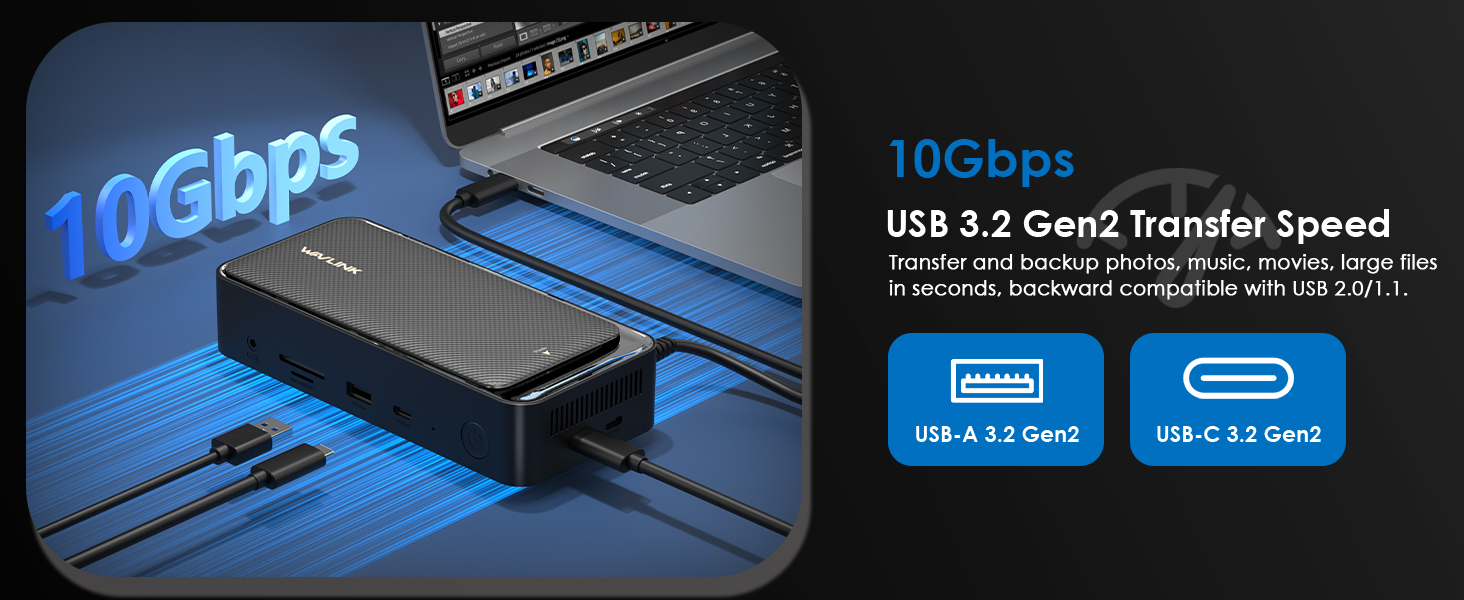
1 Built in SSD Enclosure
2 4K@60Hz Display
3 100W PD Charging
4 SD Card Reader
5 USB 3.2 10Gbps


1 For Windows
2 For Mac
3 Note




Other Products
Add To Basket
Add To Basket
Add To Basket
Customer Reviews
3.9 out of 5 stars 149
4.2 out of 5 stars 300
4.2 out of 5 stars 300
4.1 out of 5 stars 613
4.1 out of 5 stars 613
4.1 out of 5 stars 613
Price
£75.99£75.99
£99.99£99.99
£99.99£99.99
£159.99£159.99
£144.49£144.49
£139.99£139.99
SATA SSD Enclosure
10Gbps
/
/
/
/
/
Support Resolutions
2 * 4K60Hz + 4K30Hz(with DSC)
1 * 8K@30Hz/4K@144Hz
1 * 8K@30Hz/4K@144Hz
3 * 4K60Hz
1 * 4K60Hz + dual 2K60Hz
3 * 4K60Hz
HDMI
2
1
2
3
3
3
DP
1
2
1
2
2
2
Laptop Charging
100W
125W
125W
100W
100W
/
Ethernet Port
1 * 1000mbp/s
1 * 1000mbp/s
1 * 1000mbp/s
1 * 1000mbp/s
1 * 1000mbp/s
1 * 1000mbp/s
USB-C
1(10Gbps)
1(10Gbps)
1(10Gbps)
2(10Gbps)
2(10Gbps)
2(10Gbps)
USB-A
1(10Gbps)+2(5Gbps)
2(5Gbps)
2(5Gbps)
3(5Gbps)
3(5Gbps)
3(5Gbps)
SD/TF Card Slot
104MB/s
104MB/s
104MB/s
104MB/s
104MB/s
104MB/s
3.5mm Audio Port
1 * 3.5mm Audio Port
1 * 3.5mm Audio Port
1 * 3.5mm Audio Port
1 * 3.5mm Audio Port
1 * 3.5mm Audio Port
1 * 3.5mm Audio Port
Compatibility
For Windows, Mac
For Windows, Mac
For Windows, Mac
For Windows, Mac
For Windows, Mac
For Windows, Mac
Product Dimensions : 17.53 x 7.87 x 4.06 cm; 800 g
Date First Available : 30 July 2024
Manufacturer : WAVLINK
ASIN : B0CZNLH6KS
Item model number : UMD23M-10GB
Country of origin : China
Guaranteed software updates until : unknown
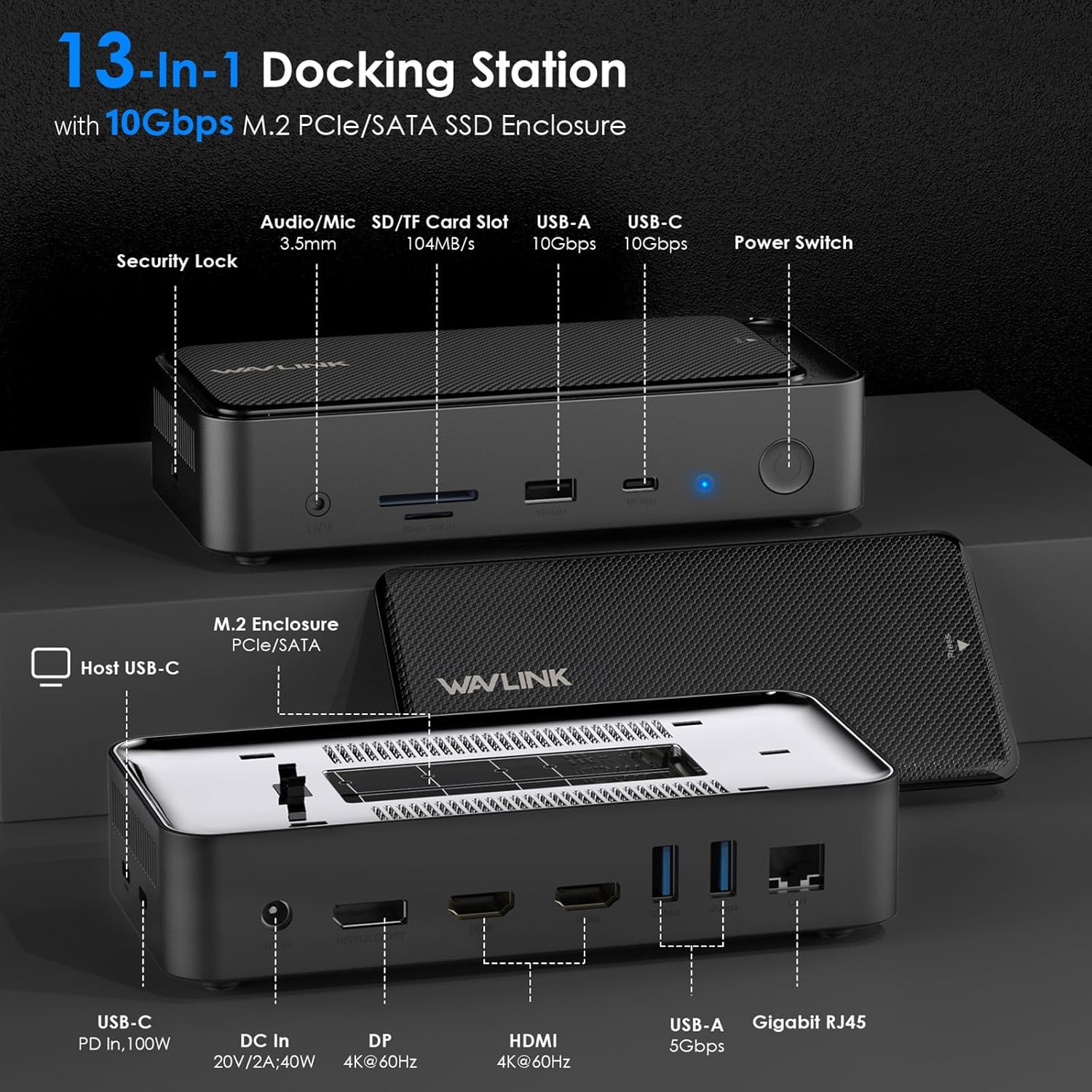
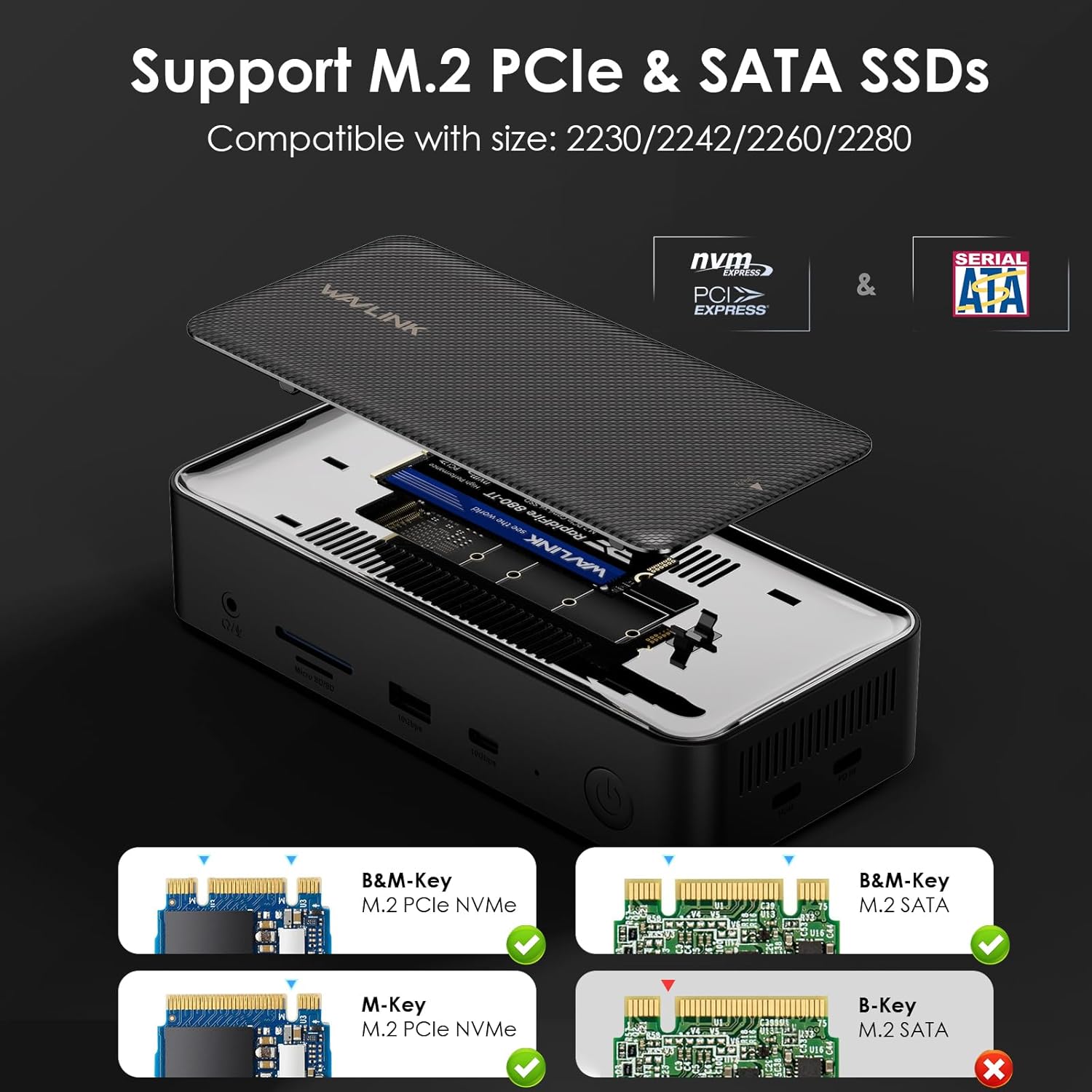
【13-in-1 Laptop Docking Station】Features a range of connection options for plug and play, including a built-in M.2 SSD enclosure, 20V DC In, 4K@60Hz DP, 4K@60Hz HDMI*2, 5Gbps USB-A(5gbps) * 2, Gigabit RJ45, Host USB-C, USB-C PD IN (100W), 3.5mm Audio/Mic, SD/TF Card Slots (104MB/s), and 10Gbps USB-A/USB-C. With 13 ports in one dock, this versatile docking station is designed to provide seamless integration between your devices and the host system. Supports M.2 PCIe NVMe SSD and M.2 SATA (B&M-Key).
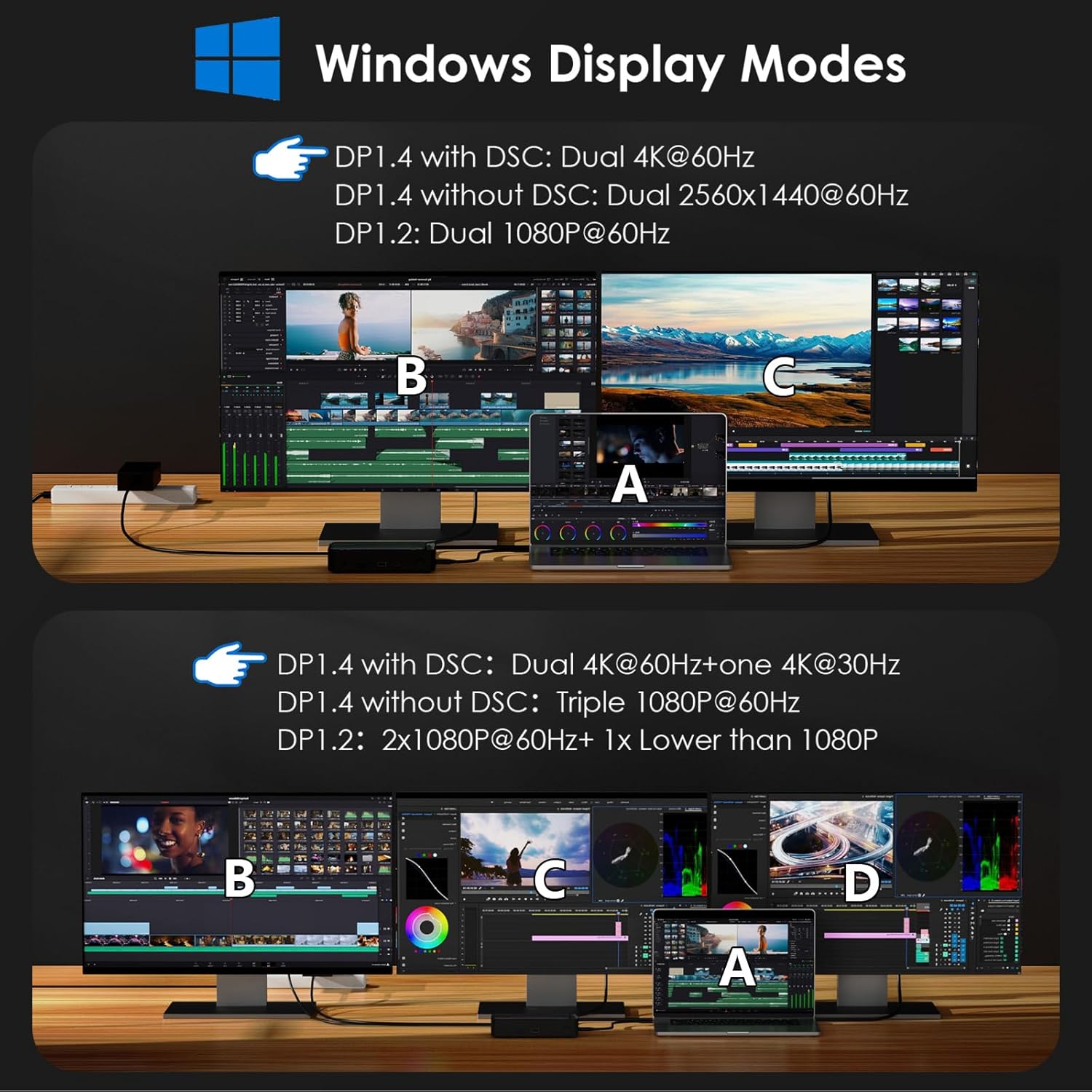
【USB C Dock 4K Display】Type C to 4K HDMI/DP multiport hub can easily mirror or extend your device’s screen. Connect up to three monitors with dual 4K@60Hz + one 4K@30Hz resolution by using 2HDMI and DP ports (under DP1.4 with DSC), which is perfect for presentations, games, videos, and expanding your workspace. NOTE: *Some Windows laptops may only support 3 monitors (including the host screen) due to their graphic card limitations; macOS-based laptops can only expand one external display with different content.
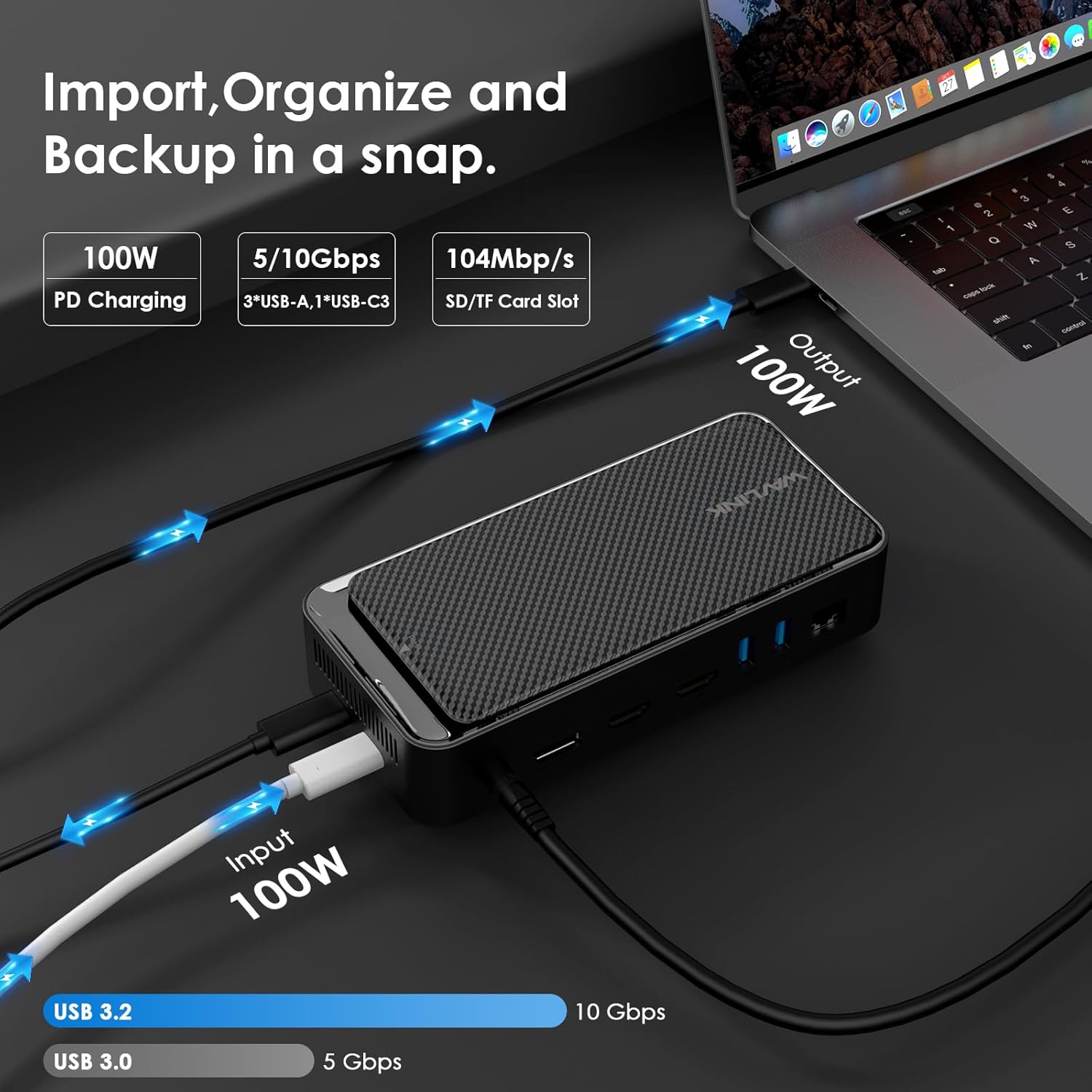
【Transfer Files In Seconds】Built-in M.2 SSD enclosure supports 10Gbps M.2 PCIe NVMe SSD and 6Gbps M.2 SATA. Includes one USB 3.2 gen2 USB-A and USB-C data port, both of which support up to 10Gbps, perfect for transferring large files in seconds. Additional 5Gbps USB-A ports are available for connecting peripherals like keyboards, mice, or printers. SD/Micro SD card slots support simultaneous reading at a speed of up to 104 MB/s. And the Gigabit RJ45 Ethernet port helps to enjoy reliable and fast-wired internet connectivity.
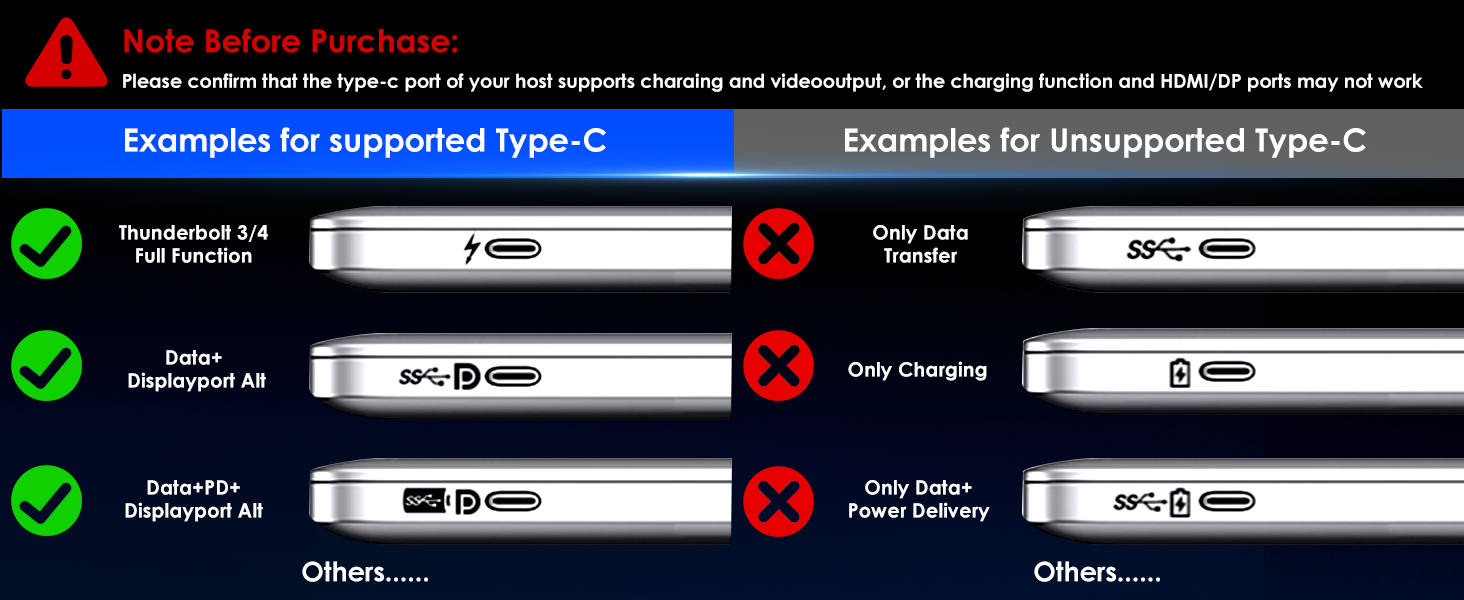
【100W PD In Charging】The USB C dock supports up to 100W charging your laptop. Connect your PD charger to the USB-C PD port to give your laptop a continuous charge and keep the setup stably in place when you are intent on your work. Never worry about a power shortage. NOTE: *The type-C port of your host should support charging and please connect your own PD charger included with your laptop(not included).
【Wide Compatibility】The hybrid multiport enclosure dock is suitable for your Thunderbolt 3/4 laptops or devices with a full functional USB-C port that supports video output, such as MacBook Pro/Air, iPad Pro, Dell XPS 12/13/15, HP Chromebook 13 G1/Spectre X360, Samsung Chromebook Plus/Galaxy TabPro S, Huawei MateBook X Pro, ASUS Zenbook 3, Widely compatible with Windows, Mac OS, Chrome OS, Linux, iPad OS, Android, iOS, and Harmony OS. No driver is required.
13 reviews for WAVLINK USB C Docking Station 3 Monitors, Laptop Docking Staion with 10Gbps M.2 PCIe/SATA SSD Enclosure, 4K@60Hz 2 HDMI/1 DP, 100W PD, USB C/USB-A Gen 3.2, SD/TF, Gigabit RJ45 for Windows
Add a review
Related Products


Original price was: £99.99.£75.99Current price is: £75.99.
Hamish –
Decent
Wouldnât charge my MacBook Pro m3 but itâs solid and looks really good. Canât comment on other functions.
Mr. M. M. Abdo –
Jammed packed with features
This little box has made my work station better in many ways. It has a lot of feature and functions, many of which I will likely never use. I will focus on the features I use the most and how it has helped me.Firstly, my laptop lacks usb and Ethernet ports. This provides additional ports and Ethernet which allows my laptop to connect to the net through the Ethernet. The additional usb ports was a major benefit. I was able to connect my mouse, keyboard, printer, action camera and cable to charge some of my devices.It has a slot of NVMe SSD or SATA SSD. Not mSATA SSD. I was able to replace my NAS at this point. Now it isnât a like for like. But my NAS has become just an external hard drive now. So it made sense to pop in an SSD in and use that as an external hard drive. This allowed me to store and backup files and be able to access them from any of my 3 laptops. The transfer rate is very fast, but this dependent on the speed of the SSD or usb/memory device you have. It provides you with a thermal strip for the SSD. Both install the strip and SSD is very easy. The cover for the SSD is very easy to open, if you ever need to replace or temporarily swap your SSD.A function I used but havenât full utilised is the external monitor. It claims it can host 3 monitors. I have only ever used one. Which worked as expected. The build quality is very good. Feels firm and all the ports are nicely placed. Enough space to easily plug in devices and cables.When You consider the amount of functions and features and potentially the space it would save. This is great value.
Karol –
Good but needs more thought
Really good idea and I wanted this to work but it was very temperamental with my screens and kept making them black out, also the need for two power supplies if you want to power your laptop from the hub is madness so I returned the item
ID –
Amazing Dock
After connecting my Lenovo ThinkPad X1 Tablet to the docking station, it basically transformed into a full-fledged PC. I connected two 32-inch monitors, a keyboard, mouse, and a printer, and it created a smooth, multi-monitor setup that made my workflow & gaming so much more efficient. & enjoyableThe docking station supports three monitors with 4K@60Hz output, using two HDMI ports and one DisplayPort, which is perfect for my monitors. I also installed a 256GB SSD into the hub, and I love that it natively supports a hard drive ,such a cool feature. The 100W power delivery keeps my tablet charged without any hassle, and it has USB-C/USB-A ports, SD/TF card slots, and Gigabit Ethernet, itâs really expanded what I can do. This setup has completely transformed my tablet into a powerhouse workstation.
Jotra –
Too Noisy
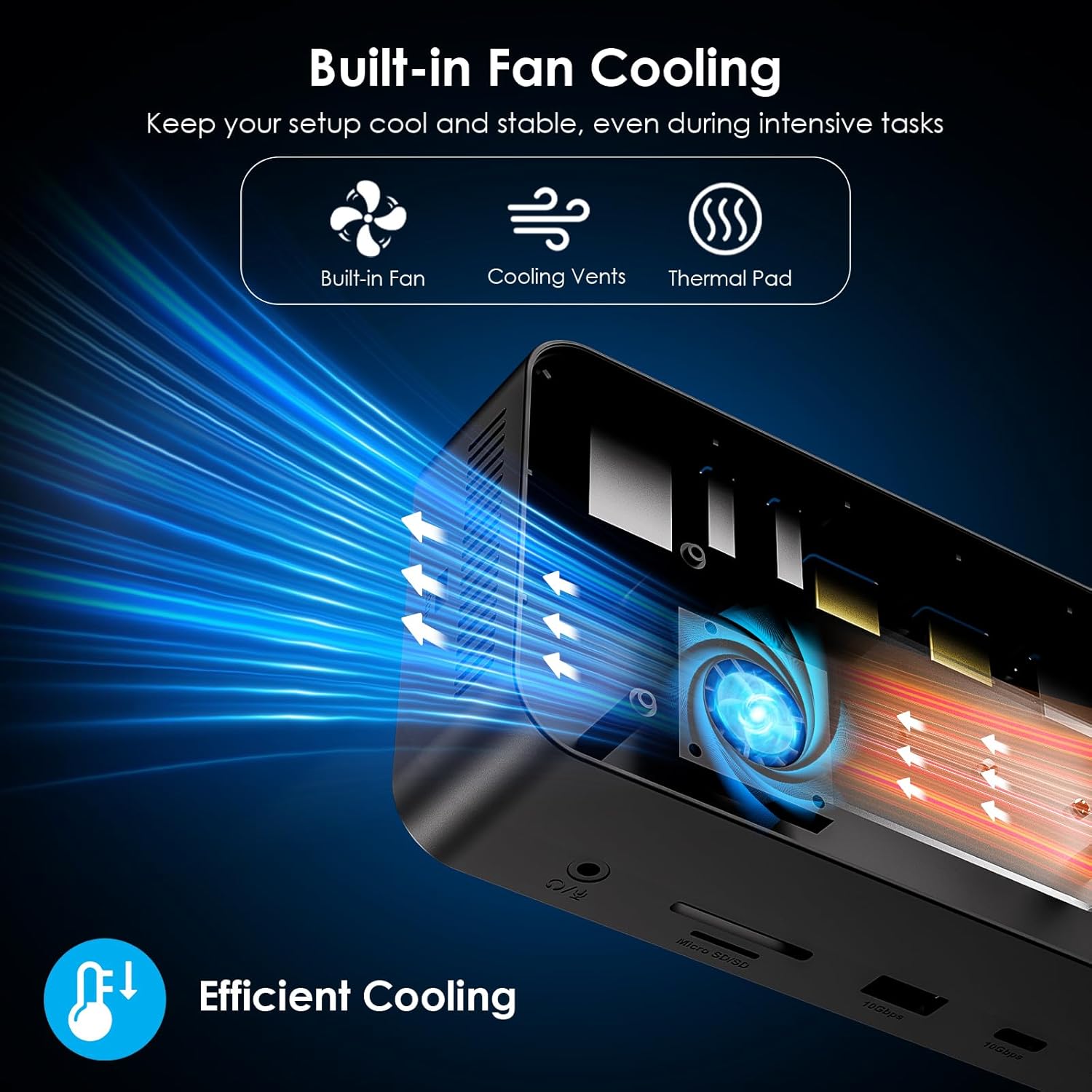
Unfortunately this unit emits a loud fan noise when powered up. For those who have a setup devoid of fans whirring in the background, then this will stand out and distract you from your work. The device would have been the perfect fit if it wasn’t for that.
Andrew –
Steam Deck Ready!
The WAVLINK USB C Docking Station has been an awesome addition to my setup, especially for my Steam Deck.Key Points:Perfect for Steam Deck: Works seamlessly with my Steam Deck, making it easy to connect multiple monitors and other peripherals without a hitch.Triple Monitor Support: With 2 HDMI and 1 DP, I can run up to 3 monitors at 4K@60Hz, which is fantastic for multitasking or gaming on a larger screen.SSD Enclosure: The built-in M.2 PCIe/SATA SSD enclosure is a great feature, letting me expand storage without any external drives cluttering the space.100W Power Delivery: The 100W PD keeps my devices charged up, so I donât have to worry about running out of juice while gaming or working.Versatile Connectivity: Loads of ports, including USB-C, USB-A Gen 3.2, SD/TF card slots, and Gigabit Ethernet, making it super versatile for all my gadgets.Overall, this docking station has been a game-changer for my Steam Deck and works brilliantly with other devices too. Highly recommend for anyone looking to expand their setup!
my_edc_essentials –
13 in 1 Desktop Docking Station from WAVLINK
13 in 1 USB C docking station from WAVLINK. It’s a versatile Desktop docking station with multiple outputs (including 2x 10Gbps ports) and is useful for either home or office usage.The build quality is reasonable with a compact and functional design. I’ve been using it with my work HP Elite Tablet and it works really well. This docking station has its ports on 3 sides so its a bit of a challenge trying to keep cables neat and tidy.This docking station has 3x 4K@60Hz display outputs (2x HDMI, 1x Display Port), 3x USB 3.0, 2x USB C, 1x GigabitLAN RJ45 Network port, 1x SD/TF Slot, 3.5mm audio/mic slot & 1x DC In Port. It also has an M.2 SSD enclosure on top of the Docking Station. I’ve tested this quite thoroughly and each of the ports works well. It’s worth noting that the DC power in only powers this docking station and for the pass through charging to work you’ll need to have a seperate 100w power delivery wall charger and lead with these capabilities and route them through the docking station.Overall I think this is a decent product which is functional and versatile, reasonably priced considering the features but with a couple of issues which means I’m rating it 4 stars rather than 5.
O –
Additional PD requirements
Dock itself is fine and looks to have all the ports as advertised. However, where it states 100w PD this is done via a separate power supply to the docks own Supply. This is different to other docks (including Wavlink) advertising the PD feature as they normally take power via a ~100w Power Supply and then provide that to the connected laptop or device. This dock has its own ~45w Power Supply to power the dock and then requires a separate power supply to provide PD.
wichr –
Dieses Dock kommt in einem schlichten, anspruchsvoll gestalteten Karton. Darin enthalten ist das Dock, ein USB-C Kabel, ein Netzteil und ein kleines Faltblatt. Auf dem Faltblatt sind die wichtigsten Merkmale beschrieben und bebildert.Das Dock ist wirkt sehr robust. Es besteht teilweise aus Metall und hat groÃzügige Lufteinlässe für die Kühlung. Die Verarbeitung ist tadellos.â Betrieb / StromversorgungIm Betrieb leuchtet ein dezentes blaues Licht, nicht ansatzweise so aufdringlich wie bei vielen anderen Docks.Einer der Verwendungszwecke für ein Dock mit so vielen USB Anschlüssen wäre, gelegentlich Geräte (Handy, Tablet, und andere Geräte mit USB Stomversorgung) aufzuladen. Im Lieferumfang befindet sich ein Netzteil, dieses dient aber ausschlieÃlich dem Betrieb des Docks und kann nicht für das Schnellladen angeschlossener Geräte genutzt werden. Die versprochenen 100W aus der Produktbeschreibung liefert es nicht, der Hersteller empfiehlt, dazu sein eigenes Netzteil (im Lieferumfang eines Notebooks z.B.) zu nutzen.Mit einem geeigneten Netzteil kann dann das über den Uplink-Anschluss an das Dock angeschlossene Notebook dann geladen werden. Mehr geht aber leider auch damit nicht, die anderen Anschlüsse dienen nämlich lediglich der Datenübertragung und unterstützen nur langsames Laden.Das USB-C Kabel im Lieferumfang eignet sich übrigens sehr gut um das Notebook am Uplink anzuschlieÃen, es ist schön lang und kann obendrein durch jedes beliebige andere USB-C Kabel mit 100W PD ersetzt werden.â AnschlüsseAnschlüsse hat das Dock viele, wie in der Produktbeschreibung gut erkennbar. Das Potential von USB 3.2 schöpft das Dock voll aus, zumindest bei der Datenrate der Anschlüsse. Bei der eingebauten SSD sieht es leider nicht so gut aus. Die Kartenleser dürften auch etwas schneller sein.â BildschirmausgabeDieses Dock hat 3 Bildschirmanschlüsse, die 4k@60Hz unterstützen, 2x per HDMI und 1x per Display Port. Das funktioniert tadellos.â SSD-GehäuseEin besonderes Merkmal dieses Docks ist wohl die Möglichkeit, eine SSD einzubauen und obendrein auch noch sehr schnell und vollkommen ohne Werkzeug. Auch SSD Modelle mit Kühlkörper passen in dem Dock. Das ist aktuell alles noch relativ selten.Für viele Anwendungen mag das eine gute Lösung sein, aber neuere SSD Modelle können leider in dem Dock nicht ihr volles Potential ausschöpfen, denn der SSD Anschluss ist mit ânurâ 5GBit/s angebunden. Bitte nicht falsch verstehen: 5GBit/s sind sehr schnell und für die meisten Anwendungen schnell genug, aber neure SSD Modelle schaffen locker deutlich mehr und dieses âMehrâ wird bei diesem Dock leider nicht genutzt.â FazitDas Dock ist wirklich sehr sauber verarbeitet, optisch sehr gefällig und bietet viele sinnvolle Anschlüsse, aber die Implementierung der Anschlüsse lässt (zumindest bei mir) zu Wünschen übrig. Es kann meine Geräte nicht vernünftig schnell per USB aufladen und auch für mein Notebook kann ich das mitgelieferte Netzteil nicht nutzen. Meine SSD ( Crucial P310 SSD 2TB) passt zwar, aber ihre Leistung wird mit diesem Dock nicht ausgereizt.Doch trotz dieser Mängel, ist der Preis mit aktuell rund 110 ⬠für die gebotene Leistung und Qualität angemessen. Daher bekommt das Gerät eine Kaufempfehlung für alle, die ihre SSD nicht mit mehr als 5GBit/s anbinden möchten und auch kein Problem damit haben, ihre Geräte mit einem eigenen Netzteil zu laden.
Pat –
I needed a hub that had a detachable cable to run about ten feet away from a pc and this worked great. If youâre doing a pc in a closet or something similar this will work!
Kanemad –
No puedo estar más contento con esta Docking estation de la marca WAVLINK USB, tengo un portátil Gaming con la cantidad justa de puertos, por lo que gracias a esta docking los he podido liberar y además ganar en funcionalidades.En cuanto al producto este viene correctamente empaquetado, y una vez abierta la caja podemos comprobar que nos trae todo lo indispensable para poder utilizar nuestra docking station en cuestion de minutos, además de la propia docking vamos a encontrar el cargador un cable usb-C a usb-C bastante largo, asà como unos tornillos y un disipador acolchado por si queremos añadir un disco nvme/SSe2 externo asà como el manual de instrucciones en varios idiomas incluido el Español.La docking en si cuenta con un monton de conexiones adicionales:En la parte trasera contamos con: 1x DisplayPort, 2x puertos HDMI de cat2 a 60hz, 2x puertos USB-A de alta velocidad (a 5gbps), un puerto ethernet Gigabit RJ45 y el conector de corriente.En la parte lateral derecha contamos con: 1x Host usb-C, un usb-C in de 100w para carga del portatil,En la parte frontal contamos con: 1x usb-A de alta velocidad (a 10gbps) , un conector de audio/mic minijack 3,5mm, 2x Ranuras para tarjetas SD/TF, y el boton de power on/off conformando un total de 13 puertos.Igualmente en la parte superior vamos a encontrar la tapa donde despues de extraerla podremos instalar un disco duro externo de tipo SSD M.2/PCIe NVMe y M.2 SATA. siendo esta igualmente muy facil de poner y quitar.El proceso de instalacion de la docking fué relativamente sencillo aunque al principio tuve un par de problemillas que luego conseguà subsanar, se supone que no necesitas instalar ningun tipo de driver para que el equipo detecte automaticamente la docking, pero despues de revisar el manual y conectarme a la pag. web para registrar el producto vi que habia un apartado para controladores de la docking los cuales descargué e instalé en mi equipo, igualmente el cable que venia con la docking para conectar al pc no estaba haciendo contacto correctamente y tuve que intentar ajustarlo ya que por ejemplo el video no se mostraba en el monitor, tuve que cambiar el conector del cable que estaba enchufado a la docking y ponerlo del lado del laptop y a la inversa y ya parece que el problema se subsanó aunque en este caso no sé muy bien si era el cable que venia defectuoso o es que previamente necesitaba instalar los drivers ya que coincidió el cambio del cable justo despues de instalar los drivers y reiniciar el equipo y lamentablemente tampoco tenia otro cable en ese momento para probar.Por otro lado comentar que el indicador LED azul que viene en el frontal de la docking para saber que esta encendida al ser tan pequeño dependiendo del angulo desde donde lo mires nos complica un poco el poder ver si el dispositivo esta encendido o no, realmente no es un gran problema pero si que en varias ocasiones me costo averiguar si realmente el dispositivo estaba encendido o no.Por el momento tengo conectado a la docking el cable Rj45 ethernet, un monitor hdmi un disco duro externo a traves del puerto USB-A (10gbps)de alta velocidad y un conector bluetooth para teclado y raton y salvo el problema inicial indicado (ya subsanado) añadir igualmente que oido tb un pequeño ruido de ventiladores internos por lo que además y eso es algo que me a gustado es que el dispositivo cuenta con refrigeración interna para asi evitar fallos de funcionamiento por calentamientos, por lo demás ahora mismo está todo funcionanando correctamente sin haber notado ningun otro tipo de problema. (Si a posteriori notara alguna otra cosa o tuviera problemas cambiaria mi valoración inicial).Considero por tanto que esta docking es es una buena solucion para poder liberar tu equipo de tener que usar todos los conectores a la hora de usar dispositivos externos, esta bien construida y ofrece buenas opciones para ampliar las conexiones de tu equipo portatil y tiene tambien un buen soporte desde la pag. web del fabricante, quiza el unico “pero” sea el tema del precio que es un poco elevado pero en este caso lo considero justificado por todas las opciones que nos brinda, por lo que en este caso la recomiendo.
GuiguiTechTips –
Ce hub / dock USB est de bonne qualité et en plus des ports habituels (USB, HDMI, SD, …etc) le slot pour SSD M.2 est bien pratique ð
Josh –
Received on timeWorking perfectly