

Youool A4 Portable USB Scanner – Handheld Color Document Scanner With 900 DPI Resolution, JPG/PDF Format, 16GB TF Card Included
£52.99




Price: £52.99
(as of Oct 12, 2025 12:36:55 UTC – Details)
Product Description

1 Creative Office Partner – Portable Scanner
Youool portable scanners make your office paperless, reducing the economic and environmental burden of paper documents.
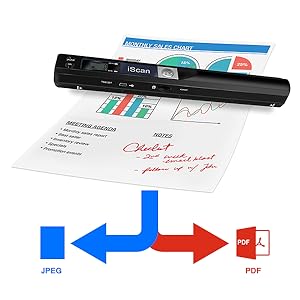
Digitally convert paper documents into PDF/JPEG files for easy storage and emailing to business partners and customers.
Lay the document flat on the table, hold it with one hand and hold the scanner with the other. Vertical scans from top to bottom can convert paper documents to PDF/JPEG in seconds.
Your computer does not need to download drivers, but the portable scanner is recognized by the USB cable, just like a USB stick, and you can find your scanned files in a folder on your computer.


Easy to Use Portable Scanner
The operation test is normal, install the battery and SD card, press the scan button, the green light is on, scan at constant speed and slow speed, and then press the scan button to finish scanning.
PDF / JPEG
It only takes a few seconds to convert paper documents to PDF/JPEG electronic documents, which is convenient for storing documents and sending electronic documents to your customers through the network.

300dpi / 600dpi / 900dpi
3 Resolution Modes to choose from: 300dpi/600dpi/900dpi, you can choose to record in the clearest way, images and documents are displayed clearly.

Power Source: 2 x AA batteries
The scanner uses AA batteries, which avoids charging problems.
After the battery runs out, you can replace AA batteries continuously, and 2 AA batteries can help you scan hundreds of photos and documents.

Comes with a 16G SD memory card
This mini scanner supports the storage of scanned electronic documents directly on an SD card and supports reading data on a computer or mobile phone connected by USB. A 16G SD memory card is included in this product list.

Complete Package
Portable scanner equipped with USB data cable, CD software, English user manual
, storage bags, cleaning cloths and boxes, complete support facilities can make it easier for you to use and facilitate storage and transport.


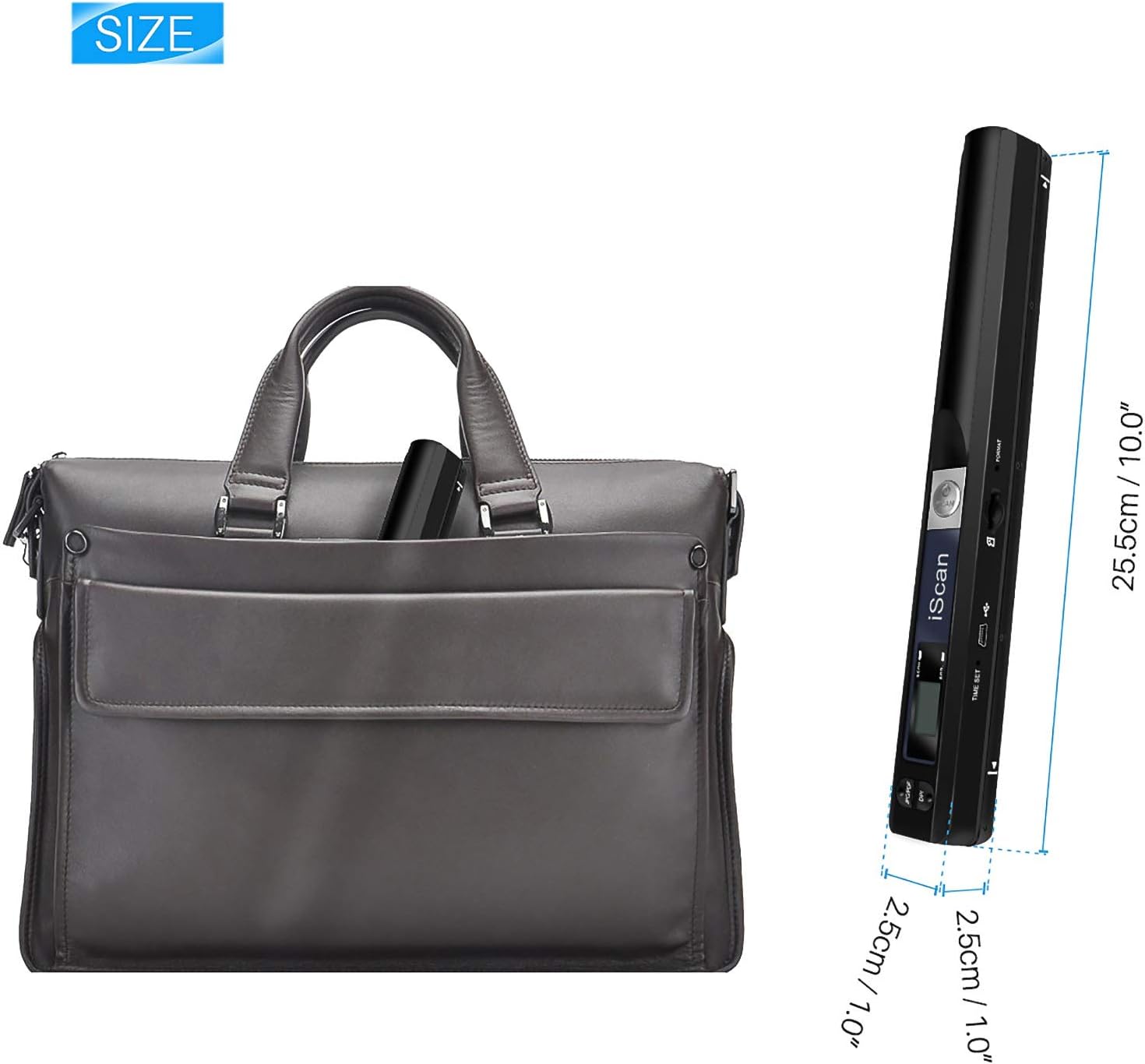
【Small Portable Scanner Can Move and Walk】 The new generation of portable scanner has made technological breakthroughs, smaller body, lighter weight and high-definition scanning services. The document scanner case is made of high quality ABS material, which is sturdy and durable, our portable scanner is 10 inches long and weighs only 6 ounces, you can put it in your briefcase or backpack, very easy and portable.
【3 Resolutions for Easy Scanning】 Our portable scanners have 3 resolutions to choose from, 300 dpi / 600 dpi / 900 dpi, you can choose freely according to your scanning needs. The higher the resolution, the higher the clarity. 900dpi records more clearly, and images and documents display the sharpest.
【Easy to Use, Flexible and Quick to Scan Files】 You just need to install the battery and SD card, press the scan button to scan at a constant speed, and then press the scan button to complete the scanning. There is no need to pre-install any software. It is quick and convenient to connect to the computer through the USB interface or remove the SD card to connect to the computer for playback.
【Supports JPEG/PDF format, Responds to Daily Transmission, Sending and Reading】 JPEG and PDF are common file formats widely used in our daily office. Our handheld scanner supports the generation of JPEG and PDF formats. When traveling abroad and often need to scan documents, take our document scanner with you to help you work faster and more efficiently.
【Why Choose Us?】 There is no scanner in the company, the photos of the mobile phone are unclear and unprofessional, and the customer urgently needs documents, what should I do? You can use our document scanner, it can help you complete the scanning task quickly and well, suitable for banks, insurance companies, lawyers, real estate sellers, etc. When you use it, you will totally trust and love it.
7 reviews for Youool A4 Portable USB Scanner – Handheld Color Document Scanner With 900 DPI Resolution, JPG/PDF Format, 16GB TF Card Included
Add a review
Related Products


![Scanners: (Limited Edition) [4K UHD / BD]](https://i1.wp.com/m.media-amazon.com/images/I/81KqcO26mcL._AC_SL1500_.jpg?w=300&resize=300,300&ssl=1)


£52.99
Lewis Dales –
poor quality
Bought this after seeing many people online using one that looked similar. However after using it indoors and outside, the results were really bad. Even on the highest quality the pictures were full of tears and white lines/bars were always visible. Making any scan not issuable within designs.
Lorna –
Doesnât work
Scanner wonât work. Inserted 2 brand new batteries as advised but when I turn it on it immediately flashes red and shuts off.
josé Gomes –
Muito bom
niha –
Mein letzter Scanner hat vor ungefähr zwei Jahren den Geist aufgegeben, und vom Kauf eines neuen habe ich lange abgesehen, weil meiner Erfahrung nach bei jedem Gerät früher oder später eine unüberbrückbare Differenz zwischen Treiber und Betriebssystem eintritt, die ich als Technik-Laie nicht zu lösen vermag.Da das Abfotografieren von Dokumenten jedoch nur ein Notbehelf ist, musste letztlich doch ein neuer Scanner her. Für diesen tragbaren Dokumentenscanner habe ich mich aus zwei Gründen entschieden â wegen der geringen GröÃe und weil die Produktbeschreibung verspricht, dass der Scanner auch ohne entsprechende Software-Installation betrieben werden könne.Der Scanner ist wirklich wunderbar klein und handlich; er dürfte in die meisten Handtaschen passen. Die Bedienungsanleitung liegt nur auf Englisch und Französisch bei, aber da das Gerät überschaubar und praktisch selbsterklärend ist, ist das kein groÃes Manko: Einfach die mitgelieferte Mikro-SD-Karte und zwei AA-Batterien (nicht im Lieferumfang) einlegen, den SCAN-Button zwei Sekunden lang gedrückt halten, und das Gerät springt an. Mit den zwei Knöpfen links vom Display lassen sich das Format (JPEG/PDF) und die DPI-Zahl (300/600/900) einstellen. Bei Betrieb werden im Display Format, DPI und Batteriestand angezeigt, ebenso wie die Anzahl der bereits durchgeführten Scans.Um den Scanvorgang zu starten, kurz den SCAN-Button drücken. Die grüne Lampe leuchtet auf. Mit dem Scanner langsam über das zu scannende Dokument fahren. Wenn die grüne Lampe erlischt, ist der Scanvorgang abgeschlossen, d.h. das Dokument wurde erfasst. Leuchtet die rote Lampe auf, war der Scan nicht vollständig und muss wiederholt werden. Zum Ausschalten den SCAN-Button mehrere Sekunden lang gedrückt halten, bis das Display erlischt.Um die Scans auf den Computer zu übertragen, wird der Scanner über das mitgelieferte USB-Kabel mit dem Rechner verbunden. Mein Betriebssystem (Windows 8.1) hat das Gerät mühelos erkannt, sodass ich die mitgelieferte Software (auf CD) tatsächlich nicht installieren musste. Ich konnte die Scans einfach kopieren, wie von einem USB-Stick. Und die Qualität ist erstaunlich gut.Zum Lieferumfang gehören auÃerdem ein Reinigungstuch und eine schwarze Schutzhülle. Mein Fazit: Handlich, unkompliziert, kinderleichte Bedienung â dies ist der Scanner, den ich mir schon vor Jahren gewünscht hätte. Klare Kaufempfehlung!
Anne –
Excellent produitFacile d’utilisation, scan rapide et transfert direct sur l’ordinateur par USB.Très bonne qualité pour des documents
Ronveaux –
Prise en main particulière mais au final assez pratique. Le logiciel de mise en page pas très intuitif
ARA –
Ottimo prodotto