

RSHTECH KVM Switch, USB 3.0 Sharing Switch with 4K@60Hz HDMI Port & 4 USB 3.0 Data Ports, USB KVM Switcher for 2 Computer Share Mouse, Keyboard, Printer, Monitor and More
Original price was: £32.97.£27.98Current price is: £27.98.



Price: £32.97 - £27.98
(as of Jan 05, 2026 05:06:35 UTC – Details)
From the brand


“Invent and Simplify”
RSHTECH was founded on the idea that it should be easy to use and manage all your computer peripherals through simple products.At RSHTECH, we are committed to creating products with top-notch functionality and simplicity. We are constantly on the drive to learn, innovate, and always hear from our customers.
USB Sharing Switch for 2 PCs
Powerful USB C Dock 4K Display
USB Port Expansion Assistant
USB KVM Switch: RSHTECH USB Switch Selector allows 2 computer devices to share 4 USB devices and 1 HDMI device. For example, keyboard, mouse, U disk, USB hard disk, printer, monitor/TV and other equipment. Reduce the trouble of repeatedly plugging and unplugging devices
5Gbps Data Transfer: USB sharing switch with 4 USB 3.0 ports supports fast data transfer at speeds up to 5Gbps, 10 times faster than USB 2.0. RSHTECH USB Switch 3.0 is backward compatible with USB 2.0/1.1
4K HD Resolution: RSHTECH HDMI KVM Switch supports resolutions up to 4K@60Hz, allowing you to enjoy stunningly clear and realistic images without lag or delay for a smoother video experience
One-click Switching: With the button on the top, you can easily switch USB devices between two computers, and clearly understand the working status of the PC through the LED indicator (red – PC1; blue – PC2). RSHTECH USB 3.0 switch supports plug and play, no driver required
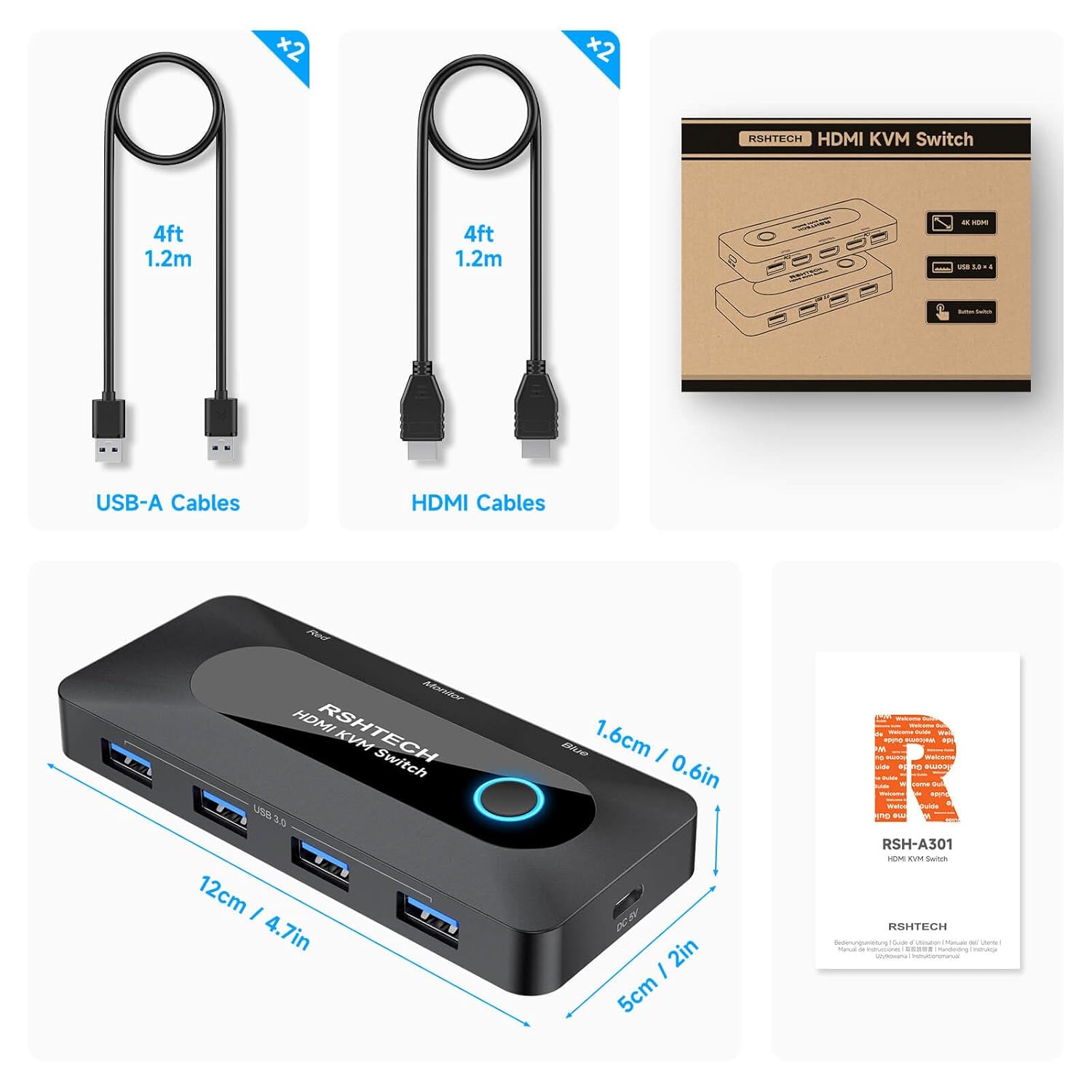
What’s in the Box? RSHTECH KVM Switch, 2 x USB 3.0 Cable (1.2m/4ft), 2 x 4K@60Hz HDMI Cable (1.2m/4ft), User Manual and Friendly Customer Service
Customers say
Customers find the USB hub reliable and appreciate its ability to switch between devices quickly. The build quality is solid, and customers find it easy to set up and use. While some customers consider it worth the extra cost, others express mixed opinions about the value for money. The cable connectivity receives mixed feedback, with several customers reporting missing cables.
13 reviews for RSHTECH KVM Switch, USB 3.0 Sharing Switch with 4K@60Hz HDMI Port & 4 USB 3.0 Data Ports, USB KVM Switcher for 2 Computer Share Mouse, Keyboard, Printer, Monitor and More
Add a review
Related Products


Original price was: £32.97.£27.98Current price is: £27.98.
P Turner –
Reliable little box
I’ve been trying various KVMs to get my desktop and laptop hooked up together. So far most of the video-enabled switches have failed to work with my Elgato Wave XLR. Not this little switch. It just works, no matter what I throw at it.It feels like it’s got a quality build to it that far exceeds its low price. It’s better than a lot of USB hubs I’ve encountered and it’s switch too. The engineers who built it should be proud of this effort. Now I just wish they did one for DisplayPort connections.
Simon Green –
Very nice simple to setup and use KVM switch
I was initially surprised at the size of the packaging as to how small it was and when I opened it I was pleased to see the unit and 4 cables. I was impressed at the size of the unit and how well made it is and it feels like a quality unit and not a cheap item. I did have some issues connecting my systems to the unit but that was to do with my computers not using HDMI directly so I obtained two display port to HDMI cables and then everything went together well after that. I found the unit easy to use and thought that using different colours for the different computers was a great idea!Overall I found that the switch works really well, it’s easy to set up and is a neat, stylish looking piece of equipment.
Amazon Customer –
Good quality.
Does exactly what it should.
R.S. A. –
USB Cables Missing / Messes up monitor
Contrary to what it says here and on the box that it arrived in, there were no USB cables supplied. Just two HDMIs. Also this KVM is actually unusable. When switching between PCs it changes the scaling (bigger text) and puts all of the windows that were open into the top-left corner of the screen and resizes them.After some research it seems it is not the KVM. I need an EDID emulator passthrough. Will try that.
J Hodgson –
Efficient and reliable, I love it…
This KVM Switch allows the control of two computers using a single monitor, mouse and keyboard.It’s plug-and-play so there’s no need to download any additional software or drivers.Just connect each computers USB and HDMI port to the switch (with included leads) and start toggling between devices with the push of a button.The button is colour coded too so you can easily see which computer it’s currently connected to (especially useful if you have the same operating system on each computer).In terms of performance, it has smooth operation with minimal latency and great video quality, and it’s really compact so it won’t clutter your workspace.The only issue for me was the length of the cables as I have my computers on the opposite side of the room from my monitor, but this was easily fixed by using a longer HDMI cable for my monitor. I also have to walk across the room to switch computers as there is no switch extension.But if you have your computers and monitor in the same spot then the cables should be plenty long enough.Overall, it’s a cost-effective solution for managing multiple computers.
SimonP –
Very useful device
Works very well – 2 computers, one set of screen, keyboard and mouse and share USB devices between them. Easy to switch between the two, the only very slight downside is that the LED is a bit bright but no problem. It comes with all the cables you need and you can add a power supply if you want to share hard disks or other devices that need more juice.
Monty –
Went faulty after two weeks
Worked fine for about two weeks. Then strangely started sending signals to connected PC’s, causing sound from monitor. Bought two, didnât bother getting the second out of the box.Returned both
Alexey –
Good tool
Works great, connected to both PC and MacBook it switches well between the two.
asambasamba –
The USB switch works as intended, perfect to switch between private and work computer. The system with the blue/red color works perfectly and I like that it’s a physical push button and not a touch button.The only thing that is disappointing, is the sound quality of the audio output. I immediately noticed a lack of bass and the overall audio quality is just not as good as when directly plugging in. So if you need the device for audio, I suggest to look for a slightly higher quality one!
Yunus –
2 bilgisayar kullanan ve sürekli cihazları birinden birine geçirmekten yorulmuŠinsanlar için birebir.
Amazon ã«ã¹ã¿ãã¼ –
åæ¿ãã«é 延ã®ããååãããã¨æãã¾ãããã¡ãã¯æ°ç§ã§æ°ã«ãªããã«ä½¿ãã¾ããè²ã§ã©ã¡ãã®ãã½ã³ã³ã«ç¹ãã£ã¦ãããåããæãã®ãè¯ãã£ãã§ãã
decades –
REWELACJA! Must have do np. TV, doskonaÅej jakoÅci urzÄ dzenie, do tego w komplecie 2 Åwietnej jakoÅci i doÅÄ dÅugie kable USB 3.0. POLECAM !!!!
mailvit –
Il a juste fallu que j’aille 2 ou 3 fois dans gestionnaire de périphériques pour obtenir le bon pilote. Le Hub s’allume, désormais, au démarrage du PC et fonctionne impeccablement. Merci au vendeur d’avoir répondu par mail.