

TECKNET Bluetooth Mouse, 4000DPI Wireless Mouse Computer Mice Bluetooth 5.0/3.0 and 2.4GHz Connectivity Mouse with 6 Adjustable DPI,18 Months Long Battery Life Cordless USB Mouse for Laptop PC
Original price was: £15.99.£15.19Current price is: £15.19.


Price: £15.99 - £15.19
(as of Jul 02, 2025 17:36:58 UTC – Details)
From the brand

Bluetooth Wireless Mouse
TECKNET Wired Mouse



Package Dimensions : 11.1 x 7.9 x 4.4 cm; 90 g
Date First Available : 23 April 2023
Manufacturer : TECKNET
ASIN : B0C3B4QJFV
Item model number : EWM01832
Country of origin : China
Guaranteed software updates until : unknown
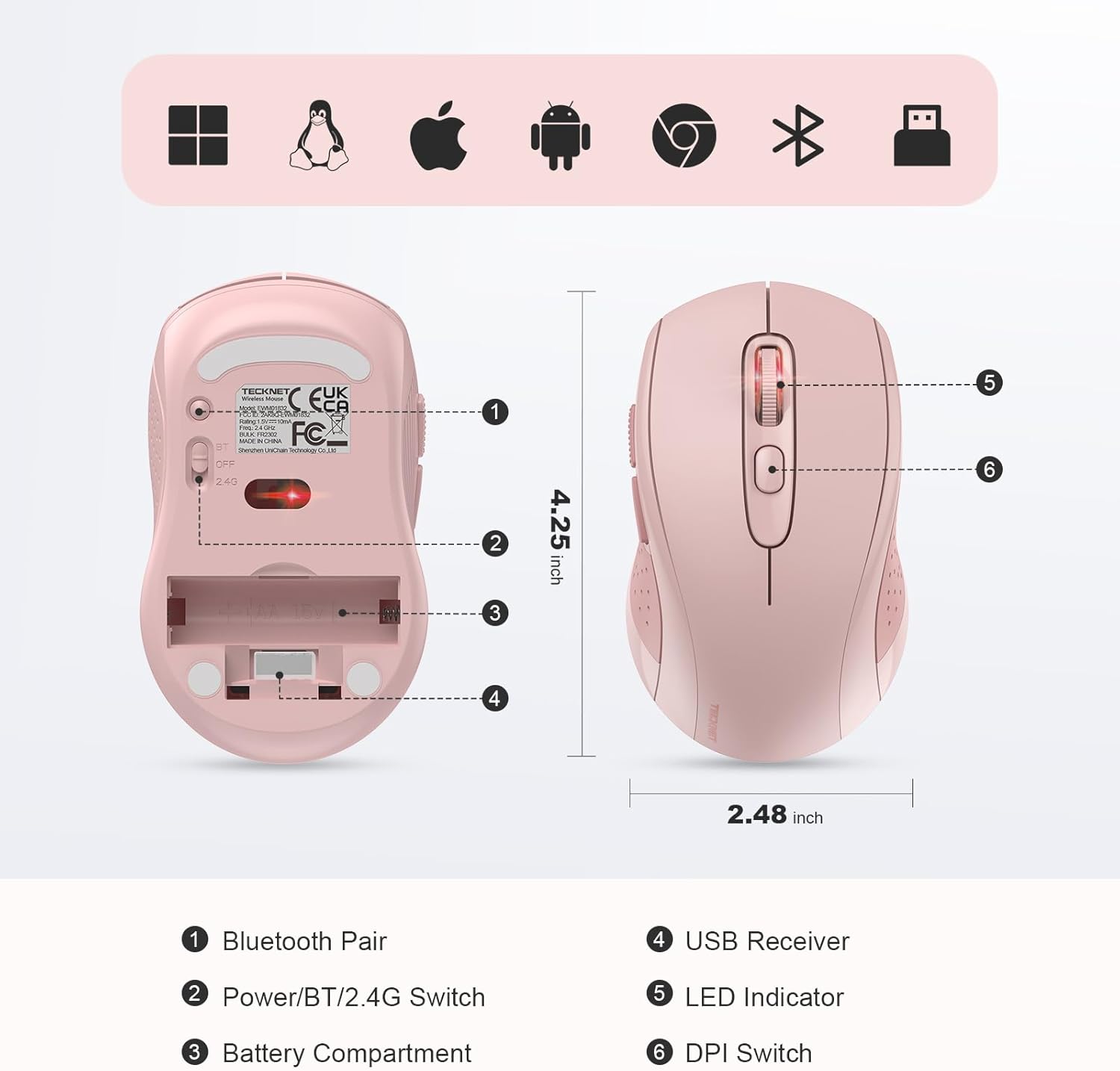
【Multi-Device Connectivity】Effortlessly switch between Bluetooth 5.0, Bluetooth 3.0, and 2.4GHz wireless with a single click. Enjoy seamless connection to laptops, tablets, and PCs. Stay connected and productive across multiple devices, perfect for work, gaming, or home use.
【6 Adjustable DPI for Precision】Choose from 6 DPI settings (4000/3200/2400/1600/1200/800) for fast, precise control. Whether you’re gaming, working, or designing, adjust the mouse speed with a single click to suit your needs—ideal for graphic design, photo editing, and web browsing.
【Durable for Long-Term Use】Tested to withstand up to 10 million clicks, this durable wireless mouse ensures reliable performance for work and play. Built to endure intense gaming sessions and long workdays, offering long-lasting performance at home or in the office.
【Quick Navigation Buttons】Navigate your favorite websites and documents faster with dedicated forward and backward buttons. Save time without having to move your cursor to the browser’s navigation bar. Perfect for internet browsing, productivity tasks, and document editing.
【18-Month Battery Life】Enjoy up to 18 months of battery life with the energy-saving auto-sleep mode. This mouse wakes up instantly with a click, giving you a hassle-free, long-lasting experience. Forget constant recharging and focus on your work or gaming.
【Ergonomic Comfort for All-Day Use 】Designed for comfort, this ergonomic mouse fits naturally in your hand, reducing strain during long sessions. Whether you’re working on a PC, laptop, or tablet, this mouse provides all-day comfort—perfect for office work, gaming, or casual browsing.
【Universal Compatibility】Compatible with a wide range of devices, including Windows, Mac, tablets, and smartphones. Switch seamlessly between Bluetooth and 2.4GHz USB receiver, making it perfect for work, gaming, and leisure.
Customers say
Customers find the mouse works well with Bluetooth 5 and appreciate its good ergonomics and easy setup. The size receives mixed feedback, with some finding it perfect while others note it’s very small, and the build quality is also mixed, with some saying it’s good while others find it not great. The connectivity receives mixed reviews, with some praising the multiple connection options while others report unreliable Bluetooth performance.
13 reviews for TECKNET Bluetooth Mouse, 4000DPI Wireless Mouse Computer Mice Bluetooth 5.0/3.0 and 2.4GHz Connectivity Mouse with 6 Adjustable DPI,18 Months Long Battery Life Cordless USB Mouse for Laptop PC
Add a review
Related Products


Original price was: £15.99.£15.19Current price is: £15.19.
Shed Painter –
Nice piece of kit
Takes 1 AA battery. Works well with Bluetooth 5, very responsive early in Win 11 initialisation. Nice button for Bluetooth synching. Switch to select 2.4/off/BT is rather small. Nice feel.
rishab –
You get what you payed for and itâs not disappointing
Itâs all you really want, will fit any average hand size so donât listen to the reviews that say itâs too small itâs just right for my hand. I havenât got particularly big hands but they arenât a small.Works how it should and it is basically a cheaper alternative of the Logitech mouseâs which does what ever it is supposed to do, connects well to my surface laptop, quality seems pretty good too.There is a usb receiver in the mouse but I donât use it because I have only got one usb port in my laptop which I use for other things so good mouse if you have a lack of ports like any Bluetooth mouse. Also the seller messaged me to make sure I didnât have any problems which is a plus
Anne smith –
It works
It actually comes with instructions which work, so I didnât have to ask anyone else for help
Dan Soar –
Great mouse for the price
Purchased this mouse in the last week so only had a few times using it. So far Iâve been using with Bluetooth which has been flawless with my ASUS laptop. Iâm a forgetful person so the auto shutoff is great for saving battery when I leave it on! Also comes with a dongle but not tired this yet, and probably wonât need to..Size wise is just right too. I have larger hands than most but this fits just right.Biggest win for me on a mouse is having the two buttons where the thumb sits. These are great when on the web for going back a page ect.Overall good quality and good value for money.
johna –
Excellent mouse
Excellent mouse no problems connecting and works well
Euan mh –
Comfortable and easy to connect mouse
Easy to set up and nice feel to this mouse-Works as expected either with USB or bluetooth connections.Good value and would recommend it.
Anthony F –
Works great!
Mouse quality is great, it’s fairly quiet (though this doesn’t bother me anyway). Very easy to use, good weight and great value for money. Battery life is awesome, think I’ve had to change the battery once (but they were used batteries and I’ve had it a good while now, not changed them since
Raff –
Basic mouse with good connectivity
This is a good basic mouse, no frills with versatile connectivity options. I used it in bluetooth mode with a Windows 10 laptop and had no issues connecting it.I would describe the mouse as small to medium in size, somewhat larger than a typical ‘travel’ mouse, but a little smaller than a full size mouse. You might struggle if you have shovel sized hands or sausage fingers, but I had no issues with it.It is lightweight, especially as it only takes a single AA battery. Build quality is ok for the price, nothing special. Not sure how long the battery cover will remain attached as it looks a little flimsy.Overall, it’s a good mouse for occasional use/spare/travelling/hot desking. I’d probably go for something a little larger and sturdier (and more expensive) for daily intensive use.
William Remaley –
I don’t normally go out of my way to write reviews on Amazon, but after having a frustrating couple years’ experience with mice (mouses?), i felt compelled to get on here and express how happy i am with this one. I’ve owned many mice over the years, normally i buy Targus or Logitech if I can. Targus used to make a really nice one with an optical top-side scroll that allowed you to scroll not only up or down but left and right too, that may have been my all-time favorite up ’til now, but they no longer make it. It died several years ago, and since i’ve gone through many. They never seem to last more than a year or two; it seems sooner or later the main click button wears out or they just stop responding like a power issue, and they need to be replaced. Many times, especially if you use a Mac or use Linux, they just won’t work at all, compatibility issues. I’ve tried a couple Logitech mice the last few times, they seem to be the premier company in the mouse market, so you’d think they’d be good quality. Had a Logitech Pebble, stopped working literally a year and a day after I bought it (also happened to be right after the warranty expired…interesting.) Also disconnected frequently (several times a day), and took some hassle to re-connect. Bought a same model replacement at a Target where Logitech was the only brand they had and the Pebble was the best (and priciest, at $29.99) they had in stock. This time, it worked for about 30 seconds before it too “died”, leaving me mouseless again until i could go back to Target to return it. Major inconvenience to say the least, considering that buying a mouse was the 1 and only reason for the original Target visit in the first place. The girl who processed the return asked me no questions about the return, even though I’d already cut open the package, which suggested to me that was not the first time she’d seen people return a defective Logitech mouse. Needless to say, i’m done with Logitech. The other thing about the Logitech mouse, it never seemed to wake up one of my machines, even if the laptop had just fallen asleep. I was always having to re-connect it too. I had just started using Linux around the time i got that, and i always assumed it was a compatibility issue, and had shrugged it off as a pitfall of Linux. Same with another “off-brand” mouse I had used, though that one was the only one I ever had that seemed to connect seamlessly with Linux over Bluetooth (I’ve found that you usually have to use the USB piece to use a wireless mouse with Linux, Bluetooth seems to be a problem, at least with mice). Not to write a hate-spiel about Logitech here, but it aggravates me greatly that their mice don’t work well, especially with their reputation and the price of their stuff. It’s like, i live in the richest, most powerful nation in the world, in the most technologically advanced era in history, and i can’t get a decent ^#$%ing wireless mouse that will actually work longer than a year!? What does a guy have to do to get a freakin’ mouse that works these days?Anyway, I bought this one due to the high ratings, features, and most options for compatibility and connections. Had it maybe a month or two, so i can’t comment yet on it’s long-term durability. But, it has been life-changing so far. I was skeptical that it would even work, but it does, and it works far better than any other mouse i’ve had since that Targus of long ago. And it’s about half the price of Logitech mice. This mouse will wake up my Linux laptop from the other room, the next day after it’s been “asleep” overnight. It turns out Linux isn’t the problem; the problem was that the other mice i had and their wireless signal were too weak. This one is also nicely designed, with a more comfortable and ergonomic fit for my hand than a Pebble’s small, shallow shape, and i have relatively small hands. I can quickly and easily switch between control of two computers by switching the connectivity switch on the bottom from Bluetooth to USB adaptor or vice-versa. The Pebble could sort-of do that too, if both laptops were “awake”, but this one is far more reliable, and is powerful enough to wake up the asleep machine, which Logitech mice can’t. Mice are simple devices in principle, easy to take for granted. But in this age where apparently mouse companies apparently either can’t build one that that works very well for very long, or don’t feel it’s in their interests to do so, Tecknet is a godsend. It also comes in a simple, environmentally-considerate cardboard box, which happily proclaims “frustration-free packaging”. Well-done, Shenzhen! No scissor-destroying, aggravating, potentially dangerous cutting open of plastic blister-packaging of questionable recyclability. I wish more American companies would take this kind of approach.Room for improvement? Well, the mouse seems to occasionally disconnect randomly from my MacOS-running laptop (I use Bluetooth connection for that one), but it doesn’t happen that often, and usually self-corrects after a couple seconds and a bit of mouse-jiggling. There’s a thin toggle-button built onto the left side of the gripping area which function as back- and forward- buttons you can activate with a squeeze of your thumb for web browsers. Takes a little getting used to, and it’s easy to accidentally click those and switch pages when doing web-surfing, but can actually come in handy when you’re used to it and feeling extra-lazy, so I have mixed feelings about that. If you’re left-handed though, this is not an optimal placement, and I think lefties will either accidentally click more than righties, or will feel this isn’t really “available” to them, as it may take a rather awkward maneuvering of the ring-finger to use. Also, there are quite a few buttons and switches on this mouse, so you really do have to read the manual to get this thing going, and you’ll probably have to consult it again from time to time, as i have. All that said, it’s an incredible relief to finally have a well-functioning, reliable, high-performance multi-platform wireless mouse that plays well with Linux and MacOS, and that alone gives me reason to rate this at five stars.
Geo –
Nickel. Utilisée tous les jours. Convient parfaitement.
Relativo –
uso su PC fisso con il dongle incluso con il mouse in modalità wifi e uso su portatile con bluethoot 5.0. Ero scettico sull’uso del bluethoot e mi sono ricreduto perché dopo 15gg di uso ininterrotto va meravigliosamente bene, mai stata una disconnessione con il bluethoot a parte quando va regolarmente in sleep dopo 30min di inattività ma è sufficiente un click su un pulsante qualsiasi del mouse e in una frazione di secondo si aggancia nuovamente. Preciso che sul portatile ho Windows 10 e bluethoot 5.0 nativo quindi perfetto per supportare il mouse nel miglior dei modi. Sul Fisso ho Windows 7, con nessuno dei due sistemi ho dovuto installare driver, riconosciuto immediatamente sia bluethoot, sia wifi. Le dimensioni sono un buon compresso, né troppo piccolo né troppo grande. Necessita di un batteria stilo AA non inclusa nella confezione, riguardo l’autonomia ne riparleremo quando la pila sarà scarica (il che dovrebbe essere anche segnalato dalla lucina sotto la rotellina). In definitiva l’ergonomia non è male, il design gradevolmente classico e i materiali sono nella media per questo prezzo (14.99), non trasmette impressione di troppo fragilino ma nemmeno quella sensazione di super robustezza. Lo consiglio a chi ha bisogno di una soluzione onesta e affidabile via bluethoot e wifi. Preciso che spesso chi lamenta problemi con il bluethoot spesso dipende dalle impostazioni di risparmio energetico del PC o da un bluethoot di vecchia generazione magari non pienament compatibile.
BC Canada –
Very happy with the purchase.Works wonderfully.I purchased this mouse to replace an aging Wifi mouse where the scroll wheel wasn’t tracking properly any more. The documentation indicated that it worked with Linux using the included 2.4Ghz wifi dongle, but I wanted to try using it as a Bluetooth mouse on Linux.I put the battery in the device, set the switch to Bluetooth and moved it around, but it wasn’t recognized by my Linux system. So I used my old mouse, accessed my Linux Bluetooth settings, and connected the new mouse to my system. After that it worked flawlessly. I rebooted the system multiple times, and while, it might take an extra second or two for the bluetooth mouse to become active after a reboot, I haven’t had any issues since I set it up.The mouse is very light and responsive. The size fits my hand nicely. And the buttons and scroll wheel work great. Even the “Back” and “Forward” buttons on the side of the mouse, (which I don’t really use), work great.When the mouse goes to “sleep” to save battery, you need to press one of the buttons to wake it up. I have two other mice that do the same thing, but with this mouse, when you press a button to wake it up, NO ACTION seems to be sent to the computer, which is a HUGE bonus. I use to have to be very careful when waking up my old wireless mice, as you could click a link, or close a program and lose work if you weren’t careful. Not a problem with this mouse. And I just ordered a 2nd one for my other computer for this exact reason.Also, it only requires 1 AA battery, unlike my other mice that seem to require 2 AA or AAA batteries, so depending on how long the battery lasts, might be savings to be had in battery usage as well.Overall, I can definitely recommend it for use with Linux (at least on my system)My system is running Kubuntu 25.04 using Wayland (rather than X11)And my hardware is a Trigkey Ser 5 (from Amazon) with an AMD Ryzen 5 5500U CPU with a built-in MediaTek controller supporting Bluetooth v5.2
Client Amazon –
Produit très satisfaisant. Bonne ergonomie. Rapport qualité prix excellent.